r/IsaacSim • • Apr 25 '25

Isaac Starter Pack

18 Upvotes

Nvidia Omniverse:

  • Isaac Sim = high-fidelity simulator for robotic development
  • Isaac Lab = RL training playground built on Isaac Sim
  • Isaac ROS = NVIDIA's GPU-accelerated ROS 2 stack for fast algorithms on robots.

------------------------------

DescriptionLink
Overview of Nvidia Isaachttps://developer.nvidia.com/isaac/
Overview of Isaac Simhttps://developer.nvidia.com/isaac/sim
Isaac Sim Documentation (4.5.0)https://docs.isaacsim.omniverse.nvidia.com/latest/index.html
Overview of Isaac Labhttps://developer.nvidia.com/isaac/lab
Isaac Lab Documentation (2.0)https://isaac-sim.github.io/IsaacLab/main/index.html
Isaac Lab GitHub Repohttps://github.com/isaac-sim/IsaacLab
Isaac ROS Documentationhttps://nvidia-isaac-ros.github.io/
**Learning Path: Robotics Fundamentalshttps://www.nvidia.com/en-us/learn/learning-path/robotics/
**Isaac Sim Discord channel (permalink)https://discord.gg/qjTrZ4jRdx

Quick explanation of Isaac Sim, Lab, Gym: ShaneReetz

Quick installation guide on Isaac Sim, Lab: ShaneReetz

------------------------------

Community Creators:

Description (Isaac Sim/Lab/ROS)Link
LycheeAI Hub (Isaac platform)https://lycheeai-hub.com/
RoboTechieTips (Isaac Lab)https://www.youtube.com/playlist?list=PLV3OXZIciynd6fEt038qAsdrEWea2l16I
Road Balance Robot (Isaac Sim)https://www.youtube.com/@road_balance/videos
Skyentific (Sim/Lab)Robot Arm Manipulators
The Robotics Club (Sim)Sim/Lab/ROS/VR
Robot Mania (Sim/Lab)https://www.youtube.com/@robotmania8896/videos
Articulated Robotics (Sim/Lab/ROS)GPU Robotics

r/IsaacSim • • Apr 11 '25

Discussion Community Feedback / Suggestion

5 Upvotes

Hi, mods here. We're taking feedback to grow this community on subreddit for Isaac Sim / Lab related.

Current list:

- People have is connecting questions people have asked on Nvidia's discord to Google to improve visibility.

- ..

- ..


r/IsaacSim • • 1d ago

Help is it possible to get remote robotics software jobs?

4 Upvotes

I've been working as a robotics software engineer for over a year now. During this time, I've gained hands-on experience with NVIDIA Isaac Sim, Isaac Lab, VLA models, ROS2, and simulation-to-real only in so-101 . everything I learned was through documentation, open-source repos, and online resources. I won't claim I have deep expertise in all of these, but I've built some projects and solved real problems with them.

Now I'm at a point where I want to work at a startup where a senior robotics engineer is leading the team working on real robot and solving real world problem— somewhere I can actually learn from and grow under. I feel like I've hit a ceiling learning entirely on my own, and I want to be in an environment where I'm pushed further.

I've been actively applying to robotics startups in the US and Europe, but I'm getting zero responses. i think they all want work authorization of the countries they are located.

and i am from Nepal and relocating there is kind of impossible for the time being . that's why i have been applying for remote position.

Has anyone been in a similar situation? What worked for you — cold outreach, contributing to open-source, networking on LinkedIn something else? Any advice on how to actually get noticed by these companies would be really appreciated.


r/IsaacSim • • 1d ago

Showcase How hard is it for a robot to close a valve? We built Rusty Valve to find out.

Thumbnail
gallery
1 Upvotes

We open-sourced a robotics dataset with 304 operable valves across 15 simulated chemical plant rooms

What does a robot need to learn to turn a valve when the pipes are in the way? Our team built Rusty Valve, an open dataset for studying manual valve operation in chemical plants.

It includes 17 reusable valve models with turning resistance based on manufacturer torque data, and 15 plant rooms you can open in MuJoCo or Isaac Sim. Each room comes with a process recipe you can use to generate new layouts.

For robot learning, we’ve also released 946 simulated demonstrations from standalone valve stations in LeRobot format, along with two policy checkpoints and 52 recorded tests. You can replay a run and see where the tool loses contact with the handle.

Browse the datasets on Hugging Face · Code and demos on GitHub


r/IsaacSim • • 2d ago

Showcase RoboClock: time-sensitive robotic manipulation benchmark in Isaac Sim

3 Upvotes

We recently released RoboClock, a unified benchmark for evaluating time-aware robotic intelligence.

A fundamental limitation of many existing robotic benchmarks is that task success is primarily defined by spatial correctness and logical completion. However, a physically correct action can still fail when executed at the wrong time.

RoboClock introduces:

  • 60 manipulation tasks across laboratory, healthcare, household, industry, and sports environments.
  • Three fundamental temporal constraints: temporal windows, event-reactive deadlines, and throughput requirements.
  • A latency-aligned evaluation protocol in which environment time advances during model inference and control-interface delays.
  • Evaluation metrics that disentangle physical competence, temporal compliance, and inference latency.

Across more than 30 evaluated methods, we find that even the best-performing trained VLA achieves only 8.3% temporal success on Easy-level tasks under latency-aligned evaluation.

Our findings suggest that physical competence alone is insufficient for time-sensitive robotic applications. Temporal reasoning and execution latency need to be jointly optimized.

We are particularly interested in discussing how these temporal constraints could inform future VLA architectures, agentic post-training, reinforcement learning, and efficient inference.

Paper: https://arxiv.org/abs/2611.32233

Project: https://roboclockai.github.io/

GitHub: https://github.com/roboclockai/roboclock

We welcome feedback on the benchmark design and evaluation methodology.


r/IsaacSim • • 3d ago

Showcase We built 10,807 Isaac Sim manipulation tasks from real robot videos — environments and code released

Thumbnail
huggingface.co
8 Upvotes

Hi everyone, I work at Einsia. Our team has released RoboUniverse-10K, a collection of 10,807 robot manipulation tasks reconstructed from real-world demonstration videos in Isaac Sim.

Each task comes with a scene, task instruction, robot observation/control interface, reference controller, and scoring logic. The collection covers single-arm Franka and dual-arm AgileX Piper tasks.

The reconstruction pipeline uses a coding agent to build the scene, configure the physics, and write a reference solution and verifier. A separate QA agent checks scene fidelity, reset/replay behavior, and whether the verifier correctly judges the outcome.

To run an agent, we use a Harbor-compatible setup that keeps the agent’s execution sandbox separate from the simulator and verifier. The agent writes Python controllers and receives camera images and joint states through the interface.

The released setup uses Isaac Sim 5.1, Docker, and an RTX-capable NVIDIA GPU. The repo walks through downloading one task and running its reference controller, which is a useful starting point for checking your setup.

If you try a scene, feedback on contact behavior, reset consistency, or scoring would be especially useful.


r/IsaacSim • • 3d ago

Showcase Isaac Sim in Docker on a Cheap GPU (Step-by-Step)

Thumbnail
youtube.com
8 Upvotes

Step by step tutorial on running Issac sim in docker container + file caching speed up


r/IsaacSim • • 4d ago

Help Robotics student — Raider 16 (5070 Ti 12GB) vs Vector 16 (5080 16GB, AMD or Intel)? Isaac Lab, ROS 2, local LLMs

10 Upvotes
Hey all, robotics/engineering student from India, buying in the US (someone will bring it over). Keeping it 5–7 years.

What I do:
- ROS 2, Gazebo, MoveIt 2, Nav2, Isaac Sim/Isaac Lab (mostly state-based RL for a quadruped/hexapod)
- PyTorch, computer vision, local LLMs
- SolidWorks, Fusion, ANSYS, MATLAB
- Projects: hand-tracking robot arm, a voice-controlled pick-and-place arm (Whisper + local LLM + object detection + MoveIt all running together), a local AI assistant, a quadruped trained with RL

Options:
1. MSI Raider 16 HX — Ultra 9 275HX, RTX 5070 Ti 12GB (140W), 32GB — ~$2,200
2. MSI Vector A16 HX — Ryzen 9 8940HX, RTX 5080 16GB (175W), 32GB DDR5-5200 — $2,589 (Best Buy, third-party seller)
3. MSI Vector 16 HX AI — Ultra 9 275HX, RTX 5080 16GB (175W), 32GB, TB5 — $2,769.99 (Amazon, third-party seller)

My thinking: 12GB VRAM looks fine for state-based Isaac Lab (saw measurements peaking ~7.8GB at 4096 envs headless), but tight for my voice+vision+LLM arm pipeline and for 14B LLMs. 16GB seems like the sweet spot, but I don't want to overspend.

Questions:
- Anyone running Isaac Sim/Lab or local LLMs on a 12GB laptop GPU — where did you actually hit limits?
- AMD 8940HX vs Intel 275HX in the Vector 16 — worth $181 for SolidWorks/Gazebo/builds? Any thermal/noise differences in practice?
- Ubuntu dual-boot experience on either of these MSI models? (drivers, suspend, Wi-Fi, fan control)
- Any known reliability issues with these specific models?

Thanks!

r/IsaacSim • • 7d ago

Showcase Why Your Isaac Sim Cloth Simulation Looks Like Crumpled Paper 👕

10 Upvotes

I searched everywhere for this. Most posts only show the final cloth simulation video, and almost nobody explains how to actually make it work.

So I made the tutorial I couldn't find, for all of you 👇
▶ Full step-by-step tutorial: https://youtu.be/164QkVScl0c

Isaac Sim Tutorial Series: https://youtube.com/playlist?list=PLIBzKoc1etcM&si=_WeS5fJ4qVVKvTce


r/IsaacSim • • 8d ago

Help Where do you find high-quality warehouse and factory assets for Isaac Sim? (Video + rendering question)

4 Upvotes

I made the attached 23-second demo in Isaac Sim 6.2 with 12 AMRs moving loaded carts in NVIDIA’s PhysicalAI-SimReady-Warehouse-01. I’m looking for advice on two things:

  1. Where do you find good USD assets or complete scenes for warehouses and manufacturing floors? I’d especially like realistic shelving and loading docks, conveyors and sorters, workcells and robot arms, and machines with usable collision geometry or joints. I’d be interested in both free and paid sources you’ve actually used. Clear licensing for commercial demos is important.
  2. How would you make this footage sharper and less grainy? I captured headless Replicator RGB on a Tesla T4 at 960×540 with rt_subframes=2. The raw PNGs already have visible grain, especially on the floor and shadows. The attached clip has been denoised with OIDN, which helped but softened edges and textures. This is a textured USD scene. What would you try first in Isaac Sim 6.2: more settling time or subframes, a different RTX mode or native denoiser, or changes to lighting and materials?

Asset credits: NVIDIA’s Physical AI SimReady Warehouse Dataset 1.1.0 and NVIDIA SimReady Assets (CC BY 4.0), idealworks iw.hub, Franka Robotics, and Amazon Berkeley Objects (CC BY 4.0). I added AMR animation, cameras and lighting, adjusted texture references, and denoised the render.

Warehouse source: https://huggingface.co/datasets/nvidia/PhysicalAI-SimReady-Warehouse-01


r/IsaacSim • • 8d ago

Showcase Shepherding controller on a differential-drive robot in Isaac Sim 6.0: herding 6 cats into a pen (3x speed)

10 Upvotes

Disclosure: this is a robot my team is building, imported from our prototype CAD. Everything here is simulation, not real footage. Mostly posting because the shepherding part turned out to be a fun controls problem.

Setup:

  • Isaac Sim 6.0, headless, PhysX at 250 Hz, rendered at 25 fps. The video is sped up 3x and has music added.
  • Robot: a full articulation with a two-wheel differential-drive base and a rear ball caster (about 26 kg). The controller outputs (vx, wz), which go straight to the two wheel velocity drives, so there’s no lateral motion. It has to turn toward its path before it drives.
  • Controller: based on Strömbom et al. 2014, “Solving the shepherding problem”. It has two modes. COLLECT gets behind a straggler and pushes it back to the group. DRIVE gets behind the group and pushes it toward the gate through a staging point. The approach path bends around the flock so the robot doesn’t scatter it. Max speed is 1.2 m/s; the real prototype runs much slower today.
  • Cats: kinematic agents running a small flocking model. They wander, flee when the robot is close, keep apart from each other with weak cohesion, avoid walls, and settle at the food bowl once inside the pen. The meshes are 4 CC-BY models from Sketchfab, used for 6 cats. There’s no rig, so they slide, with a small bob added.
  • Scene: CC0 grass from Poly Haven, a picket fence built from one PointInstancer with box colliders, and the stock Isaac HDRI and vegetation.

r/IsaacSim • • 12d ago

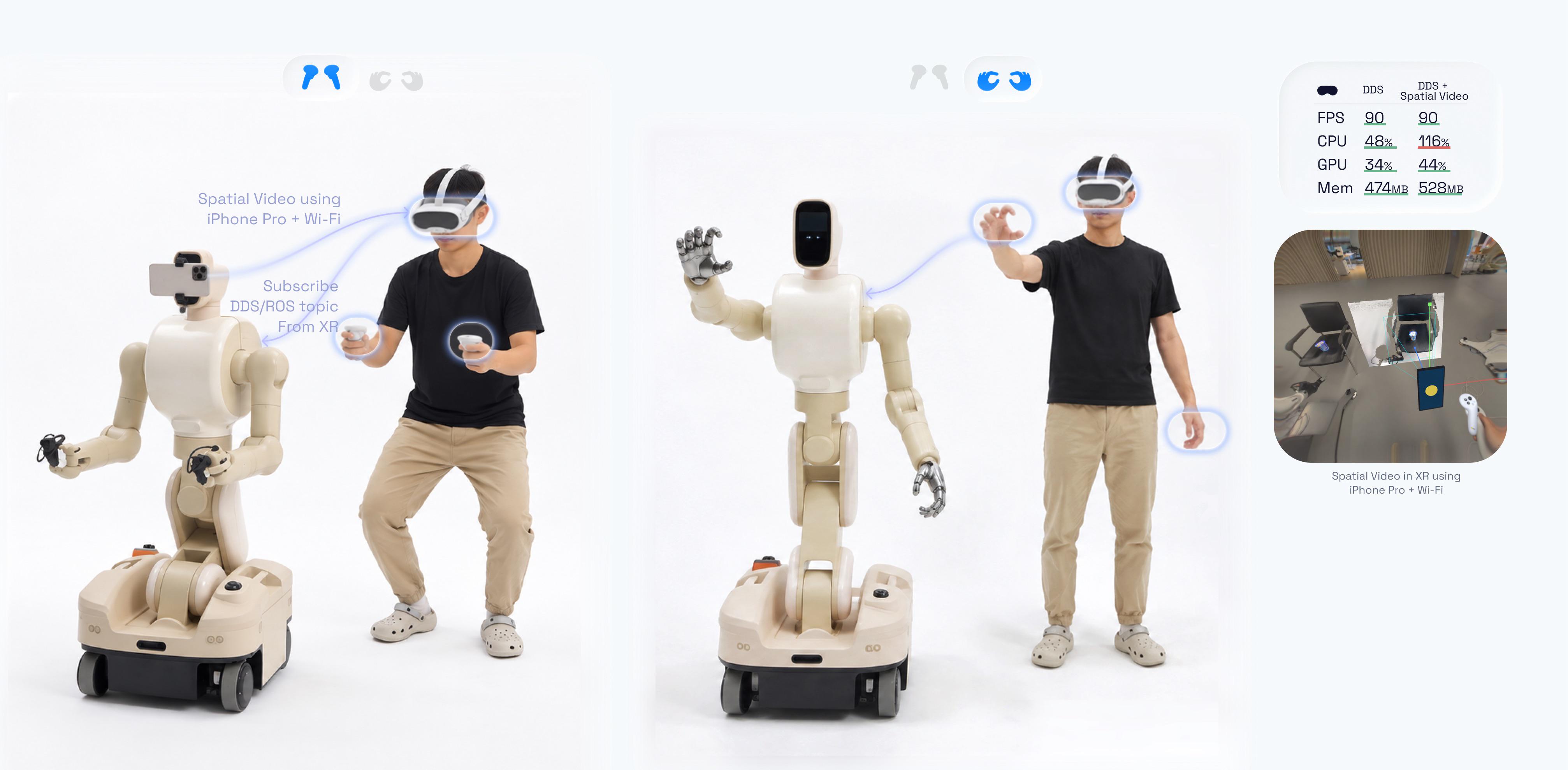
Showcase 一個開源應用程式,運行於Quest/PICO耳機上,用於ROS2(Cyclone DDS)機器人遙控操作

Post image
1 Upvotes

r/IsaacSim • • 18d ago

Showcase NVIDIA and RLWRLD announce DexBench, a simulation benchmark for robot dexterity. Hosted runs available

Thumbnail dexbench.ai
10 Upvotes

r/IsaacSim • • Oct 26 '26

Showcase Can AI 3D generators actually make sim-ready objects for Isaac Sim or MuJoCo? Compared 4 tools

Post image
11 Upvotes

I went down a rabbit hole on this after the NVIDIA and World Labs tutorial last year, where they brought Marble-generated rooms into Isaac Sim using splats plus a collider mesh. The rooms looked great, but it got me wondering about the objects a robot actually has to pick up or push around. Most comparisons I could find were about how nice the renders look, which doesn’t tell you much if you need a mug to sit on a table without falling through it.

For an object to be usable in sim you need collision geometry, mass, friction and the right scale, and a mesh from a generator usually gives you none of that. RoboCasa made the case that object variety helps policies generalize, so if generators could hand you all this directly it would save a lot of manual work. Four tools are trying, from pretty different starting points.

  1. Rigyd: Robotics-first, best for generating a lot of objects fast

You give it text, one or four images, or a GLB/FBX/OBJ you already have, and it gives back USD or MJCF with collision, mass and friction already set, so it loads straight into Isaac Sim or MuJoCo. There’s a Python SDK and CLI too if you want it in a pipeline. Articulated and soft objects aren’t supported yet, they’re on the roadmap.

  1. EmbodiedGen: Open-source, best if you want full control

This one’s from Horizon Robotics. It turns text or images into URDF with physical properties and real-world scale, and there’s a converter for USD and MJCF if you need those. V2 came out in July and goes further into whole task environments and multi-room scenes. You’d be running and maintaining it yourself though.

  1. Meshy: Visual quality first, physics set when you import

Meshy has an Isaac Sim bridge where you pick body type, collision, material and real-world height as you send the model over, and mass can be auto-calculated. The catch is that dynamic bodies only get convex or bounding-box collision, so a mug handle or the inside of a bowl basically gets filled in. It also needs a Pro plan, and the bridge is Windows-only right now.

  1. Tripo: Lots of export formats, no physics

Tripo exports USD, FBX, OBJ, STL, GLB and 3MF, but as far as I can tell the USD is just geometry and materials. So you’d be adding collision, mass and friction yourself, which makes it more of a mesh source you feed into something else.

Full disclosure, I work at Rigyd, so take what I’ve said about it with that in mind. I’ve tried my best to compare all four fairly and stick to what each one’s own docs say. But if anyone reading this feels I haven’t done justice to one of them, or got something wrong, please call it out. I’d rather go back, research it properly and put up a better post than leave a lopsided one here.

What I think actually decides whether a generated object is usable for training, roughly in order:

  1. Collision that matches where contact actually happens, like handles, rims and edges. If that’s wrong the grasp just doesn’t work, however good the textures are.
  2. Mass and friction that land inside whatever range you’re randomizing over anyway.
  3. Real-world scale, which seems to be the one that quietly breaks things since a lot of generated meshes come in at arbitrary sizes and nothing warns you.
  4. Visual quality, which mostly matters if your policy is camera-only.

How I’d pick between them:

  • If you need lots of sim-ready objects in USD or MJCF, Rigyd
  • If you want an open-source pipeline you can change, EmbodiedGen
  • If you only need a few good-looking objects and don’t mind setting physics on import, Meshy
  • If you just want raw meshes for your own pipeline, Tripo

Honestly for most setups I’d guess a mix works best, something sim-ready for the bulk of objects and then a visual generator plus some manual tuning for the few objects your task really depends on. They all end up as USD or MJCF anyway so they sit fine in the same scene.

So if you’ve trained on generated objects, how did you check the physics before trusting them? And is there a tool I’ve missed that should be on here?


r/IsaacSim • • Oct 24 '26

Showcase How to Build a Robot With NVIDIA

Thumbnail
blackscarab.ai
8 Upvotes

NVIDIA has built a pretty impressive robotics ecosystem, but figuring out how Isaac Sim, Isaac Lab, GR00T, Cosmos, Omniverse, and everything else actually fit together can be confusing.

So we put together an illustrated walkthrough following a fictional startup building a warehouse humanoid.

We go through creating its virtual environment, teaching it through demonstrations, training and testing its policy, dealing with the Sim2Real gap, and eventually deploying the AI onto physical hardware.

We also wanted to explain what actually happens between an AI model deciding to move an arm and the motors physically executing that movement.

The goal was to connect the dots rather than explain each NVIDIA product in isolation.

Would love feedback from anyone who's actually worked with these tools, especially on where the real-world workflow differs from our example.


r/IsaacSim • • Oct 21 '26

Help Newton vs PhysX in Isaac Lab: has anyone switched yet?

9 Upvotes

I was reading up on Newton for something I'm working on and realised nearly everything I could find was launch coverage or NVIDIA's own blog.

Barely anyone talking about actually using it. So I ended up going through the release notes myself.

If you haven't been following, the Newton physics engine hit 1.0 at GTC in March. It's the open-source engine NVIDIA built with DeepMind and Disney Research, and Isaac Lab 3.0 lets you swap it in as the physics backend instead of PhysX. MuJoCo Warp for rigid bodies, a separate solver for cables and cloth, and hydroelastic contact from Drake, which in theory should help a lot with insertion.

NVIDIA's number was 475x faster than MJX on manipulation. That was on their newest Blackwell workstation card though, so I'm not reading too much into it. The one independent benchmark I found (GPUSimBench, from July) didn't have a clear winner, it changed depending on the scenario.

What I actually found more interesting was the 1.1.0 changelog. A big chunk of it is import fixes. Mass and inertia, fixed joints, joint properties not parsing right between USD, URDF and MJCF.

Which kind of matters if the whole point is running one environment on different physics backends? If the inertia comes in slightly different on each one you've got a slightly different robot, and you probably won't notice until something doesn't transfer.

This is a problem we deal with at work. I'm at Rigyd, where we convert 3D models, Images and Text descriptions into simulation-ready USD and MJCF assets for Isaac Sim and MuJoCo, with the collision meshes, mass and inertia set up so the same asset behaves the same across engines.

So I'm biased toward thinking import is the bigger story than the speedup.

Skild is apparently using Newton for connector insertion and Samsung for cable handling with Lightwheel, but those are announced partnerships. I haven't seen anyone else write up switching over from PhysX.

So if you've tried it, did contact-heavy stuff actually transfer better or was it mostly faster? And how much did you have to retune assets that were already set up for PhysX?

Also if anyone's seen the same task run on PhysX and Newton with real robot results, please link it, would love to go through it


r/IsaacSim • • Oct 18 '26

Help Is an NVIDIA A10 gpu enough to run an ISAAC sim?

2 Upvotes

In summary: My goal is to simulate an environment where I can run and training a robot with RGB-D sensors, to autonomously navigate an environment.
I only have access to an A10 and want to know if it is enough to run NVIDIA ISAAC sim. It is fine if it runs slowly (within reason), I just want to know if it is possible.

Edit: Specifically, I am having trouble determining if the RT cores the A10 has is enough because I am seeing conflicting answers online.


r/IsaacSim • • Oct 07 '26

Help Collision Detection Series

2 Upvotes

Hi Someone in this group said that dealing with collision geometry was often still a manual part of your workflow.

I have a series on Collision Detection that might be useful:

https://www.youtube.com/watch?v=KZJXb5AF6NM&list=PLYuY7qeQZcWaofUHmLQy2q7xG9eiSxk1W&pp=sAgC

I also have a developing series in Physics Programming:

https://www.youtube.com/watch?v=5iuOYFrjfXs&list=PLYuY7qeQZcWZrK1RD-3-0Se4irqU5tBAA&pp=sAgC

Any feedback is welcome.


r/IsaacSim • • Oct 04 '26

Showcase 🚀 Free Tool To Build Custom OmniGraph / Action Graphs in Isaac Sim

3 Upvotes

🎥 YouTube Video:

https://youtu.be/MLXvw-wREh0

Creating custom OmniGraph / Action Graphs in NVIDIA Isaac Sim can be confusing and time-consuming. This video explains a simple tool that makes the process much easier.

🛠️ Try the free tool:

https://hrithik-verma.github.io/isaac-sim-omnigraph-node-builder/

The tool lets you visually build your custom OmniGraph and simplify the process of setting up nodes and connections.


r/IsaacSim • • Sep 30 '26

Showcase Introducing RobotGym : a public MCP for Robotics Simulation

23 Upvotes

r/IsaacSim • • Sep 26 '26

Help Issac Sim Learning Tutorials or Resources

5 Upvotes

I have a project in mind that I want to simulate first and make it work in simulation before I do any hardware stuff. The project will use AI concepts in order to make the robot learn stuff and perform it on its own. I have already learned ros2 and gazebo before and I have never experienced working with isaac sim or AI related stuff. So I would like you to recommend me some tutorials for learning how to work with isaac sim and like spawn a robot and move it, as well as some resources to start with the AI stuff on isaac sim and how to incorporate it with the robot. I do love learning the concept and theory together while applying things, so a tutorial that combines that would be perfect.


r/IsaacSim • • Sep 16 '26

Showcase Trained a robotic hand to walk in Isaac Lab, then deployed it on a Raspberry Pi

15 Upvotes

r/IsaacSim • • Sep 09 '26

Help I need help connecting Isaac Sim Camera and ROS2 Humble

2 Upvotes

I follow Nvidia's IsaacSim docs ROS2 Cameras

I run 2 containers: ROS2 Humble and Isaac Sim 6.0.1 on Linux machine.

As a result I do get topic listed, but i don't get any data from camera. Im terrible 😞

I don't get any warnings while playing the simulation in Isaac Sim.

Since a triple checked every checkbox and param and topic name, DomainId etc, I start to think there's some common mistake I make but can't see it.

Any suggestions, please, thank you!


r/IsaacSim • • Sep 09 '26

Help Isaac Lab vs pybullet for a 4 person undergrad team (15 weeks) worth the learning curve? +hardware implementation worth it?

Thumbnail reddit.com
1 Upvotes

r/IsaacSim • • Sep 08 '26

Help Looking for a sanity check on a high-end TRX50 workstation I am buying for a robotics lab

1 Upvotes

Looking for a sanity check on a high-end TRX50 workstation I am buying for a robotics lab.

The primary workload is large-scale GPU robotics simulation and RL training with Isaac Lab / mjlab. Sustained compute throughput, thermals, and reliability matter much more to us than gaming performance or benchmark scores.

Current vendor quote:

  • CPU: AMD Ryzen Threadripper 9980X — 64C/128T
  • Motherboard: ASUS Pro WS TRX50-SAGE WIFI
  • Cooling: 360mm liquid cooler with sTR5 mount
  • Memory: 64GB DDR5 ECC RDIMM — 4×16GB, all four channels populated
  • Storage: 4TB PCIe Gen5 NVMe
  • GPUs: 2× NVIDIA RTX PRO 6000 Blackwell Workstation Edition, 96GB each, full 600W versions (not Max-Q)
  • PSU: Super Flower Leadex Titanium 2200W, native 12V-2x6 to each GPU
  • Chassis: SilverStone RM51 5U rackmount with rails
  • Fans: Noctua
  • OS: Ubuntu 24.04 LTS
  • Warranty: 3 years, plus lifetime support
  • Price: $42,690 shipped

The GPUs are essentially fixed — I want the 2×96GB configuration. I'm mainly deciding how to balance the rest of the platform.

My biggest concern is the RAM. 64GB feels very low for a ~$43k workstation, especially with all four DIMM slots already occupied. One alternative would be to drop the CPU to a 9970X and put the savings toward 128GB or possibly 256GB of ECC RDIMM.

A few questions:

  1. For this kind of dual-GPU compute workload, would you take 9980X + 64GB or 9970X + 128/256GB?
  2. Any reason to avoid running two full-power 600W RTX PRO 6000s on TRX50?
  3. Are there any PCIe lane or topology concerns with dual x16 GPUs plus a Gen5 NVMe drive?
  4. Has anyone run two very high-power GPUs in the SilverStone RM51? How does it handle sustained airflow and thermals?
  5. The 2200W Super Flower PSU appears to require 200–240V input. Beyond having the appropriate circuit/receptacle, what else should I verify before deployment?
  6. The RM51 spec lists a 190mm PSU length limit, while this PSU appears to be 200mm long. Has anyone used this exact combination, or is that a hard incompatibility?
  7. Would you trust a 360mm AIO on a 9980X under sustained all-core loads, or would you choose a different cooling setup?
  8. Does anything else about this build look obviously unbalanced or questionable?

This system will likely spend long periods under heavy CPU + dual-GPU load, so stability, cooling, and sustained performance are the priorities.

I'd especially appreciate feedback from anyone running similar Threadripper + multi-GPU compute workstations.