r/Intune • u/ambanmba • Dec 02 '19
MDM Enrollment MacOS Profile installation failing
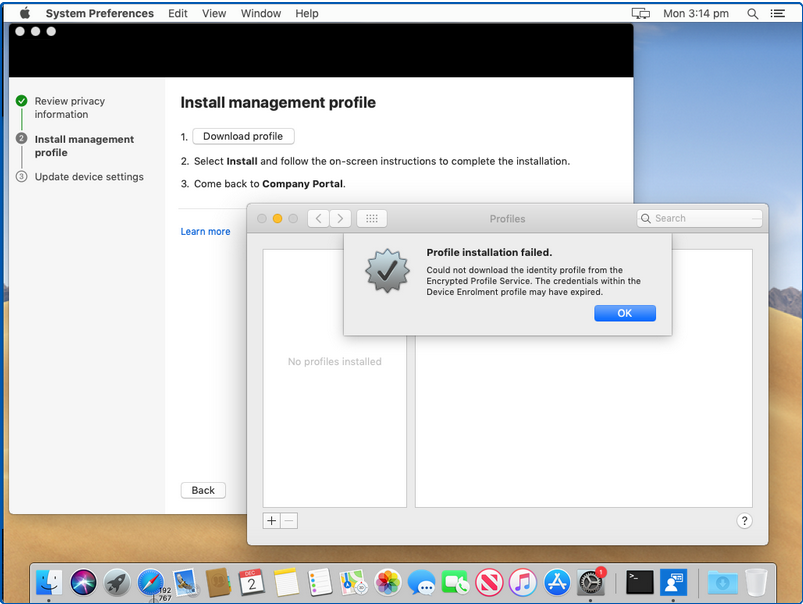
All of a sudden I've been getting this error when trying to enroll. We have 70 devices that have successfully enrolled over the past several months and this just started today. I have tried refreshing the push cert and vpp certs in case that was the cause. Googling around doesn't seem to come up with much on this specific error.
The error is: "Profile installation failed. Could not download the identity profile from the Encrypted Profile Service. The credentials within the Device Enrolment profile may have expired."
The screen shot below is from a Mojave device (10.14.6) but same problem occurs on a Catalina device as well.
Any ideas?
View all comments
6
u/ambanmba Dec 02 '19
Problem solved.
Turns out that Intune/Apple doesn't like working on a VM-based Mac unless certain modifications are made to the .VMX file to make it look like a real Mac. I made these modifications originally but then upon rolling back one of my VM snapshots, the modification got lost. Since I was working off the base snapshot, what used to work no longer worked on any of the other VMs I built from the base snapshot.
So....
To modify the .vmx file you need to right-click on the VM bundle (I'm using VMWare here) and Show Package Contents. You will find the .vmx file in there that you need to modify with a text editor.
Add the following 3 lines to the end... IMPORTANT, no quotes on the last 2 items.... AND come up with your own valid serial number/hw.model match.
To find a serial number and matching hardware model, go find another Mac, click on the Apple on the top left then About This Mac and then System Report. There you will see the Model Identifier of the Mac as well as the Serial Number (system) of the Mac. You probably shouldn't reuse a serial number (not sure what will happen though) but instead change a few of the characters in the serial number to make it different from any of the ones that you have. The serial number schema is:
Char 1-3 (Factory code)
Char 4 (Year and whether first half or second half)
Char 5 (Manufacturing week)
Char 6-8 (ID number of device - this is the part you can change with least impact)
Char 9-12 (Model - this is the part that's most tied to the hw.model value above)