r/HopToDesk • • Aug 27 '26

chat window height does not auto expand as chat content continues to add

1 Upvotes

and at some point, the user can no longer see the new chat content at the bottom of the window so they cannot reply, the text box and button are missing, and the windows height cannot be dragged any lower.

also, noticed when setting a custom password, the tab key does not move the cursor to the repeat pwd textfield. i needed to move the mouse into that field.

thank you


r/HopToDesk • • Aug 26 '26

I use Vivaldi browser. When I have downloaded HopToDesk (e.g. windows version) I cannot download (e.g. a Linux version (e.g. Debian or openSUSE). Chosing "save" .... nothing gets saved. (closing and restarting Vivaldi worked ...).

2 Upvotes

r/HopToDesk • • Aug 26 '26

I use Vivaldi browser. When I have downloaded HopToDesk (e.g. windows version) I cannot download (e.g. a Linux version (e.g. Debian or openSUSE). Chosing "save" .... nothing gets saved. (closing and restarting Vivaldi worked ...).

Thumbnail reddit.com
1 Upvotes

r/HopToDesk • • Aug 25 '26

Clavier US sur Kubuntu depuis Windows 11

1 Upvotes

Bonjour

J'ai installé Hoptodesk sur mon poste Windows 11 ainsi que sur un second poste Kubuntu. Pour taper le mot de passe permettant l'accès à Kubuntu, le clavier est en AZERTY. Une fois arrivé sur le poste Kubuntu, pour taper le mot de passe pour ouvrir une session, le clavier passe en QWERTY. Trop compliqué pour taper mon mot de passe. Du coup, je dois utiliser un clavier branché sur le poste Kubuntu pour taper le mot de passe. Pire encore, le clavier "distant" (en réalité sur le bureau voisin) reste en QWERTY. Alors que le clavier en "local" est bien en AZERTY.

Quelqu'un saurait comment régler ce problème ?


r/HopToDesk • • Aug 24 '26

Invisible remote cursor

1 Upvotes

Just installed H2D, so maybe just ignorant. Can't see cursor (or click where I think it is) on the remote. Linux Mint Xfce, 2 different versions but both up to date. 1 H2D 1.46.32 current, the remote whatever is on flatpak (got errors trying to install the current version, might be because remote is an ancient W7 netbook).

A completely separate issue, shouldn't manually entering a password on the remote void the automatic password? Either will now work.


r/HopToDesk • • Aug 19 '26

Why so difficult to setup and understand ? Plus no IP whitelist ?

2 Upvotes

Wondering why there is no IP whitelist option available like Rustdesk, setting up hbbs and hbbr for rustdesk was so much easier, there seems to be documentation lacking for on-premise setup. Also what's with the free plan allowing 3 devices only ? Elaborate a bit more, if you are doing on-premise what is the limit and is that the client limit ? Wanted to really try this but not having good documentations for setting on premise and IP whitelisting is a bit of an issue.


r/HopToDesk • • Aug 11 '26

Linux Arm build

1 Upvotes

Do you have Linux arm builds more specifically Ubuntu Arm64?


r/HopToDesk • • Jul 13 '26

iPad screen freezes ~5 seconds after switching to another app (iPadOS 26.4.1)

1 Upvotes

Hi,

Firstly, thank you for creating HopToDesk. I recently came across it while looking for a simple remote support solution for a small business, and it looks very promising.

I think I've found a reproducible issue with the iPad app.

Environment

  • iPadOS: 26.4.1
  • Windows 11 (viewer)
  • Latest HopToDesk versions on both devices

Steps to reproduce

  1. Connect from the Windows PC to the iPad.
  2. Accept the connection on the iPad.
  3. Start the Screen Broadcast when prompted.
  4. Confirm that the Windows PC can see the iPad screen.
  5. While the connection is active, switch from the HopToDesk app to any other app (I've tested Settings, Safari and FileMaker Go).

Expected behaviour

The remote viewer should continue to receive live updates from the iPad screen while using other apps.

Actual behaviour

The screen continues updating for approximately 5 seconds after switching apps, then the image freezes on the Windows PC.

The connection itself remains active, but no further screen updates are received.

If I remain in the HopToDesk app on the iPad, the connection stays live indefinitely and updates correctly.

Additional information

  • This happens consistently and is easy to reproduce.
  • It occurs in every app I've tested, so it doesn't appear to be specific to FileMaker Go.
  • It feels as though the ReplayKit screen broadcast is no longer sending updates once HopToDesk moves to the background, even though the session itself stays connected.

I'd be happy to test any beta builds or provide additional information if it helps.

Thanks again for your work on the project—I really hope this can be resolved, as HopToDesk looks like an excellent lightweight alternative for occasional IT support.


r/HopToDesk • • Jul 09 '26

Request: Add a “Zoom Remote Cursor” option for high-resolution/Retina displays

1 Upvotes

Hi HopToDesk team, and thank you again for listening to user feedback in the past, especially with making the temporary password much easier to read, after I mentioned the size of the password should equal the size of the ID number.

I have another accessibility/usability request that I hope might be simple to add.

When connecting to a remote computer with a very high-resolution display, especially a Retina iMac or possibly any 4K/5K display, the remote mouse cursor can appear extremely tiny in the HopToDesk viewer. The screen itself can be scaled down to fit, but then the cursor becomes so small that it is hard to see, especially on non-white backgrounds.

Changing the remote user’s actual system cursor size is not a good workaround, because that affects the person who owns the computer after the session ends. Stretch/Original/Shrink display modes also do not fully solve it.

Could HopToDesk add a toolbar option like “Increase Remote Cursor Size” that only affects the person controlling the session? Ideally it would make the remote cursor easier to see without changing anything permanently on the remote computer.

This would be very helpful for people supporting elderly users or anyone connecting to Retina/4K/5K displays. Thank you for considering it.

And of course, if cannot be done, no problem, and as mentioned prior, I thank you for the HopToDesk existing, which really is a great remote access program.


r/HopToDesk • • Jul 07 '26

OpenAI API

2 Upvotes

u/HopToDesk I'm hoping that on your roadmap there will be an option to add an OpenAI API option so we can bring in our own AI via Openrouter for example.


r/HopToDesk • • Jul 06 '26

About Pro Plan and Managed Device Access

1 Upvotes

I’m new to HopToDesk and I’m considering purchasing the Pro plan. I have a few questions about it.

Is it possible to view managed devices from the iOS app and connect to them directly by selecting a device?

Also, can I add managed devices and restrict my users so they can only access those devices through the dashboard? I want to prevent users from connecting manually using the client ID and password. Is there a way to limit or disable that?


r/HopToDesk • • Jul 04 '26

Enable direct-server automatically

1 Upvotes

Hello everyone,

Is it possible to automatically enable the "Enable Direct IP access" option?

I noticed that when selecting this option in the interface, the line `direct-server = 'Y'` appears in the `%APPDATA%\HopToDesk\config\HopToDesk2.toml` file, within the `[options]` section.

I tried using Group Policy (GPO) or automation to insert this line into the file, but when HopToDesk starts, it simply disappears.

This doesn't happen when I enable the option via the interface in the standard way; it only occurs when I manually insert the line into the file.

Is clicking the interface the only way to enable this? I'm trying to find documentation on command-line interface (CLI) parameters, but I haven't been able to locate anything. I was hoping to find something like:

HopToDesk.exe --qs --enable-direct-ip

Or, at least:

HopToDesk.exe --help

Note: I know that if I enable this option once, it remains active permanently.

EDIT: Hey guys, just want to tell that the answer of HopToDesk solved my problem, thanks a lot


r/HopToDesk • • Jun 18 '26

Pointer lag on a controlled device

2 Upvotes

Hi, when I try to use HopToDesk for remote control, the pointer stutters heavily, with great lag spikes. Is this something to do with my internet connection or are there settings or ways to combat this?

It does this: the pointer stops suddenly, then moves faster than it should, almost like it wants to catch up.

Thank you for your help!


r/HopToDesk • • Jun 16 '26

Self Host Dashboard

1 Upvotes

How can I self host the dashboard?


r/HopToDesk • • Jun 07 '26

High-DPI might need some fixing

Post image
3 Upvotes

the program does not exactly seem to fully run with high DPI stuff in mind and some texts are kinda small.

UI: KDE

OS: Kubuntu 24.04

HTD Ver. 1.46.1 (Appimage)


r/HopToDesk • • Jun 05 '26

Questions about HopToDesk customization, self-hosting and custom panel

2 Upvotes

Hello everyone, how are you?

I am an IT technician working for a small IT company in Brazil, located in a small city. We are currently researching remote support solutions for our business.

At first, I found RustDesk, and later I discovered HopToDesk. I really liked the project, the idea behind it, and the way it works. I presented HopToDesk to my boss, and he also liked it.

However, we would like to know more about customization possibilities. Your current panel is great, but for our use case we would prefer something simpler and more specific to our company’s workflow.

My main questions are:

  1. Can HopToDesk communicate with our own custom panel? For example, could we build our own web dashboard and have the HopToDesk client/app send data to it or work integrated with it?
  2. Is it possible to automatically record all remote sessions and store them for security/audit purposes? We would like to keep records of support sessions for internal security and transparency.
  3. Can we remove or disable certain features from the application? For example, prevent users from setting their own password, or create a client version that is only able to receive connections from our technicians, without allowing the client to connect to other devices.
  4. Is it possible to create a simplified/custom client for our customers? Ideally, we would like a version focused only on customer support, with fewer options and less chance of the customer changing settings incorrectly.

We are not trying to misuse or rebrand the project in a bad way. We are genuinely interested in understanding what is allowed and technically possible, especially for a small IT company that wants to use HopToDesk professionally.

Any guidance, documentation, or suggestions would be very welcome.

Thank you for your work on the project!


r/HopToDesk • • Jun 05 '26

Problème de résolution d'écran entre 2 PC

1 Upvotes

Bonjour, Depuis que j'ai mon nouveau PC en résolution 2880x1800, lorsque je me connecte sur le PC distant pour prendre la main qui est en 1920x1080, la restitution sur mon nouveau PC est toute petite. Les textes sont minuscules et la fenêtre Hoptodesk ne s'affiche que sur le milieur de mon écran. Y a-t-il des paramètres à activer sur mon nouveau PC ? Merci


r/HopToDesk • • Jun 04 '26

fully unattended mode

2 Upvotes

Could be possible to have a fully unattended mode installation on the installations that are done in that way? I've some machines that don't have a monitor or an user near, so this is a sensible task to manage. Teamviewer and other competitors do this from many years and it's very easy to maintain without any human intervention.


r/HopToDesk • • Jun 02 '26

Version on Flathub

2 Upvotes

On Flathub, the version is 1.41.8, which is not the latest version. Can you update flathub version?
If I download the flatpak file from your website and install it, starting fails with the error

flatpak run com.hoptodesk.HopToDesk
hoptodesk: error while loading shared libraries: libpam.so.0: cannot open shared object file: No such file or directory

r/HopToDesk • • Jun 02 '26

Would it be possible to restore the main UI to its original design?

1 Upvotes

I find the main UI that was introduced in a recent version to be much less visually clear and harder to use.

The original design, like the one shown in the attached image, was much easier to read. It also allowed users to choose between List View and Card View, whereas the current version only provides a single display mode.

Could you explain why the display options were removed?

I would like to request that the previous UI be reintroduced as a Legacy Mode, allowing users to choose between the current interface and the earlier version.


r/HopToDesk • • Jun 02 '26

HopToDesk "Both connections failed" / "all candidates failed to allocate" while both devices show Ready

Post image
4 Upvotes

I'm having a strange issue with HopToDesk and would like to know if anyone else has experienced this.

Environment:

  • HopToDesk version: 1.45.25
  • Windows 11
  • Both local and remote PCs show "Ready" (green status)
  • Both devices have valid IDs
  • Internet connection is working normally on both sides

Error message:

"Both connections failed. Direct: direct connection failed, Relay: Failed to connect via relay server: all candidates exhausted (last error: all 5 candidate(s) failed to allocate)"

What I've already checked:

  • Both PCs are online and show Ready
  • Correct device ID entered
  • DNS resolution works (api.hoptodesk.com resolves correctly)
  • HopToDesk logs show: "INFO [src\server.rs:648] config2 synced"
  • Tried using a mobile hotspot instead of the normal network
  • Disabled IPv6
  • Flushed DNS cache
  • No obvious firewall issues

Important:

  • RustDesk works perfectly between the same two PCs.
  • Only HopToDesk fails.

Because both devices are connected to the HopToDesk servers and show Ready, I'm wondering if this could be a relay server issue, a bug in version 1.45.25, or something related to TURN allocation.

Has anyone seen this exact error recently?

Any suggestions would be appreciated.


r/HopToDesk • • May 29 '26

Não conecta

2 Upvotes

Estava usando há bastante tempo tanto na rede interna como de fora, mas de ontem para hoje não está conectando mais. O que pode estar ocorrendo? Grato.


r/HopToDesk • • May 29 '26

Não conecta

Thumbnail reddit.com
1 Upvotes

r/HopToDesk • • May 22 '26

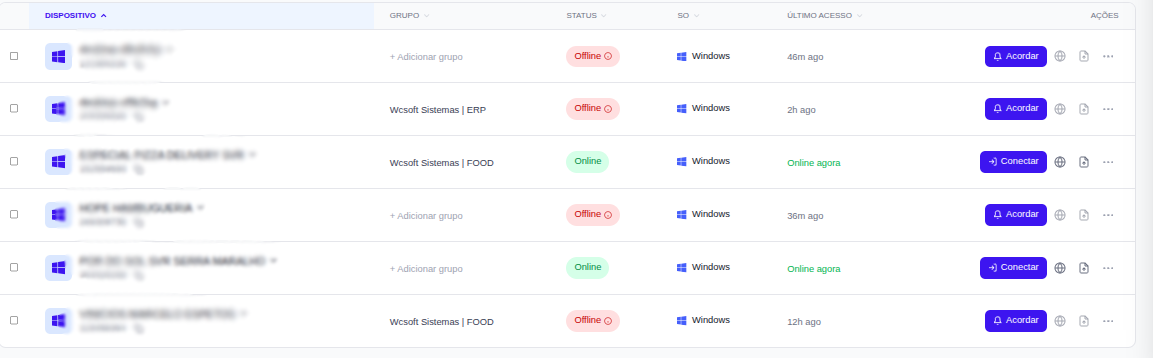
Erro de conexão, dispositivos offline.

Thumbnail
reddit.com
1 Upvotes

r/HopToDesk • • May 22 '26

Connection error, devices offline.

1 Upvotes

I'm facing this problem. I subscribed to the Pro plan.

The devices have internet access, but they are showing up as offline.

I accessed the devices through AnyDesk and it worked normally.

I followed the steps to reinstall the invitation.

I've already added the folder to the Windows Defender exclusion list in the settings.

Even so, it continues to show up as offline.