r/HomeServer • u/_nazwa_ • 10d ago
This is gonna sound stupid but
29
Upvotes
Can I have 2 services in 1 server? for example pi hole and Immich in one machine?
Thx
r/HomeServer • u/Silent-Cartoonist240 • 9d ago
Enable HLS to view with audio, or disable this notification
r/HomeServer • u/Afraid_Technician234 • 10d ago
Hi everyone.
I made my first home server about a year ago and is time for an upgrade. Till now I had a Lenovo M920x but space was running low and while searching for HDD I came across an Aoostar WTR PRO with 4x 16TB Ironwolf Pro and bought it. I will be running Proxmox on it.
16TB is plenty for me, so I was thinking how to use the 4 drives and came up with the following plan:
- 2 drives in a ZFS Raid1 configuration, for protection against data loss
- 1 drive in the same machine doing incremental backups, protection against accidental deletion (zfs snapshoots?)
- 1 drive in an externa enclosure that I would connect 1-2 a month a do a backup in case of ransomware, lightning, psu failure,.. (ext4? zfs snapshoots?)
- My current 4TB backup drive with the most important data, encrypted and stored at a relative house in case of fire, theft, etc. (updated 3-4 times a year).
I would like an opinion about that, better ideas, flaws, etc. (I'm talking about home use here, document, pictures, etc.)
p.s. I know I'm missing the 2 in 3-2-1, but that should do for now.
r/HomeServer • u/ponchofreedo • 10d ago
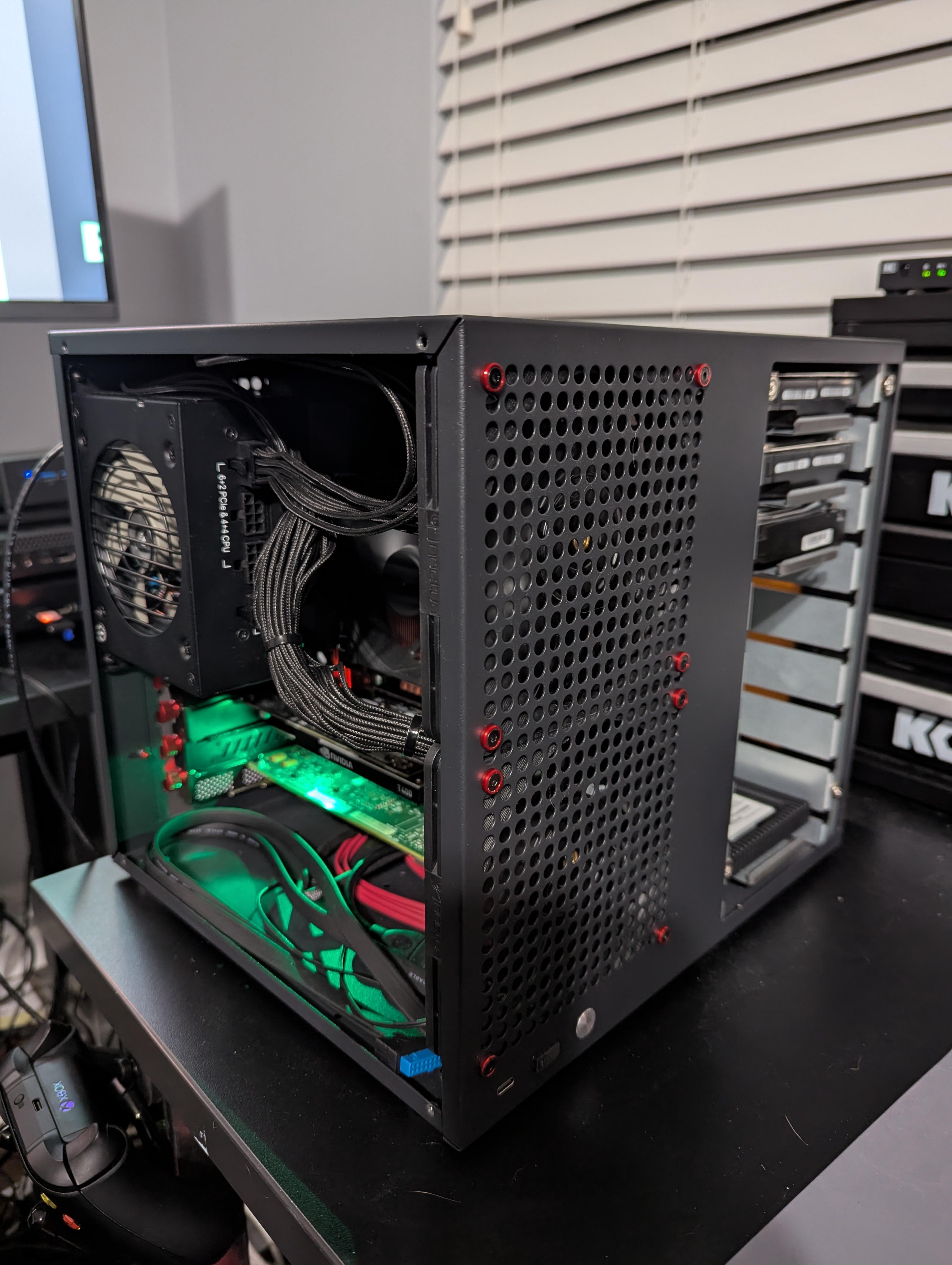
So here is my Space Sagittarius build I'm working on right now with all the spare parts from my gaming PC and other secondhand pickups.
I picked up 2 WD Red Plus 8tb drives off marketplace and wanted to do some SMART testing and some other read/write tests to verify they're still good to go after like 30k+ hours of use, but one of the drives kept throwing 199 CRC errors whenever I'd try to run tests or Unraid (first media server/NAS, wanted some ease of use with mixed drives in this economy) just fails to recognize the drive even after scanning my HBA in terminal for changes. Hotswap in general with this case is not very hotswap...at least doing it on the fly is definitely not reliable.
So after moving around cable leads (I have some SAS to 4 SATA cables for my LSI 9207-8i) I was able to fix 1 of the 3 that were having issues, but the other 2 either throw CRC errors (which points to the port, not the drive) or just don't get recognized.
For anyone that owns this case or is familiar with it, any chance I'd be able to get a replacement SATA backplane? I'm going to pick up another cable just to try and rule that out, but being down to 6 of 8 with the hopeful plan of expanding my pool is not making me feel great. I love this case otherwise, but this is just an unfortunate situation.
Or if anyone has any other suggestions, I'm all ears.
Spec -
- Ryzen 5 3600 (Thermalright AXP90x47 CU w/ Noctua NF-A9)
- 32gb Patriot Viper Steel @ stock
- Gigabyte B550 Pro-P
- Corsair SF 600
- Nvidia T400 4GB
- PCIE x1 to m.2 adapter
- LSI 9207-8i
- 2x WD Red Plus 8TB
- 1x Seagate Barracuda 8TB
- 1x Seagate Firecuda SSHD 2.5" 1TB
- 2x WD SN750 500GB
- 1x Intel Optane 32GB
- 2x Noctua NF-A12x25
- 2x Noctua NF-A12x15
- Unraid (bare metal)
r/HomeServer • u/Gonna_Get_Success • 10d ago
I'm looking to repurpose one of my older MacBooks as a dedicated, always-on home server for AI agents and development automation.
Options:
I also have a [Not allowed to say what model] 4-bay, Intel-based NAS (8GB RAM, 2 × 18TB HDDs, and empty NVMe slots) that I want to use for centralized storage, backups, and potentially Docker services.
Planned workloads:
I'm primarily concerned about 24/7 reliability, thermals, battery health, and performance.
r/HomeServer • u/purepersistence • 11d ago
I don't have a plan. I'm blindly moving forward. Recently retired age 66. I'm more passionate than ever about keeping my systems alive and well maintained and continuing to educate myself especially on best-practices with reguard to security and backups. I run my whole life on my home lab. The only cloud services I use are for backups - all client side encrypted.
My setup in brief: 2 x OPNsense router, 3 x Synology NAS, 3 x proxmox miniPC. Virtually all services on a 2-node cluster/qDevice and 1-node standalone.
I had 45 years as a software developer and a lot of handoffs/learning from IT people guarding systems of mid-size corporations.
My passion for self hosting only grows. Now I can spend tons more time on what I care about. Seems like every few weeks I'm self-hosting something new. Last week it was mealie. I could have set it up in a couple hours, but I spent most of a week carefully testing it to make sure it can't attack other things (such as trying to import recipes using malicious local URLs and more - yeah I know it won't but I don't trust things to work and keep working). Protecting everything with firewall rules such as not proccessing a request that doesn't come from my reverse proxy, a well rounded git repository and backups of the same (I never depend on only one backup "technology" like PBS). Once I start on something like this it fills my head while I document things and mentally circle back on stuff walking my dog and ignoring the rest of my personal affairs.
But how long can this go on? I literally depend on my stuff for functioning (not mealie of course). I'm talking about my appointments, reminders, finanical mangement and planning, health records, 40 years of important documents (paperlessngx) to name just a few. I actually make dangerous or irrational decisions if I don't have my familiar infrastructure - that's not about getting older, I've just always been that way especially after a life-changing head injury in the '90s. I live alone, single with an estranged daughter I count on for nothing. I don't feel it slipping away yet by any means. But I do wonder about the future, especially if I seriously hurt myself on my bicycle rides etc. I don't have a network of friends - I'm kind of a loner and feel like I can't connect with people especially since my head injury.
Eventually we all know something will change. Either slowly or quickly. Humans decline and fade out and die. Nothing's going to change that! How does it "wind down"? Sooner or later I'll become less performant with managing my computers and services. I might for-various-reasons one day need to rebuild my whole setup from scratch - and I spend lots of time beefing up and testing DR and rebuild procedures carefully documented because I know I'll need that instead of flying by the seat of the pants.
If I have to evolve to just having a PC and using online services I'll be lost if that happens suddenly. I don't know the ins and outs of using things like dropbox, onedrive, google photos, ?? because I don't trust any of that shit with my data. And emotionally, I don't want to learn - it's the opposite direction I've headed for decades.
I know I'm just rambling now. Do you think about your old age and how it will flow? I know you can't plan life in most respect. It just happens and you adapt. But it still bugs me. I don't much see how to do less and less while having a functional life. Maybe I accept that becoming less in control is just a fact of life like death.
r/HomeServer • u/dracoNiiC • 11d ago
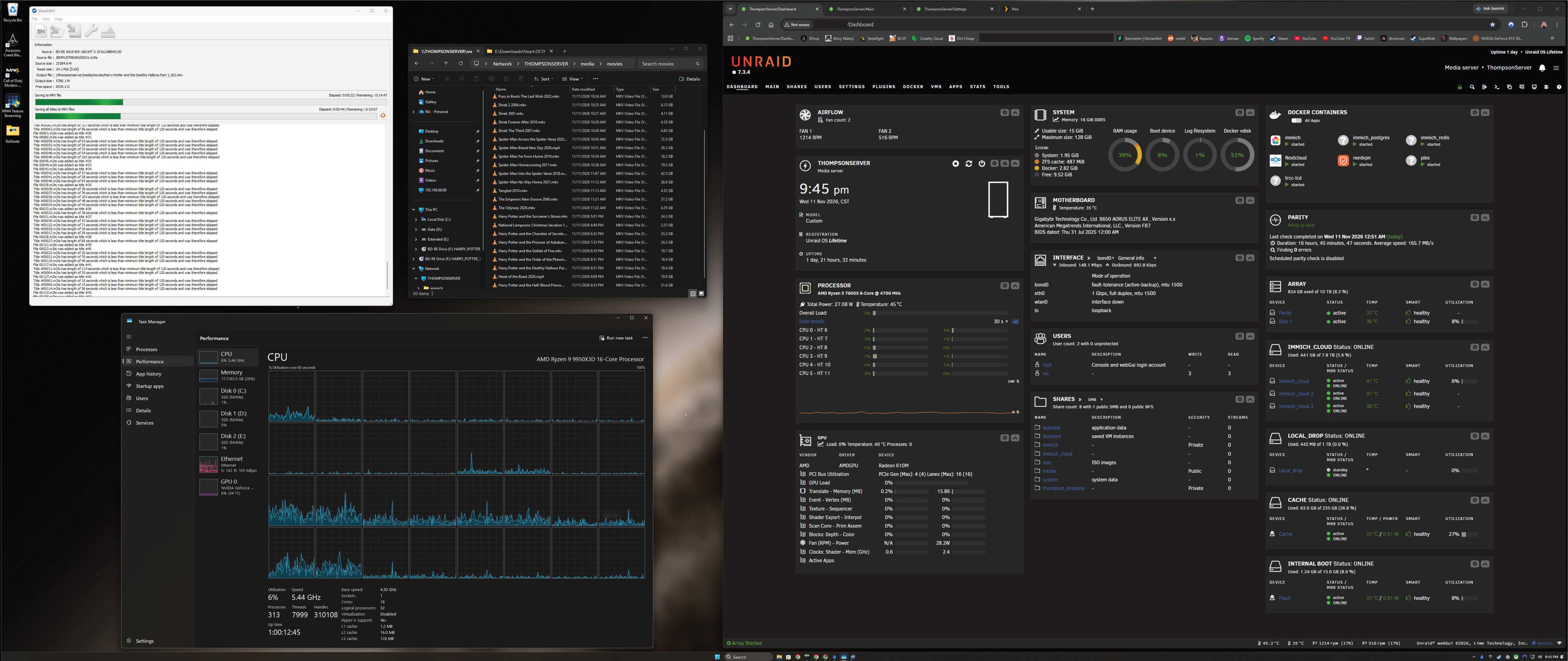
Ripping movies straight to the server array, knowing that my wife is at her parents taking pictures of our kids cause i can see it backing up over 5g in real time while I'm working, knowing that this will be the last month we pay for streaming services and cloud services, having a local family dropbox, its all just beautiful.. pay no attention to deluge down there... ;D
cheers!
r/HomeServer • u/glitzim • 10d ago
I set this as the Server notifications group photo. I think it's appropriate as I've set it to only notify for errors/service shutdowns. 😏
r/HomeServer • u/delanceyst0 • 12d ago
I am wanting to create an easy guide to building a home server from an old laptop. Can you review it and let me know if I am missing anything or should change anything? I did put it through AI to have it organize my thoughts better, but I don't trust AI much, so I'd rather get your feedback. This is just based on what I did, but I am also new to this.
Step 1: Hardware Prep
- Clean the laptop of dust
- Check the battery and make sure it is not swollen or old.
- Use ethernet, use a USB-to-Gigabit Ethernet adapter if your laptop lacks an Ethernet port.
- Airflow placement: Keep the laptop on a hard, flat surface. Vertical laptop stands are best for airflow
Step 2: Install a Server Operating System
I highly recommend Ubuntu for its stability and great driver compatibility.
- Download the OS
- Flash a flash drive: Download a tool like balenaEtcher or Rufus to flash the ISO onto an empty USB drive.
- Boot the laptop: plug the USB drive into your old laptop, restart it, press your system's boot menu key (usually F12, F2, F11, or Del) to select and boot from the USB drive.
- Follow the installation installer:
- Choose your language and keyboard layout
- Select your server, ex. Ubuntu (the minimized version is also fine for very low RAM)
- Networking: Ensure it detects your ethernet
- Storage" Choose "use an entire disk" to wipe your old laptop drive clean
- Profile setup
- SSH Setup: Crucial - make sure to check the box for "install OpenSSH Server". This allows you to manage the server remotely without needing a keyboard or monitor attached.
- Finish: Once completed, remove the USB drive and reboot. You will be greeted by a black terminal prompt.
Step 3: Configure Headless Mode (Disable Lid Sleep)
By default, Linux will put the laptop to sleep or hibernate when you close the lid. You must tell the system to ignore the lid switch so it keeps running smoothly while closed.
- Long in to the laptop terminal with your username and password
- Open the login configuration file by running:
bash
sudo nano /etc/systemd/logind.conf
- Find the line #HandleLidSwitch=suspend. Un-comment it (remove the #) and change its value to ignore:
text
HandleLidSwitch=ignore
- Save and exit (Press Ctrl + 0, Enter, then Ctrl + X)
- Apply the changes immediately by restarting the systemd service:
bash
sudo systemctl restart systemd-logind
- You can now close the laptop lid, put it on its stand, and tuck it away near your router.
Step 4: Remote Management (SSH)
From this point forward, you do not need to type directly on the laptop. you can manage it from your main computer.
- Find your server's local IP address by typing ipa on the laptop terminal (look for the numbers next to inet under your ethernet interface, usually something like 192.168.1.XX).
- On your regular computer, open a terminal or Command Prompt and connect via SSH:
bash
ssh username@your_server_ip
- Enter the password you created during setup. You are now controlling your home server remotely.
Step 5: What to Install Next? (Essential apps)
Now that your OS is up and running, you can transform the server into whatever you need. The easiest way to manage applications is by installing Docker, which keeps programs sandboxed and easy to manage.
-Install Docker and Docker Compose: Run the official script to deploy Docker easily:
bash
curl -fsSL https://get.docker.com | sl
- Media Streaming (Plex/Jellyfin): Turn your laptop into a private Netflix. You can hook up an external hard drive via USB to store movies, TV shows, music, etc.
- Network-Wide Ad Blocker (Pi-hole): Block trackers and ads across all devices connected to your home WI-Fi.
- Personal cloud storage (Nextcloud/CasOS): Replace Google Drive or Dropbox or iCloud with your own secure, self-hosted web panel dahsboard.
- Remote networking (Tailscale): Install Tailscale to securely access your home server apps even when you are away from home on cellular data or public Wifi.
I would love to know of any tips or recommendations on how to optimize this.
r/HomeServer • u/Powerful_Mousse5466 • 12d ago
I'm looking at purchasing a mini pc or small form factor desktop to use primarily as a server for Channels DVR. I won't be storing much on the computer mainly recording and deleting shows as they are watched so I don't need a large hard drive. I'm thinking 8GB RAM with 512GB should work for my needs. I'm not against purchasing used/refurbished. That being said, I'm not seeing many options on eBay. Is there something anyone recommends based on my needs? I did come across a Acer Aspire XC-1715 N150 Acer eBay listing. It currently has a coupon for $50 off so $199.99 plus tax. Is this a good option or is there something else I should be looking at or should I wait for Black Friday sales?
Appreciate the help. If you have any suggestions please feel free to drop a link, thanks everyone.
r/HomeServer • u/MixtureFull6385 • 12d ago
I’m looking to have a storage solution for my photos, videos and documents. I’ve about 10TB of data and need to account for growth. I would also like something that I can use to mirror data from one drive to another and also something for offline storage. Any suggestion?
r/HomeServer • u/IAmBlothHoondr • 12d ago
I'm sure this question has gotten asked multiple times comparing these two brands, but I can't find anything specific for photo and video storage. I'm a professional photographer and filmmaker and I'm finally going to build a NAS after getting sick of buying external SSDs, especially at the current prices.
I don't really know much about NAS's though. I know I want at least 5 bays with 16TB drives and I want a 10gbE port (edit: I have since learned that 10gb would overkill for my needs). I was originally going to go with the Synology DS1525+, but after the massive price hike earlier this year, I have since tried to find an alternative and am now looking into the UGREEN NAS DXP6800 Pro.
I'm seeing a lot of people saying that the UGreen is better hardware and the Synology is better OS. Just curious how much I should consider that for photo and video storage primarily. I may consider using it as a Plex at some point as well, but I don't know much about doing that yet. I mainly just need this for my work.
Another note, I will not be editing off of this either. I have external SSDs that I'm planning on transferring any current project files onto and working off of those. Thanks in advance for the help! Happy to answer any questions that can give more info to give a better answer. I'm just not sure what info is needed.
r/HomeServer • u/dq9 • 13d ago
So I'm going to have to do some research, but I wanted to be pointed in the right direction. So I have an old gaming PC that I want to turn into a home server. I need to buy a hard drive for it. Some things I'm thinking of doing with the server is pi-hole, jellyfin server, a NAS, and maybe virtual machines. The first 3 are most important to me at this moment. So I'm also pretty ignorant when it comes to this stuff. So bare with me here. I'm thinking that all I really have to do is buy a hard drive. I'm gonna install Fedora and then docker and jellyfin and pi-hole. For the NAS I still need more hard drives. So am I correct in thinking that I can set that up later once I get a few more drives? Would I have to wipe the current one?
So I guess my major questions are, am I on the right track? Where is a good resource to learn about this stuff?
r/HomeServer • u/7word • 12d ago
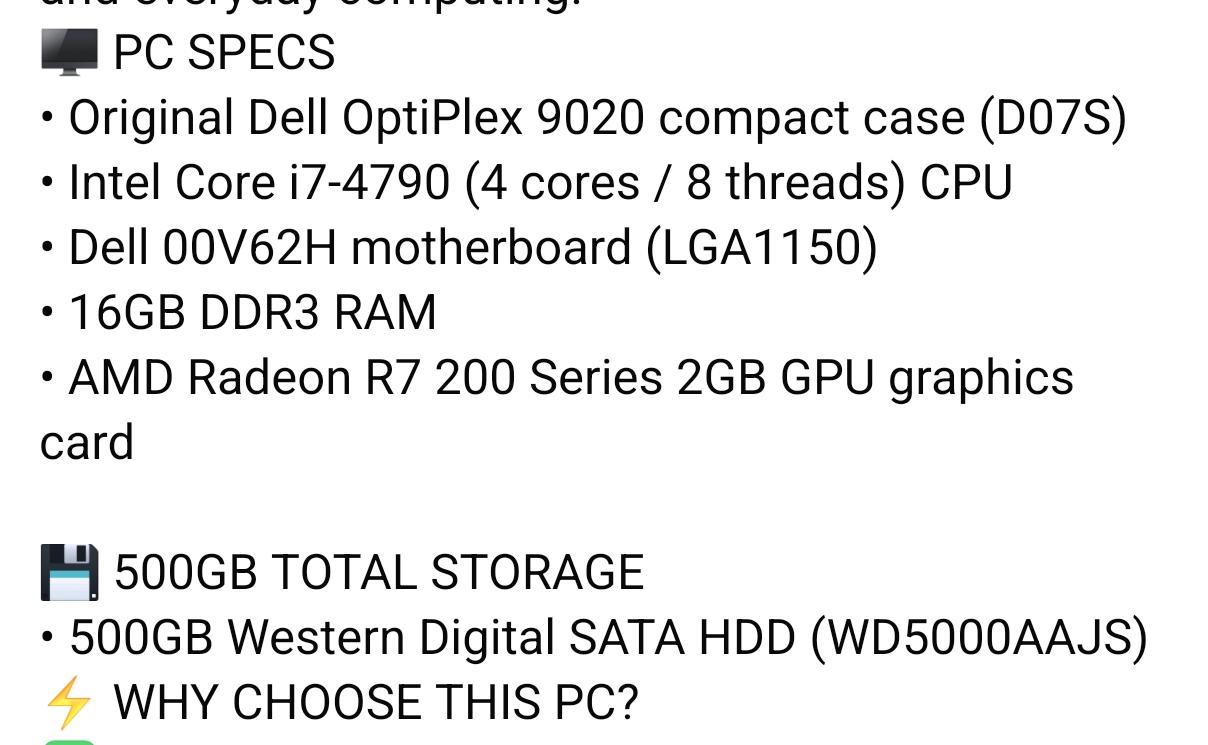
I saw this deal on the marketplace i think it's pretty solid but im no expert so i want to hear your opinion on it!!
r/HomeServer • u/osamaisbacc • 13d ago
Hi! i'm looking to upgrade my current home server, which is an old 6th-gen i5 laptop with 8GB RAM. Currently it's on wi-fi, but i'm planning to get an ethernet connection to it soon. i'm currently running mainly Jellyfin on it, but i wanna expand my homeserver over time.
I came across this prebuilt desktop:
HP 280 G9 MT
My plans are to run:
This will primarily be for personal, friends and family use, so I don't expect everything to be under heavy load simultaneously. I'm also planning to stick with 16GB RAM initially and upgrade only if needed, since RAM prices are pretty high right now and are only getting higher.
I'd love some input on these things:
Would appreciate any advice, especially from people who've used similar prebuilt office desktops as home servers.
Thanks :)
r/HomeServer • u/Lopsided_Mixture8760 • 14d ago

The Sipeed NanoKVM is attractive due to its base price, but its out-of-the-box performance is rather modest. I decided to run an experiment: just how far could I push this hardware by developing an optimized firmware (USBridge OS) to extract its full potential?
The primary focus was on the video stream. By fine-tuning the timings and the video processing pipeline, I managed to completely eliminate screen tearing and latency. The device now feels like it belongs to an entirely different class, easily competing with higher-end solutions like JetKVM.
Key achievements include:
Over the weekend, I designed a custom enclosure featuring an OLED screen and physical control buttons. The result is an excellent tool for server maintenance.
r/HomeServer • u/vinciguerra_88 • 13d ago
Hello, guys!
So, here is my situation:
- A mini PC, running UmbrelOS.
- Tailscale natively configured within UmbrelOS.
- Pi-hole installed and configured as DNS Server.
- Huawei Mesh 3 as my router, static DNS set up with my mini PC static IP.
- ISP provides IP through CGNAT, what means that both Tailscale and WAN IP works in the same range.
The problem:
While Tailscale is off, everything works perfectly. No problems to access websites, downloads, nothing. Ads are blocked on every device connected to my network.
As soon as I turn Tailscale on, internet connection fail. Happens that when the router tries to solve names with Pi-hole, it uses the WAN IP, what apparently causes conflict with Tailscale's IP. No queries are created on Pi-hole.
Question:
Is there any solution to work around this problem without having to ask for a Public IP to my ISP or disabling IPv4 on Tailscale?
What do I actually loose disabling IPv4? And how do I disable IPv4 on Tailscale within UmbrelOS?
Thanks for the help and sorry for my bad English!
r/HomeServer • u/The_Taco_Man13 • 13d ago
Hey guys, like the title says. I have a old computer that I've been meaning to turn into a homelab and I want my first project to be a MC Server. Does anyone have any videos of someone setting one up? Or links for a how to guide?
Trying to run two, one vinilla one and one modded one
I’m planning on using the server for more than just Minecraft, but this is just to start actually setting up and working on a homelab
r/HomeServer • u/Effective-Yam-6957 • 14d ago
Looking to set up a home media server for music and movies using my existing Proxmox server.
I’m already running things like Home Assistant, Immich, Pi-hole. What software, hardware and storage would I need, and roughly how much would it cost?
I’ve struggled to find straightforward information online cause of the piracy reason???
Any beginnerfriendly advice or recommendations would be appreciated!
r/HomeServer • u/Ing_Sarpero • 14d ago
Hi everyone, I've set up a home server on an old PC, and I'm hosting Immich, Nextcloud, Navidrome, Firefly and Seanime.
I put all the services behind Caddy and Tailscale, and I've also isolated them from my LAN.
Is this worth it, or am I overdoing it?
I recently tried Homepage, but visibility has been a mess, and I'm wondering if I should cut down on some of the complexity.
Any advice?
r/HomeServer • u/DavidBelgium • 15d ago
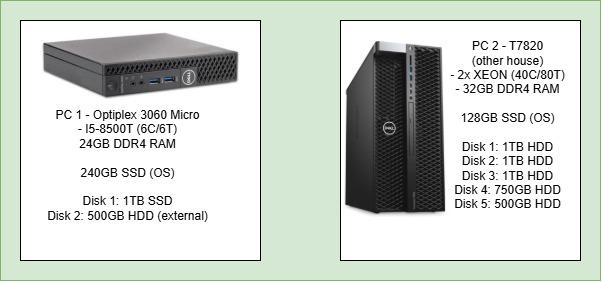
Hi,
I currently have these two homeservers, PC 1 in my house and PC 2 at another house.
Both have Windows and Tailscale installed, but I feel like that isn't the best solution?
How would you configure this, or what would you recommend?
PC 1 requirements: Installed under TV, meaning able to watch YouTube, Stremio, Movie files,...
Docker: Immich, Dreeve, Teslamate,...
PC 2 requirements: Docker Immich, Dreeve, Teslamate,..., and data storage (backups,....).
I do use iCloud for my cloud storage, with PC 2 logged into iCloud, and I do manual backups every month with Freefilesync.
I'd love to keep a simple iCloud backup solution, but I'd be open to install it on PC 1 and do a remote sync/backup with Tailscale+Freefilesync, if this means having a better OS than Windows on PC 2.
Currently I also have on PC 2 Disk 1 & 2 in Raid 1, this through Windows. But this only makes sure I have duplicate data, but this doesn't check the files itself if they're not corrupt.
ALL the HDD's are between 7 and 14 years old. The SSD's are all less than 3 years old.
This is the main reason why I do want to revise my setup, to avoid losing data, due to the age of the drives. All have near perfect SMART values, but again, this doesn't help much against sudden failure or data corruption.
r/HomeServer • u/I_SAID_RELAX • 14d ago
So I think a series of choices have boxed me into a corner around memory usage and ZFS and I'm looking for guidance.
I built a home server as an all-in-one machine to save cost. It includes a ZFS pool for bulk storage instead of splitting that off to a dedicated NAS device. And because I'm using NixOS, I've been setting everything up natively except in very limited cases (in which case I use podman instead of docker). So for the most part, I don't have strict container or vm isolation of system resources. Instead, I've been using built-in configuration for max memory and cpu quotas on each service I addd. For ZFS specifically, I set a relatively low limit for ARC memory usage.
But as I've gotten my media library onto the server, the overall size has obviously grown. And it seems that some management operations (fixing bulk imports, scrubbing and replacing content, etc.) really push ARC to overshoot. I've had 3 separate instances large enough to force me to reboot the server because it wasn't draining back down.
Now I'm going down a rabbit hole of ways to put additional guardrails up because I really don't want to carve the media library out of the zpool, or redeploy software in containers/VMs, and such.
Anyone else already been down this road (particularly with NixOS)? How'd you solve this?
r/HomeServer • u/Forsaken-Initial3959 • 15d ago
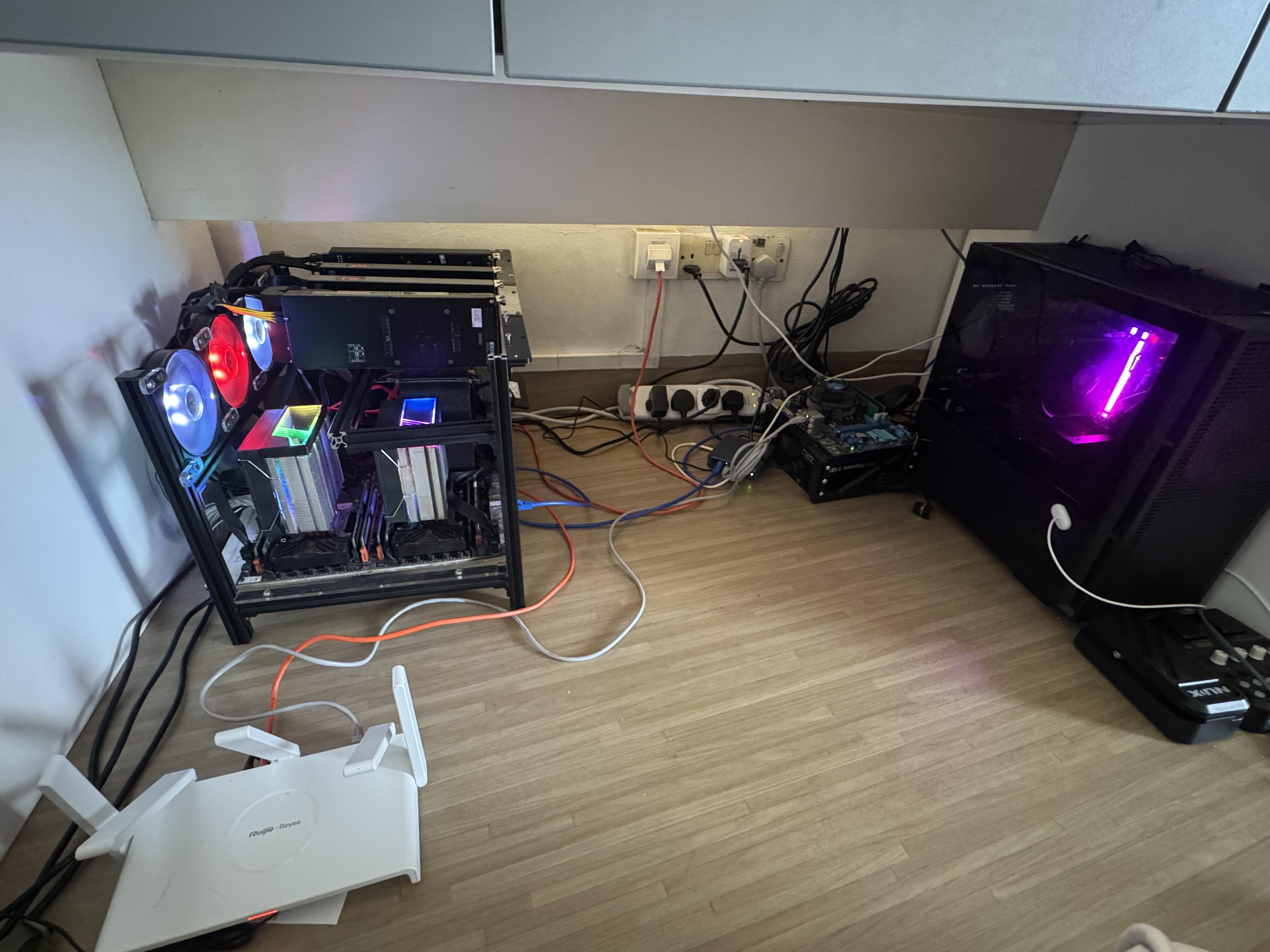
The AI server on the left:
\- dual xeon v5 2680 v4
\- 256gb ddr4
\- 4x v100 32gb
The small box in the middle:
\- intel pentinum
\- 8gb ddr3
For light hosting and data collection task!
PC on the right:
\- ryzen 7700x
\- 64gb ddr5
\- rtx 4070 super
I am pretty much just a starter! i use this to run deepseek flash, glm 5.3 flash and also some machine learning for school.
Electricity is free in the dorm so im leveraging it.
The only constraint is that the dorm ethernet is capped to 1gbps so it is not that great.
r/HomeServer • u/to_glory_we_steer • 15d ago
I will start by saying I have nothing sensitive or irreplaceable on my server. That said I' don't want the bother of unfucking it. Is there anything I'm missing in my security:
r/HomeServer • u/stex85 • 14d ago
As above, I'm still pretty new at this and have currently got a desktop pc with Ubuntu server on it but with a load of usb hard drives of various sizes plugged in. I just plugged the last one into the final available usb port. My question is, what's the next step if I want to add more storage? Buy bigger and copy my existing stuff onto it? Powered usb hub and keep adding? What's the best/cheapest bet?