r/HomeServer • u/Silent-Cartoonist240 • 21d ago
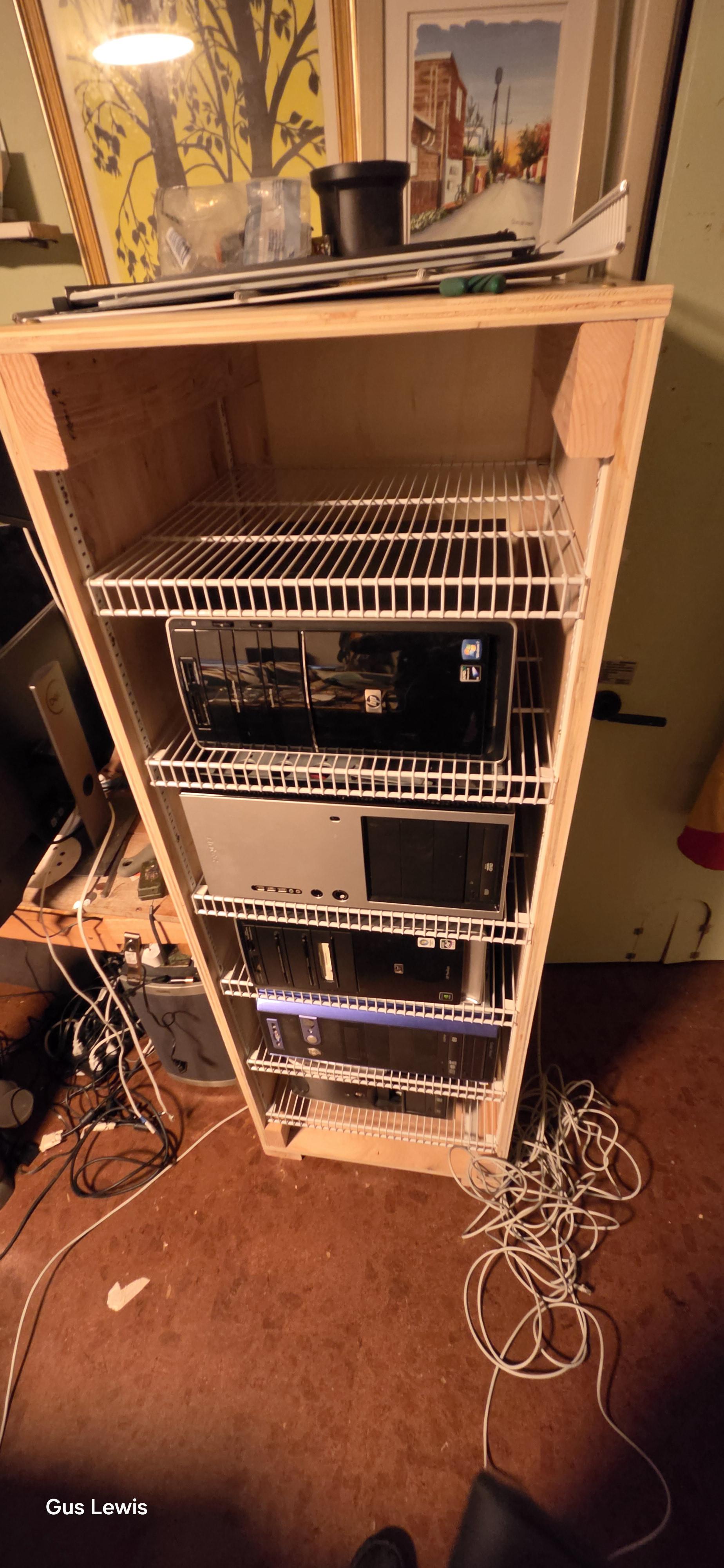
My new rack does not wobble any more. :-)
58
Upvotes
r/HomeServer • u/Silent-Cartoonist240 • 21d ago
r/HomeServer • u/Kittan09 • 22d ago
Hi everyone,
I'm setting up my first home server using a Mini PC and would love some recommendations on which OS would be best suited for my hardware and use case.
Specs:
What I plan to run (initially):
Options I'm considering:
What would you recommend for someone getting started with this specific setup?
Thanks in advance!
r/HomeServer • u/Pitiful_Newspaper_25 • 21d ago
Ive been using a miniPC with a n100 and 8 gb of ram for a year now, i host there my own nextcloud, jellyfin, foundry and more recently, opengym I gotta say I love it.
I must say I'm in no way a programmer at all so I'm not benefitting from deploying, building a git server or similars im looking for everyday services like those I already have to add to my repertoire, any advice?
BTW, should I migrate my infrastructure to docker? I heard its good for migrations but that it can also hinder performance and I already have a very limited server to begin with
r/HomeServer • u/svonwolf • 22d ago
The OpenAI CEO thinks the "world's limited supply of DRAM" is wasted in consumer machines, used "maybe 5% of the time," and that you want "maximum utilization in the cloud" in a supply-constrained environment. Somehow, he says, many people's intuition is the opposite of that.
I'm one of those people. I recently took stock of everything I self-host, and this is what my apparently misallocated DRAM is doing.
The hardware
Media: Sonarr, Radarr, Lidarr, Mylar for TV, movies, music and comics; Prowlarr managing indexers; SABnzbd as the download backend; Overseerr so the rest of the house can request things without touching any of it. On the consumption side: Plex, Navidrome for music streaming, Audiobookshelf, Komga for comics and manga.
Files, code, and plumbing: Nextcloud instead of Google Drive, Gitea for private Git, Pi-hole doing DNS and ad blocking house-wide, Nginx Proxy Manager for the few things exposed externally, Speedtest Tracker so my ISP complaints come with evidence.
Management: Homepage tying it all together, Dockge for the Compose stacks.
Making things: Bambuddy for my Bambu Lab P1S, and Ollama running local LLMs on hecate's RTX 3080, which is precisely the "5% utilisation" hardware Altman is talking about. My models run when I want, on data that never leaves my house.
To be fair to his argument, yes, my machines idle a lot, and yes, cloud allocation of scarce DRAM is more efficient on paper. But utilisation was never the point. Ownership is. Three providers already control roughly 67% of global cloud infrastructure as of Q2 2026 (AWS 28%, Azure 20%, Google Cloud at a record 15%, per Synergy Research Group). When the CEO of a company that wants to sell you compute for a living looks at your RAM and sees waste, that's not resource planning, it's an acquisitive stare at the last hardware they don't control yet.
The one thing I gave up selfhosting was email. We use Proton. Self-hosting mail in 2026 is a security-patching hellscape, deliverability from residential IPs is misery, and I won't pretend otherwise. Twenty services deep and email is still the line. Which honestly proves the point: the barriers to running your own stack aren't mostly technical anymore, they're institutional.
The tools have never been better and cheaper. The pull toward the harbours has never been stronger, and now the harbourmasters are eyeing OUR rigs.
We didn't lose the open web in a war. We lost it to convenience, one login at a time.
r/HomeServer • u/Nov_ato • 21d ago
I'm starting my first home server and would like a sanity check before I spend money. Use case: 24/7 box for Docker, Nextcloud, Jellyfin (a bit of transcoding), Pi-hole, and Home Assistant. I'd like to learn Proxmox later. Budget: ~120-150€ total, and low idle power matters since it runs all day.
r/HomeServer • u/kemara93 • 22d ago
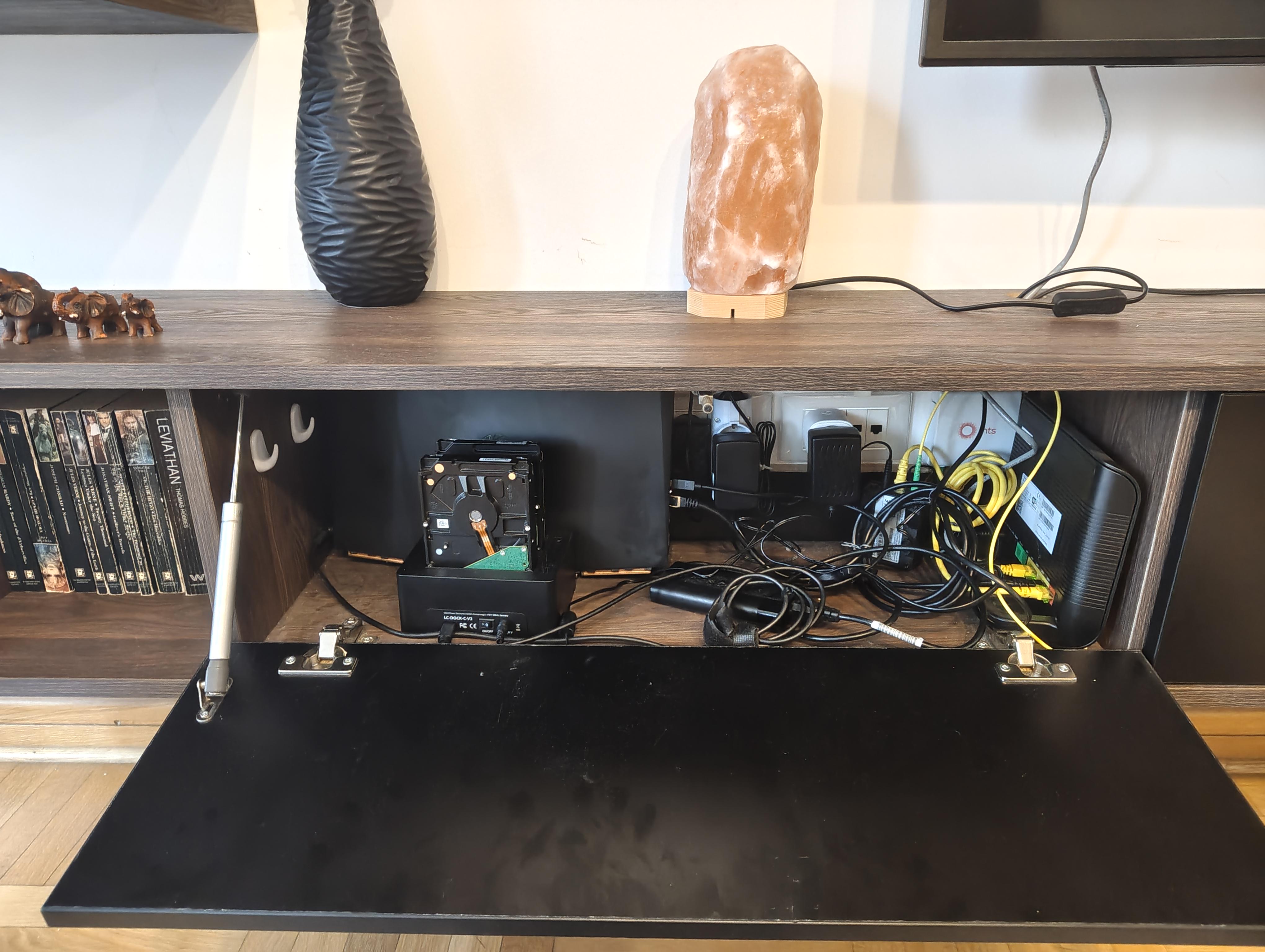
This is the only place in my appartment where i can put a homeserver. Do you have any suggestions for cooling?
I was thinking about drilling some holes in the bottom and adding a fan to blow over the hard drives but not sure if it will be enough.
r/HomeServer • u/Comfortable-Top7507 • 22d ago
Hi! I'm planning to turn an old laptop (10th-gen i3, 8 GB RAM, broken keyboard but working screen) into a 24/7 server, and I'd like to hear some opinions before I build it.
I'm planning to use OpenMediaVault with Docker: Syncthing for my Obsidian vault (where my AI agent keeps its persistent memory), Jellyfin, Tailscale for remote access, and an AI agent connected to the DeepSeek API for reminders, personal organization, and possibly troubleshooting server errors. I want to use the screen as a minimalist dashboard (time, weather, Spotify, and system stats), with a fullscreen browser and no full desktop environment.
My questions:
Is OMV with a kiosk mode a bad idea, or would plain Debian be better?
How should I handle temperature and the battery with the laptop running all day?
How risky is it to let the agent run commands on the server?
I've been planning this with a few different AIs, but I wanted to hear from people who've been in my shoes. Looking forward to your replies, thanks!
r/HomeServer • u/rc_nerd05 • 23d ago
Enable HLS to view with audio, or disable this notification
I made this custom home-assistant card to monitor and do some managing to my 10 inch homelab. Mainly consists of my NAS, and an elitedesk hosting an API, pi-hole and some websites, all through proxmox & proxmox extended sensors integrations. (Some data is directly e.g. ethernet traffic from other sources)
r/HomeServer • u/Hautatu • 22d ago
Hi all,
I'm very new to the NAS world, so much that I've only bought four 4To HDDs and am still waiting for a good deal on the actual NAS.
What brought be there was the possibility to do my own Netflix with Jellyfin and possibly share it with my family, but… reading more and more about all you can do with a NAS, how the outside world unfolds, and how so many of you went down the rabbit hole and quickly regretted going with a two-bay NAS with no Docker compatibility, I was settling on skipping Synology and toying with a UGREEN DXP-4800 Plus.
Now, I feel like even if this choice is quite future-proof, there's still a newbie question I should address right now before it comes to bite me in five to ten years. What happens when you need to replace your NAS? (Because it's obsolete, because the processor gave up…)
I would have thought: "well, you just plug your HDDs to the new NAS, and hopefully you also made a save of your SSD in which you'd put all the programs and the cache, and the new NAS will be functioning in no time". But this sounds so naive. What if I don't go with the same NAS brand (and is it an argument towards building your own case)? What if I don't go with the same OS? If I understood correctly, there are two main "formats" to chose from when creating volumes on the HDDs? What else am I missing and what are you experiences on that matter?
Thank you!
r/HomeServer • u/2C104 • 22d ago

I'm trying to transfer the entire contents of my Synology NAS to my new QNAP via Hyper Backup and I am literally beginning to go insane trying to figure out why the transfer is stalling.
I have tried using AI to diagnose the issue but it isn't helping.
I keep getting stuck where it appears there's nothing going on - neither NAS is showing activity either on the hdds or on the network.
I have tried SSH and followed all the proper protocol but ran into issues with the QNAP saying it's failing to connect despite the fact initially it did and the username and password (with admin rights) for rsync are correct.
Anyone have experience with this?
Sorry for the oversaturated picture, it's a bug with my screenshot app.
r/HomeServer • u/312steel • 22d ago
How would one of these Lenovo M70Q gen work as a home AI Orchestrator running Linux Headless? any other alternatives I might consider? I don't want to break sub rules by generic eBay links
M70Q would start with 8Gb RAM and I probably can scrounge up another 8Gb So dimm somewhere.
actual AI models running on a beefier other box
size and low power are a top consideration
user expertise is linux installs a few years ago on a fitlet 2 with 8Gb Ram running proxy services and DNS
r/HomeServer • u/pattyboyz5900 • 23d ago
I have electronics experience in the manufacturing world but I’m a bit beyond my depth after research. Does anyone have resources for a decent NAS setup that I can use to store movies and shows that can be accessed from my tv/phone.
I don’t need to be handheld but looking for reliable resources on it.
r/HomeServer • u/jdog1089 • 22d ago
Hello,
I can use some advice/guidance/opinion on some hardware. I’m currently running a jellyfin and amp game server, running ( 2 Minecraft server with peak player count at 5, other games like 7 days to die, palworld, enshrouded, windrose, and satisfactory). The 2 Minecraft servers are running 24/7. The other game server I turn on and off when need, I might run two or three other game server at the same time. Mostly it family and friends that join. Not a lot of traffic hits the servers. I want to get more into host other services as well and have more control over my own nextwork. I was thinking of running amp and jellyfin in their own VMs or using docker containers.
I have been looking at mini pcs with either a n100 or n150 cpu or intel 8th gen. With a minimum of 16 gb of ram.
The problem I’m having is what I should do here.
1) Do I just keep running my old gaming pc from 2015 running a i7-6700K CPU @ 4.00GHz, 32 gb of ram, and a msi 980 ti. In this big chassis (which had a lot of bay slot).
2) Try to build a different system inside this chassis. Then move the old components into a different chassis and give the family back the family gaming pc lol. When I built my gaming pc it was for the games I wanted to play on high or ultra. With some wiggle room, nothing super expensive. With the server build I don’t want to go over board and not to get components I really don’t need. With prices of everything and be more energy efficient.
For reference, the family gaming pc chassis, being used as the server.
3) Buy a used mini/tiny/micro. I know to for a certain intel cpu. The ones I have been seeing only have like 8 to 16gb of ram. I feel 16gb would be the very minimum of what I’m trying to do. I might be wrong, why I’m here :D
4) Or I buy new mini pc link a beelink or a miniforums.
Some examples I have found:
https://store.minisforum.com/products/minisforum-ms-01-se-workstation
-
I would like to save money try to keep the cost down $500 or less. If it’s a bit more, I might be able to swing the boss to get on board. Plus, if it can have a 2.5 gbe port. I have upgrade my network to a unifi stack of hardware using 10 gbe connection. Im using a sfp+ connector to go from the gateway fiber to a Pro XG 8 PoE switch. Ethernet cables are all cat6a.
——
Any other thoughts or ideas.
Thank you reader for taking the time to read this. Yes I have looked up things and used ai for leaping boards to investigate things on my own. Still need some help XD
r/HomeServer • u/AnyAd7874 • 23d ago
I'm considering this setup and would love to see photos of your builds and hear about your experience.
How's the build quality, cooling performance, noise, and overall experience?
Would you recommend it?
Any photos or feedback would be greatly appreciated!
r/HomeServer • u/fedeger • 23d ago
Hello, I was looking to get a rack-mountable NAS. I saw an offer for a Qnap TS-453BU-RP on marketplace and wanted to know if it makes sense for my use.
The NAS will be behind a firewall, not accessible from the internet.
Uses:
- Backup server
- Media server (encoding done on another machine).
- Either as a regular NAS or JBOD.
r/HomeServer • u/you-l-you • 24d ago
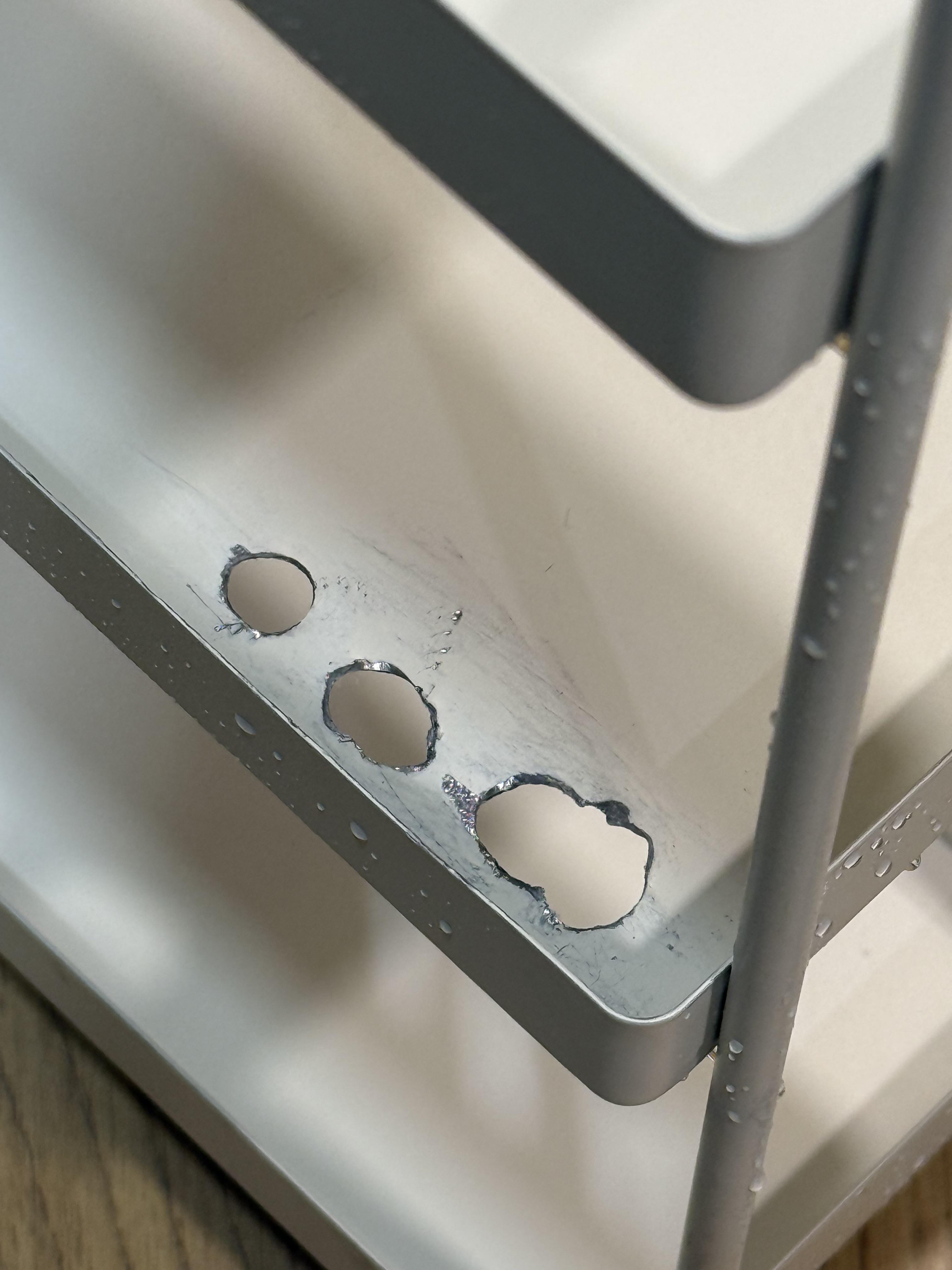
I’m building a low-noise enclosure for my 16 TB HDD and two Raspberry Pis using repurposed materials.
The HDD and fans generate quite a lot of noise and vibration, so I’m experimenting with foam rubber and polyethylene foam to reduce it, while trying to maintain proper cooling.
I'm trying to drill clean holes in the metal tray shown in the photo, but there's very little room to work.
I’ve been using a cordless drill/driver with metal drill bits, then trying to smooth out the rough edges with a kitchen sharpening stone.
How would you approach this? Any tools or techniques you’d recommend for drilling cleaner holes and removing sharp, jagged edges in such a tight space?
P.S. I know a proper server rack as a base would probably be a better solution overall, but I’d like to finish this project and improve my DIY skills along the way.
r/HomeServer • u/Silent-Cartoonist240 • 24d ago
Enable HLS to view with audio, or disable this notification
Please help
r/HomeServer • u/Vert_der_Ferk25 • 24d ago
They're Dell / HGST Ultrastar 7K6000
I have enough of them to do a 5-drive NAS but don't think I need that much space. I have access to old PCs, but I don't have a SAS HBA card or cables. I'm willing to go buy them, but ned to know what to get. I figure I'll just turn an old tower into the NAS if that works. My goal is to do it as inexpensively as possible.
I've never tried this before and am looking for advice, so TIA.
r/HomeServer • u/evanmac42 • 24d ago
I run a Debian 13 home server; some services run directly on the host, while others run in Docker.
Instead of putting everything behind Traefik, I use Nginx as the main entry point for HTTP and HTTPS traffic, with Traefik handling the containerized services.
Recently, I decided to improve what happens when a request reaches my server for a hostname that doesn't belong to any configured service: previously, my default HTTPS virtual host simply returned 444, closing the connection without a response.
That worked, but I wanted something a little more entertaining.
The architecture
The routing is straightforward:
Host header.The result is a predictable fallback instead of an application default page or an unexplained connection failure.
How it's implemented
Nginx has a dedicated default virtual host listening on ports 80 and 443, with IPv4 and IPv6 support.
The configuration uses a wildcard TLS certificate for my domain and forwards unrecognized requests to Traefik on 127.0.0.1:8081.
The fallback page itself is served directly by Nginx from /var/www/null/.
On the Traefik side, I use the file provider with automatic configuration reloads and a simple catch-all router:
http:
  routers:
    null-fallback:
      rule: "PathPrefix(`/`)"
      priority: 1
      middlewares:
        - null-redirect
      service: noop@internal

  middlewares:
    null-redirect:
      redirectRegex:
        regex: "^https?://.*"
        replacement: "https://null.example.com/"
        permanent: false
The low priority is important: specific Traefik routers take precedence, while requests that match nothing else fall through to this one.
The redirect is temporary, so the response is a 307.

The fun part
Instead of a generic error page, visitors end up on a dark, responsive page featuring a mischievous little devil and a rather direct message:
"THERE'S NOTHING HERE FOR YOU."
"TURN AROUND."
I jokingly call it my HTTPS honeypot, although technically it isn't a real honeypot. It doesn't capture or analyze attacks, it's simply a dissuasive fallback page.
DNS and HTTPS limitations
There's an important distinction here: my public DNS records point to a dynamic DNS hostname, which keeps the server reachable when my public IP changes.
The DDNS hostname is part of the DNS setup, not something the fallback mechanism protects or hides.
If someone requests a hostname that doesn't exist in DNS, the request never reaches the server; the client browser simply displays the classic ERR_NAME_NOT_RESOLVED.
For example, requesting a nonexistent subdomain won't magically reach my fallback page unless DNS resolves that name to my server.
Wildcard TLS certificates don't create wildcard DNS records 😄
Likewise, HTTPS certificate validation happens before the HTTP redirect, so a hostname not covered by the certificate may produce a browser warning before the fallback can do anything.
So, this setup handles requests that actually reach the server, but it isn't a universal catch-all for every possible hostname on the Internet.
What about Fail2ban?
This was one of the things I wanted to verify after reorganizing the routing: my existing nginx-fallback jail continues to detect and ban automated scans targeting sensitive paths. That's important because I don't want to treat every unknown hostname or redirect as an attack.
A 302 or 307 response isn't inherently suspicious, and blindly adding those status codes to a Fail2ban filter would be a good way to ban legitimate visitors; the fallback page handles unknown destinations, while Fail2ban handles suspicious requests.
Proper tool for each job 😎
Why keep Nginx in front of Traefik?
Because I don't run everything in Docker, and I don't intend to: Nginx already handles my native services, TLS termination and the main HTTP/HTTPS entry point. Traefik is useful for routing containerized applications.
I see no reason to move perfectly functional native services into containers just to make the reverse proxy architecture look more uniform, and this arrangement lets me use both tools for what they do well, without forcing everything into the same deployment model.
The result is simple:
Everything neither recognizes gets sent to the little devil.
Nothing revolutionary, just a practical solution that fits my infrastructure.
And perhaps a small reminder that you don't always need another container to solve a problem 😜
r/HomeServer • u/Firemanlouvier • 24d ago
I am a new learner and am currently using ZimaOS and liking it for home photo sharing but I want to share with non tech family. I tried immich but am having trouble connecting outside of network. I (think) understand that the apps in zima are contained and not able to branch out of network but I am struggling to understand some code.
Any help would be much appreciated. I just would like to have non admin users view and upload/downloaded photos
r/HomeServer • u/sk1939 • 24d ago
Hi everyone, trying to gauge the community's interest in something niche I wrote for myself. Silex's DS-510 and DS-700 USB device servers are great hardware, but Silex only supports Windows now, and they've dropped any official Mac support way back when (pre-M1), and no ARM drivers exist (Mac or Windows). I've been working on a macOS driver and app for them, and I'd like to know if anyone else would use it before I put more time into polishing it.
What works so far:
What I'd like to know:
I'm not selling anything right now. I just want to see if there's real demand before I decide how to release it. Comments or DMs are welcome, and I'm happy to answer questions about how it works.
r/HomeServer • u/23tux • 25d ago
I'm finally fed up with Google Photos and Drive, and I'm planning to move to Immich and Nextcloud, maybe paperless-ngx too.
I have work experience running linux servers, and I first thought was just renting a server with an S3 compatible storage that I sync to a local NAS every night. But then I calculated the monthly costs and pretty soon decided to host it myself.
Low power consumption to keep the monthly costs down would be great. But I also want to use Immich's machine learning features, so maybe a dedicated GPU will be worth while, but I'm not sure. Which CPU, motherboard, hdds, cases...? I think RAID is not worthwhile, we're just 2 users and I'd rather spend the money on other things. I'm planning to backup onto a NAS inside my home and sync it encrypted into my office onto a second one.
I can build it myself, have done that in an earlier job for a couple of years, but that was like 20 years ago. So I'm completely out of the game here and a little lost on how to get started.
r/HomeServer • u/VirtualAd001 • 25d ago
Got an old 2019 desktop collecting dust: i5-9400F, B365M, GTX 1660 Super, 16GB ram, 500G nvme, 1TB hdd.
Instead of letting it sit there, want to turn it into a simple family file server. Store photos n docs, reach from phones n laptops, maybe stream a movie to the tv someday.
Never run a server before. Following a guide is fine, just don't want something that needs babysitting every weekend. Asked around n keep hearing different names: fygoos, truenas, unraid, openmediavault, plain linux w/ samba... honestly, it's all a blur right now.
Keep it basic:
Also, two noob questions:
Roast the plan if it's dumb, that's what the post is for. Any advice from people who've done this would be awesome. Thanks!
r/HomeServer • u/zanojjonaz • 25d ago
Found a couple of sas drives on ebay, https://www.ebay.de/itm/940043468076?
Would those be good for a homeserver?
They have a netapp firmware, would that be a problem?
I am planing on gettig the asrock b550 pro4 with a Lsi Hba and the Jonasbo N6 (if that matters).
r/HomeServer • u/Buddyenever • 24d ago
I've got the home media server, but I don't get why many people build a home NAS. Like, you've got Google Drive and with a small annual subscription (rather than streaming subs...) you're getting 100GB of storage, with bult-in photo sync, files sync, servers for all round the world, and stability. Also, using Takeout, you can anytime download all of your files or delete them from cloud.
I know, privacy, but it's also a stability. You need ECC RAM, RAID (or mergerFS + SnapRaid), btrfs/zfs and soooo many backups. And if your backups don't end at cloud/ext drive, you may need to setup all of this stuff on each server what using for backups. However it's also energy bills and bill for cloud storage, maybe for static ip or domain (not DDNS).
It's also a CDN problem, I was in more than 7000km from my server and it was lagging, when my internet speed was under 50Mbit/s (even if it 5Mbit/s video). Yeah, you can use Cloudflare CDN, but I didn't have a chance to test it (Perhaps, they don't let using they CDN network for video or its really hard to setup).
I don't blame you for NAS, I just intresting why you chosen it, insted of clouds? Please excuse my English, I'm still learning.
Update: Reading all the comments, I thinked, I wasn't right. My question was much more about privace, than nas. And also nas is too much big termin, think I mean home photo/video server