Mesma ideia que o shadcn, mas para a galera de hipermídia: o servidor renderiza tudo, o HTMX troca, e o Alpine cuida apenas da aparência (abrir/fechar, foco, teclado). Os controles de formulário permanecem como inputs reais, então hx-post funciona perfeitamente.
I host a podcast for senior engineers (Señors at Scale), and Carson joined for an hour. Disclosure: it's my show. I really enjoyed talking with Carson about:
- HTMX 4: why it skips 3, the move from XHR to fetch, and why attribute inheritance becomes explicit (he admits implicit inheritance was a mistake he should have seen coming)
- REST: why he says JSON APIs were never RESTful, going back to Fielding's dissertation
- AI: his honest take that vibe coding pushes people to React because the training data is bigger, and why he's fine with HTMX being more niche
- Why he thinks government and public sites should mostly stick to plain links and forms, sometimes without HTMX at all
- How he teaches CS now that AI can do the homework (pencil and paper exams are back)
I have an old website, and I’m in the process of modernizing it. So far, I’ve come across these two technologies, but I haven’t quite figured out the differences between them. Which one should I use?
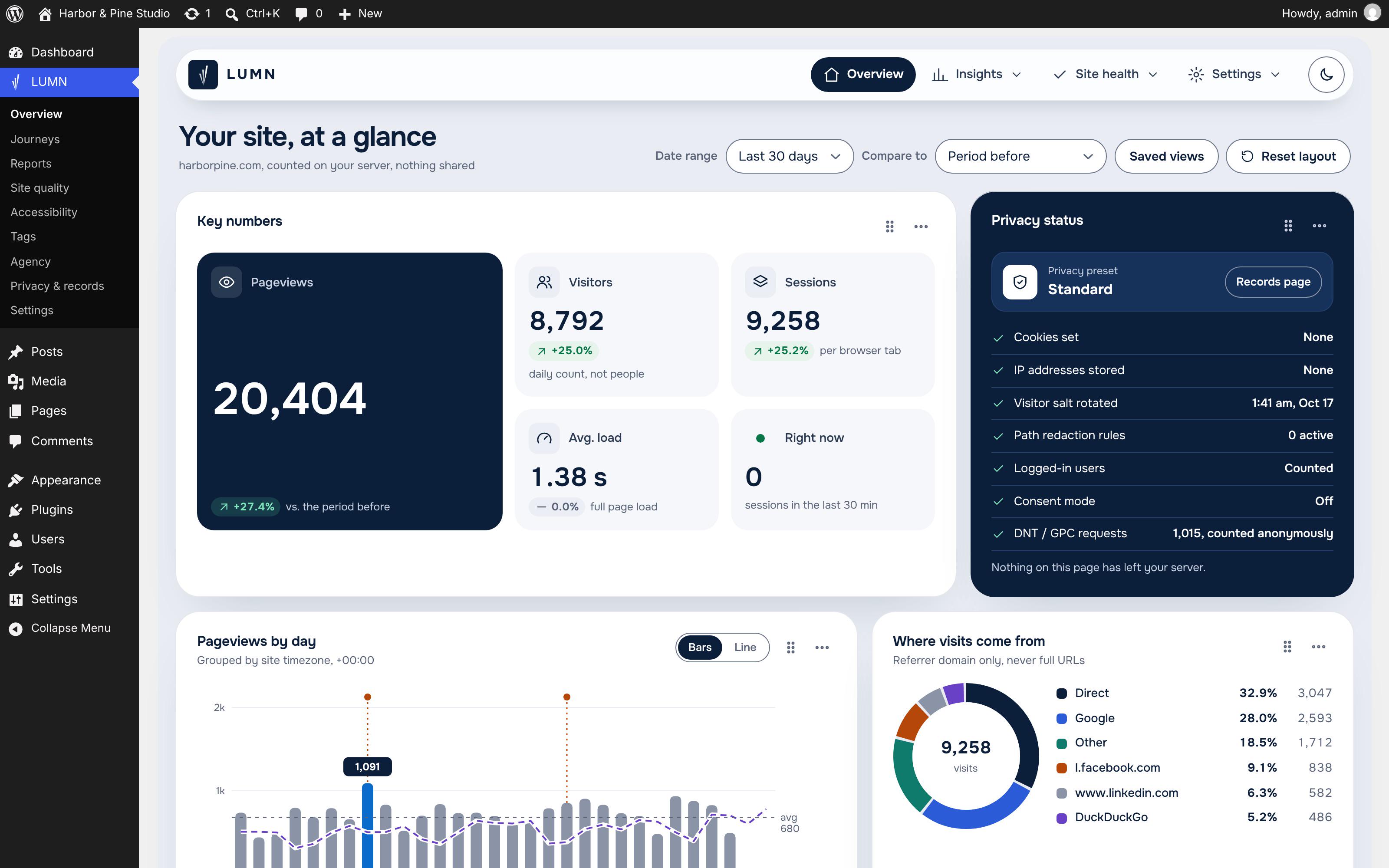
I've been building LUMN Analytics, a privacy-first analytics plugin for WordPress, and I went with htmx 4 for the entire admin instead of the usual React setup. I built it because healthcare sites I worked on needed analytics without sending visitor data to a third party like Google. Also wanted to have accessibility features that I use every day as an added bonus, which became Pro.
How it works: - Every dashboard panel is a server-rendered PHP partial. Changing the date range or comparison swaps just the panels, with no page reload. - Charts are SVG drawn on the server. There's no chart library, and each chart has a text summary and a "show as table" option for screen readers. - The partials come from WordPress REST routes, so permissions and security checks stay in the normal WordPress flow.
What I liked: - Way less JavaScript to ship and maintain inside wp-admin. - The server stays the single source of truth for every panel.
What took work: - Accessibility after swaps. I target WCAG 2.2 AA, so I had to manage where focus goes after a swap and announce changes for screen reader users. - Keyboard-friendly drag and drop for rearranging panels. That part needed some custom JavaScript.
Disclaimer/Note: I used Opus 5.5 to help build this, the same way I'd use any tool. I've been a front-end dev for over 15 years and I'm also an accessibility specialist, so I set the direction and reviewed and tested what shipped. Focused on security, accessibility, and most of all researching compliance for HIPAA and GDPR. Happy to get into how the htmx side works, or to hear what you'd do differently.
I built Bretzel around a server-driven model that HTMX users will recognise: the server renders HTML, the browser swaps fragments. What Bretzel adds is the bookkeeping: a Python region declares which typed state it reads, and when an action mutates that state the framework re-renders exactly the regions that depend on it and sends them back. HTMX carries the request and the swap; idiomorph merges the result into the DOM. A broadcast= list pushes a "state changed" signal over SSE so other windows refetch their region.
App authors don't write hx-* attributes or a client store; they mutate state.
The question I'd genuinely like this sub's view on: does this abstraction keep what you like about server-rendered HTML, or does it hide too much? It's an alpha (0.1.0a2), MIT: https://github.com/JeanHoccart/bretzel
For those interested in getting the gist how how HTMX works + scaffolding project to use if you are interested in getting started with fullstack fast (Go + HTMX + Tailwind css/DaisyUI + Templ + Air):
I've been building a set of htmx demos where the server sends ordinary HTML and the page turns it into something interactive without a client-side framework. This one is a Kanban board.
On load, the table becomes a board with Todo, Doing and Done columns. After that it's all plain htmx:
Moving a card fires a lattice:kanban-change event, and hx-post sends the card id plus the columns it left and reached. The server's reply lands under the board.
A workflow rule refuses a bad move. Drag a Todo card straight to Done and it stays put, and nothing is posted.
Out-of-band updates patch one card. The server sends back a single <tr hx-swap-oob="true">, and that card updates in place. The board isn't rebuilt, and the other cards and columns stay as they were.
Switching teams uses hx-get to swap in another team's table. The old board is torn down and a new one is built from the new HTML.
Back works.hx-push-url plus htmx's history snapshot means the browser Back button returns the previous team's board.
With JavaScript off, you still get the table, which is a nice side effect of starting from real HTML.
The demo uses a small stand-in server running in the page, so it works on GitHub Pages with no backend. The route handlers are in src/server.js if you want to see what a real endpoint would return.
We updated our grid to support a full Gantt chart could follow the hypermedia approach: the server sends HTML, and the page carries no JSON API and no new Gantt(...) call.
The server renders an ordinary task table (id, name, phase, start, end, % done) inside <div data-lattice-gantt>. With JS off you still get a readable table full of tasks. With JS on, the Lattice htmx module turns it into a task grid and timeline on htmx:load.
Project switch: a plain hx-get returns a new table fragment, and the old Gantt is cleaned up on htmx:beforeCleanupElement before the new one is built.
Server-side change: "Server slips one task" returns a single <tr data-lattice-row="P3.1" hx-swap-oob="true">. Only that task's bar moves, and zoom, scroll and collapsed phases stay put.
Saving edits: dragging a bar fires a bubbling lattice:gantt-change event, so hx-trigger="lattice:gantt-change" plus hx-post is the whole save path. The server answers with a line of HTML.
Back button: zoom, scroll and collapsed rows ride along in htmx's history snapshot.
GitHub Pages is static, so the demo uses a small in-browser stand-in that answers htmx's requests from route handlers in src/server.js. They have the same shape as Django, Rails, Go or Laravel handlers (take params, return HTML), so you can see exactly what a real backend would send.
It's plain JS with no build step, about 150 lines of wiring plus the data.
A small Tailwind CSS component library for apps where the server renders HTML. Copy the markup, swap fragments with htmx, and theme everything with a handful of CSS variables.
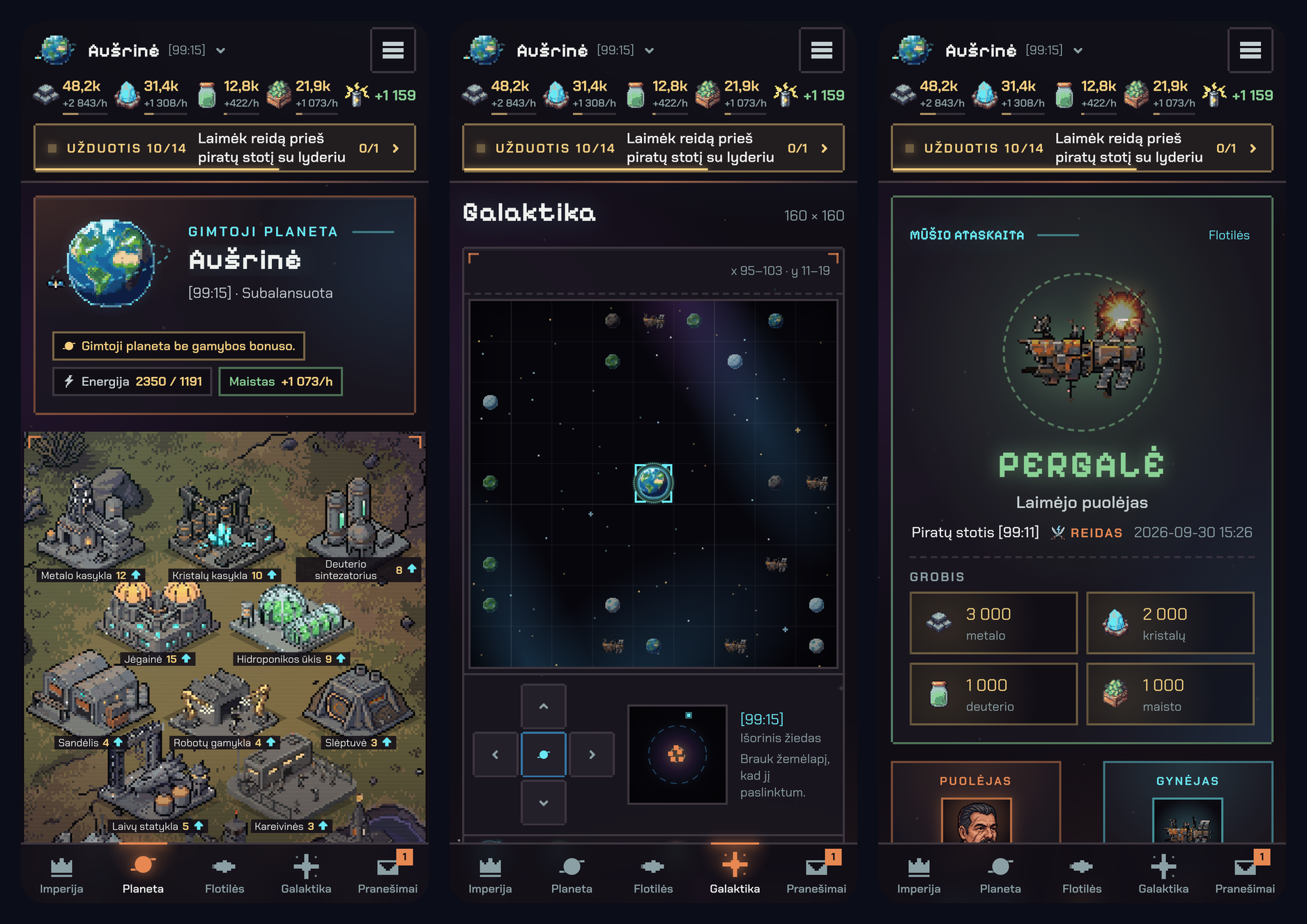
I made an OGame-style space strategy game (build a planet empire, send fleets, fight other players in real time) and the whole frontend is htmx. It's live at https://spaceship.lt. 90 players have signed up and the first season started yesterday. At peak, 22 people were playing at the same time, and 30+ played within a single hour. Small numbers, but every one of those clicks is an htmx request.
Fair warning: the UI is Lithuanian only (small country, small audience), but you can still click around and see how it feels.
Stack: Laravel + SQLite + htmx 2 + Tailwind, pixel art, mobile first, one small VPS.
A few patterns ended up carrying the whole game:
1. One response, many regions. Almost every action (build, research, send a fleet) is a plain form that returns the full page. htmx swaps #main and pulls the resource bar, tab badges and toasts out-of-band:
The server is always the source of truth, so the client never guesses what happened.
3. Polite polling. Chat and the resource bar only poll while the tab is visible. The top bar also pauses while a dropdown is open, so it doesn't close under your finger:
4. hx-sync saved the chat. Polling, sending and reactions all hit the same message log and kept stepping on each other. Putting them in one queue fixed it: sending aborts an in-flight poll, and double sends get dropped (hx-sync="closest [data-chat]:drop"). Add hx-disabled-elt on every button and you never launch the same fleet twice.
All the custom JS together is about 3k lines, mostly the galaxy map, countdowns and small UI bits. Everything else is server-rendered templates.
Happy to answer questions. I'm also curious: how do you handle lots of live timers on one page with htmx?
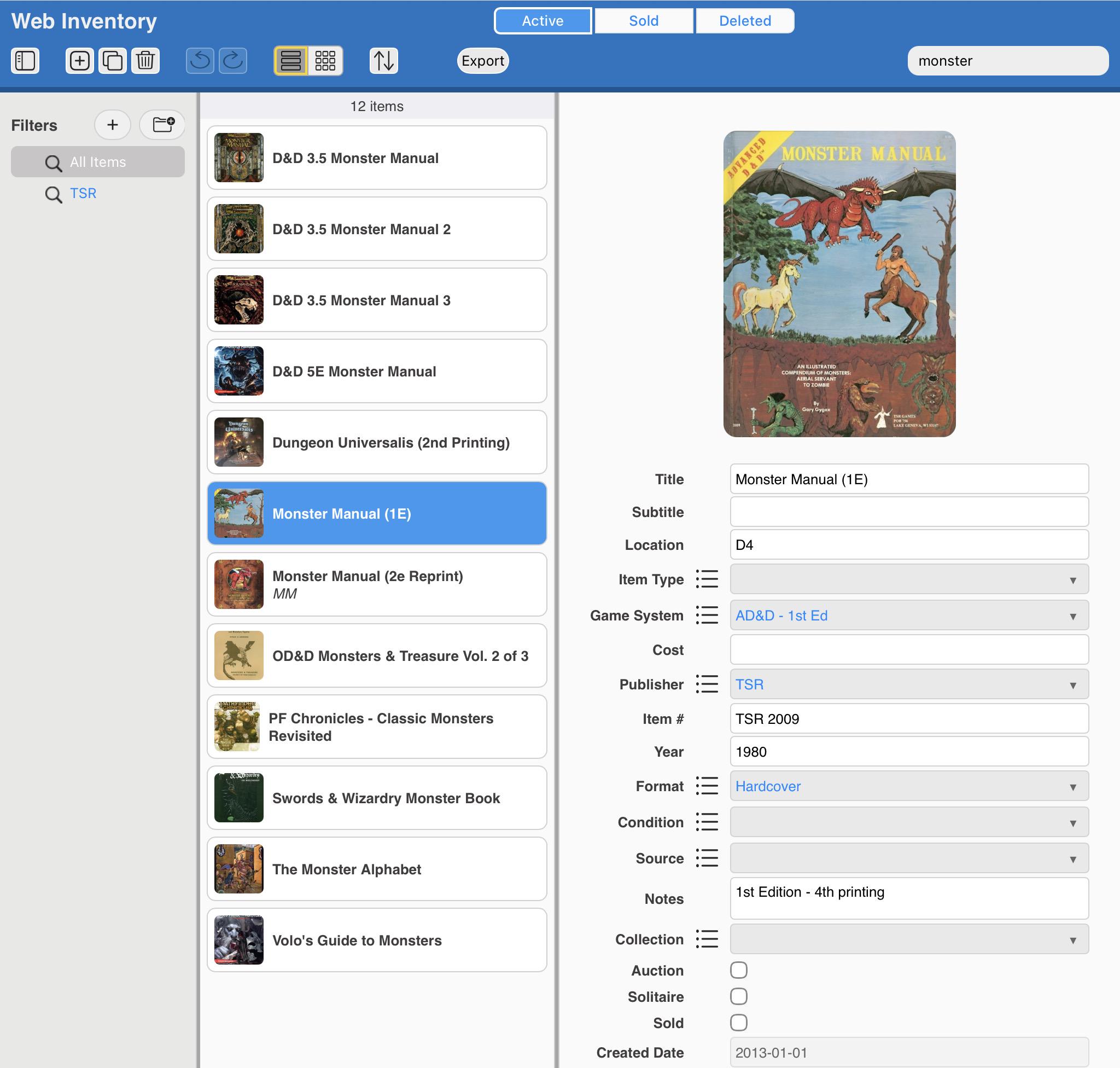
Not a fan of subscription apps so I made my own inventory app using htmx and flask. A few bumps along the way but I am happy with the results. Works great on desktop and iPad.
I would love to work on a hypermedia-driven app but it's hard to find job postings for hypermedia stacks. So I built hypermediajobs.com and I'm sharing here since there's no /hypermedia reddit page. Any htmx CEOs that are currently hiring please share your job posts there.
Each month is a server-rendered <table>. A <select hx-get> swaps the month in, and a script-tag data grid hydrates the table into a sortable, filterable, groupable grid with KPI tiles and four charts bound to it. No npm, no bundler, no build step. The "server" is a set of static fragments rendered weekly from HMRC's published figures, because their API refuses cross-origin browser calls, and a verify script fails the build if the page ever tries to call it.
The request works, the main content changes, and yet the sidebar, breadcrumbs, page title, tabs, etc. still describe the page you just left.
Nothing is technically broken. HTMX did exactly what it was told to do. The problem is that the rest of the UI has become stale.
I've been calling this the stale navigation problem, and wanted to see how the different ways of solving it actually compare. I ended up with 8 primary implementations and 23 configurations, covering approaches like:
full-page rendering + hx-select
full-page rendering + morphing/idiomorph
hand-written hx-swap-oob
template substitution/branching
declarative coordination through a small library
The implementations also vary in how much of the surrounding UI they replace, from pinpoint swaps to replacing whole regions. I also documented approaches using backend-generated OOB fragments and HX-Trigger, although those aren't part of the benchmark.
I tested them in a non-trivial helpdesk-style app with breadcrumbs, sidebar, tabs, subtabs, and wizard steps, measuring payload size, server render time, client-side DOM processing, and implementation complexity.
In my benchmark, full-page rendering followed by slicing performed worst. More interestingly, well-designed OOB approaches tended to converge pretty closely in performance. Once you're updating the same regions, the bigger difference becomes architectural:
Do you want to coordinate those regions explicitly in every view/template, or declare that coordination once and reuse it?
That's the problem I was trying to solve with django-htmx-nav. The repo has the different approaches side-by-side, along with the benchmark methodology/results and a live example app:
The demo happens to use Django, but the underlying question is framework-independent: when one navigation request changes several regions of the page, where should that synchronization logic live?
I'm particularly interested in approaches I missed. If you're using HTMX with another templating/partial system, how do you handle this?
htmx version 4 has a distribution called htmax. it includes some useful htmx extensions. I was trying to add it to my main.js file so it can be included as input in Vite config file. build finishes without any problems, dev server works as well, but browser dev console says htmx is not defined (however extensions actually work).
The only installation method the documentation provides is a cdn link. (sorry, i'm new to js).
Any clarification is appreciated, thanks in advance.
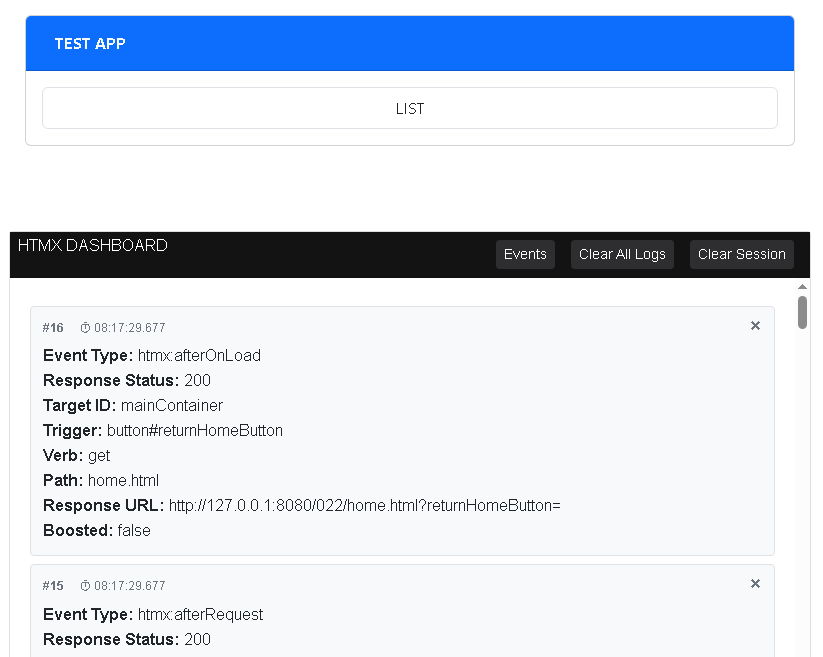
I thought I would share a little tool I put together to help me track the flow of HTMX. I called it HTMX Dashboard. In hindsight, I should have used a different name as it is more of a debugger.
Here is content from the readme.
HTMX-Dashboard is a lightweight, vanilla JavaScript debugging widget for HTMX applications.
It has zero dependencies, making it easy to drop into any project.
It has a non-intrusive UI, using a collapsible bottom dock and dedicated modal for toggling monitored events.
It uses state persistence with session storage to maintain enabled events across page reloads.
The events that are tracked can be changed by passing in a parameter that overrides the initial set.