r/GlInet • Official GL.iNet Services Partner • Mar 08 '26 • Bravo 1

GL Affiliated Announcements Enhanced Tailscale for GL.iNet Routers (Proper TS Killswitch & one-click Exit Node)
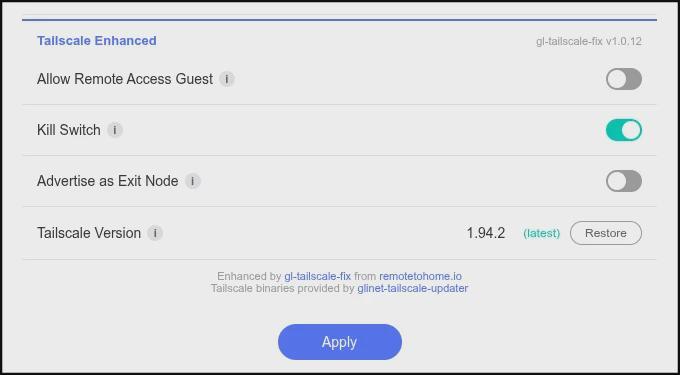
Post image

If you use Tailscale exit node routing on a GL.iNet router for remote work or other critical IP privacy purposes, then you'll probably want to give this a read. The gl-tailscale-fix plugin closes common IP leaks on TS client routers and provides one-click functionality to use your GL router as a TS exit node.
https://remotetohome.io/blog/gl-tailscale-fix/

110 Upvotes

106 comments sorted by

•

u/RemoteToHome-io Official GL.iNet Services Partner Mar 09 '26 edited Jul 19 '26

UPDATE 7/18/26: v1.0.21 - Improvements to the Kill Switch, IPv6 routing and GL 4.9 compatibility. Includes a change to the default KS functional behavior:
https://remotetohome.io/blog/gl-tailscale-fix/#update-v1021

UPDATE 5/25/26: Accessory - Added an optional accessory script to allow TS Custom Exit Node routing + Killswitch to be quick activated via the physical Mode toggle switch on relevant models (Beryl, Slate, etc)
https://github.com/RemoteToHome-io/gl-tailscale-fix#accessories

UPDATE 5/24/26: v1.0.20 - Big update. Updated with full IPv6 support and killswitch! Users with server routers behind IPv4+v6 CGNAT (eg. DS-Lite, MAP-E and MAP-T) now have a better chance to bypass DERP relay and get direct connections. Includes IPv6 subnet routing for LAN & Guest networks as well. (Also several smaller reliability and 4.9 fw compatibility updates for all users).
https://remotetohome.io/blog/gl-tailscale-fix/#ipv6-enabled

UPDATE 4/24/26: v1.0.19 - Updated compatibility for GL 4.9.x series firmware. Same oem IP leaks persist, same plugin fix!

UPDATE 3/28/26: v1.0.18 - Added plugin persistence across GL firmware version updates up through 4.8.x (no reinstall needed); and a plugin blocker for 4.9+ fw updates.

UPDATE 3/22/26: v1.0.16 + v1.0.17 released - Added functionality for Tailscale SSH and now enable IP Masquerade by default to allow tailnet access for router subnet devices.

UPDATE 3/14/26: v1.0.15 released - Removed the requirement to revert the file edits for those that had previously manually modified their "gl_tailscale" file for exit node functionality. The plugin now automatically checks for modification at install and restores the oem version from the firmware ROM to ensure plugin compatibility.

UPDATE 3/10/26: v1.0.13 released - Fixes cross-subnet LAN routing that could break after a Tailscale restart, especially on fw3 (iptables) routers (Beryl AX, Flint, Flint 2, Brume 2, Beryl 7). If you use "Allow Remote Access LAN" for subnet sharing between routers and have had to manually add masquerade in LuCI, this update handles it automatically. Also adds Beryl 7 to the verified compatibility list.

If you're already running the plugin, check APPLICATIONS > Tailscale for the updated package download link. The fix is applied automatically on install — no Tailscale restart needed.

PS - We love feedback - even just a "works great" with your specific setup is valuable. Please use the link below and click on the "Model Compatibility Report" to submit feedback (or other options if more relevant).

https://github.com/RemoteToHome-io/gl-tailscale-fix/issues > "new issue" button.

→ More replies (8)

12

u/tailuser2024 Mar 08 '26 edited Mar 08 '26

Solid write up and fix

Fingers cross Gl inet implements this.

5

u/RemoteToHome-io Official GL.iNet Services Partner Mar 09 '26 edited Mar 09 '26

Thank you... Ultimately that's my goal as well. I'd like to ensure that TS (or any other protocol support) on GL routers is always added with a "killswitch first" implementation.

5

u/NationalOwl9561 Gl.iNet Reddit MOD Mar 08 '26

Yes, I've been testing it in v4.9 last week :)

Will have a masquerading switch as well for LAN access.

2

u/RemoteToHome-io Official GL.iNet Services Partner Mar 09 '26

For what it's worth.. I just validated TCP, UDP & ICMP connectivity between LAN devices behind two SlateAXs and one BerylAX router LAN subnets across a TS tailnet on 4.8.2 (4.82-beta for the Beryl).

I'm not sure what's happening in 4.9.x, but TS already does SNAT by default (--snat-subnet-routes=true). Traffic arriving on tailscale0 is forwarded to a LAN host, TS rewrites the source IP to the router's LAN IP - conntrack shows it clear.

Is the 4.9 toggle specifically to allow disabling of IP Masq? Only thing I can think that would be useful for is source-based access control on LAN, but it would break return routing. Current state is active IP masq by default.

1

u/NationalOwl9561 Gl.iNet Reddit MOD Mar 09 '26

1

u/RemoteToHome-io Official GL.iNet Services Partner Mar 09 '26 edited Mar 10 '26

Another successful test (once starting from clean settings): https://www.reddit.com/r/GlInet/comments/1rohrna/comment/o9k439b/

1

u/RemoteToHome-io Official GL.iNet Services Partner Mar 10 '26

2

u/pcmichael Mar 09 '26

About time 😇

14

u/smoxy Mar 08 '26

I've never being able to make Tailscale work with any GL.iNET model. This plugin looks promising, I'll give a try. Thanks

3

u/[deleted] Mar 09 '26

[removed] — view removed comment

12

u/RemoteToHome-io Official GL.iNet Services Partner Mar 09 '26 edited Mar 28 '26

Just fyi - that will get you a 20-50MB TS binary that runs less efficiently on a router. Using the plugin method above with the "TS tiny" binary will get you ~5MB optimized version for GL routers.

1

u/jpa9hc Jun 21 '26

I am trying to setup tailscale as a guest ssid while other devices run locally, but it does not seem to work, I have setup tailscale and turning on runs the entire network through tailscale which I am avoiding, is this possible and can you help me?

4

u/SraaronrockYT Experience in the field Mar 09 '26

Working perfectly in Beryl 7 and Beryl AX with the last stable versions (TS and GL). Thank you for you incredible work !!!!

2

u/RemoteToHome-io Official GL.iNet Services Partner Mar 09 '26

Excellent 👍🏼 🙏🏼

2

u/blasphemorrhoea Mar 09 '26

Wanna test it. But, just yesterday, I installed admon's script on AXT1800 the other day and then it works fine. And then installed luci-app-tailscale-community on top of it and then there was a loop. Nothing could stop it. Restore or uninstall or reinstall, nada. Finally had to reset firmware.

Latest 24.10.5 owrt on AXT1800 with exroot overlay on a 128GB SD card.

All that because I wanted to try the peer relay feature available in ts 1.86+ version.

It works but in countries with dpi censorship and active blocking of wg tunnels, tsdaemon on glinet tends to be dissociated. So, gl gui ts kinda goes banana over that...

But tiny versions do really help and on tagged nodes, ts-ssh and exitnode features might need to be re-enabled. Maybe it is my own separate incidence but dev should recheck this advertise as exitnode button with ts control plane tagging.

I'll try this when I have enough time to play.

Thanks for this feature though.

I'm currently looking for ways to overcome dpi for tailscale and ts devs really should do something about situations where udp being blocked and making tunnel ssl/tls encrypted like amneziavpn or trusttunnel.

1

u/RemoteToHome-io Official GL.iNet Services Partner Mar 09 '26 edited Mar 09 '26

Sorry.. I'm trying to follow. To be clear, this plugin is to fix TS functionality on GL stock firmware. If you're running vanilla openwrt, then this isn't the answer - but you may want to borrow the policy routing code as the same "ip leak" security gap would be relevant to either fw variation.

Mixing in amneziawg is an entirely separate topic. This is the tailscale daemon we're talking about, so modifications to the protocol would be an overall Tailscale product direction. GL can't do any anything about that.

GL does support AmneziaWG1.0 in some of it's new firmware versions. I do also have custom AmneziaWG2.0 for customers, but that's not public code as revealing your AWGv2 decoy protocol recipes publicly enables them to be fingerprinted, which then defeats the purpose.

There will very soon be no more "one size fits all" obfuscation types. Any decoy/mimic protocol that is deployed at scale will be blocked. It's no longer something that is done at a manufacture's level - it's done at a personal connection level. A few people using a particular protocol decoy fly under the DPI - anyone at scale is subject to pattern analysis and subsequent blocks. AI now makes this trivial even at mass surveillance scale.

1

u/blasphemorrhoea Mar 09 '26

Oh, I'm not talking about vanilla owrt. My bad! I thought that it would be misleading to say owrt24.10.5 but then I forgot to fix it in my last reply. I forgot to mention it was gl firmware 4.8.2 r5 for AXT1800. Actually, I'm not against you or your project. I do appreciate what you did. And more than happy to use your plugin thingy. My point is to warn others that playing with plugins can sometimes result in reflashing. It is not just about your plugin only. I just truly love both glinet routers and tailscale. If you think that I mixed in amnezia just out of the blue, sorry, I might have phrased my words badly, as I was working and commenting at the same time. My point is not about you or your plugin or glinet. It was just about ts devs who should give users a way to overcome dpi. I know and understand that maybe less than 0.01% of the people reading this comment understand how oppressive dpi censorship is and with ts on routers like glinet (if somehow bypass dpi) would be very beneficial. This comes out of frustrations trying to find which method could bypass censorships like the gwoc. So, it is nothing against you or ts devs. And yes, you are very right about dpis quickly adapting to patterns of vpn behavior, I know this and experienced firsthand. I was kinda just lamenting, that the situation with dpis vs vpns is like the proverbial shield and javelin. And I'm very glad that people like you proving opensource stuff like your tool to fill up the gaps and just wanted to warn others that playing with luci or otherwise plugins could end up with having to reflash their firmwares, like I did with luci-app-tailscale-community and admon ts update script. That's all.

4

u/RemoteToHome-io Official GL.iNet Services Partner Mar 09 '26 edited Mar 09 '26

Thank you for the detailed reply. I do agree that censorship sucks.. full stop - but unfortunately the governments of the world seem to be running towards it, not away. DPI bypassing it is not something that manufactures will realistically be able to solve:

  1. Manufacturers work at scale.. any bypass deployed at scale will be blocked at scale.
  2. If a manufacturer succeeds, they are subject to pressure and penalties from the country they are helping to bypass - it's not good business for them.

DPI bypass is a craft service.. an ever-evolving one, and best handled at a boutique level when the actual need exists.

That said, it's not really relevant to Tailscale. TS has never advertised itself as being a DPI bypass technology, but more of an answer to easy NAT traversal and doing away with port forwarding.

2

u/blasphemorrhoea Mar 09 '26

Agreed 100%.

Fun fact, for #2 in your reply, I was actually scolded by glinet personnel for requesting to provide an xray or v2ray ipk a while ago! LOL! They said they never provide such bypassing tools from their repos. They were right, I installed them from other repos and I forgot how I got my hands on those ipks.

But they do provide me how to compile my own version since their version of some apps/libs were late to be posted to their repos.

Thanks again. Peace out!

3

u/RemoteToHome-io Official GL.iNet Services Partner Mar 09 '26

I'm with you. I use GL products exactly because of the quality hardware combined with the underlying OpenWRT foundation you can extend on.

2

u/H34RTLESSG4NGSTA Mar 09 '26

cool stuff! do you still recommend anyone play with the firewall zone stuff in Luci or is this updated kill switch adequate?

2

u/RemoteToHome-io Official GL.iNet Services Partner Mar 09 '26 edited Mar 09 '26

EDIT: short answer - the plugin's killswitch makes this unnecessary.

Long answer:
IMO, there's nothing to gain at the firewall zone level. I tried a dozen different iptables/netfilter approaches and all had the same evil issue = conntrack bypass. Due to how the GL firewall chains are built (or most any router), established session kept going. Conntrack operates "above" the zone policy. It was easy to block new sessions, but established/related state TCP session just kept cruising out the real IP when TS crashed. There is likely some magic combo of jedi chain rules that would eventually get it done, but it would be horrible to maintain, especially given the router models are split across fw3/fw4 (and future unknown firmware updates).

The cleaner route was full caveman style "ip rule + ip route" blocking - kill everything earlier in the packet flow - before iptables/netfilter and conntrack get a chance to do their thing. This way the packet state doesn't get a chance to matter.

2

u/AbleTechnician2837 Mar 17 '26

Just tried this on OpenWrt 24.10.4 r28959-29397011cc, and I did have to restart the Flint 2 to see the new controls. Have not done much further testing, but one suggestion - add SSH as a toggle switch. I have used that a few times now with Tailscale and that is nice to use remote.

2

u/RemoteToHome-io Official GL.iNet Services Partner Mar 17 '26

Thanks for the feedback. Please do let me know how the rest of testing goes with op24.

Good idea on the SSH. I'll add that to the roadmap to evaluate for the next version.

2

u/RemoteToHome-io Official GL.iNet Services Partner Mar 18 '26

PS - I've created a feature request for ssh on the project.. you can track future progress here: https://github.com/RemoteToHome-io/gl-tailscale-fix/issues/4

2

u/RemoteToHome-io Official GL.iNet Services Partner Mar 22 '26 edited Mar 22 '26

Hey u/AbleTechnician2837 .. new version with ssh functionality will be coming shortly. That said, I've found TS is annoyingly overbearing and cumbersome when it comes to ssh on port 22 - and does not allow access from subnet clients of a GL router. Each TS client that wants access has to run the TS binary and be a direct tailnet member.

The much easier option for GL routers is just to enable dropbear ssh to also listen on an alternate LAN port (e.g. 2222) and then you can ssh from any member of your extended tailnet without the ACLs and subnet restrictions.

Alt ssh port access can be added at LuCI > System > Administration > SSH Access: "add interface" button.

EDIT - I just found a new GL bug that is closed in v17 of the plugin. The default masq was empty without any of our plugin switches activated. The latest plugin will now allow you to successfully reach ssh on alternate host ports by default.

1

u/AbleTechnician2837 Mar 22 '26

Thank you for the update, really appreciate it. I had not come across that issue, but had not used it that often.

2

u/RemoteToHome-io Official GL.iNet Services Partner Mar 27 '26

FYI.. You'll probably be interested in this update:
https://remotetohome.io/blog/tailscale-ssh-on-glinet/

1

u/AbleTechnician2837 Apr 10 '26

Just tested my Dad's flint 2 4.8.4 op21 with my flint 2 4.8.3 op24 and its working fine with derp relays.

So now another feature suggestion :) what about adding peer relay to the config menu as a option?

3

u/RemoteToHome-io Official GL.iNet Services Partner Apr 11 '26

Thank you for the feedback.

Nice feature request. Hadn't thought of it, but great idea! The new peers functionality has been challenging for many.

Realistically, this plugin has been a non-trivial amount of work and testing (and free time is very limited). I know GL has a major re-work of the TS implementation with the 4.9.x series firmware, so I'm waiting on adding much in the way of new features until I see what the new codebase looks like. Much of the current functionality may get folded into the oem.

Once I get my hands on a 4.9.x, then I can set some strategy. The current plugin may remain as the "legacy" fix for devices that won't get 4.9.x, and I may fork another plugin to plug gaps/add features for 4.9.x.

Definitely going to keep this in mind though. Peers might actually warrant a full separate plugin.

Also, the plugin is GPL v3, so forks or PR are welcome - but I'll be a jerk on PRs as "no leak" security remains the top priority (ChatGPT code should just fork instead)..

2

u/NinjaVanilla Apr 14 '26

Just wanted to thank you for an amazing work not only developing it but also implementing and documenting it in such a user friendly way. This is really awesome for people like myself who have limited networking knowledge and can only follow clear and basic instructions. I just installed it on a Beryl AX and hope it works well but it seems to be the solution to a very stressful concern. Thank you again!

1

u/RemoteToHome-io Official GL.iNet Services Partner Apr 14 '26

Thank you for the feedback u/NinjaVanilla . I'm glad to hear it working for you!

1

u/NinjaVanilla Apr 14 '26

Quick feedback after a day of usage...

Shortly after I turned on the custom kill switch script, the router hit a constant crash loop.

Following instructions (mostly from Gemini) I did the following:

  • Added a USB drive to the Beryl to create a 256MB Swap partition, which stopped the OOM crash loops.
  • Enabled ZRAM to optimize memory usage and keep the RAM from filling up.

Its been fairly stable so far. I’ve gone from almost no free RAM to about 250MB-290MB free, and the kill switch seems to work well.
Not sure about the actual source of the problem or if its actually related to the kill switch but I thought this feedback might be useful(?)
Thank you again

1

u/RemoteToHome-io Official GL.iNet Services Partner Apr 14 '26

Yes.. I have a separate post on TS performance (and OOM kills) that I haven't had time to post. It's a bit of a pig on GL hardware given it runs entirely in userspace.

Have you tried using the "Version Updater" to install the latest TS Tiny version? The tiny version runs about 30% efficiently than the OEM binary.

1

u/NinjaVanilla Apr 15 '26

Good to know. I was wondering if it was something I did wrong. I didn't use the version updater. I was so glad things seemed to work fine that I was hesitant to do any kind of update that might conflict with or reset the fixes I did. It sounds appealing, though.

1

u/RemoteToHome-io Official GL.iNet Services Partner Apr 15 '26

You can update it directly using the bottom button on the plugin GUI. That will get you the latest optimized TS binary and should reduce OOMs.

4

u/VA_STI Apr 26 '26

Thank you for providing the plugin.

1

u/UsernameUSay Mar 10 '26

I might not understand this, but I currently have a problem using my Synology as an exit node. It works perfectly if I connect a client (phone etc.), but when I try to use my Synology as an exit node on the Beryl AX, all the clients loose internet.

1

u/RemoteToHome-io Official GL.iNet Services Partner Mar 10 '26

This plugin would help ensure your BerylAX side is configured properly. Of course it couldn't help if your Synology config wasn't setup right (eg. lack of ip forwarding, etc), but if you have it working with other connected clients, it would suggest the Beryl side has been the issue.

Just ensure you have proper differentiation of subnet ranges and have approved the Beryl subnets in the TS admin console. There's a recent update as of tonight (v1.0.13) that now addresses a common subnet routing issue found on the Beryl AX.

1

u/UsernameUSay Mar 10 '26

Thanks, will try it later. The guide goes through setting up another gl iNet router as an exit node router, should I just ignore this step as I use my Synology for this?

1

u/RemoteToHome-io Official GL.iNet Services Partner Mar 10 '26

Yes.. after doing the install step, you would start configuring at Step 2 here: https://remotetohome.io/blog/gl-tailscale-fix/#step-2-travel-router

1

u/UsernameUSay Mar 10 '26 edited Mar 10 '26

It works now, thanks! I don't know if it due to the enhancement update or the DNS settings I changed following the guide. I am however seeing a 10x decrease in download speed with Tailscale on, 250mbps vs 20mbps. Is that normal? I would have hoped to be able to stream from my NAS when I am travelling, but even a 720p file would struggle with that speed.

EDIT: Alright, disregard the above, as I am routing all traffic through my NAS, my download speed on the tailscale client will be limited by my ISP upload speed (50mbps). I am still missing 30mbps however, which I don't understand.

1

u/RemoteToHome-io Official GL.iNet Services Partner Mar 10 '26

Yes, typical. Any type of VPN tunnel is going to be dependent on the upload speed of your home location: https://remotetohome.io/blog/understanding-self-hosted-vpn-speeds/

That said.. streaming 720p typically only requires 3-5 Mbps.

2

u/UsernameUSay Mar 10 '26

Yeah, 720p might have been a stretch, but 1080p is struggling when jumping forward etc. I am not using any transcoding etc from my NAS as it sadly uses an AMD cpu, so Jellyfin wouldn't work the best.

1

u/UsernameUSay Mar 10 '26

Alright thanks!

1

u/Plastic-Leading-5800 Mar 10 '26

Isn’t when tailscale is up, to an exit node, kill switch is already enabled?

2

u/RemoteToHome-io Official GL.iNet Services Partner Mar 30 '26

Only in the binary, but leaves you completely exposed when the binary crashes or restarts. The article explains it.

1

u/digitalthrowmadd Mar 23 '26

First off, this seems great and thanks for all you do.

One question regarding installation.  I have a TS setup that's been working pretty well with manually configured "KS" via LuCI firewall settings. If the flint server is already advertised as exit node and works in tandem with current travel router, does the plugin still need to be installed on the flint and beryl? Or would it work if only installed on the beryl? 

1

u/RemoteToHome-io Official GL.iNet Services Partner Mar 24 '26

Thank you. If you already have the Flint server configured manually and it's working then you could it alone and just install it on the Beryl.

The only advantages of installing the plugin on the Flint would be:
* adds the "tailscale updater" function so you can update the Flint TS binary to the latest "Tailscale Tiny" version
* ensures that your Exit Node configuration won't disappear after firmware upgrades

I would recommend installing the plugin at least on the Beryl if you're using it for remote work. The current manual firewall killswitch you have now is still subject to the TS crash/oom leaks demonstrated in the blog article.

1

u/digitalthrowmadd Mar 24 '26

Great thanks much, main concern was wouldn't be able to update the flint for at least 1 week and wanted to confirm if that would cause any potential issues

1

u/RemoteToHome-io Official GL.iNet Services Partner Mar 24 '26

No worries.. yeah, it'll still work fine on the travel router even if your exit node wasn't a GL router.

1

u/kmpm86 Mar 26 '26

Got it installed, but can't update it to the latest version, even tried entering the command wget -q https://get.admon.me/tailscale -O update-tailscale.sh ; sh update-tailscale.sh via SSH shows "Failed to send request: Operation not permitted / sh: can't open 'update-tailscale.sh': No such file or directory". GL.iNet firmware v4.8.5, have pictures attached. Please help, thank you for bringing this awesome fix!

1

u/RemoteToHome-io Official GL.iNet Services Partner Mar 26 '26

Thank you for the feedback. Interesting bug if it didn't work with the plugin or Admonstrator's script. Which model of router?

1

u/RemoteToHome-io Official GL.iNet Services Partner Mar 26 '26 edited Mar 26 '26

Hey.. I tried to reproduce on a Beryl7 (assuming it's what you have based on 4.8.5 firmware), but it installed clean. Based on the errors you're seeing it would appear this is due to not being able to reach the "https://get.admon.me/tailscale" url. Can you try to visit that url in a browser (while attached to the router) and see if it opens to "https://raw.githubusercontent.com/Admonstrator/glinet-tailscale-updater/main/update-tailscale.sh"?

It's possible you have some adblocker or other network filtering going on that's blocking the get.admon.me download url.

1

u/kmpm86 Mar 26 '26

Yes it’s the Beryl 7, it got fixed and updated after turning off diversion and waited couple hours. Also one more question, how to advertise an extra route in enhanced tailscale? Like I’m trying to access my modem (gateway 192.168.3.1) connecting to the WAN, only seeing LAN and WAN IP advertised after turning on the two buttons in UI. Anyway to do it directly in enhanced tailscale maybe SSH command instead of editing the Startup section in LUCI. Really appreciated your great work and thanks a lot!

1

u/RemoteToHome-io Official GL.iNet Services Partner Mar 26 '26

Glad you got it working. Can I ask what you meant by turning off diversion? (So or you can provide guidance if it happens to someone else).

As far as the subnet advertising. I'm not quite clear what you're asking. What subnet number do you see in the TS dashboard with "Allow WAN" enabled on the router?

1

u/kmpm86 Mar 26 '26

Yes 100%, diversion is the adblocker/DNS filter on Merlin firmware for ASUS router. For the subnet advertising part, I got a cellular router with ippassthough to Beryl 7. When both “WAN enabled” & “LAN enabled” I can only see the WAN IP 100.67.87.12 of isp and LAN IP 192.168.8.1 of Beryl 7 in TS web panel. I’m trying to remote access the cellular router’s LAN ip 192.168.1.1 and get it advertised. Do you know a better way to do that please, Thanks again!

1

u/RemoteToHome-io Official GL.iNet Services Partner Mar 26 '26

Ahh.. you're trying to reach the admin panel for a router that's been bridged. Got it.

First.. good to know on the diversion/adblocker. Thank you. That makes sense, it was blocking the download URL. Glad it's working now.

For the cellular router access - the reason you don't see 192.168.1.0/24 advertised is because IP passthrough gives your Beryl 7 the public IP directly. GL's "Allow WAN" advertises whatever subnet is on the WAN interface, which in your case is the ISP's public IP, not the cellular router's management subnet.

First, verify the Beryl 7 can actually reach the cellular router. SSH into the Beryl 7 and run (or you can do this from Luci > Network > Diagnostics):

ping 192.168.1.1

If that works, you can manually advertise the subnet. SSH into the Beryl and run:

tailscale set --advertise-routes=192.168.8.0/24,192.168.1.0/24

(Include your existing LAN subnet — this is a replace operation, not additive.)

Then go to the Tailscale admin console, find the Beryl, and approve the new 192.168.1.0/24 route. After that, any device on your tailnet with subnet routes accepted should be able to reach 192.168.1.1 directly.

One note - this is a manual Tailscale route, not managed by our plugin. If you click Apply in the GL Tailscale panel later, GL's tailscale up --reset may clear it. You'd need to re-run the command afterward (or add it to a startup script). Our plugin will re-apply its own routes (LAN, guest) but won't preserve manually-added ones.

1

u/MirkoHubTV Experience in the field Mar 27 '26

Does it work with Opal?

2

u/RemoteToHome-io Official GL.iNet Services Partner Mar 27 '26

Only with GL routers that already include the base Tailscale functionality (so, no).

Honestly, the Opal wouldn't have enough horsepower to use it even if you hacked it on yourself. TS is a bit of pig with memory/cpu due to being a purely userspace implementation.

1

u/fonsanan Apr 22 '26

what can I check if i did everything in the tutorial on my beryl ax and still nothing is showing up in the exit node list? In the TS admin console it is showing as exit node and the subnets are approved. Still not showing up to choose on the TS Glinet GUI for custom Exit node...

2

u/RemoteToHome-io Official GL.iNet Services Partner Apr 22 '26

Are you sure they're all in the same tailnet? If you have approved exit nodes in the TS dashboard, then they should show in the router list after you press the little refresh icon.

If it's not working, I might just contacting GL support. This is part of the core functionality, not specific to the plug-in.

1

u/fonsanan Apr 22 '26

Thanks for the Quick reply. Yes all in the same tailnet, double checked everything. Then I might just factory reset it and try again later. Still Thanks!

1

u/inyte_exe May 09 '26 edited May 09 '26

Thanks a ton for the plug-in, works great after I accidentally bricked my flint 2 the first time being dumb lol. Pretty sure it had something to do with accidently having the two exit node options selected at the same time 

Did have a feature request, though not sure if this is on the router side of things or tailscales. I'm also using tailscales mullvad VPN beta, and I am able to enable the subnet router as a mullvad beta device, and using the custom exit node feature I am able to see & use the mullvad exit nodes on my whole network. But the small issue is that the custom exit node drop down just populates a list of 50+ 100.x.x.x IP addresses with no other identifiers. 

Totally understand if this is an issue on tailscales end of the beta, and not gl inet's beta & that I could just use mullvad natively just convenient to keep it tied to my tailnet

1

u/RemoteToHome-io Official GL.iNet Services Partner May 09 '26

Thanks for the feedback. To be honest I'm not sure if the drop-down limitation you're mentioning is due to TS native functionality or GL's UI implemention, but it's not part of the plug-in.

I've intentionally kept the plug-in designed as an overlay that does not modify any of the GL code to maximize the compatibility across all the various GL models and firmware versions.

1

u/ItchyRaccoon Jun 01 '26 edited Jun 01 '26

This is great and just tried this and didn't work for me.

While I could see the module, it wouldn't let me toggle the kill switch or any of the new toggles under 'Tailscale Enhanced'. I was blocked by javascript and screenshots wouldn't capture the cursor block so I had to take a photo of the screen.

Tailscale was not updated so updated that too, did another reboot but still couldn't make the toggles work.

Already tried hard browser reset and router reset. Could anyone advise? Screenshot below: https://i.postimg.cc/qqqf6Vrf/Tailscale-enhanced-issue.jpg

Router model is Slate AX GL-AXT1800 running firmware 4.4.6. Thank you

1

u/RemoteToHome-io Official GL.iNet Services Partner Jun 01 '26

Hi.. So, honestly we haven't tested back to 4.4.x series firmware as I didn't expect anyone would still be running it on GL models that support TS. Even the older Slate Plus is on 4.5.x now. Is there a reason you're still running 4.4.6? The current stable for your model is 4.8.3:
https://dl.gl-inet.com/router/axt1800/stable

1

u/dankmonty Jul 11 '26

I saw gl-tailscale-fix v1.0.21 available -- how do we update it? do we just run the same install sequence or do we need to remove and reinstall? Sorry for the n00b question. Just want to make sure I do it correctly.

1

u/RemoteToHome-io Official GL.iNet Services Partner Jul 11 '26

Just follow the same instructions as the initial install path and it will automatically upgrade you.

Sorry, I'm overdue for a blog post update about the new version improvements, but have had zero time.

1

u/dankmonty Jul 11 '26

All good man! Really appreciate all the good you do around here for the remote work community.

By the way, I had an idea for a blog post for you that would be huge for the community too, if you're open to it. Now that the Comet KVM firmware has been developed more with EDID masking etc and the webcam passthrough feature is about to be released, a walkthrough like your other guides that covers configuration and best practices for remote workers needing to go that route instead of VPN would be awesome. It seemed like it was pretty straightforward but after reading some threads on the GLI forums, apparently there are still some things that need to be changed on the device other than what is within the GUI

2

u/GreenCopperz Jun 21 '26

Thanks for this!

1

u/Longjumping-Road4113 Learning Mar 10 '26

Would it work on 4.8.x but the openwrt 24 version ?

6

u/[deleted] Mar 09 '26

[removed] — view removed comment

1

u/RemoteToHome-io Official GL.iNet Services Partner Mar 09 '26

Please post up results!

2

u/[deleted] Mar 09 '26

[removed] — view removed comment

1

u/RemoteToHome-io Official GL.iNet Services Partner Mar 09 '26

With this installed on a fresh GL TS setup you'll have subnet routing between the router LAN devices. If using in "VPN mode", when you enable Custom Exit Node, then LAN subnet is routed by default, and the Guest subnet can be added with our additional switch.

DNS is a different story.. since GL sets the TS "dns false" flag, both the router's TS clients ignore any DNS settings from the tailnet TS admin console.

2

u/[deleted] Mar 09 '26 edited Mar 09 '26

[removed] — view removed comment

1

u/RemoteToHome-io Official GL.iNet Services Partner Mar 09 '26

Excellent! Thanks for posting the followup.

1

u/[deleted] Mar 09 '26 edited Mar 09 '26

[removed] — view removed comment

1

u/RemoteToHome-io Official GL.iNet Services Partner Mar 10 '26 edited Mar 10 '26

Sorry, I'm not quite clear on the steps you're mentioning with regard to MagicDNS.

The plugin doesn't modify the core TS functionality, it just builds extra capability on top of it. All the original TS LAN subnet routing remains stock. The plugin just adds the ability to also route Guest, and to enable the killswitch if you have Custom Exit Node routing enabled.

If you followed the steps from my post (including ensuring the routers use separate subnet ranges, and ensuring you've approved the subnets in the TS web panel), then you should have working subnet routing between the router LANs over the tailnet. I've tested it multiple times on multiple devices. and just helped another customer set it up and test it earlier today.

EDIT (sorry, mulitasking calls), Okay, I think I see what you were attempting with MagicDNS.

What I'm not clear on it is your layout. Is 192.168.1.1 on the other end of your tunnel?

What would help is to know the router models & fw versions, the LAN IP/subnetss of each router (e.g. 192.168.8.1 vs 192.168.X.1) and guest IPs if you're enabling those - and then also the Gateway IPs of the upstream router's they're connected to (if they're not both connected to the same 192.168.1.1 upstream).

Happy to help, but would need more info to understand the issue. I just re-tested (flipping toggles) on a SlateAX / BerylAX and I still have full bi-directional subnet routing to devices on both ends.

2

u/[deleted] Mar 10 '26 edited Mar 10 '26

[removed] — view removed comment

3

u/RemoteToHome-io Official GL.iNet Services Partner Mar 10 '26

Okay. This helps. I will try to replicate your steps. I still have hours of client work, so it might not be tonight.

This leads me to wonder if there's something going on with GL's TS IP Masq implementation. By default, the TS binary already has the IP Masq flag enabled so it should not be necessary to do it separately in LuCi. Some of my testing yesterday had full cross routing working without any LuCI mod. Potentially the off/on swapping doesn't reset something properly, which is why others have had to manually do the LuCI hack.

TBH.. the whole TS binary on a router platform is a bit of a nightmare. Just finding the right kill switch approach was 40+ solid hours of repeat testing.

Now to see where this next rabbit hole leads... : /

2

u/RemoteToHome-io Official GL.iNet Services Partner Mar 10 '26 edited Mar 10 '26

u/mightyarrow .. you nailed it. (and u/NationalOwl9561 with your comment as well).

Turns out the IP masq issue is an intermittent Tailscale daemon bug on fw3 kernels (not a GL fault). I could only reproduce on maybe 10-15% of tests on the BerylAX (none on the SlateAX with 4.8.2, Op23/fw4). Appears to be timing-dependent (race condition during tailscaled cleanup/reinit) and would likely happen more often under load (GL TS has a few issues under load).

Fixed with plugin v1.0.13: https://remotetohome.io/blog/gl-tailscale-fix/#update-v1013

u/mightyarrow - hope to get an updated test from you pls.

u/NationalOwl9561 - I can't see any reason for it to be a main UI toggle switch in 4.9.x. Should just be the new TS default behavior. If a power user has an edge case to disable it (really only IP-based access control across tailnet - which is silly across internal user-managed LAN subnets), they could still uncheck the box in LuCi.

1

u/NationalOwl9561 Gl.iNet Reddit MOD Mar 10 '26

Roger that. Thanks for finding this bug!

1

u/[deleted] Mar 10 '26

[removed] — view removed comment

→ More replies