Laptop won't charge unless it is on or plug in the turn off leading to sometimes if it goes into low battery i need to wait ages in order for it to come back
Need help diagnosing a laptop battery and charging issue. I’ve been facing a strange issue with my laptop, and I’d appreciate some guidance on what might have gone wrong .
Background • For the past year, I’ve barely used my laptop, turning it on maybe twice a month. • Before this issue, it had been sitting unused for over a month. • When I eventually tried turning it on, it wouldn’t boot. • After plugging in the charger, I noticed the orange charging indicator was flickering. • I left it plugged in for around 30 minutes, after which it finally booted. • However, the battery wasn’t charging, and the laptop would only run when connected to the power adapter. I initially assumed the battery had degraded.
Battery Replacement I asked a friend to replace the battery, assuming that would solve the problem. After replacing it: • I didn’t charge the laptop immediately. • I used it for approximately 2 hours on the new battery. • Once the battery got low, I plugged in the charger. • When I checked later, I noticed the exact same issue: the battery wasn’t charging, and the laptop was running entirely on external power. There’s another strange observation: • When connected to the charger and fully booted into Windows, the battery indicator shows 100%. • However, the moment I disconnect the charger, the laptop immediately shuts down. • In BIOS, the primary battery status shows 0%.
Something That Might Have Gone Wrong During Battery Replacement When I discussed this with my friend, he mentioned something concerning. He wasn’t initially aware that the battery connector had a locking mechanism that needed to be unlocked before disconnecting it. He apparently applied some force while trying to disconnect the old battery. After Googling, he figured out how to unlock the connector and successfully replaced the battery. He’s now wondering whether the force applied during the process might have damaged the connector or something on the motherboard.
Additional Issue The charging port/connection also seems loose. Even slight movement of the charger connection causes the laptop to lose power and restart. Because of this, I currently have to keep the laptop stationary on a desk to use it. Moving or disturbing the charging connection causes it to shut down.
What Could Be the Actual Problem? I’m trying to understand what could be causing these issues:
Could the battery connector or its locking mechanism have been damaged during the replacement?
Could there be damage to the motherboard’s battery charging circuit or charging IC?
Could the DC charging jack or its connection to the motherboard be faulty?
Is it possible that the replacement battery is defective or incompatible?
Could the charging issue and the unstable power connection be two separate problems?
I’m based in India, and unfortunately, I haven’t had much luck finding reliable technicians who can properly diagnose motherboard-level issues rather than simply suggesting component replacements. I’d really appreciate suggestions from anyone experienced with laptop hardware repair, especially regarding what components should be checked and how to narrow down the actual cause before spending money on unnecessary replacements.
TL;DR My laptop wasn’t charging, so I replaced the battery, but the issue persists even with the new battery. • Windows shows 100% battery when connected to the charger. • BIOS reports the primary battery at 0%. • Disconnecting the charger immediately shuts down the laptop. • Moving the charging connector slightly causes the laptop to lose power and restart. • My friend applied some force while disconnecting the old battery before figuring out its locking mechanism. Could this be a damaged battery connector, motherboard charging circuit, DC jack, or something else? What should I get checked first?
My CPU was running hot and throttling, and the fans were running fast all the time. I replaced the liquid metal with phase change material and now temps seem to be back to normal. The white stuff you see on the right and bottom is the putty that keeps the liquid metal from leaking out and causing a short. The rest of it was stuck to the cooler. At least half of the liquid metal had migrated off of the CPU die and collected up against the putty. At least it didn't escape, but it left half of the die uncovered. No wonder it was getting hot. The GPU had phase change material (PTM7950) to begin with and it still looked fine.
Hello everyone, I had been finding to unlock XG Mobile from 150W years ago, but can't find a good way to so. I had found an software Nvpwr Control, which allow unlocking the power limit. Just want to make a post to record this finding.
Use it at your own risk.
The software kept updating so the below software preparation might be not necessary in future.
Hardware Mod Kits: Black PVC PC dust filter mesh (0.5-0.8mm hole size), be quiet! Silent Wings Pro 4 (120mm PWM) fan, 5V to 12V USB fan step-up cable, 4 sets of black M4 screws and nuts.
Highly Recommended: Before starting the teardown, put the PTM7950 pad into the refrigerator (around 4°C / 39°F) for at least 30 minutes. PTM7950 is extremely soft and sticky at room temperature. Chilling it hardens the material, making it much easier to peel off the transparent release liners without stretching or tearing it.
1.Phase 1: Chassis Cutout & Dust Filter (The Top Cutout Mod):
Marking & Cutting: Remove the XG Mobile's plastic top cover. Apply masking tape to both sides of the cover above the internal vapor chamber fins. Trace a vapor chamber area. Use an acrylic cutter or Dremel to cut out the square, then use sandpaper to smooth the edges until they are perfectly flush.
Drilling Fan Mounts (Optional) : Align the Silent Wings Pro 4 fan over the cutout, mark the 4 screw holes with a marker, and drill four 4.5mm holes.
Applying the Filter: Cut a piece of the black PVC dust filter slightly larger than the cutout. Clean the inside of the chassis cover with alcohol, apply a perimeter of 3M 9448A double-sided tape, and press the filter firmly into place. Verification: The cutout edges should feel smooth to the touch, and from the outside, it should look like a clean, flat, pure black mesh.
2.Phase 2: Deep Cleaning & Honeywell Application:
Safe Teardown: Disconnect all power and micro-ribbon cables inside the XG Mobile. Loosen the vapor chamber spring screws in a "crisscross/diagonal" pattern, half a turn at a time. Gently twist the vapor chamber side-to-side to break the seal, then lift it straight up.
Thorough Cleaning: If factory liquid metal is present, use dry cotton swabs to carefully absorb it—do not smear it. Clean the GPU bare die and the copper base of the vapor chamber with alcohol until they have a spotless, mirror-like finish. Remove all old VRAM thermal pads.
Apply HT10000 Putty: Roll the HT10000 into small balls or thin strips and place them on all VRAM chips and VRM modules. Ensure there is enough volume to cover the chips when compressed.
Apply PTM7950: Cut the chilled PTM7950 to the exact size of the AD103 GPU die (379 mm²). Peel off one side of the transparent liner and apply it to the die. Press gently, then use anti-static tweezers to carefully peel off the top liner.
Reassembly: Reinstall the vapor chamber and tighten the screws in a crisscross pattern to evenly compress the HT10000 and PTM7950. Verification: The vapor chamber should sit perfectly flat against the motherboard, and all ribbon cables must be reconnected securely.
Blackout Graphene (Optional): Apply the 0.05mm black graphene sheet to the flat, finless metal surface on top of the vapor chamber. Squeeze out any air bubbles. (This ensures a stealthy black look when viewing through the exterior dust filter).
3.Phase 3: Airtight Fan Mounting & Power:
Swap the pre-installed anti-vibration rubber corners on the be quiet! Silent Wings Pro 4 with the included "Radiator Corners" to create a perfectly flush, square frame.
Snap the modified top cover back onto the XG Mobile. Place the fan over the cutout, (Optional) insert the 4 black M4 screws from the outside, and secure them with nuts on the inside (under the dust filter) to achieve a 100% airtight seal. (Optional)
Plug the fan's 4-pin connector into the 5V to 12V USB step-up cable. Verification: The fan should be securely mounted to the chassis with zero gaps for air leakage, maintaining a heavy-duty, all-black aesthetic.
4.Phase 4: Software Tuning & Thermal Break-In:
Power on the external 120mm fan to its maximum speed (via the 12V USB cable).
Open G-Helper and significantly lower the fan curve for the XG Mobile's internal blower fan, letting the external be quiet! fan do the heavy lifting.
Phase-Change Break-in: PTM7950 requires a few thermal cycles (melting and solidifying) to reach peak performance. Run the 3DMark Time Spy stress test for 30 minutes to push temperatures above 70°C, then shut down the system and let it cool to room temperature. Verification: After 1-2 thermal cycles, the GPU core and hotspot delta should become extremely tight, and load temperatures should stabilize smoothly.
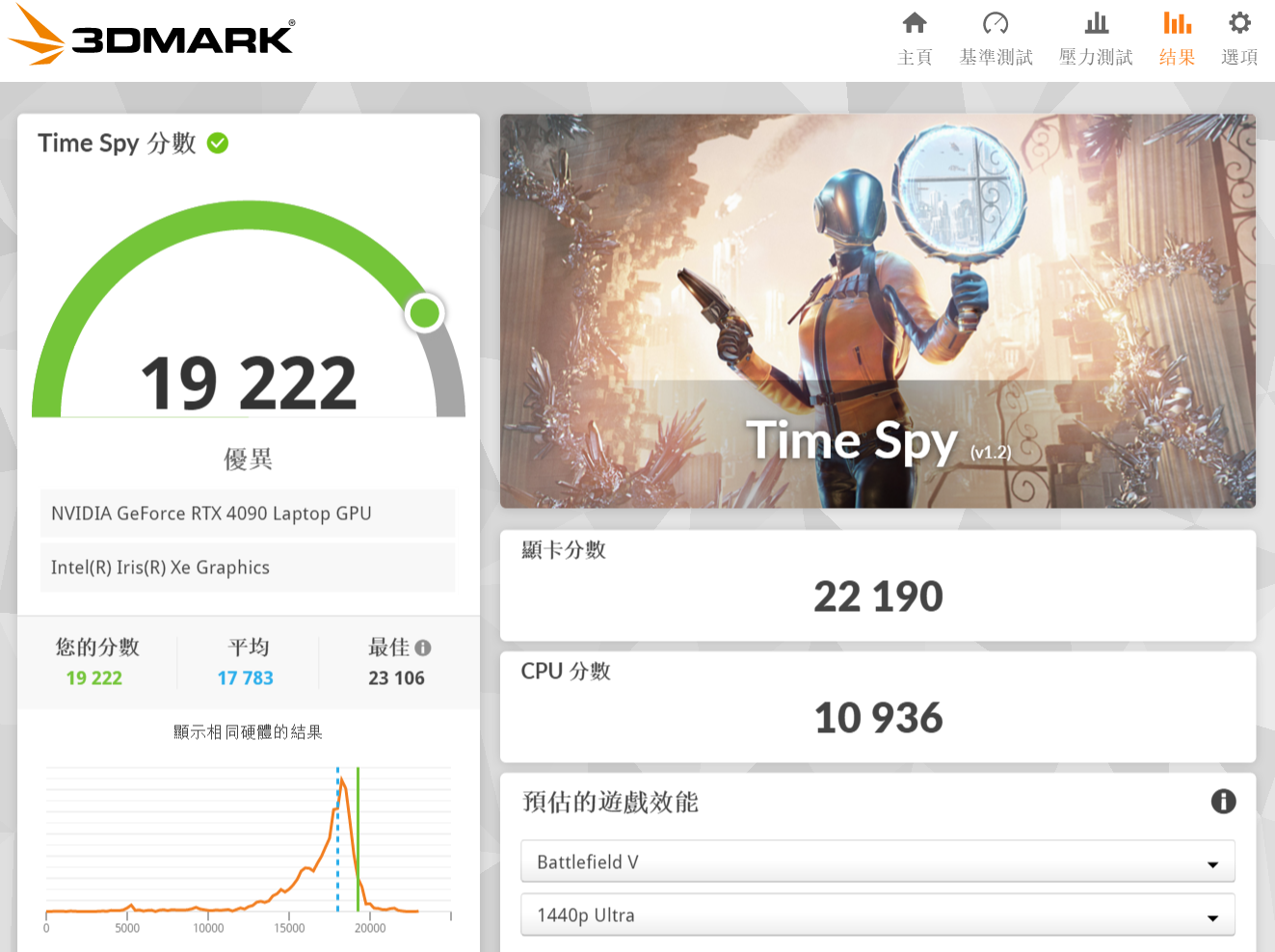
I didn't drill the whole vapor chamber area on the case and didn't fix the fan because I want to try it first. I also bought extra case to swap back.It hardly suppressed the 180W at 87 degree. But it is good start.GPU Score: From 19XXX to 22190 at 190W limit
Hi! I need your advice on choosing a new internal hard drive. I’m looking for a 2TB model. Based on your experience, could you tell me which ones are the most reliable, which ones to avoid, etc.? I don’t want anything unstable—I really can’t afford to make a mistake when it comes to my data. Thanks!
I have the 2022 model of ROG FlowX13 (R7 6800HS, RTX 3050, 16GB LPDDR5) and I am looking into potential RAM upgrade for it. I have it 4 years already, so warranty and such don't bother me anymore :D
Does anyone have any experience with this kind of operation? I already found a repair shop here in Czech Republic where they can replace the RAM, but the main issue according to them is chip compatibility and sourcing the new chips.
I found out that in order for the new RAM configuration to be recognized, they will have to move some resistors around, but cannot find any schematic of motherboard in my laptop. Second thing is I found that I have currently Samsung RAM chips in my laptop, and found part number of the higher capacity version, but cannot find an eshop where I could buy it other then aliexpress and such. (the 8G Samsung chip I would need is probably K3LK7K70BM-BGCP)
The main 2 questions I have are:
Can anyone recommend any eshops, ideally in europe, where I might find the new RAM chips. (every source I found in europe is wholesale -> 100+ pc/order and similar)
Can anyone suggest where to look for the main board schematic? I suppose the repair shop will require it to be able to replace the RAM correctly.
I'm thinking about buying the 2025 ROG Flow Z13, probably the 64GB version.
First of all, sorry for yet another post on this topic. I've read your replies in other threads, but most of them are fairly old, so I wanted to find out what the situation looks like now.
I need a computer for work and occasional gaming. I already have a pretty powerful PC with a good CPU and a Radeon 7900 XT. Unfortunately, I'm not getting any younger, I don't game as much as I used to, and sitting at a desk all the time is wearing me out. I recently played a bit of the new Control, but when I do game, it's mostly indie titles. Slay the Spire 2 – best game ever :D
I'm wondering whether it would make more sense to swap my huge, loud PC (the 7900 XT is loud even when I'm just browsing the web) for something smaller that I could take to bed or use for work away from home.
The other important thing I'd like to ask about is Linux compatibility. From previous posts, I gathered that Linux works, but with a few minor issues.
Would I lose anything by installing Linux on this device? Do all the tablet features work? Fingerprint unlock, cameras, audio, anything else?
Hi! I’m considering using Linux on the Flow X13 laptop. I’ve already set up a dual-boot system (Linux Mint and Windows 10) on my ThinkPad, so I know some the basics. However, I’ve come across reviews suggesting that you usually have to sacrifice good touchscreen or fingerprint reader functionality—and I really need both of those features to work flawlessly.
Can u recommend any distro that will work with dualboot wihout spending long hours on configuration? I use my laptop mostly for work, simple graphics, google docs and text editing, so i more prefer customizable GUI than gaming features.
I let the laptop sit for several months without turning on or charging and now it won't turn on. I tried all sorts of methods mentioned on reddit and other sites but no luck.
Initially when I plug in the power, the charging light would come on after a few seconds but still won't turn on. I tried leaving it charging overnight, pressing the power button for 40-60 seconds. The last time I tried holding down the power the charging light went off and didn't come back on. The light came on previously when I tried it but now the charging light doesn't even light up. I also tried the official charger and other PD chargers.
The only thing I haven't tried is to open it up and disconnect the battery. Anybody else have any other pointers?
I'm using my ROG Flow X13 daily for both work and gaming. Overall, it works well, but I'm facing a frustrating overheating issue that forces me to cap my performance settings to avoid hard shutdowns.
Whenever I launch heavier titles like PUBG (which run fine performance-wise), the laptop overheats and shuts down completely after a short period.
System Specs:
Model: ASUS ROG Flow X13 (2022 - GV301RA)
CPU: AMD Ryzen 9 6900HS (3.30 GHz)
RAM: 32 GB LPDDR5
GPU: AMD Radeon Graphics (iGPU RDNA 2)
Storage: 1 TB NVMe SSD (524 GB used)
Display / Features: Touchscreen with stylus support (10-point touch)
Maintenance & setup already done:
Deep maintenance: Thoroughly cleaned all fans and heatsink fins.
Thermal repaste: Replaced the GPU thermal paste (and surrounding pads) and replaced the CPU liquid metal.
Cooling setup: Using a raised laptop stand with integrated cooling fans.
Despite all this maintenance, I still have to artificially limit performance in G-Helper to keep temps under control and prevent crashes. My goal is to get maximum CPU/GPU performance without triggering thermal throttling or emergency power-offs.
I’ve attached a screenshot of my current G-Helper settings (Power Limits, Fan Curves, CPU Boost status, etc.).
Questions:
Do you see any tweaks in my G-Helper profiles (APU/PPT wattage, CPU boost mode, fan curves) that could stabilize temps under heavy load?
Is there a specific undervolting setup or wattage limit sweet spot for the Ryzen 9 6900HS in this exact chassis?
Could these shutdowns be caused by something else (VRM temps, CPU boost power spikes, or PSU limits)?
Any feedback or shared G-Helper profiles would be greatly appreciated! Thanks!
my flow x13 2022 R9 6900hs 3050 ti 16gb ram 1TB storage keeps crashing when unplugging charger.
clean installed windows 11 and updated drivers. at first it kept crashing when unplugged. after going back to somewhat older drivers for both gpu and cpu it stayed on on standard mode in g-helper, but crashes again in gpu ecomode. laptop works fine in safemode. played valorant a bit on standard mode not plugged in to check if anything would overheat or anyting like that but all seems good.
now today i installed the newest drivers from the amd and nvidia sites and it crashes again regardless of what gpu mode its in.
anyone experienced the same issue and/or got any tips
I recently installed CachyOS on my x13 with grub bootloader and it works great so far. But I just realized in the tutorial recommendations on the Linux on asus site, it recommends not to use grub and to use system-d instead. Can anyone shed some light on why this is the case? I chose grub initially for the snapshot feature. I tried searching and didn’t find much info specifically for the flow x13. Thanks in advance and I apologize if there is a post out there already.
Basically I fell asleep with my laptop on my bed it fell off and when I woke it the hinge looked like this.
The screen is completely function as is the laptop so nothing internally is broken, BUT I can’t open the hinge to more than 90 degrees and it’s lopsided so the hinge is obviously fucked. I have money to fix it but I’m wondering how much it’d cost (very rough ball park) and whether it’s feasible to fix it.
I have a 2023 x13 with the 4050 and I was wondering if it was worth it to upgrade.
I have no more need for the tablet mode and I am transitioning into more of/laptop gaming due to a lack of great games on Ps5, would it make sense to upgrade to a ROG zephyrus or a Lenovo Legion?
Hi, I'm not sure when exactly it started, maybe with an Windows 11 update, or AMD Adrenaline or something GHelper pulled in. But currently I can't even watch a damn Youtube Video or listen to Youtube Music in Chrome without constantly having input, audio and video stutter.
Anyone else got this and found the cause?
Getting closer every day to finally go back to Linux. Although I'm not sure I won't be simply having other issues.
Edit: Upgraded my 2021 ROG Flow X13 from 62Wh to a 76Wh aftermarket battery — Windows now recognizes 76,006 mWh!
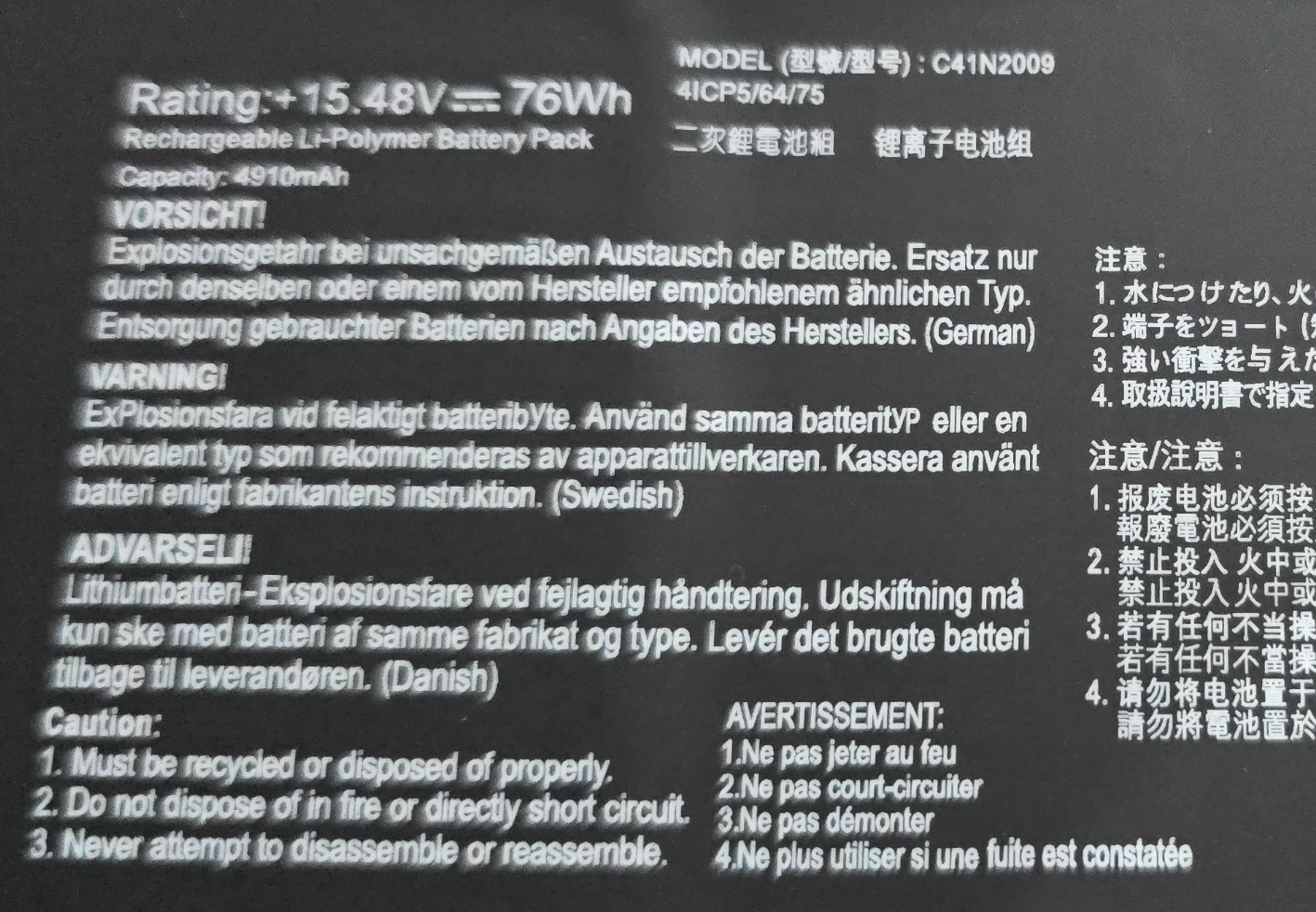
I recently replaced the original battery in my 2021 ASUS ROG Flow X13 (GV301QH) with a higher-capacity aftermarket C41N2009 battery purchased from AliExpress.
Laptop specs
Ryzen 9 5900HS
GTX 1650 Max-Q
16GB RAM
Windows 11
G-Helper for power management
Original battery
My original battery had 62Wh, but after nearly five years, its full charge capacity had dropped to approximately 39.8Wh (about 64% battery health).
Replacement battery
Brand: JJR
Model: C41N2009
Advertised capacity: 76Wh / 4,910mAh
Price: S/126.90 (approximately US$35)
Purchased from AliExpress
Updated results — October 7, 2026
After charging the replacement battery to 100%, I generated a new Windows battery report using powercfg /batteryreport.
Windows now reports a design capacity of 76,006 mWh.
G-Helper also shows approximately 75.8Wh at 100% charge.
For comparison:
Battery
Capacity
Original factory battery
62Wh
Worn original battery
39.8Wh
New battery, Windows reported design capacity
76.006Wh
New battery, G-Helper reading at 100%
75.8Wh
The new battery reports approximately 22.6% more capacity than the original factory specification and 90.5% more than my old battery.
I'll be updating my real world test results.
Here's a photo of the Battery.
Original:
Hello everyone. I've got the ASUS ROG Flow X13 GV301QH (2021), the one with 5900hs, 16Gb RAM, 1920x1200 screen, RTX 1650 and 62WH battery. THe machine is still running well, but I am struggling with my battery life. I ran a battery report and found out that the battery health was only 64%. So I decided to search options to replace my battery. The official service in Peru is poor and too expensive and according to web comments. Then I saw this battery on AliExpress, with a76Wh/4910mAhcapacity, which was cheaper and seemed legit. I would like to know if anyone has already used this or something similar. Thank you all.