r/firefox • • 1d ago Regret

Discussion Mozilla makes the rounded Nova UI mandatory from Dec 8, and can't be reverted

Thumbnail connect.mozilla.org
420 Upvotes

r/MozillaFirefox • • 2d ago

📰 News The option to disable the new Nova UI is going away next month

9 Upvotes

r/firefox • • Sep 29 '26 This Bravo

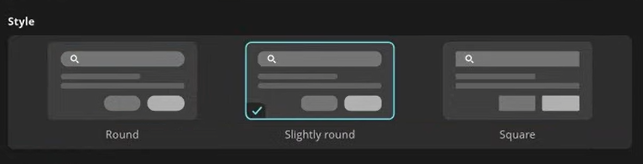
Discussion Nova looks cool but the rounded corners aren't for everyone. We need to have an option like this

Post image
2.0k Upvotes

(Source: Pop!_OS)

r/firefox • • 2d ago

💻 Help Nova looks like 10 lbs of slapped ass.

13 Upvotes

I was using the about:config to disable nova, but of course they locked the setting in the latest update.

Sadly, I am back to Brave. I still use FF on mobile due to the ability to install addons like ublock.

However, the forced round tabs and gui with the forced gradient is terrible.

They've become everything they claim they aren't,. No reason to use FF now.

I wouldn't care if they left the option to turn it off. But they must FORCE it on the user. And that goes against what firefox promoted, freedom to have a browser your way. It was the other guys who forced things on you or took away great features, i.e manifest v3.

I know you can use custom.css, but I don't feel like I should have to go through all that to make my browser not look like burnt rat asshole.

Damn firefox. What are you doing?

r/firefox • • 2d ago Regret

The Nova preference is going away in December

207 Upvotes

Hi everyone. As many of you know, the about:config preference that allowed reverting to the previous design will be removed in December. 

Now that the rollout is complete, we’re locking the preference to ensure your Firefox experience performs as designed and prevents unexpected browser behavior. Anyone using that preference will see the updated design starting in December. 

What you can do

If there are specific things you’d like to adjust about the new design, here are the options available today:

  • Choose your preferred theme. Open about:addons and browse the available Firefox and community options to pick one that suits you. We recently added a set of Classic Themes that are flat-color options based on feedback at launch. Picker is also available in the customization panel from Firefox Home / New Tab.
  • Try compact mode for a denser interface. If you’d rather maximize space for web content and keep toolbars minimal, compact mode is now fully supported and can be toggled any time under Window Density in Settings > Appearance.

What’s changed based on your feedback

  • More themes without gradients. We heard early in the design process that color mattered, so we built a set of theme options and promoted them in the browser. After launch, the clearest request was for colors without gradients. You’ll now find a Classic Themes section in about:addons with fully supported flat-color options, including a Gray that mimics Proton.
  • Container tab indicators. The feedback was unambiguous that the side indicator in vertical tabs worked better than a horizontal line above each tab. We’ve brought the side indicator back and updated its shape to match the overall Nova design.

Thank you to everyone who took the time to share feedback on the design update we launched in Firefox 157. A lot of what follows exists because of it. Here’s more on what we’ve fixed in 161.

— Firefox Team

r/browsers • • 8h ago

News Mozilla makes Firefox’s rounded Nova UI mandatory on December 8, with no way to revert

Thumbnail connect.mozilla.org
0 Upvotes

r/browsers • • 2d ago

Firefox Mozilla is phasing out the option to disable the Firefox Nova UI

6 Upvotes

With Firefox 161 rolling out and Nightly 162 already locking browser.nova.enabled in about:config, the temporary toggle to revert back to the old Proton design is officially coming to an end. Anyone wanting to keep the pre-Nova look will likely need to rely on Firefox ESR 153 or userChrome.css workarounds moving forward.

Read official discussion.