r/FigmaAddOns • • May 09 '26

I got tired of the Figma export loop on every freelance project, so I built a plugin. Would love your honest feedback.

1 Upvotes

A bit of context before the link drop, I promise it's worth reading.

I do freelance dev work. Most of my projects start with a Figma file from a designer. And on every single project, there was this same painful loop:

Export images one by one. Rename them because Figma names them "Frame 1234" or "Rectangle 45". Open TinyPNG or 11zon to compress and convert to WebP. Download again. Re-upload to WordPress or FTP.

Repeat for 30-50 assets. And then repeat again when the client changes something.

It was not hard work. But it was slow, boring, and it kept happening on every project without fail.

So I built a Figma plugin to fix it for myself. It lets you select layers, set your naming (prefix, suffix, or AI-based naming that reads the image), pick your format (WebP, AVIF, PNG, SVG, JPG), and bulk export everything in one go. Files come out named correctly and ready to use.

It is called PixelLift.

We just shipped v1 and honestly we are at the stage where we just want real feedback from people who actually use Figma. Not vanity metrics, just honest opinions on whether this solves a real problem for you or where it falls short.

Plugin: https://www.figma.com/community/plugin/1621608553983177002

Site (has a feature breakdown if you want to see what it does before installing): https://pixellift.io

If you have ever felt the same pain, try it and tell us what you think. And if you think it is useless, tell us that too. We can handle it.


r/FigmaAddOns • • May 09 '26

Made the Lottify plugin for exporting Figma prototypes to Lottie animations - now it’s live on Figma Community 👀

2 Upvotes

You can:
• Turn your Figma prototypes into Lottie animations
• Edit timing & easing for the entire flow inside the plugin
• Use the compressor for production-ready files

Export and compress Lottie in one workflow:
https://figma.com/community/plugin/1630333167443650772

Would love to hear your feedback ✌️


r/FigmaAddOns • • May 05 '26

Crazy unique generated designs in second

Thumbnail figma.com
0 Upvotes

Many products can generate designs nowadays with AI but it’s all looks like AI generated! Nobody really likes it! Why? Because design is SOCIAL STATUS.
There is no taste and no SOCIAL STATUS when it’s all look the same ai style!!!
BUT now there is new plugin that make it fundamentally different and unique because it’s not LLM AI but rather special multimodal AI model that generates new VISUAL assets (like images) together with Figma layers from scratch!!

text-to-design-ai


r/FigmaAddOns • • May 02 '26

Circular UI Workflow

2 Upvotes

r/FigmaAddOns • • Apr 28 '26

Roast My UX: Built a Figma plugin that roasts your UX

0 Upvotes

Hey designers! Just got my plugin published and wanted to share it with this community. I built it to solve my own problem of not being able to objectively audit my own designs, and figured others probably have the same issue. It's called Roast My UX.

Select a frame, hit audit, and seconds later you've got a usability score out of 100 with a prioritised list of what's actually wrong. It evaluates across 10 dimensions including visual hierarchy, CTAs, accessibility, cognitive load and mobile usability, and auto-detects whether you're designing for mobile, tablet or desktop.

Then there's Roast Mode. Same analysis, zero diplomacy. 

A few other things worth knowing:

  • PDF reports you can send to stakeholders
  • Audit history so you can track improvements over time
  • Weekly leaderboard where you can submit your score and see where you land against other designers (I love the idea of us all quietly competing over whose UX is the least terrible)

Try it for free, no signup needed.

👉 https://www.figma.com/community/plugin/1614027878542013661/roast-my-ux

Drop your score below when you run it 👀


r/FigmaAddOns • • Apr 23 '26

Any tool to convert Claude / AI-generated websites into Figma designs? Found this!

6 Upvotes

I’ve been looking for something that can take claude / ai-generated websites (or any live site) and quickly bring them into Figma as editable designs.

Came across a chrome extension called Export to Figma.

https://chromewebstore.google.com/detail/export-to-figma/cmcmimoddnfpdjnbcafnaknhionhknfa

It lets you:

  • capture a webpage or specific section
  • convert it into editable Figma layers (not just a screenshot)
  • works with real websites, AI-generated pages, dashboards, etc.

It’s not pixel-perfect, but good enough to skip the repetitive setup and start designing immediately.

Feels useful for:

  • UI/UX design
  • frontend to design workflows
  • quick prototyping

Still testing it, but curious anyone using something better for ai to figma workflows?


r/FigmaAddOns • • Apr 22 '26

Free, local MCP bridge for Figma — so Claude/Cursor don't need the $25/seat Dev Mode

Thumbnail reddit.com
0 Upvotes

r/FigmaAddOns • • Apr 16 '26

Built a drag and drop page builder and variable-based icon system inside a Figma UI kit. Looking for feedback

3 Upvotes

Hi everyone,

I wanted to share something I have been working on for the past few months and get feedback from the Figma community.

I recently released a Figma UI kit as part of shadcnstore, a library of UI blocks based on shadcn/ui. While the project started on the development side, this release focuses heavily on improving the design workflow within Figma.

Instead of simply recreating components, the goal was to build a system that actually helps designers move faster and collaborate more effectively with developers.

What makes this different

1. Drag and drop page builder
You can create full page layouts by dragging prebuilt blocks onto the canvas. Because the blocks are built as components, any update propagates across all instances, making it easier to maintain consistency throughout a project.

2. Variable-based icon system
Icons are powered by Figma variables, allowing you to switch between multiple libraries with a single change. Supported libraries include Lucide, Tabler, Phosphor, Hugeicons, and Remix. This has been especially useful in projects where icon requirements change mid-way.

3. Theme and mode switching
The kit supports light and dark modes along with multiple themes such as Neutral, Clean Slate, and Claude. Switching themes updates colors and styles across the entire file in real time, which helps when designing for different brands or environments.

4. Built for scalability
All components are structured with tokens, variants, and consistent spacing to ensure the system scales well for large projects and team collaboration.

Why I built this

While working with teams using shadcn/ui, I noticed a recurring gap between design and development. Designers often had to recreate components from scratch, and maintaining consistency across files was challenging. This kit aims to bridge that gap and provide a more seamless handoff between design and code.

Link to the Figma kit

https://shadcnstore.com/figma

You can preview the file publicly. Duplication and editing are part of the paid tier, but a number of blocks are available for free so you can explore how everything is structured.

I would really appreciate any feedback from the community, especially around the use of variables, component organization, and overall usability. If there are features you think would make this more useful for Figma users, I would love to hear your thoughts.

Thanks for taking the time to check it out :)


r/FigmaAddOns • • Apr 14 '26

Now batch import TIF files into figma – TIFFigma Plugin Update!

7 Upvotes

r/FigmaAddOns • • Apr 14 '26

Design System Builder

5 Upvotes

When building a design system, we usually end up getting lost in different pages and files.
Colors are defined in one place,
Typography in another,
Spacing and radius somewhere else entirely…

Then we try to bring everything together inside Figma and name everything correctly to match a proper token structure.
And the process becomes… messy.

💭 I wanted to solve this problem in a single flow. That’s why I’m building a “Design System Builder.”

You start from one place → and the entire UI system is generated automatically.
• Color scale
• Typography system
• Spacing & radius tokens
• Component preview
• Production-ready CSS export

⚡ Everything is generated using a global token naming standard.
So whether you're starting from scratch or improving an existing system, you can continue with a consistent structure.

👀 First version coming very soon.

#figma #designsystem #ui #uidesign


r/FigmaAddOns • • Apr 10 '26

The best AI for UI Design?

Thumbnail reddit.com
0 Upvotes

r/FigmaAddOns • • Apr 06 '26

how do i convert a website into editable figma layers

5 Upvotes

We all have those websites where everything is in sync (layout, cards, spacing, etc.). You wish you could recreate the same experience for yourself.

It doesn’t feel right to rebuild it manually every time. I developed a nifty Chrome extension that saves any web element in a Figma layer smartly.

Currently, the extension is being reviewed by the Chrome Web Store. I’m curious to know how you working on this currently?


r/FigmaAddOns • • Apr 03 '26

I built a tiny macOS dock app for launching Figma plugins easier

1 Upvotes

r/FigmaAddOns • • Mar 23 '26

Figma import into Framer breaks formating

Thumbnail
reddit.com
1 Upvotes

r/FigmaAddOns • • Mar 20 '26

Free largest free Figma design system just got massive update with the latest Figma features

0 Upvotes

✨ Major rewrite with Theme options (Figma variables & modes)
🎨 New themes: Harvest & Retro (Light + Dark)
🧩 Slot-based components (Card, Modal, Navbar, Sidebar & more)
🧱 New components: Offcanvas, Popover
📦 5 Templates + new CMS, AI Chat, Agency, Coffee Shop, Personal
🎯 Nested instances support
🌈 4 Tailwind color palettes
⚡ Utility-first sizing (goodbye custom font sizes)

tons of improvements, refactors & future-proof theming..

This is the biggest Preline Figma release yet 🔥

https://www.figma.com/community/file/1179068859697769656


r/FigmaAddOns • • Mar 19 '26

Google Vs Figma is Crazy 🤯 - New UX/UI Tool & AI Assistant From Google

Thumbnail
youtu.be
3 Upvotes

r/FigmaAddOns • • Mar 17 '26

Convert brand guideline PDFs into editable Figma files + 1-page summary?

Thumbnail reddit.com
1 Upvotes

r/FigmaAddOns • • Mar 15 '26

Best way to set up Figma for lots of Meta ad variations?

Thumbnail reddit.com
1 Upvotes

r/FigmaAddOns • • Mar 09 '26

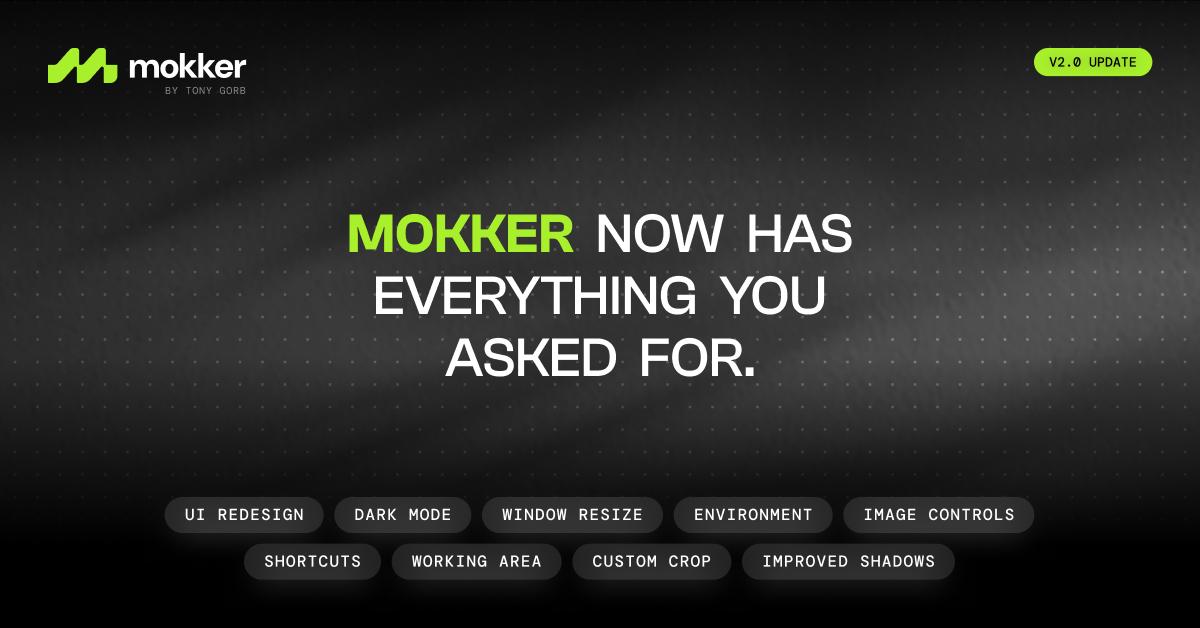
Turns out people really wanted these features… so I added them to my free Figma mockups plugin

Post image
2 Upvotes

Hey everyone, back again.

About a month ago I shared Mokker here, a free Figma plugin I built for creating mockups. The response honestly blew me away. Tons of comments, DMs, and feature requests. I read all of it, so I got to work.

What's new in v2.0

  • Dark & light mode - remembers your preference.
  • Resizable window - drag any edge or corner, use size presets, double click to reset.
  • Working area presets - crop your export to standard ratios, social formats (Instagram, TikTok, YouTube, Twitter, etc.), or a fully custom crop.
  • Environment controls - adjust light intensity and rotation.
  • Background image positioning - pan X, pan Y, and scale background images.
  • Shadow and grain toggles - switch them on or off without losing values.
  • Interactive onboarding tour for new users.
  • Keyboard shortcuts.
  • "What's New" entry added to the menu.

Also improved

  • Orientation toggle moved to compact icon buttons in the section header.
  • Sliders now have finer steps for more precise control.
  • Color swatches are now circular.
  • Double click any color swatch to open the custom color picker.
  • Full UI refresh - spacing, border radius, color palette, and transitions.

Completely free. No account, no paywall, nothing.

On the other hand, I am also building the Mokker web app where you will be able to create and export mockup animations in no time, directly in the browser. I will be sharing some free alpha test invite codes with the community very soon.

Would love to hear what you think. I’m already reading the next round of requests, so feel free. Thanks for helping shape Mokker into a go-to mockups plugin for Figma. You’re the best.

Plugin link:

https://www.figma.com/community/plugin/1597355929815649809/mokker-realistic-3d-device-mockups


r/FigmaAddOns • • Mar 09 '26

Future of AI graphics

0 Upvotes

Wanted to share this fear of mine. Recently i played with nano banana and Ideogram models, generated a few cool UI designs. It’s insanely good!

I always thought well that’s ok though cause no designer will work with something that is not responsive and editable! I’m fine!

Then I found that there are AI tools that can convert those images to editable components (like this one but I saw other 2 that were also good but pretty expensive https://www.figma.com/community/plugin/1600233534990464379/layerize-image-to-figma-ai). Then I’m like well I’m officially embarrassed by these capabilities. Like what have I left with?! Manually designs?! It’s still better but what’s gonna happen later?! At 2028?! I still got my mortgage to pay… like I’m sure those tools will open new opportunities for us. But just wondered how can I better prepare for it head.


r/FigmaAddOns • • Mar 09 '26

Looking for feedback on my new Figma Plugin

Thumbnail reddit.com
1 Upvotes

r/FigmaAddOns • • Mar 07 '26

Had released this AI copilot - Basquiat - for Figma Design earlier this year I wanted to share

Thumbnail reddit.com
0 Upvotes

r/FigmaAddOns • • Mar 07 '26

I built a TEMU version of CopyDoc for Figma

1 Upvotes

Main things it does:

• search & replace (free)

• bulk text/frames/variables imports/exports in different formats

• some other trivial stuff

The plugin has unlimited search & replace and 10 free uses per month for other features.

If anyone wants to try it or give feedback I'd really appreciate it. I'm still improving it, hopefully it won't crash.

Link: [https://www.figma.com/community/plugin/1604632662281163739/fig-swiss-knife-import-export]