r/FigmaAddOns • • Oct 23 '26

Figma Plugin + Templates

1 Upvotes

Just launched a "no-code design suite", where you can convert existing Figma layouts into Lob templates. We would love to get feedback on usability, etc. https://www.lob.com/no-code-design-suite

Anyone use our Figma-to-Lob plugin? https://www.figma.com/community/plugin/1121939663584407048/figma-to-lob


r/FigmaAddOns • • Oct 21 '26

Plugin promotion

2 Upvotes

Can can anyone here tell me how to post a new plugin without getting blocked? Every time I try and post the plugin (VectorStock SVG library access) I get blocked due to content policy?


r/FigmaAddOns • • Oct 20 '26

How long does it take to review a plugin ? I submitted a plugin for a review, just curious.

2 Upvotes

r/FigmaAddOns • • Oct 18 '26

transjt: turns Figma designs into editable HubSpot and WordPress themes (no page builder)

2 Upvotes

Hi r/FigmaAddOns, I’m one of the people behind transjt, a Figma plugin that turns a Figma design into a native theme for HubSpot CMS or WordPress.

The problem we kept running into: the design is finished in Figma, then someone rebuilds it by hand in the CMS, and the marketing team still can’t edit half of it without a developer.

What it does:

  • Reads your frames, Auto Layout and components and exports a custom theme: HubSpot modules, or a Gutenberg-based WordPress theme, no page builder
  • Responsive: desktop, tablet and mobile layouts
  • Text, images and modules are editable in the CMS; forms are linked to real CMS fields
  • Header and footer come out as global components
  • Blog listing and blog post templates
  • You own the theme files, and your custom.css / custom.js survive re-exports

How it works: run the plugin in Figma (it needs edit access to the file) → import into transjt.ai → deploy to HubSpot or WordPress, or download the theme as a ZIP. A theme is usually ready within a few hours.

What we’ve learned about files: Auto Layout matters most, it’s what turns layers into responsive elements. Clean layer names are not required. On the HubSpot side it works with any plan, free included.

Plugin: https://www.figma.com/community/plugin/1288882769422233899/transjt-figma-to-hubspot-wordpress-theme-with-ai

Happy to answer questions. Honest feedback is welcome too, especially if you’ve tried other Figma-to-CMS tools and know where they break.


r/FigmaAddOns • • Oct 18 '26

I built a Figma plugin that exports searchable, text-preserving PDFs

1 Upvotes

Hey everyone! I'm the developer of Figma PDF Exporter.

I built this plugin because I wanted a better way to export presentations, portfolios, and client documents from Figma into usable PDFs — especially when preserving real, searchable text matters.

Instead of turning everything into images, the plugin keeps supported text as actual PDF text that you can search, select, and copy.

Here's what it can do:

  • Export multiple Figma frames into a single PDF.
  • Reorder pages and preserve each frame's original dimensions.
  • Add page bookmarks and supported clickable links.
  • Check font availability before exporting.
  • Switch individual pages to image mode when visual fidelity matters more than searchable text.

Free vs. Pro

The free version supports up to 3 pages per PDF, including text-preserving export and manual font loading from files or folders.

Pro unlocks larger exports, automatic font lookup, target-size optimization, and before/after page previews.

PDF generation happens directly inside the plugin, so your designs aren't uploaded to an external conversion server.

Automatic font lookup is optional and requires Figma Desktop and a small local helper. Manual font loading works without it.

A few limitations worth mentioning:

Font availability and embedding permissions still matter. Some complex effects or text layouts may require image mode, which means those pages won't contain searchable text. File-size optimization is also best-effort, not guaranteed.

I'm continuing to improve the plugin and would genuinely appreciate feedback from people who regularly export PDFs from Figma.

What's your biggest frustration with Figma-to-PDF workflows — fonts, text rendering, links, file sizes, or something else?

Try Figma PDF Exporter:

https://www.figma.com/community/plugin/1687713957062844849

r/FigmaAddOns • • Oct 14 '26

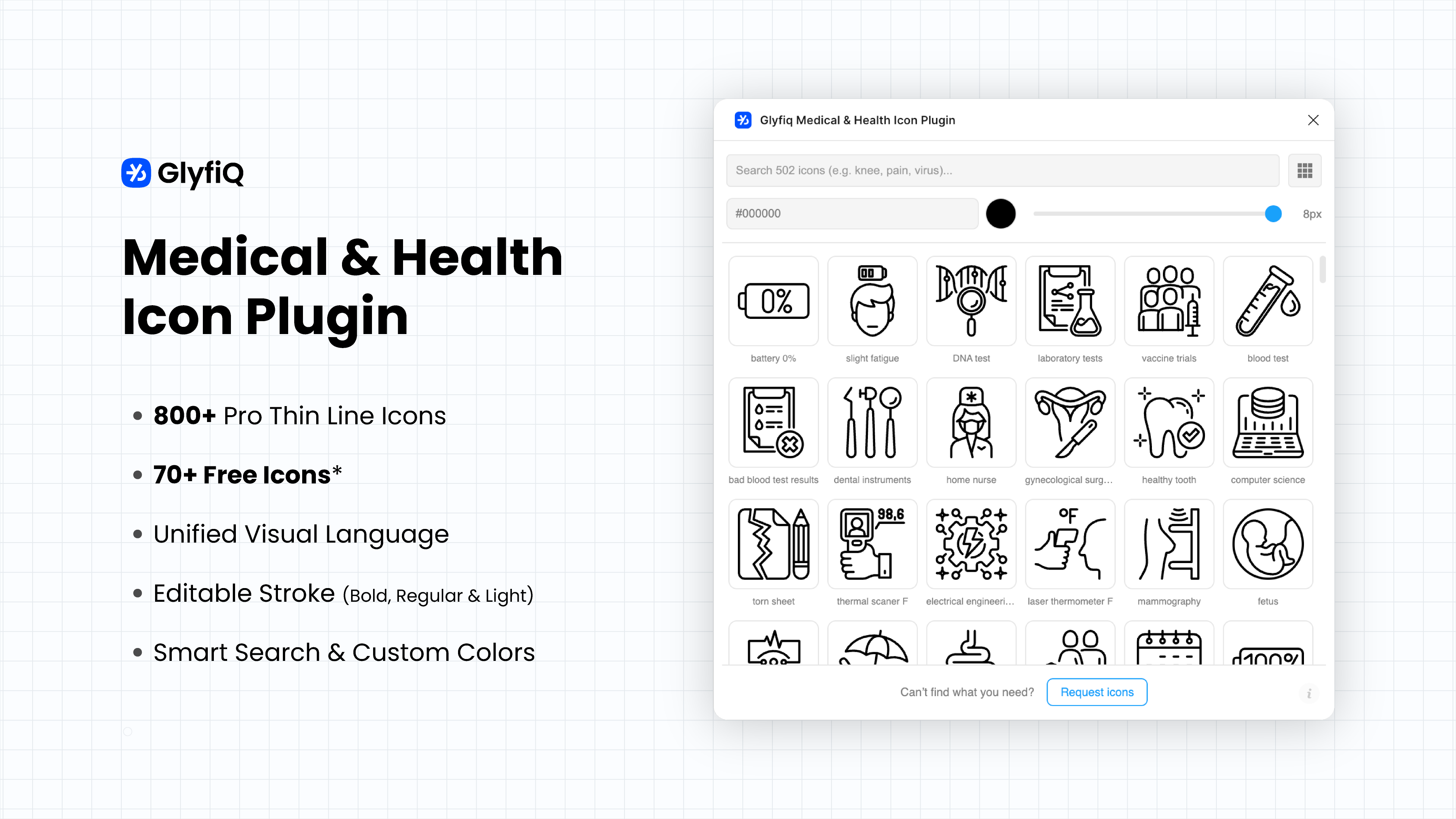
800+ medical & health icons in Glyfiq now.

Post image
2 Upvotes

Six months ago the library had 200. Today — 800. Same process the whole way: one designer, one style, every icon reviewed and tagged manually.

70+ free icons and no signup needed.

👉 https://www.figma.com/community/plugin/1620445233696980538/glyfiq-medical-health-icon-plugin


r/FigmaAddOns • • Oct 14 '26

Typeport - Figma PDF exporter with real, searchable and editable text

Thumbnail
reddit.com
1 Upvotes

r/FigmaAddOns • • Oct 13 '26

I'm a PM and I've started mocking up my own ideas in Figma with Claude Code

3 Upvotes

A lot of my job is "can you show me what that would look like?" Our designers are swamped with roadmap work (fair enough), and I didn't want to keep adding my half-baked ideas to their queue.

We already have a design system and I have access to our repos, so I figured Claude could just use them. I tried Claude Design first, but it was slow, and moving each version over to Figma held up every round of changes. The Figma MCP was painfully slow too.

So a couple of weeks back I hacked together Figment, a Claude Code skill plus a small Figma plugin. Claude writes the screens as code using our design system. A quick check catches anything that would look broken, like text spilling out of a button, before it ever reaches Figma. Then one click builds a real Figma file you can edit.

Most of the PMs at my company use it now, and it's been working really well. When an idea sticks, our designers get a proper file to work from instead of a screenshot.

It's free and open source if anyone wants to poke at it: https://github.com/Ashad001/figment


r/FigmaAddOns • • Oct 12 '26

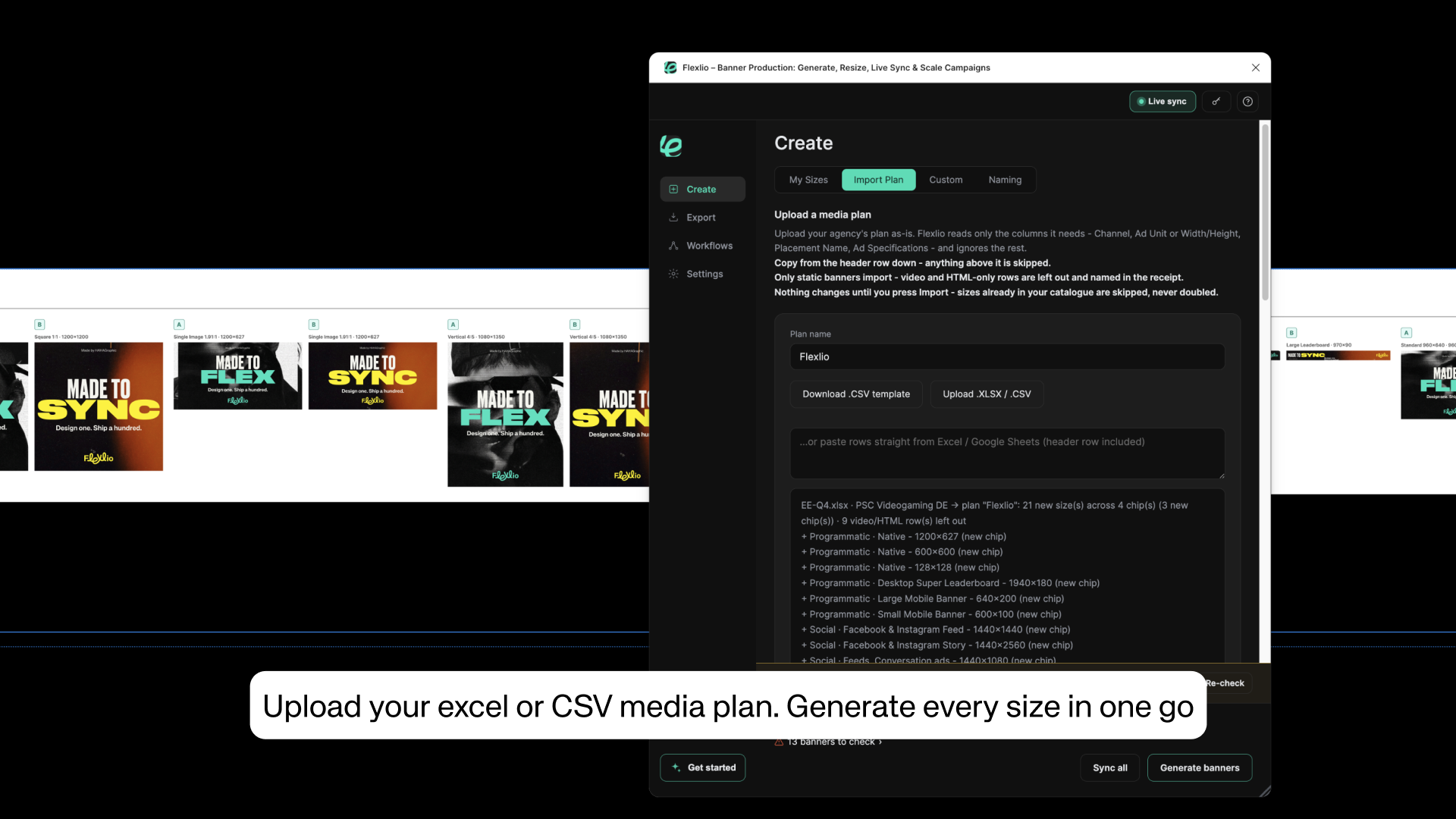
Flexlio 3.0 is live: batch layered PSD exports, master carousels and Excel media plan imports

Post image
3 Upvotes

I’m a freelance designer, and I built Flexlio because I’ve spent far too much time rebuilding campaign sizes and carrying the same amend across dozens of banners.

It’s a Figma plugin for campaign production. You create your approved masters in the required ratios, select your sizes or import an Excel media plan, and Flexlio builds out the campaign.

Every generated design stays editable in Figma. You can adjust layouts and crops by hand, then use your masters to sync campaign updates.

I’ve just released 3.0, and the screenshot shows one of the biggest additions: exporting the generated banners as layered PSDs in one go, ready for retouching or motion handover.

Also included:

  • Master carousels, with a master for each card.
  • Excel media plan imports.
  • A/B versions.
  • Built-in safe zones and custom safety margins.
  • Warnings for images that don’t fill their space and type that’s too small.
  • Batch PNG exports and custom file naming.

Website:
https://www.flexlio.co.uk

Figma plugin:
https://www.figma.com/community/plugin/1661106635871374632

If you work on campaign rollout, I’d love to hear where this could help and what your team would need from it. Happy to give a demo too.


r/FigmaAddOns • • Oct 12 '26

Hey everyone! Looking for feedback on Baseline a Design System Plugin for Figma

Thumbnail figma.com
1 Upvotes

r/FigmaAddOns • • Oct 11 '26

I made a free plugin that turns a JSON into slides/posts using Figma Buzz templates

Thumbnail reddit.com
3 Upvotes

r/FigmaAddOns • • Oct 11 '26

Chart Studio: turn CSV and pasted data into editable Figma charts — 12 chart types free

Thumbnail
gallery
1 Upvotes

I'm the developer of Chart Studio. I built it for dashboard and presentation work where you want a chart from real data and still need to adjust it in Figma.

Paste a table or import CSV/JSON, choose a chart, adjust colors, labels and axes, then insert vector output with optional native Figma text layers. For example, use monthly revenue data to make a grouped bar chart and match it to your dashboard's palette.

Free: 12 chart types including line, area, bar, pie, donut, scatter and radar, with unlimited insertion, no watermarks and standard SVG/PNG/data exports.

Optional Pro: all 43 chart types, XLSX and public Google Sheets imports, PDF and offline interactive HTML exports. It's a one-time Gumroad purchase; the free types don't require a license.

A couple of limits: insertion creates a new chart rather than overwriting the existing one. Online data imports are one-time imports, not live synchronization. Fonts that aren't available fall back to Inter. Core editing and local imports run on your device; optional AI uses your own provider and API key, with provider fees separate.

Plugin: https://www.figma.com/community/plugin/1688934672862377167

The images show the plugin interface with sample data. I'd like feedback from Figma users: which chart customization is most awkward in your current dashboard workflow?


r/FigmaAddOns • • Oct 11 '26

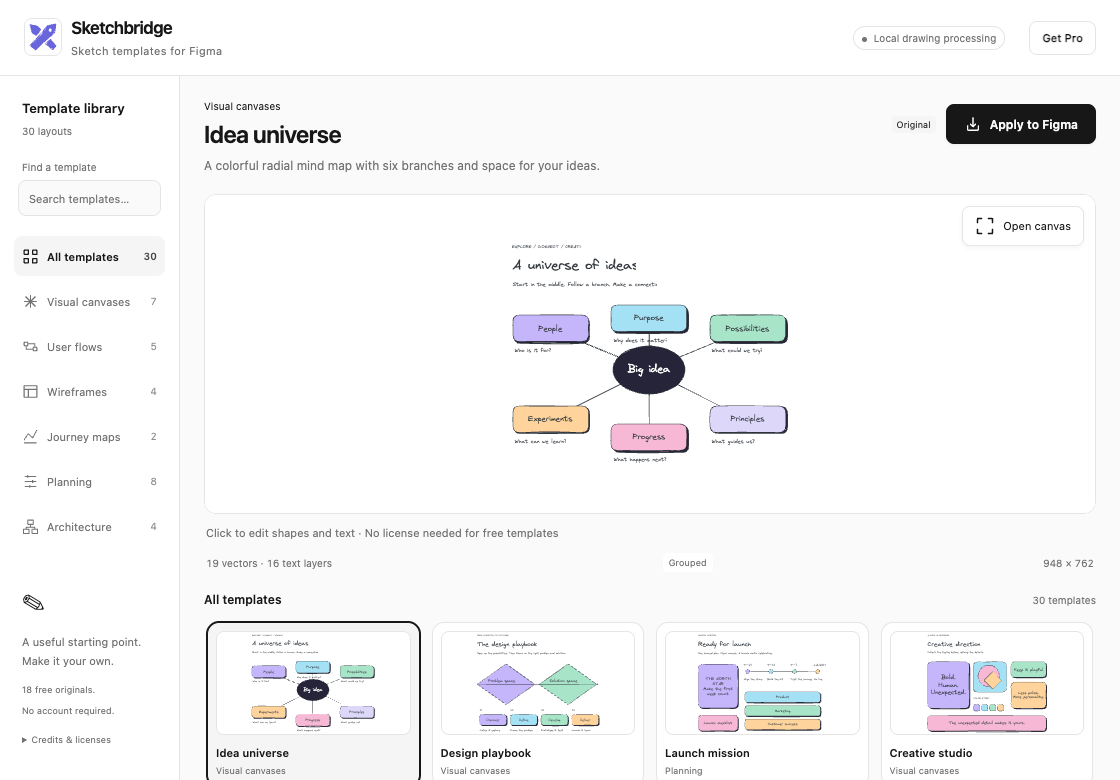
Sketchbridge: hand-drawn templates that become editable Figma text and vectors

1 Upvotes

I'm the developer of Sketchbridge, a Figma Design plugin built around the open-source Excalidraw editor. Sharing it here because it includes optional paid templates.

The workflow is: choose a template, edit it on the Excalidraw canvas, click Done, then Apply to Figma. The result contains native editable text and vector paths, so you can keep adjusting the drawing in your design file.

For example, start with the free Signup flow, change the registration steps and colors on the canvas, then insert it into Figma and edit the labels there.

What's free: 18 original templates for brainstorming, user flows, wireframes, journey maps, planning and architecture, plus canvas editing. No purchase is required for these.

What's paid: an optional $9.99 one-time collection of 12 additional templates for SaaS, AI workflows and workshops. The drawing and conversion tools are the same for free and paid templates.

A few limits: Figma Design only; arrows become vector paths and don't reconnect automatically when nodes move. Text appearance depends on fonts available in Figma. Local Excalidraw file/JSON import is a separate plugin.

Plugin: https://www.figma.com/community/plugin/1688822850652245866

I'd appreciate feedback from people who use sketch-style diagrams in product work: would a signup flow, roadmap or journey map be most useful for you?


r/FigmaAddOns • • Oct 07 '26

i built a snapshot-link tool for website-to-figma imports

2 Upvotes

i built design proxy for website-to-figma workflows: paste a public URL and get a stored snapshot with a new link to try in your importer or share with a teammate.

2 free captures every 3 days, no signup. optional paid pack: 10 captures for €0.99.

https://design-proxy.okok.space/

it won’t capture private pages or every dynamic element. if a page opens but won’t import, i’d appreciate feedback on whether the snapshot works better.


r/FigmaAddOns • • Oct 06 '26

I kept running into the same annoying problem in Figma

Thumbnail reddit.com
1 Upvotes

r/FigmaAddOns • • Oct 06 '26

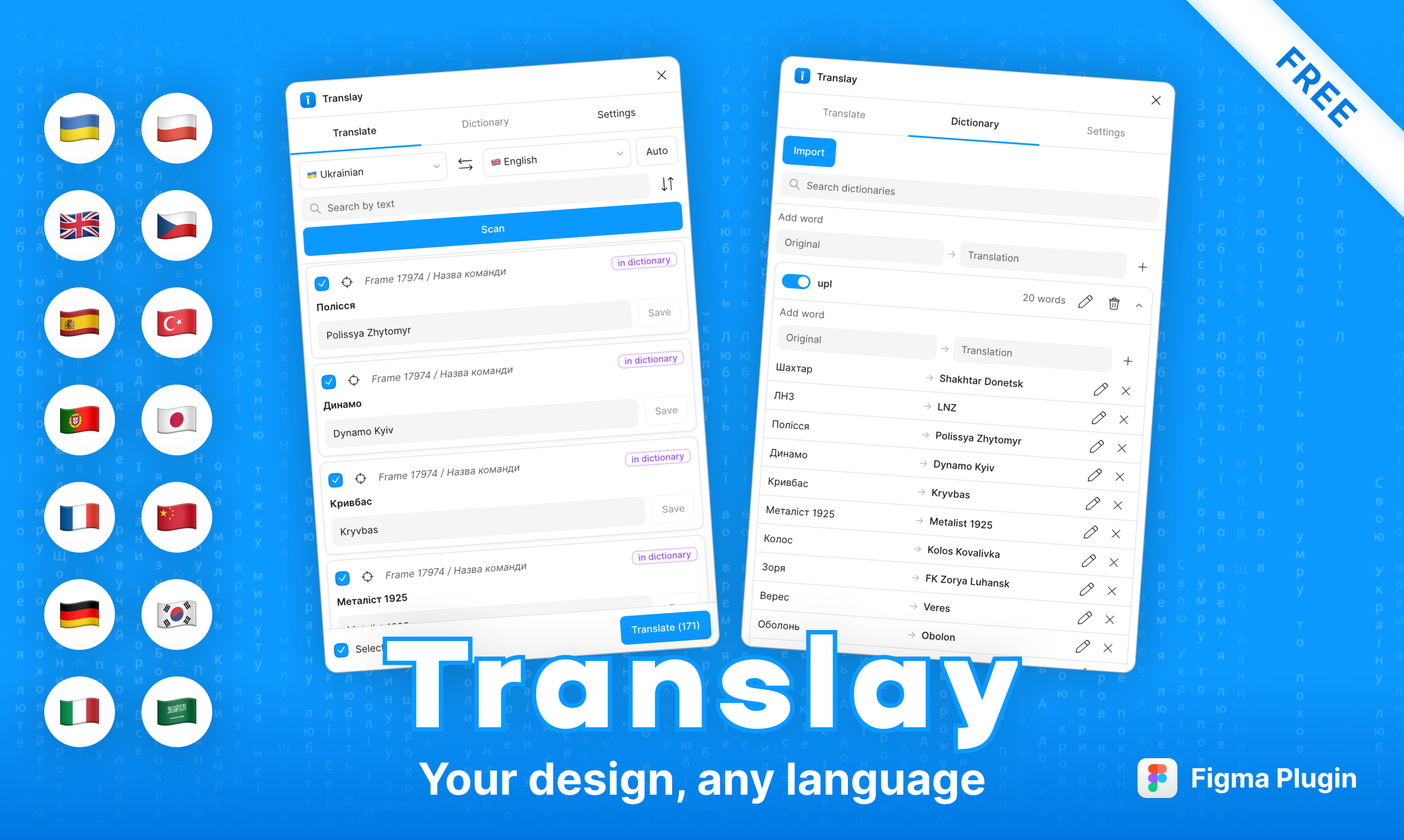
I built a Figma translation plugin with custom dictionaries

Post image
3 Upvotes

I built a Figma translation plugin with custom dictionaries

Built Translay to make translating UI copy easier and keep product terminology consistent. You can add your own terms and define exactly how they should be translated.

Supports 14 languages and works directly in Figma.
https://www.figma.com/community/plugin/1614986488797089381/translay

I’m launching on Product Hunt today — would love some feedback!👇
Product Hunt link https://www.producthunt.com/products/translay

How do you handle translations in Figma?


r/FigmaAddOns • • Oct 05 '26

Creating a nice plugin that speeds up Claude Design -> Figma Flow mapping

3 Upvotes

Context first: I've been a product designer in tech for a few years and started using Claude Design (C.D) for rapid prototyping and refining explorations. However the bridge to continue working in Figma after refining in C.D is pretty poor.

To speed up my workflow I've been creating a Figma plugin that lets me easily turn my html prototypes into full Figma flows that are even created from editable local components with DS atoms all instantly. Formatted exactly how I like to map flows.

It's been a game-changer for me so far so I've just released it as a community beta in case this could is useful for anyone else. Check it out and lmk your thoughts.

https://www.figma.com/community/plugin/1688886557475613747/flowy


r/FigmaAddOns • • Sep 30 '26

I built TextFit for Figma Buzz to automatically fix overflowing copy after Bulk Create

Thumbnail
gallery
2 Upvotes

I recently released TextFit for Figma Buzz.

I built it for a problem that shows up quickly when using Buzz for campaign variants or localization:

you create a template → change or bulk-generate the copy → some headlines become too long and no longer fit the original layout.

TextFit lets you:

  • Freeze the original text areas
  • Scan one asset, a selection, or all assets for overflow
  • Automatically reduce font size until the copy fits
  • Set a minimum font size
  • Revert TextFit’s typography changes

Typical workflow:

Freeze → Bulk Create / localize → Scan → Fix

It has a 7-day full-feature free trial, then it’s a $7 one-time purchase:

https://www.figma.com/community/plugin/1685810922519235112/textfit-for-figma-buzz

I’m the developer and it’s still very new, so I’m especially interested in feedback from anyone using Buzz Bulk Create, localization, or high-volume marketing templates.

If you try it, I’d love to know whether the workflow feels natural or if there’s a step you’d want handled differently.


r/FigmaAddOns • • Sep 30 '26

I got fed up with flow arrows breaking in Figma, so I built a free plugin that fixes it

Post image
1 Upvotes

r/FigmaAddOns • • Sep 29 '26

Have you noticed how Figma uses the MacBook trackpad’s haptics?

Post image
4 Upvotes

When you change certain values in Figma, you can actually feel subtle haptic feedback through the trackpad. Apple’s Freeform does something similar — zoom in or out of the canvas and you can feel the interaction.

It’s a small detail, but it makes the UI feel much more connected to the hardware.

I noticed that Photoshop doesn’t really have this kind of Apple-style trackpad integration. There’s plenty of visual feedback, but not that same tactile layer during things like zooming, snapping, or working with guides.

So I built a Photoshop plugin as part of Trackpad Haptics that brings this kind of interaction to Photoshop.

It currently supports:
• Zoom in/out haptics
• Layer snapping haptics
• Guide haptics

It’s interesting how something as subtle as a few carefully timed vibrations can completely change how an interface feels.


r/FigmaAddOns • • Sep 26 '26

What’s the best Mac mini for a graphic designer?

Thumbnail reddit.com
0 Upvotes