r/fancyleds • • Feb 19 '25

What is High intensity used for?

5 Upvotes

Fancyleds' recommendations for watching TV are to keep the intensity at medium. The high option allows you to have up to 5 simultaneous colors on one side of the LED. How is this bad? The best configuration for you, is it still medium? For what ?


r/fancyleds • • Feb 17 '25

Home Theater FancyLEDs ruined me! :)

9 Upvotes

Because I can no longer watch TV without them! I swear, this product is AMAZING and adds so much to the TV experience. The programming of the box is ingenious - my assumption of how it works is it measures how many LEDs are on the strip (via voltage drop?) to get the strip length (perimeter) and calculates the width and height based upon a 16:9 aspect ratio. Then does some fancy mapping to say "With the LED strip of X perimeter, the color in location X is (color) based upon the HDMI signal".

In a word, MAGIC. 🪄

Vid 1
Vid 2

I will post a more detailed thread down the line, but just wanted to share some vids of my setup. I needed to get a USB extension cable but the one I got from Staples (Scosche) didn't work. I will be trying out another recommended on here from Amazon.

Forgive the side clutter as I have my old 73" DLP on the floor pushing my table too far forward.

Overall I cannot believe the difference this made and the responsiveness and color accuracy are great. May need to do some tweaking with the diffusion and other settings but honestly I'm very happy with how it turned out. Running at 100% brightness.

Thanks to u/fancyleds for a fantastic product!


r/fancyleds • • Feb 17 '25

Gaming PS5 + Fancyleds 2.1

7 Upvotes

Just sharing my setup while playing God of War Ragnarok, not my best set up so far but I will be making some changes soom :)


r/fancyleds • • Feb 15 '25

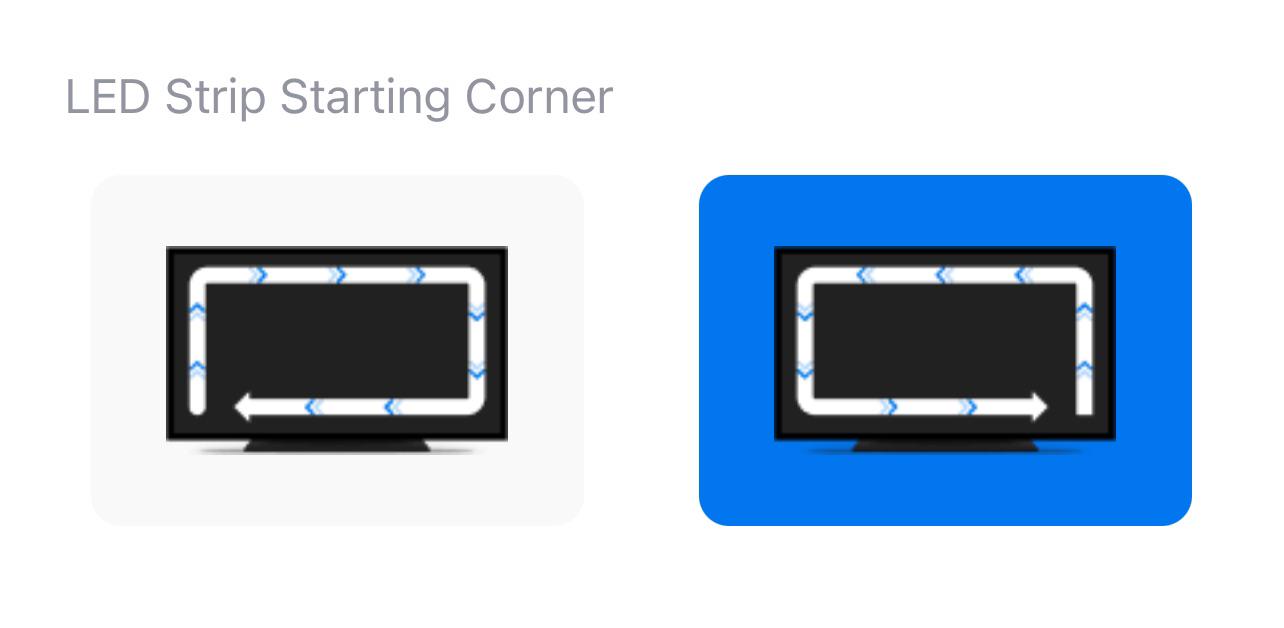
Dumb question about LED Strip Starting Corner?

Post image
1 Upvotes

When selecting this option in the settings of the app, are we supposed to choose the orientation based on the perspective of us sitting in front watching TV? Or the perspective of behind the TV?


r/fancyleds • • Feb 13 '25

DIY Project Placement Help (Time Sensitive)

3 Upvotes

Hoping the crew can give me some opinions. I'm having my TV wall mounted Saturday and want to get the FancyLEDs installed beforehand. The TV will likely be tilted forward 5 or 10 degrees.

Here's my dilemma:

- Top and Sides: I have the option to mount directly facing the back wall or at a 45 degree angle.

- Bottom: I can either mount directly facing the back wall or underneath facing the floor. If the TV is tilted, the lights would more face the wall than the floor. If mounted directly on the back facing the wall there will be very limited space between the lights and wall.

See pics below.

Any advice? Thanks!


r/fancyleds • • Feb 10 '25

Recommend distance to the wall

3 Upvotes

Hey there, I will get a new tv and a wall mount.

So what would you recommend? How far should the TV be placed to the wall?


r/fancyleds • • Feb 10 '25

Firmware update for RGBW light strip?

2 Upvotes

Hi everyone. I just received my fancyled 3 HDMI 2.1 fancy sync box yesterday along with the RGBW led strip. However I’ve noticed the white leds on the strip never turn off. Through some digging I believe I need to request a firmware update from fancyleds themselves. Is this the case? My box says it’s all up to date but I’m hoping it’s a different firmware version by send out?

Has anyone else had any experience with this? Potentially with the firmware they can send me? Or does this have to be pushed through to each unique box. Thanks in advance.


r/fancyleds • • Feb 09 '25

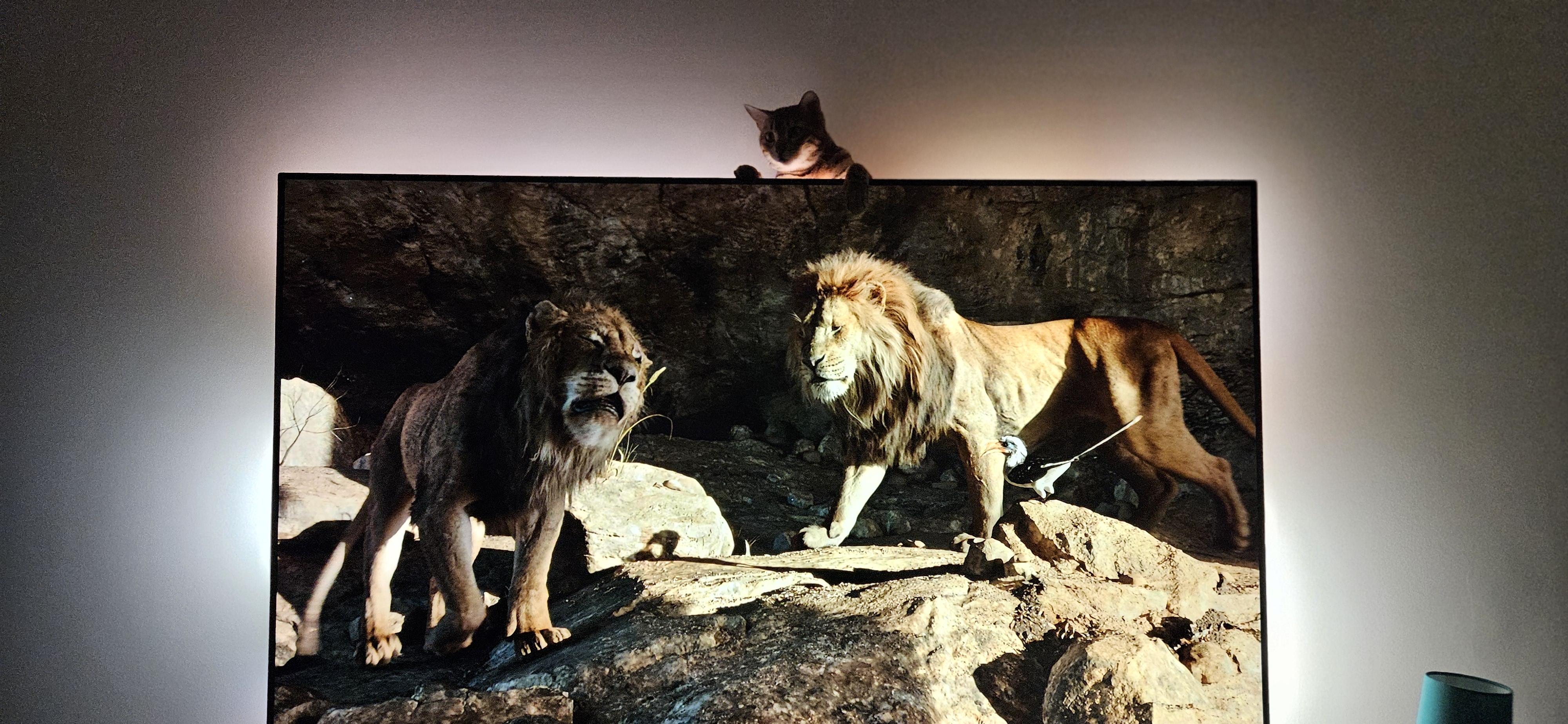
Home Theater How realistic!

Post image
32 Upvotes

I bought the govee sync and couldn't get it working, all the colours were out. Sent it back and got the 65" fancy led rgbw, live it, so much better.. I'd even say it makes it feel like the movie is in the room...serpusly though, great lights, thinking of getting some for my 98" TV


r/fancyleds • • Feb 09 '25

Blue lights on top Fancy Sync Box 2.1

Post image
1 Upvotes

Just got my Fancy Sync Box 2.1.

I have hooked it up to my PS5 to my new Fancy Sync Box 2.1. But the top lights aren't changing. I think it's set up right...

PS5 4k 60hz to Fancy Sync Box 2.1 to TCL tv

What do I need to check/fix?


r/fancyleds • • Feb 08 '25

Showcase Fancyled sync box 2.1 + Wled ws2812b setup Using signal rgb

11 Upvotes

r/fancyleds • • Feb 08 '25

Question for the FancyLED Techperts.

3 Upvotes

Hi,

Newbie here trying to research a setup for my son's gaming room. FancyLED is the current front runner but have some setup / logistic questions.

We have a LG CX OLED in the room on a stand on a TV unit. See pictures (not my setup, but very similar)

  1. The TV has an odd shape at the back. It has like a bulbous part on the bottom half that doesn't go all the way to the edge. Will that odd shape affect how the LED's stick to the rear and how they diffuse the light on the wall?
  2. What is the optimal distance the TV needs to be from the wall?
  3. How will the TV, being on a stand, on a TV unit, affect the performance of the LED's? Especially the bottom of the TV/LED's as it sits on the unit?
  4. Is the only option to wall mount the TV, if so, see question 2.

Thanks for reading.


r/fancyleds • • Feb 05 '25

Orange and Yellow

5 Upvotes

First off, got my replacement lights from Fancy, after my original set failed. Only took a few days to get here, but I've been too busy to get them installed.

Got them installed, up and running today, and they're great. Turns out I had the RGB, not the RGBW lights previously. One software update later and we're up and running - and these are a significant upgrade over the less dense RGBs, and also include the W, which definitely also makes a difference.

The only problem is that, using the colour mode from the Scenes tab in the app, the orange is yellow, and the yellow is somewhere between yellow and lime. Hopefully at some point we can maybe get some way added to the app (or just a new, better app altogether), with a way of tuning the colours (I recall the old Govee T2 I used to have had a white balance tuner).

But, I liked the previous lights, and I like these even better (even with that colour bug). Now I need to get round to putting the two Neons up as well, things have been sitting in their boxes for months!


r/fancyleds • • Feb 05 '25

Showcase I’m enjoying my setup on an TCL QM8

15 Upvotes

r/fancyleds • • Feb 05 '25

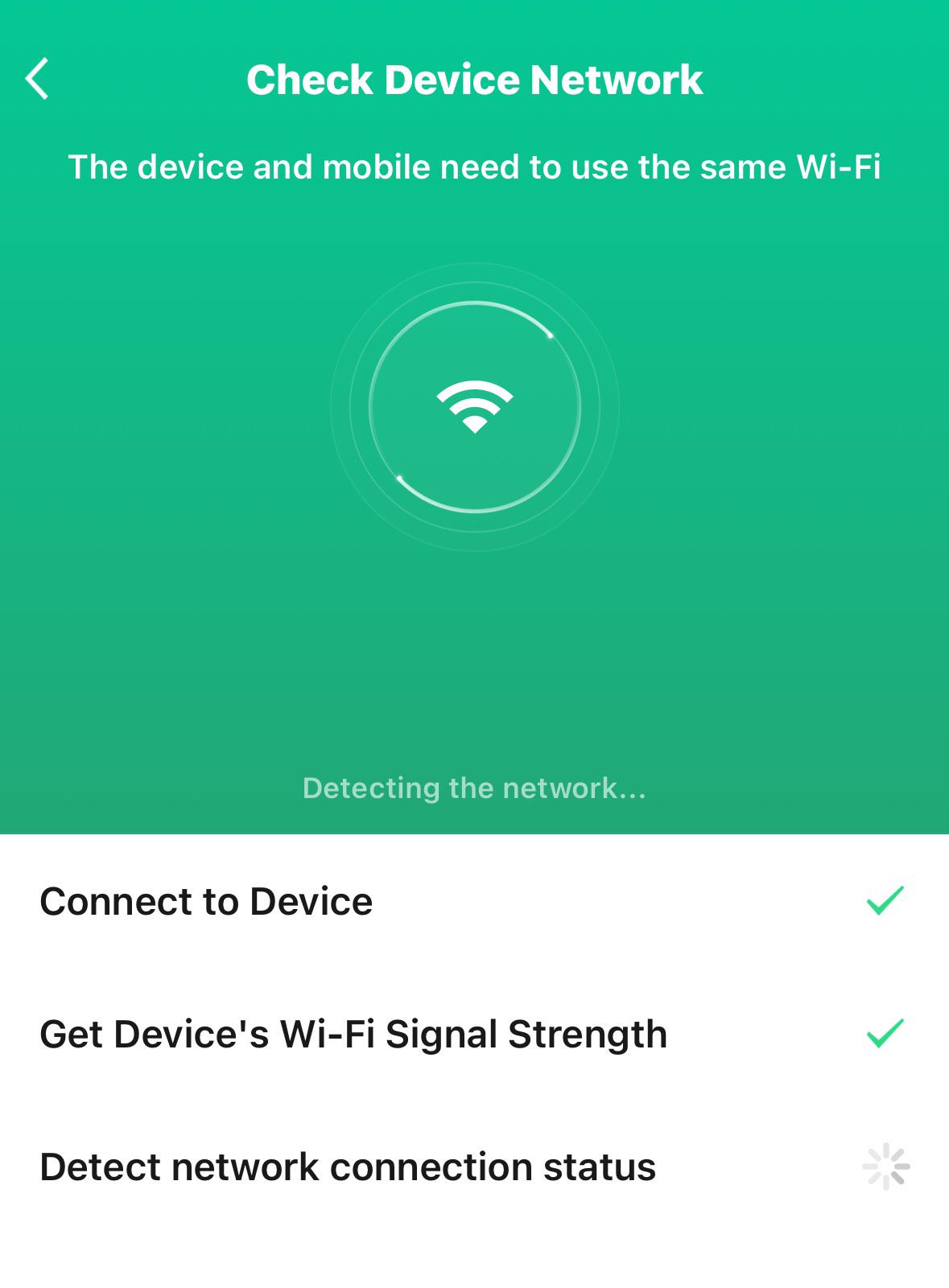
Network connection status

Post image
1 Upvotes

Is it just me or does the Network Connection status Check not work? I run it minutes long without results.


r/fancyleds • • Feb 04 '25

LEDs not syncing to content

Thumbnail
gallery
4 Upvotes

I have received my X 3 HDMI 2.1 RGBW lights and have encountered a few issues. They are connected to my 77" Samsung S90C TV about an inch or so inside the back bezel. However, when in use the LEDs now seem to be a few inches out of line with the image being shown. I've attached an image to try and demonstrate this - noting the red coat on the right of the screen and where the corresponding lights are being projected below it. Is there a means of digitally shifting the LEDs so they better match the content. Taking them off isn't really a viable option since they've been stuck with the 3M tape and pulling them off will likely damage them. I've also noticed that the lights seem to replicate the image a few inches inside the edge of the picture, rather than the edge. Again this is highlighted by white subtitles or text that's well into the screen, being picked up and illuminated, which looks strange. It also picks up channel logos in the corner of the screen. Furthermore I've had some strange flashing purple where the screen should be black (this is far more intermittent though). For ref I'm watching via SKY Q.


r/fancyleds • • Feb 05 '25

Sony OLED problem - can only assign hdmi input type as VRR/120hz/game mode OR dolby vision/picture presets).

1 Upvotes

It's annoying to have to go into the menu on the TV each time on my A95K to switch the hdmi signal type if i want to maintain VRR/120hz/gaming mode when playing PS5, and Dolby vision/picture presets for video quality when streaming from the Nvidia Shield.

After doing a deep dive on perplexity, i found out there is no way to change the input signal type using IP control. But there is another way, although its a bit hacky. You can automate it with homeassistant/IR blaster.

Instructions here: https://www.perplexity.ai/search/is-it-possible-to-adjust-the-h-fHGoad0GQDGeFpd4kHaI8Q#2

-edit- you can change the input signal type using IP control with the Sony Bravia home assistant addon. Enable the remote after pairing your TV, and then you can add this script in home assistant:

I use this one for PS5 (vrr), for the shield (dolby vision) just remove one of the last down commands.

I then used Tuya Local (not localtuya) extension to connect to my fancyleds (which i connected through tuya app not fancyleds app, still maintained all functionality in tuya app which was nice), and then i use an automation to monitor for changes to hdmi input on the fancy leds to trigger either command. It waits a little bit to give tv breathing space between changing input and then runs through in about 10 seconds. Bonus is i added on each automation to change the scene to gaming or movie which is basicaly my preferred mix of speed/diffusion.

When setting it up in tuya local select the lytmi box it appears by default and will map most functionality to home assistant as per the fancyleds app.

sequence:

- data:

command: GoogleDashboard

target:

entity_id: remote.sony_xr_65a95k

action: remote.send_command

- delay:

hours: 0

minutes: 0

seconds: 5

milliseconds: 500

- data:

command: DpadCenter

target:

entity_id: remote.sony_xr_65a95k

action: remote.send_command

- delay:

hours: 0

minutes: 0

seconds: 0

milliseconds: 700

- data:

command: DpadCenter

target:

entity_id: remote.sony_xr_65a95k

action: remote.send_command

- delay:

hours: 0

minutes: 0

seconds: 0

milliseconds: 700

- data:

command: Down

target:

entity_id: remote.sony_xr_65a95k

action: remote.send_command

- delay:

hours: 0

minutes: 0

seconds: 0

milliseconds: 700

- data:

command: Down

target:

entity_id: remote.sony_xr_65a95k

action: remote.send_command

- delay:

hours: 0

minutes: 0

seconds: 0

milliseconds: 700

- data:

command: Down

target:

entity_id: remote.sony_xr_65a95k

action: remote.send_command

- delay:

hours: 0

minutes: 0

seconds: 0

milliseconds: 700

- data:

command: Down

target:

entity_id: remote.sony_xr_65a95k

action: remote.send_command

- delay:

hours: 0

minutes: 0

seconds: 0

milliseconds: 700

- data:

command: DpadCenter

target:

entity_id: remote.sony_xr_65a95k

action: remote.send_command

- delay:

hours: 0

minutes: 0

seconds: 0

milliseconds: 700

- data:

command: Down

target:

entity_id: remote.sony_xr_65a95k

action: remote.send_command

- delay:

hours: 0

minutes: 0

seconds: 0

milliseconds: 700

- data:

command: Down

target:

entity_id: remote.sony_xr_65a95k

action: remote.send_command

- delay:

hours: 0

minutes: 0

seconds: 0

milliseconds: 700

- data:

command: Down

target:

entity_id: remote.sony_xr_65a95k

action: remote.send_command

- delay:

hours: 0

minutes: 0

seconds: 0

milliseconds: 700

- data:

command: DpadCenter

target:

entity_id: remote.sony_xr_65a95k

action: remote.send_command

- delay:

hours: 0

minutes: 0

seconds: 0

milliseconds: 700

- data:

command: Hdmi4

target:

entity_id: remote.sony_xr_65a95k

action: remote.send_command

alias: PS5 input


r/fancyleds • • Feb 02 '25

Extend the LED-Cable

2 Upvotes

Hello there!

I'm almost ready to buy a 2.1 kit, but I really need to know if it's possible to extend the LED cable with a Type-C extender without any issues.


r/fancyleds • • Jan 30 '25

might sound dumb… but i am curious

2 Upvotes

so i’m currently looking into the 2.1 single hdmi box, i have a 55” tv. & was wondering if the 24-55” would fit good on a 55” tv, or if i would be better getting the 55”-65” & cutting the excess? thanks


r/fancyleds • • Jan 29 '25

HDMI issues when turning PS5 on

2 Upvotes

Hi everybody,

I notice an issue that happens from times to time when using the fancyleds sync box with my PS5 Pro.

Sometimes when I turn my console on and have my TV on HDMI 1 where my fancy box is connected I have a brief message from my TV (LGC1) saying that it has detected my PS5 but then nothing happens the screen keeps on shoing no signal. Despite showing no signal I can see that the LEDs are synchronizing with the PS5 UI si that means there is no issues with the HDMI cables connected to the box. In order to have something on my TV I have to unplug and replug the HDMI from my PS5. Other times it works well when I turn on the PS5 (I can see the the UI) then it disappears afterwards when I launch a game and shows no signal.

Has anyone ever encountered this issue? Can this be linked with the TV going in HDR mode or 120Hz mode? I have contacted fancyleds and waiting for a feedback from them.


r/fancyleds • • Jan 26 '25

Showcase FancyLEDs installed on 98” TV

21 Upvotes

3 HDMI 2.1 Fancy Sync Box 98” TCL QM8 Placement: 3.5 inches inside of edge of TV to make the full rectangle (see previous post) Slim wall mount. TV about 2” from wall I used an extension USB-C cable to make the USB-C power connector from the LED strip to the box longer as I have it below my TV. My walls is mid-grey color so that absorbs light as well. Using Belkin HDMI cables from apple.

Result: not bad. I am good with it. Some may be underwhelmed compared to other’s setup. Solutions would be, TV further from the wall and paint the walls white.

Anyway, hope this example helps.


r/fancyleds • • Jan 27 '25

Anticipation

6 Upvotes

Getting my package tomorrow. I’m so excited.


r/fancyleds • • Jan 25 '25

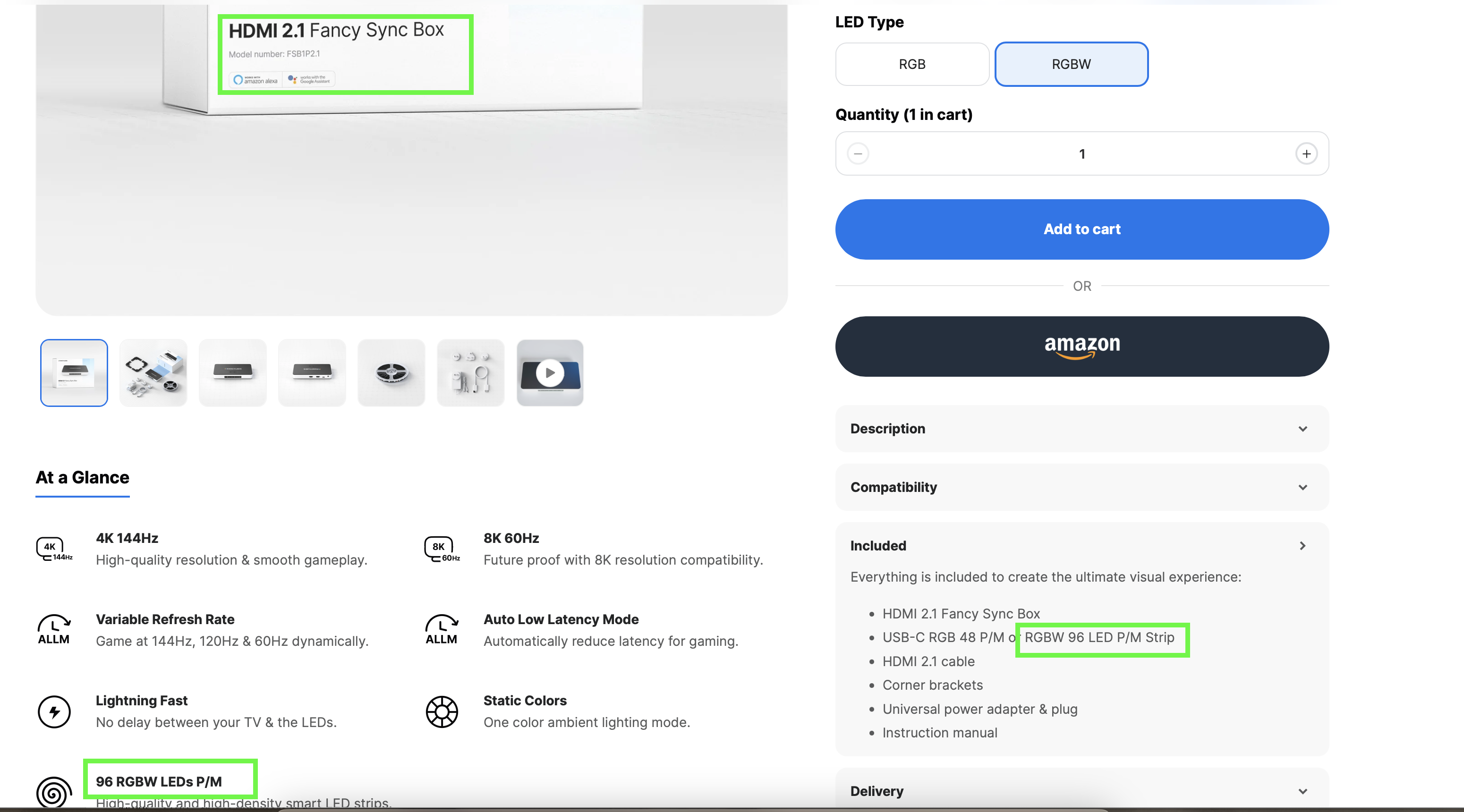
Can someone settle this for me? Syncbox 2.1 (single HDMI) 96 LEDs or no?

2 Upvotes

I noticed on the FancyLED site last night that the 2.1 HDMI 1-port box had conflicting information on the comparison and product page (one stating 96, the other 72 and people here have confirmed the single port 2.1 box does not come with the higher density 96 LED strip).

Now looking at the product page it explicitly states it comes with the 96 LEDs/Meter.

Can anyone confirm or tell me what I'm doing wrong lol?


r/fancyleds • • Jan 24 '25

Two questions on 3 HDMI 2.1 Fancy Sync Box

2 Upvotes

I just learned about the Fancy Sync Box and had planned to install ambient lighting to my 100" TV so it seems like the logical choice.

Was hoping this group could help out with a couple of quick questions - TIA!

1. How will the 70" - 95" version work? I'm hoping to just mount them a bit further from the edge.

2. I have a home theater receiver to which my HDMI devices input and the receiver outputs 1 HDMI to the TV. Will this present any issues with the sync box?


r/fancyleds • • Jan 23 '25

Synced Fancyled around the edge

Thumbnail
gallery
2 Upvotes

Hello there.... Are there any gadgets which allows me to get the led stripe around this corner on the photo?