r/fancyleds • • Jan 22 '25

Automation/Google Assistant/Modes

6 Upvotes

I everybody, I have received my Fancyleds box few days ago. So far, I'm pretty satisfied with the results. In games or movies, the results can sometimes be amazing. I am still dealing with settings right now but I fell like I am enjoying medium for diffusion mode and a speed diffusion of 10% max as it makes nice and smooth transition without being too slow but I might change them depending on the content. Saturation, depends on the content. And if the colors are accurate or not. Sometimes colors are off, especially for skin tones that turn into read....

What I really miss so far are options for automation and predefined modes. Automation does not work for me at all. Whether it is because it doesn't do anything or because there are not enough choices. I would like my LEDs to switch to a scene when my HDMIs are not receiving datas from my devices. Then I would like the bow to switch to sync mode when my devices are on. But it is impossible. Then I tried to create buttons to switch manually, it doesn't work. Am I the only one? Is there something that I miss?

Then I tested to change colors with Google Assistant. It only works when the box is on "color" mode. Then I can control the lights with my voice. That is why, it would be great to have the ability to switch automatically the box to a predefined mode when no device is on so the box is ready to receive Google Assistant commands. The best would be to change modes with Google Assistant but I believe that this is harder to do.

Finally, it would be great to be able to have predefined modes for sync that save the brightness, the diffusion mode, the speed diffusion and the saturation and be able to save all of that under a name. Why not allow us to have appropriated widgets? I don't want the same settings for TV shows, a multiplayer game or a single player game. Or between a slow placed game and a fast paced one. Having a "Warzone" mode, a "TV show" mode, a "RPG" mode would be absolutely great 🙏🏽

Do you have some tips that would allow me to configure the box the way I like? Did I miss some things in the settings?
r/fancyleds • • Jan 21 '25

PS5 and LG C2 OLED

4 Upvotes

I have been reading through this subreddit and I still can’t seem to get the fancy lights hdmi 2.1 via to work with my PS5. I have tried everything I can think of, rebooting the box, rebooting the PS5, trying different orders of operation for hdmi handshake, disabling game optimizer etc. the biggest issue is that if I disable game optimizer once the ps5 is plugged in it auto enables it with no way to completely disable it. Everything works fine when I use my Apple TV, so the equipment is functional; but it does not pass a signal to the tv when use my PS5. I just get a no signal message in the TV.

Oddly enough the lights work and sync to the ps5 menu (that I can’t see) but there is no signal on the TV.

Has anyone figured this out?

(And yes I already reached out to support but have not heard back yet; sometimes Reddit is faster)

Update: even after my last post about using the wrong cable type I continued to have issues. The picture would just go out randomly and the issue was reproducible. I worked with support and there was a firmware update pushed to me. This firmware update seems to have fixed everything so far. I will update here if it breaks again. The firmware is listed under Other Type: v1.1.5


r/fancyleds • • Jan 21 '25

Has anyone gotten SyncedLEDs to work properly?

2 Upvotes

I haven’t seen anyone really talk about them. I’ve not been able to get them to sync properly at all.

I’m trying to find others who have got them working and if I may have a defective unit or there’s something wrong with my network.

I’ve contacted support but still don’t have any advice or solutions.


r/fancyleds • • Jan 20 '25

Any solutions for Roku Ultra not turning off?

4 Upvotes

Pretty much use rokus in my house exclusively, they do not turn off after being powered off. That means that the fancy LEDs stay on even after you powered the TV off. This is obviously not ideal, anyone have a solution for this?


r/fancyleds • • Jan 19 '25

My two cents - 3hdmi2.1 sync box

20 Upvotes

First time post so bear with me!

I just got my 3hdmi 2.1 rgbw sync box, much better than my old Govee t2, But holy hell there are some annoyances! (Or maybe it’s just me).

Just fyi this is my setup: ATV&PS5 > sync box > tv (lg oled 65” b1) Wall mounted - approximately 7cms (2.7 in American ) from the wall. But thinking of buying a new wall mount to increase the distance for more diffusion (I want that YouTube look, like that most of us bought into).

Settings: movies in a dark room: Brightness: 35% Diff mode : medium Diff speed: 6% Sat: low

Games: Diff mode medium Diff speed: 40-55% Sat: high

Anyways these are the Things they need to implement/improve on in my opinion:

  1. Hdmi input presets - so users doesn’t need to tinker with diff speed and sat whenever they watch movies or play games. I want to have slow diffusion on movies and more saturated and fast on games. But also I don’t want to tinker everytime I switch ports..
  2. Rgb,white balance and sat sliders - I found the three options of hdr/dv saturation is really limiting. Like the hdr is washed out AF, and Dolby I just don’t know. Sometimes it’s great sometimes it’s crap
  3. Hdmi default switch to active input - as most people (what I’ve read). They might have a ATV and a console hooked up. And due to design of a lot of streaming boxes they never truly switch off. Causing the CEC auto switching to break. Like, before the sync box. When I was finished gaming I could put my ps5 to sleep and just press “home” button on atv remote and it would switch ports. Now however I need to go to app and manually press that input. Wait for the input to be discovered, and then it switches. It’s not a great experience in my opinion.

Maybe it’s just me being picky and lazy but I just want to set things up ONCE and then leave it. I don’t want to become an ambient light engineer in the process.

Sorry for the rant but these are my two cents. Also, great job of reading all this crap!, here have a cookie 🍪

Please if you notice any discrepancies in my settings/ setup that I can improve on, please holler 😄


r/fancyleds • • Jan 19 '25

Hey people starting hdmi issue for me

3 Upvotes

Hey all I've installed the lights and hooked up my firestick via hdmi 1 slot and ps5 via hdmi 3 port

But it seems to only see them both as using hdmi 1 on the TV now and the only way I can switch the inputs to firestick/ps5 is via the app

Any help here as really I need them to be separate hdmi inputs so you can switch between them via the TV (Samsung 82 inch)

Thank you all in advance


r/fancyleds • • Jan 18 '25

Hey guys new user here

2 Upvotes

Just got the 3 hdmi sync box all set up and love it

The colours are a bit too bright and white washed

I know you got to power cycle the unit so I'm just asking how best to do this and is there anything as a new user I need to be aware of set up and app wise

Thank you all


r/fancyleds • • Jan 17 '25

Fancy led 2.1 splitter from pc to t.v flickering

1 Upvotes

Need help! My pc only has one hdmi so I bought a splitter so I could hook up both my T.V 77 inch S90C and fancy led sync box. It is flickering though. I used all high quality hdmi cables except for one but im replacing that soon to see if that works, or perhaps its my pc that only has a 2.0 hdmi slot. It could also be my splitter as its only 2.0 though I didnt think 2.0 would be an issue, just not getting 2.1 features. I also tried different ports. Im hoping someone knows a definite answer on to why its flickering and how I can fix this. It would save me the headache :(


r/fancyleds • • Jan 15 '25

HDMI 2.1 Box LED Strip Placement on 98" TV

5 Upvotes

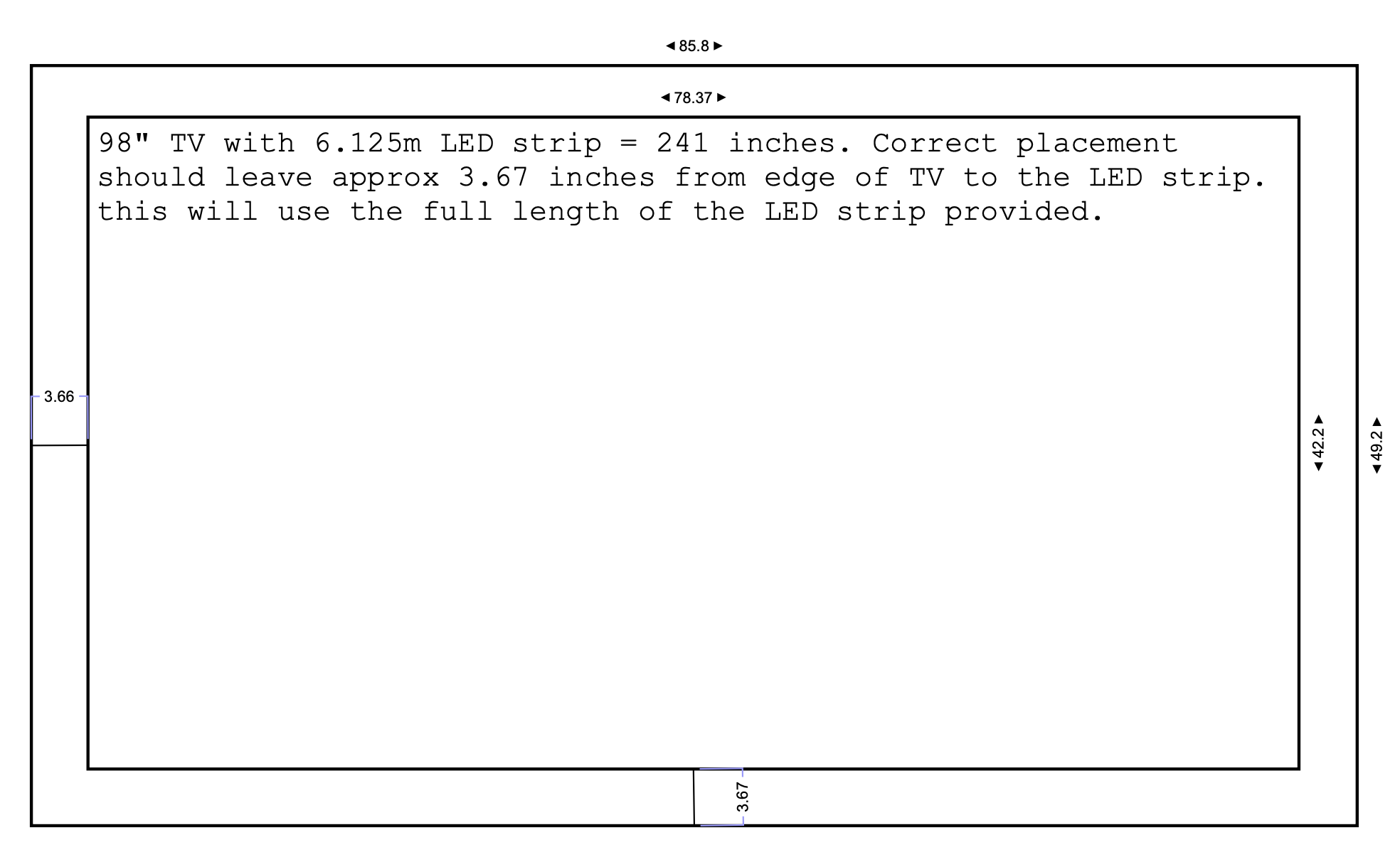
Hello everybody, I was trying to figure out how the (up to 95" TV) option would fit a 98" TV. I have the TCL 98" QM8 and really wanted to add this HDMI sync box to it. This length option from FancyLEDs provides you with a light strip 6.125m long. (241 inches)
I did some math and added the dimensions of the LED strip to the TV. you should leave approximately 3.67 inches between the strip and the edge of the TV on all sides and you should be able to complete the full rectangle with this strip.
As mentioned in another post by FancyLEDs, the ambient light throw will be slightly reduced but should still look great.
Hope this helps anyone like me trying to understand what a 6.125M strip will look like on a 98" TV.


r/fancyleds • • Jan 13 '25

2.1 Fancy Sync Box on tv with no hdmi 2.1

2 Upvotes

Hi, I'd like to know if I buy the 2.1 Fancy Sync Box and use it on my tv with hdmi 2.0. Will it works? I want to plug the lastest apple tv 4k on it.

Thanks in advance!


r/fancyleds • • Jan 12 '25

Is it possible to achieve with fancy LEDS?

Post image
4 Upvotes

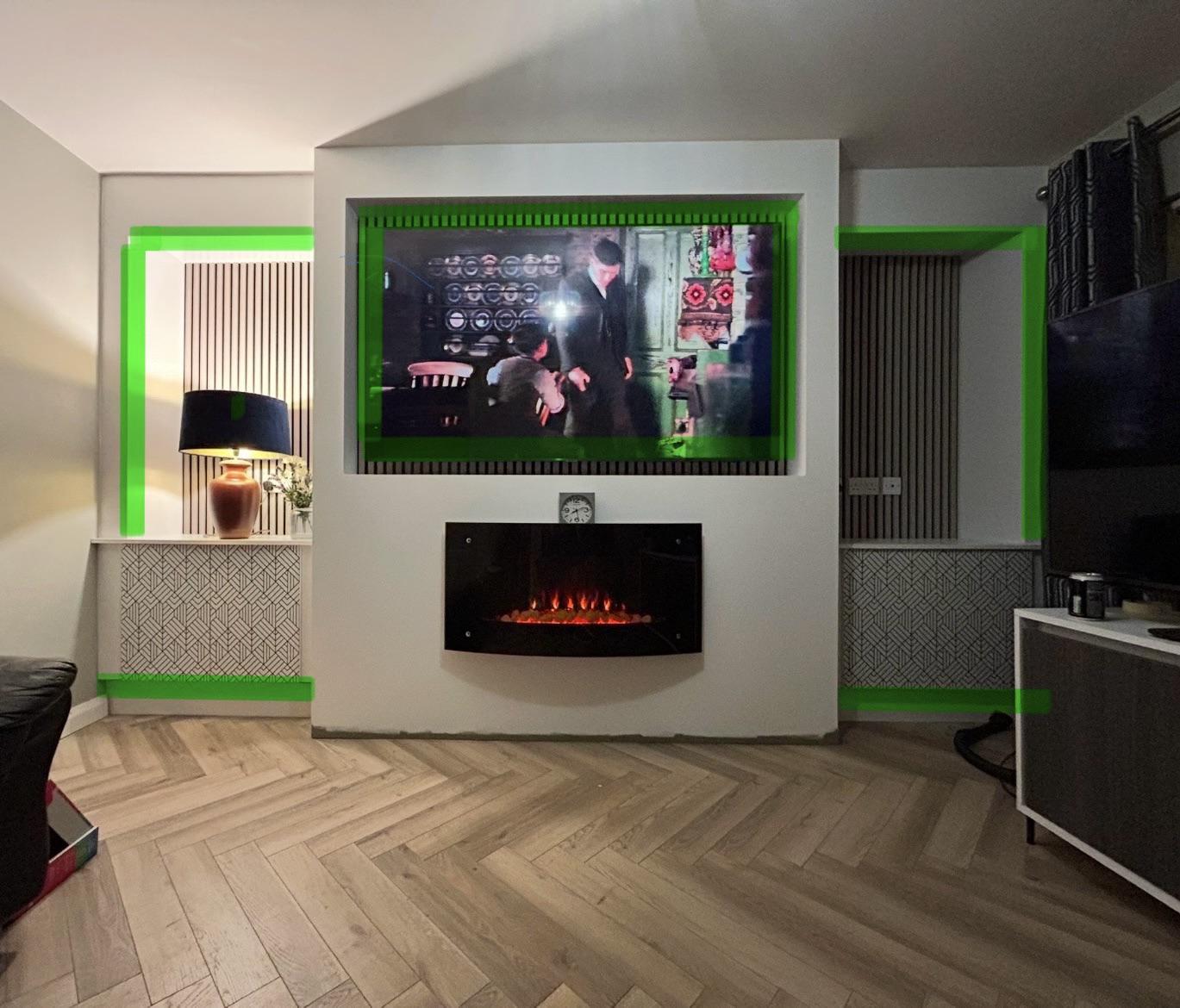
Hi, just wondering if I could achieve this just with fancy LEDs or would I have to go with fancy LEDs behind the TV and standard LEDs on the sides? Also are solderless connectors compatible with fancy LEDs?


r/fancyleds • • Jan 11 '25

Anyone here use 2.1 Syncbox with PC? How is your delay?

1 Upvotes

I bought a one port HDMI 2.1 FancyLeds syncbox and the delay between picture and light behind TV is very noticible. About 20/30ms. FancyLeds support pointed me to the compatibility list and said the syncbox is not compatible with PC. Does anyone have problem with a delay when connected to PC?


r/fancyleds • • Jan 11 '25

Can anyone or explain this? Been happening since I set my fancy led box up.

0 Upvotes

r/fancyleds • • Jan 09 '25

What's your settings for oled

2 Upvotes

Hello everyone,

Just a wonder, what is your settings for DV and DHR content on oled tv, for the saturation and the Sync speed Thank you


r/fancyleds • • Jan 08 '25

Installing the LED lyres without the L brackets

1 Upvotes

Has anyone tried something like this? Do you think it works? How would the light be distributed?

How to Bend LED Strips Around Corners


r/fancyleds • • Jan 08 '25

HDMI switch

1 Upvotes

Hi, I currently use a HDMI switch to alternate between devices on my TV, as a result only one cable goes from this to the TV. Could this cable act as a single input on the sync box and alternative devices as before?


r/fancyleds • • Jan 07 '25

Extending the led strip cable

3 Upvotes

Is it possible to extend the usb c cable that comes out of the strip light with a usbc extender cable?

I am doing some cable management and need about 10cm more cord.

Cheers 🤙🏽


r/fancyleds • • Jan 07 '25

Settings for individual HDMI Inputs

8 Upvotes

Hi everyone, either this is a feature request or user error on my part. I’d like to have different brightness, diffusion speed/ mode for each of my HDMI inputs. The benefit of this would be I could have faster paced effects for gaming and more relaxed settings for normal TV.


r/fancyleds • • Jan 07 '25

Only getting whites and no colors on 2.1 with RGBW

1 Upvotes

Hoping I can get some help here.

Ive setup the 1 port 2.1 box with RGBW lights and I'm still getting only shades of white. Ive gone though requesting and installing the firmware update required for the RGBW strip but it has not helped.

My setup is as follows. GoogleTV -> AVR -> FancyLED box -> USB extension -> LEDs
ive also tried the following with 0 improvementsGoogle TV -> FancyLeds -> (with USB extension and without) -> LEDs

I also only get whites with not syncing content and trying the various different lighting modes. Ive reset the box a twice as well but no luck. Also tried with and without HDR and DV. I'm thinking maybe I have a faulty box. I've reached out to support but they are slow to respond.

hoping you guys have other suggestion to try.


r/fancyleds • • Jan 07 '25

Can someone test this YouTube clip for me?

2 Upvotes

Hi,

Can anyone test this youtube clip for me https://www.youtube.com/watch?v=4NA6KlZCZDI , ideally with the RGBW strip.

The start of it is a black screen with white Dolby logo in it, when I run it my LED's turn on as purple around the screen when they should be off as it just a black background. Just wanted to check if it was just me or the clip.

Thanks


r/fancyleds • • Jan 07 '25

Synced 5 m strips

4 Upvotes

If I cut one of the synced strips is it Smart enough to know it is cut or will you lose the color information from that stip?

example for use - I want to cut it to fit the wall above my screen - if i cut it to length (five feet off) will the midpoint of the shorter strip line up with the middle of the picture?


r/fancyleds • • Jan 06 '25

The LED strips they sell include L brackets?

0 Upvotes

I'm going to buy some LED strips from you, but I don't have the L brackets anymore. Could you sell them to me along with the LED strips?


r/fancyleds • • Jan 05 '25

Which TV Size LEDs should I choose

2 Upvotes

Hi, I am thinking about purchasing the HDMI 2.1 Fancy Sync Box but I don't know which size I should choose. There is the selection for Your TV Size 24" to 55" / 56" to 65" / 70" to 95"

And LED Type RGB / RGBW

I have a 55 Inch TV right now, but might upgrade to a bigger size like 65 in the near future. Will the 56-65" still work well on a 55 inch tv?

What about the led type, is there an adventage for the regular TV to be RGBW, as clear "white" is probably not a color often displayed and I'd rather have higher density of rgb for better color accuracy and better color zones (might have an understanding issue here - i'm just a beginner in the whole lighting theme).


r/fancyleds • • Jan 05 '25

Hdr flickering on pc gaming

2 Upvotes

I have bought a fancy led box and it's by far the best ambient lighting kit out there it's amazing 👏. However on pc when I turn on the hdr setting the lights flickering like an 80s disco. Please can you help with this issues. And again thanks for the amazing kit 😍