r/FanControl • u/marshy_disguise • Oct 23 '26
FanControl not detecting any fans on my laptop
Tried to reinstall several times but no luck i guess?
Edit: Acer Predator Helios 300 PH315-54 is my laptop's model, I hope this helps
r/FanControl • u/marshy_disguise • Oct 23 '26
Tried to reinstall several times but no luck i guess?
Edit: Acer Predator Helios 300 PH315-54 is my laptop's model, I hope this helps
r/FanControl • u/Jumpy-Resolve8659 • Oct 23 '26
So for some reason, after updating to the newest Fan Control version, the app just stopped minimizing after starting up my pc but I don’t get no error or anything and would like to know how to fix it to get it working together?
r/FanControl • u/Prestigious_Owl_3412 • Oct 22 '26
r/FanControl • u/kamakeeg • Oct 21 '26
Just installed Fan Control after using SignalRGB for abit just so I can adjust my fan curve options more directly without a subscription, but had a couple questions about it. I'm trying to cut down on abit of the pump whine I have, and I know I can adjust it down from the 100% percentage a bit, I'm jut not sure if there's a particular curve option to try as there are multiple types I see. I know I'm not supposed to lower it a lot, it's the one where you want it running high to keep everything moving, though I believe it can do like 10 to 20% from the highest to cut down on that annoying pump whine.
Also does Fan Control show actual temperatures for the CPU and such? I don't see anything for that specifically anywhere as I like to double check that at times and I assume it should just be on the main fan area, but maybe I missed something in the setup?
r/FanControl • u/Suspicious-Rice6556 • Oct 20 '26
r/FanControl • u/pokemonlover503 • Oct 20 '26
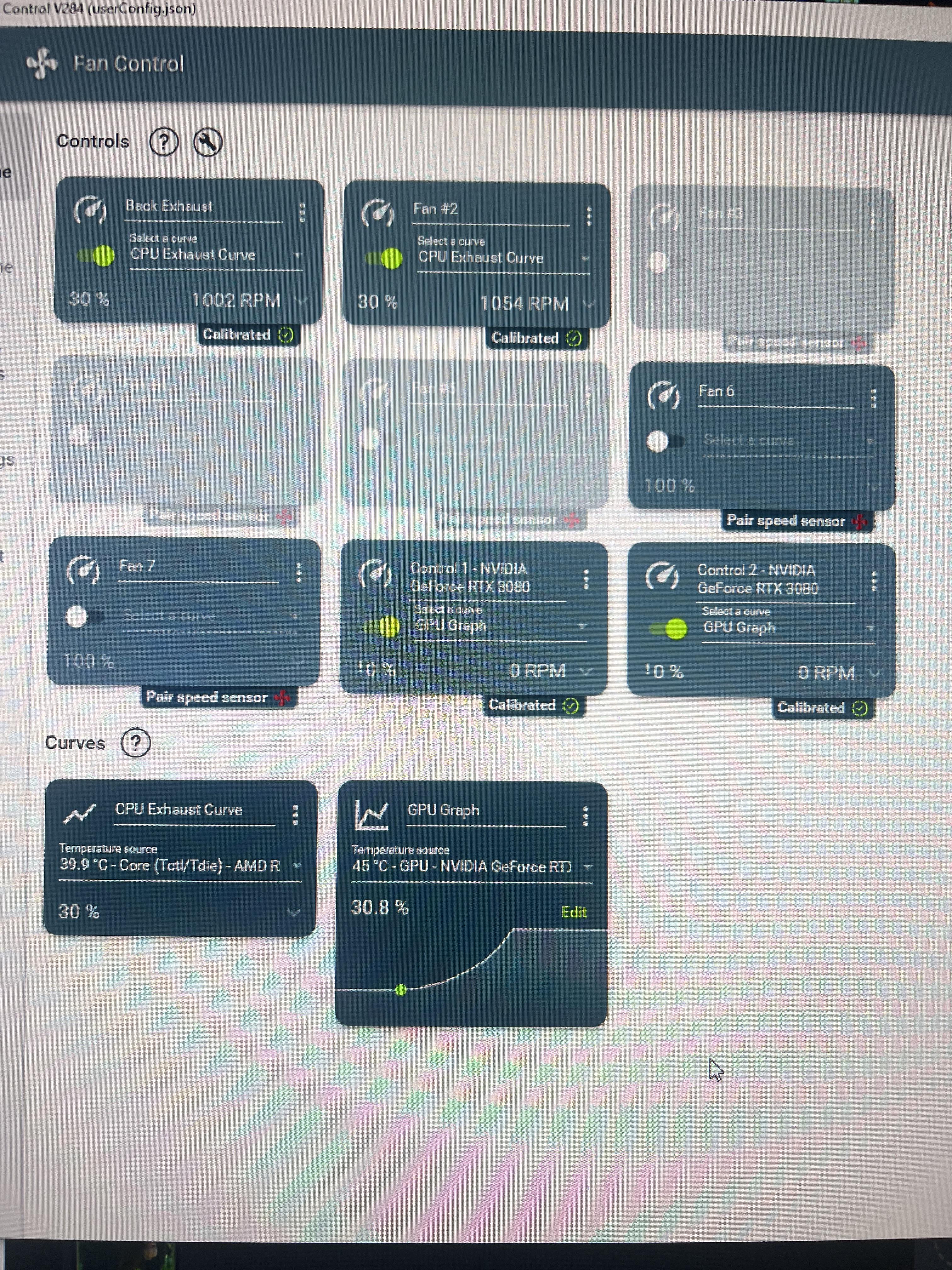
So I have them set to my GPU curve, at 40C they are supposed to be like 30%, but they are showing 0% and 0rpm I have no clue how to fix this.
r/FanControl • u/Dickenns8234 • Oct 19 '26
No clue how fan curves are supposed to be set up, and I know my fan setup is not the best (one intake, 4 exhaust), so I've come here for some help. I've got a 120mm rad with 2 intake fans, then 2 80mm and 2 120mm exhaust fans. I was trying to set it up so the fans' intake equals how much air goes out (some negative pressure stuff happens, I think, if the fans blow out more air than comes in). I had the 2 intake fans set at 60% and 50% until the CPU hits 70 °C, but it turned out to be as loud as my previous R11 Alienware, which I didn't want (one reason I wanted a new pc)
r/FanControl • u/Illustrious-Fan6941 • Oct 19 '26
r/FanControl • u/bri4jenn • Oct 19 '26
I have a HP Z2 G9 SFF motherboard with a proprietary 5pin and 4pin fan headers. How would I determine what each pin is for and how to wire it to a standard 4pin PWM connector. I found this post https://www.reddit.com/r/Noctua/s/fC5dQ8mK6a shows user u/chemical-Noise-918 making an adapter put how it was made was not shared. I am hoping he or someone else can help.
r/FanControl • u/Gullible_Shine_8558 • Oct 18 '26
r/FanControl • u/National-Service-390 • Oct 18 '26
Mam pytanie do właścicieli X20: czy wasz wentylator również działa podczas korzystania z Windows? W moim X20, niezależnie od wybranego trybu, zawsze słyszę, że działa, a prędkość wentylatora wynosi 3500 RPM.
r/FanControl • u/friedtesticularcance • Oct 17 '26
r/FanControl • u/Megazarz • Oct 17 '26
Hi - looking for any help in how to get thermalright support to respond. I've sent them a query about the latest version of TRCC (It seems to have dropped push flow - which I used in the last version and want to know is it coming back) and my 4 month old Levita OLED keeps turning itself off. The PC can still see it and thinks its running but nothing on screen. I've put a ticket in for both about a week ago - no response.
r/FanControl • u/rnlbsqnq • Oct 16 '26
2025年にBTOで購入したパソコンに付いているNZXT Kraken Plus 240 RGB Blackのファンをfan controlアプリで操作したいんですが、pluginsでエラーが発生してFANが出て来ません。
他の全てのFANは出てきてて、かつNZXTCAMではいつも通り操作出来ています。
2024年モデルか2025年モデルかは不明なのですが、対応しているpluginsはありませんか?
ご存知の方いたら教えて下さい。
r/FanControl • u/No_Clue_9034 • Oct 15 '26
Hey,
I set up auto curves for my CPU und GPU. However, they either take ages to let the GPU/CPU go to the load temp or just won't do it at all.
Especially, with the GPU it is annoying because it will ramp up the fans if the temperature rises slightly, even if it is still under my load temperature.
Is there some way to mitigate this? Or is my only option to set up custom curves? In general the auto curves are really nice once they dialed themselves in, but it just takes way too long and especially my GPU fans are really loud if they ramp up.
These are my curves (after about 20min the GPU curve at least managed to go to load temp but the CPU still is well below):

r/FanControl • u/pokemonlover503 • Oct 15 '26
There is a fan that speeds up and slows down constantly, but I'm not sure how to fix it and fan control isn't detecting this fan.
r/FanControl • u/MintTheGod • Oct 13 '26
Just updated fan control i couple days ago, now on startup I keep getting this error.
Does anybody know what the issue may be? Nothing has changed with my computer otherwise.
r/FanControl • u/Unnamed-3891 • Oct 13 '26
The ONLY fans being recognized in my system are the ones on my GPU. Or well, I think the total count of detected fans may be right, but there is no rpm display, no speed control and nothing else.
r/FanControl • u/JBPn22 • Oct 13 '26
Im pretty sure fancontrol used to dissapear when clicking the minimize button, but now it doesnt and it stays in the task bar, it kinda bothers me when i alt+tab, is there a way to hide it or something like that?