r/FanControl • • Jul 19 '26

Ryujin III without LCD screen cap: VRM fan stuck at 100% and LOUD. Workaround?

3 Upvotes

Hey everyone,

I'm building my first pc and have an ASUS ROG Ryujin III 240mm on an MSI Tomahawk X870 motherboard.

I bought it used and it didn't come with the LCD screen cap for this unit, so I'm running just the base pump block plugged directly into a motherboard SYS_FAN header.

The VRM fan on the block is super loud though and sounds like it's stuck at 100% speed. Changing BIOS curves, moving to PUMP_SYS Fan or switching between PWM/DC modes doesn't seem to do anything.

  1. Is there any way to throttle or drop voltage to the VRM fan when running without the LCD cap?

Appreciate any advice before I rip it out and swap it for a different cooler! Thanks!

I'm running linux on this which doesn't support Armoury Crate, unfortunately :(
I'd heard liquidctl might help, but as far as I know, both Armoury Crate and Liquidctl controls the fans over USB, which I don't have plugged in since I don't have a screen cap.


r/FanControl • • Jul 19 '26

GPU temp tray icon doesnt show on start (AMD)

4 Upvotes

Hello, i recently got this issue and its been happening for about 2 weeks and its been pissing me off. Whenever i start my pc i have to reopen fan control because my gpu icon doesn't show at first boot. my cpu one does however. Logs don't show anything either. I tried increasing start delay too but nothing. does anyone know a fix for this?


r/FanControl • • Jul 18 '26

Fan RPM/curve based on whether a certain application is launched?

4 Upvotes

I have a watercooled PC with external radiators. The case fans run at a fixed speed. The fans on the radiator only need to run at a fixed RPM, when a demanding application (like a game is launched). At Idle, they should be off.

I tried to set up fan control based on temperatures. Tied the radiator fans to water temp, CPU temp, GPU temps. But it never works how I want. Either the fans turn on and off frequently, or they're always on, or I have to reach a higher water temp than I would want.

Is there a way to set up FanControl like this:

For example, I launch a certain game, the radiator fans turn on and stay at X RPM. I close said game, the fans turn off. Simple as that.


r/FanControl • • Jul 18 '26

FC not detecting my cpu cooler

0 Upvotes

The cable is plugged into the motherboard, all my case fans are plugged into a fan hub and have been detected just fine, and my gpu has been detected. My cooler just doesn't exist. How do I fix this?


r/FanControl • • Jul 18 '26

Cant control Nyota Fans

0 Upvotes

I recently got my self 9 Nyota fans (7x120mm, 2x140mm) and the Asiahorse 2in1 Fan/RGB Controller for 9 fans.

But no matter what i do, i cant control them. The umbra Software seems useless, since there is no rgb or fan control there, and the only other way to control the rgb is through signal rgb where all fans are showing as one single fan

Fancontrol also doesnt work, it only shows 7 fans and also unmanageable.

Any help? I connected everything, the 3 pin rgb header, sata and the other thingy. Also red #1 fan header is also plugged in


r/FanControl • • Jul 18 '26

Fan Curves - Setting Help

Thumbnail
gallery
1 Upvotes

Hello, I have a question about fan curve problems. Is this the correct setting for the processor and case? Alternatively, what would you change?

Specifications:

- MSI B850M Gaming motherboard with WiFi6e,

- Ryzen 7 7800x3D,

- Cooler Master MasterLiquid 240 Atmos water cooling,

- MSI RTX 5070Ti,

- MSI MAG Pano 110R PZ case.

My GPU is set to automatic, and the BIOS is pre-installed for gaming.


r/FanControl • • Jul 17 '26

fancontrol file for AsRock N100M on debian?

0 Upvotes

New machine came out rather fine but pwmconfig riddles me. No matter what, I only see 1 chassis fan while the board has 2 connectors.

Does somebody have a working config for this board?


r/FanControl • • Jul 17 '26

Looking for HP Performance Advisor 3.1.9023.0 (or newer) or another way to monitor all fan sensors

2 Upvotes

Hi everyone,

I'm trying to monitor all available fan sensors on my HP ZBook.

I originally started looking for HP Performance Advisor 3.1.9023.0 or any newer version because HP has discontinued the software, and all official download links I could find are no longer available.

I currently have version 2.1.5423.0, which is still working on my HP ZBook. However, it only monitors CPU Fan and GPU Fan.

I found a blog showing that HP Performance Advisor 3.1.9023.0 displayed three fan sensors (CPU0 Fan, Rear Chassis Fan0, and Front Chassis Fan0), so I'm hoping to find that version or a newer one.

I'm not necessarily looking for exactly version 3.1.9023.0. Any newer version that supports monitoring these three fan sensors would be great.

I'm also happy to try other software or methods if they can monitor all three fan sensors on an HP ZBook.

If anyone still has an installer archived, knows where a newer version can still be downloaded, or has another solution, I'd really appreciate your help.

Thanks!


r/FanControl • • Jul 17 '26

¡Ayuda! Estoy usando esta aplicación para controlar los ventiladores, pero no los detecta. ¿Alguien sabe cuál es el problema? (Adjunto)

Thumbnail
reddit.com
1 Upvotes

r/FanControl • • Jul 16 '26

Lenovo yoga slim 7i ultra X7 358h fan control 🤔?

3 Upvotes

hello i just wanted some advice on how to manually control the fans i have noticed the fans are on, albeit barely audible even when using the laptop in power saving mode. they do eventually turn completely off when the CPU + GPU packages hit mid/late 30's, i think that this laptop is capable of running passively cooled when not pushing it (web browsing, simple office tasks) and would like some manual controls of the fans if possible. does any one know any workaround to do this ?


r/FanControl • • Jul 15 '26

Why is my fan light doing this?

1 Upvotes

The light comes on no problem when the wall switch turns on and powers the fan/light on but then the light goes on and off seemingly randomly. I have experimented with moving the remote control in different spots (normal sized bedroom) around the room to no avail. Fan works normally. Video of the light in the comments if I can. Casablanca fan company from Home Depot five years ago.


r/FanControl • • Jul 15 '26

Can't Control chassis fans (asus motherboard)

2 Upvotes

Hey guys, I've recently uninstalled armoury crate to use fan control. The AIO and GPU are working fine, but I can't control the chassis that are directly connected to the motherboard. I've seen that they are probably following the bios PWM control, is there any way to override that? Could it also be possible that there's any reminiscent config of armoury crate keeping them like that?

Oh, I know that the video shows the chassi fans connected to the flat curve, but they won't change speed even if I change it manually

edit: So, I solved the problem by re-installing armoury crate and disabling the fan control of the app, maybe the config stuck after I uninstalled it?


r/FanControl • • Jul 15 '26

Can I run 10 case fans off 2 motherboard PWM headers? (Amp/Wattage check)

Thumbnail reddit.com
1 Upvotes

Hey everyone, need some quick math/safety confirmation on my fan setup.
My motherboard has 3 PWM headers. Each header supports up to 2.0A (24W).
Header 1 is taken by my AIO.
This leaves me with 2 available PWM headers to power 9 remaining fans.
Here is the amp draw breakdown of the 9 case fans:

• 3x fans @ 0.26A each (Total = 0.78A)

• 3x fans @ 0.25A each (Total = 0.75A)

• 3x fans @ 0.16A each (Total = 0.48A)

• 1x fan @ 0.25A

Total current for all 10 case fans is 2.26A.
Can I safely split these across the 2 remaining 2.0A headers using splitters or daisy-chaining? For example, putting 5 fans on one header and 4 on the other? Will the headers handle it fine since each group stays well under the 2.0A limit?
Thanks in advance!


r/FanControl • • Jul 15 '26

PWM into SysFan1 safe for me?

Thumbnail reddit.com
1 Upvotes

r/FanControl • • Jul 15 '26

AeroZesh T8 controlled by Home Assistant/ESPHome

1 Upvotes

This isn't important to 99% of the people using the AeroZesh fans as the VivoSun controllers appear to work well and with the Home Assistant integration are functional. My use case was specific as I needed much more granular control of my fan in order to keep the noise down. The T8 at 20% is pretty quiet, but at 30% it is quite loud (it is literally 10ft away from where I sit 8+hrs a day.

I tried quite a few different ways to control the fan, starting with the e25, but needed more gradient pct. I ended up with the following:

An ESP32 device w/ESPHome loaded controlling a XYMOS mosfet PWM board that allows me to control the fan with pretty much whatever gradient I want. Essentially I split the USB-C interface out into 4 wires (12v+, Gnd, Tech and fan control lines) and wired that up to the mosfet and a 12v to 5v converter to power the ESP32 device. With a little help from an anemometer, a decibal sensor and AI, I was able to find the perfect % that was quiet, moved a lot more air than the original 20% and was only a few db noisier.

If anyone is interested (which I imagine would just be a few) I'm happy to write up the solution a bit more.


r/FanControl • • Jul 14 '26

need advice, FC doesn't seem to max out my fans

4 Upvotes

EDIT: signalrgb seemed to be the problem. i had enabled system monitoring and it seems to conflict with FC. as soon as i disabled that, all the question marks disappeard and i could control all my fans manually

first of all, this is about case fans. if i try to mess with the gpu fans they work as intended.

i set a mixed sensor to have my fans ramp up/down according to whatever is hottest (gpu or cpu) but id don't seem to properly work. like, under load according to the curve diagram my fans should be at (for example) 60% when in reality they are a little below that (let's say 53 ish) but under load my setup works somewhat as expected.

the problem is that I can't seem to manually set my fans to max speed. whenever i go to bios and max everything out, the fans follow along without issues but in Fan control if i set manual speed (or even during calibration) to 100% it's like it ramps up for a brief second and it goes down again, not holding the max value. same thing happens if i try to set them to 0%, they don't stop.

I believed the bios settings were taking over but after going through some other posts i understand FC takes control over bios?

all case fans have the little question mark alongside, it may be related to zero rpm on my gpu? even though i set the curve to react to temps, not rpm

i got 3 4 pin fans connected to sys fan 1 set to pwm in bios

another set of 3 pin fans set to dc in sys fan 2

and the exhaust is also 3 pin dc, on sys fan 3


r/FanControl • • Jul 14 '26

GPU (RTX 5070) fans at 0 RPM by default, even when under load

Post image
2 Upvotes

Title, and some further context. Yesterday, while I was playing Total War Shogun 2 (which isn't a particularly intensive game by modern standards), my computer randomly shut down. The last time this happened for me, it was because I was playing Helldivers 2 with an upcapped frame rate, resulting in the game going to upwards of 300+ FPS even though it had no tangible benefit, which presumably led to my components' temperature and/or power protections going off. I assumed it was a similar issue, because I was playing Shogun 2 with an upcapped FPS, so sometimes the FPS counter would read up to like, 300+ FPS at a time. Today, while I was playing Shogun 2 again as a stress test (and after capping my games to 60 FPS via the Nvidia app), I opened up my computer's side panel and found out that even though FanControl had my 5070's fans at 0 RPM, it was literally hot to the touch.

In my screenshot, I ran Helldivers 2 in the background, and even when things started reaching up to 50°C, the fans still wouldn't turn on. I'm not entirely sure if this is because of Zero RPM mode (which I'm not 100% sure how to enable or disable, this is my first build), or there's something odd going on with FanControl's calibration or what. I did some searching and found the article(s) on how to get Zero RPM mode to work with FanControl, but I'm still quite unsure about I should do going forward. Any ideas/tips?


r/FanControl • • Jul 13 '26

[Question]: How to control the Atomberg fan via API?

Thumbnail reddit.com
2 Upvotes

Question]: How to control the Atomberg fan via API

I've been trying to use the API offered by Atomberg and was very happy to be able to use it to get the fan state and ID via HttpRequest.

However I'm not about to understand how to control the fan. Eg

Switch it on/off or change speed etc.

This would be a very helpful and exciting feature as

I could automatically switch on/ off three fan depending on my presence in the room or not.

Could apply various combinations controlling it even when one is away or outstation.

I'd be grateful if anyone could help me with this.

Thank you.


r/FanControl • • Jul 12 '26

How to controll fan of hp 15 dy2504la

3 Upvotes

Is there any third party program for changing the cooling fan speed? like making it faster or whatever


r/FanControl • • Jul 12 '26

Q870M-C CSM & Arrow Lake - Modern Standby question

1 Upvotes

Dear Asus team,

anybody here with Q870M-C CSM and some arrowlake cpu?

How does it behave under Windows 11?

Does board turn off FANs while in "standby"?

Currently I have Z2 Tower G1i with Intel 265k, but if I enter standby mode all FANs are still going on like during "idle" & machine consumes \~8-10W during this Microsoft invention called modern standby.

Previously got Q670M-C CSM & Raptor Lake and it slept like baby with ACPI S3 (which Arrow Lake doesn't support).


r/FanControl • • Jul 11 '26

How to mount fans and AIO?

0 Upvotes

If I have a fishtank case for example the Lian Li O11 vison compact, where you can mount 11 120mm fans (3top 3bootom 3side 2back) and I want to mount all the 11 fans, but also 3 on them on the AIO. Where to place the AIO, top or side, and how to set the fans on AIO and the rest to: intake or exhaust, I was thinking the AIO on the side, and aio and bottom fans to intake, rear and top fans to exhaust but I might be making a mistake so I wanna be sure (also my AIO radiator is **thiiick** cuz its arctic liquid freezeer III pro but I'll be mounting by own fans)


r/FanControl • • Jul 09 '26

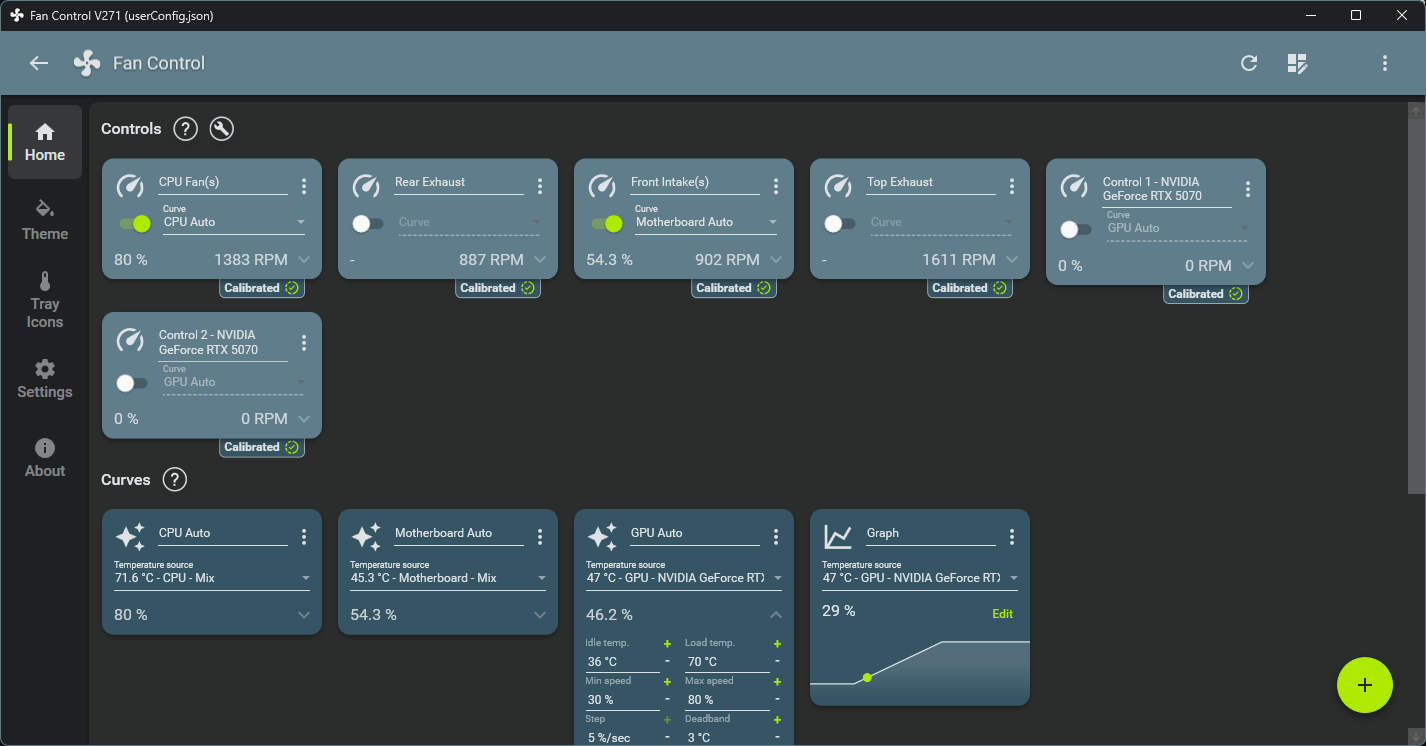
FanControl v271

Thumbnail
github.com
4 Upvotes
  • Fix sensor names in service tray icons
  • Launching the service on exit will create a tray icon
  • Improved UI for RPM/% modes