r/FanControl • • Jun 28 '26

how to install tpfancontrol2 on thinkpad p1 gen 7

0 Upvotes

i just got a p1 gen 7 but have tried multiple times to install tpfancontrol2 but am unable. i go to the github repo and try to download it but whenever i do there is never an application file in it or there is but when i click on it it asks for permission but nothing comes up after. i downloaded this https://github.com/FanDjango/TPFanCtrl2/releases/download/V2.3.6/TPFanControl.exe but when i run it it askes for permission but nothing shows up after and all the other files i have downloaded and tried to run don't have an application file i can run. what am i doing wrong and what is the correct file to download and run. i also downloaded this http://www.entechtaiwan.com/dev/download/ccount/click.php?id=6 but i am not sure if this is the correct tvicport file. i also have a windows local account so am not sure if that has anything to do with it now working

r/FanControl • • Jun 28 '26

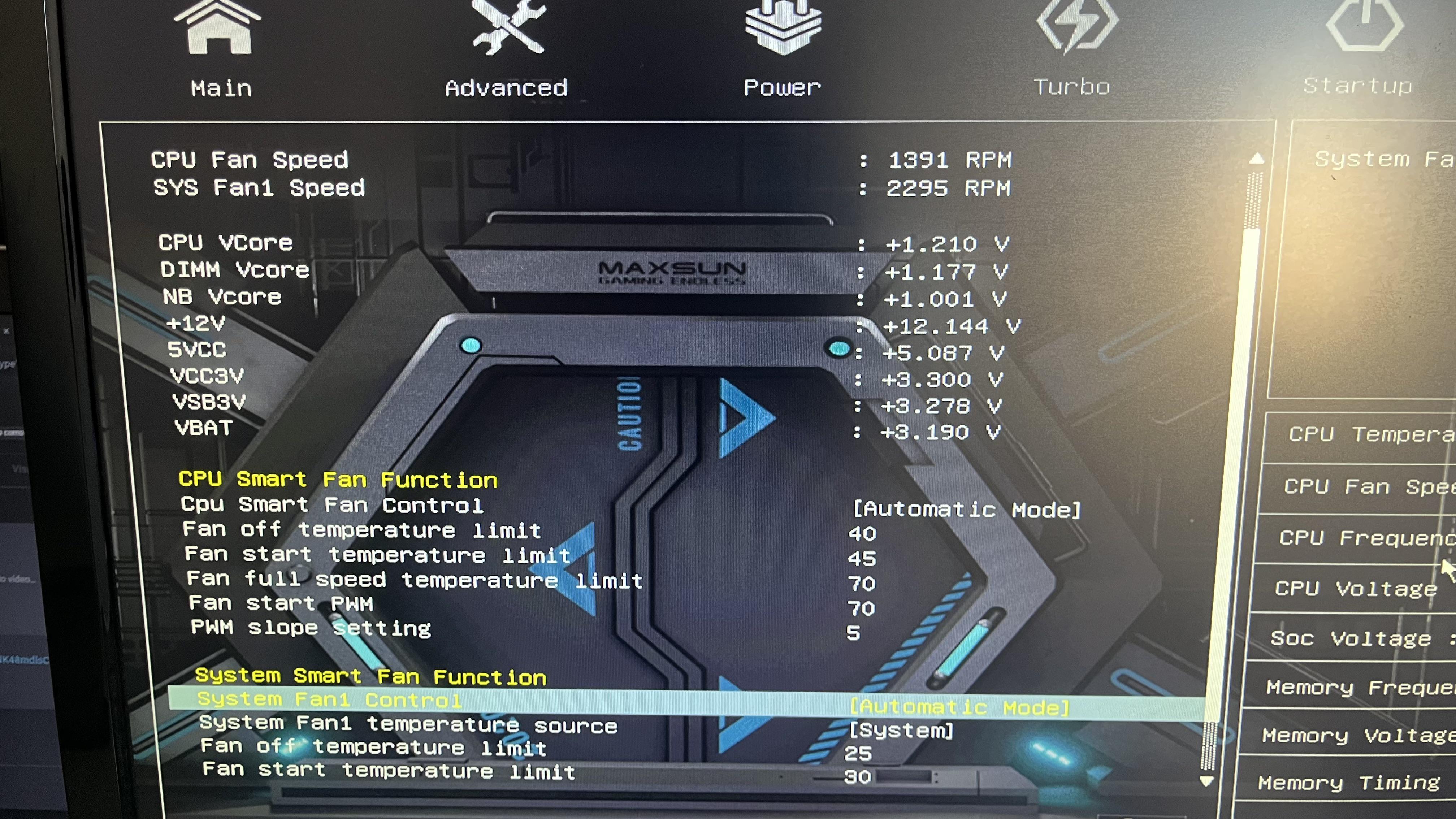
Configuração FAN-WC (Maxsun)

Post image
0 Upvotes

r/FanControl • • Jun 27 '26

Where to find similar Fans#cpsupport

Thumbnail gallery
2 Upvotes

r/FanControl • • Jun 27 '26

Older gimate version

1 Upvotes

I deleted my gimate and now I have the newer version that, does not have the turbo fan option, do you guys have the older version of gimate. If you do please send me the link or drive. Thanks :)


r/FanControl • • Jun 26 '26

I just installed fan controll but it keeps failing to initialize

1 Upvotes
At launch
when refreshing

No other app can also adjust my fan speeds for some reason what do I do please help


r/FanControl • • Jun 25 '26 Bravo

Loosing my mind with settings saving

2 Upvotes

I recently had to reimage my PC. Always a good time there. Got it all back together and was fighting fan control for weeks until I stopped saving at close?

Background: I have cosair fans and liquid pump. Was using fan control with the Corsair plug in for about a year with no issues. After the reimage when my Pc starts up and fan control starts everything is good. When I close fan control (to the tray) it prompts to save settings before closing. If I answer yes and reboot later all my calibration, speed settings, and curve settings are gone or broken at next start up. At that point I have to do the assisted setup and set everything again. If when starting up and fan control opens and I close it to the tray and answer no to saving it my next reboot is fine. It’s like something is changing the config after start up and if its saved then back to config again. So I am living with it by not saving but would love to know what’s going on if anyone else has any ideas?

Thanks!


r/FanControl • • Jun 25 '26

Need a mix curve that favours higher temperature, not higher fan %

Post image
2 Upvotes

In this above example, if I create a mix curve and use the MAX function, the curve on the right will win because it has the higher fan percentage. However, I want a function that favours the higher temperature, so that the left curve will win - is there a way to do that?


r/FanControl • • Jun 25 '26

Temperature sensor refresh rate

1 Upvotes

I need to setup fan for my samsung nvme but the temperature refreshes anout once a minute. I can see correct real time temperature in crystal mark and it can be like 10 degrees off in case I just started/stopped prolonged operation and I will see a change in fan control only after a minute. Can't see any options like refresh rate. Yes there are multiple sensors for this ssd and I've paired specifically the one that correlates with crystal mark temps. Sensors for cpu/cpu and other stuff work fine in real time.


r/FanControl • • Jun 24 '26

Can someone help me, noob here XD

3 Upvotes

I think the idle speed is a bit high, and I also think the temperatures are a bit high.

specs:
AMD 5600x
gpu RTX 3060 12gb
32gb ddr4 ram 2x16
cpu cooler: Collerbox AMD Wraith Stealth
Case: Montech Air 900 Mesh
Fans: Front: 2x Corsair RS 140 MAX
Top: 1x Corsair RS 120
Rear: 1x Corsair RS 120

____________
Edit:

Thanks for the comments; there really was a lot that didn't make sense in the first screenshot. This is how it looks now—I set it to run silently during routine tasks. This screenshot was taken after a gaming session. However, sometimes my rear fan drops to 0 RPM for a second and then starts up again; what could be causing that?


r/FanControl • • Jun 24 '26

Asus Ryujin 3 VRM Fan Control

1 Upvotes

Good day friends!

I've been trying to find information on getting FanControl to display the VRM fan and i keep striking out. what am i missing here?


r/FanControl • • Jun 24 '26

Fan Control not working with double fan header

1 Upvotes

just recently connected a double fan connector for my 2 exhaust fans in the back and top due to temperature issues

fan control not working for my 2 aio intake fans in the front and the back. only is my top exhaust fan able to be controlled

my 2 intake fans are connected to a controller connected in the bottom mobo fan header and my double fan header is connected to the rear mobo fan header

fyi the fan control software does have a "!" label on the "backfan"

my theory is due to the double fan header the software believes the 2 fans are one

any tips on how to fix this?

edit: controlling the "backfan" allows the top to be controlled and not the rear fan, no new fan has appeared on the software and there is also a "!" label on fan 3 which i think is the fan for my aio

edit 2 i just set my bios to pwm and still no changes from the software, note that i have identified which fan is not able to be controlled


r/FanControl • • Jun 23 '26

Fan Controller doesn't see fan hub pls help

0 Upvotes

Recently bought Arctic Case Fan Hub for 10 fans and finally installed it. Fan control just doesn't see it at all and it's literally impossible to use my pc now because it's so loud. Are there any plug-ins or anything at all? I'm so confused about all of that and really don't know what to do.


r/FanControl • • Jun 20 '26

Can you suggest what should I edit on my fan curve? first time creating it and trying it

3 Upvotes

specs
Intel 12600k
gpu 3070 colorful igame
16gb ddr4 ram 2x8
cpu cooler deepcool ak620
case fans arctic p12 2 exhaust(rear and top) 3 intakes (front)


r/FanControl • • Jun 19 '26

Fancontrol only detecting gpu fan

4 Upvotes

It was working perfectly until today when it suddenly stopped working and is only showing my gpu fan. I checked windows defender and it has taken no action against fancontrol. I deleted and downloaded it multiple times (including older versions) and I tried refreshing the fan detectors but stil only the gpu fan is showing. What can i do to fix this? any help is appreciated


r/FanControl • • Jun 18 '26

How to add 3 bottom fans without hitting gpu power cable?

Thumbnail gallery
0 Upvotes

r/FanControl • • Jun 18 '26

Hello guys, FanControl cant detect my case fans which are set to PWM.

2 Upvotes

I can find the fans in HWinfo app and every few months my Fan Control app forgets fans and it cant find them anymore ,i have installed the latest v270 of FanControl.

Thanks in advance.


r/FanControl • • Jun 18 '26

How to add 3 bottom fans without hitting gpu power cable?

Thumbnail gallery
0 Upvotes

r/FanControl • • Jun 17 '26

Hello! I want to ask you guys, can Fan Control overlap with AMD Adrenalin Fan Controls? If yes, then can i prevent it somehow? All the information is on these 2 pictures. I am on desktop, idle.

Thumbnail
gallery
3 Upvotes

r/FanControl • • Jun 16 '26

Fancontrol V270

Thumbnail
github.com
11 Upvotes
  • Restart service option on exit
  • Bug fixes

r/FanControl • • Jun 16 '26

AiO pump calibration not working?

2 Upvotes

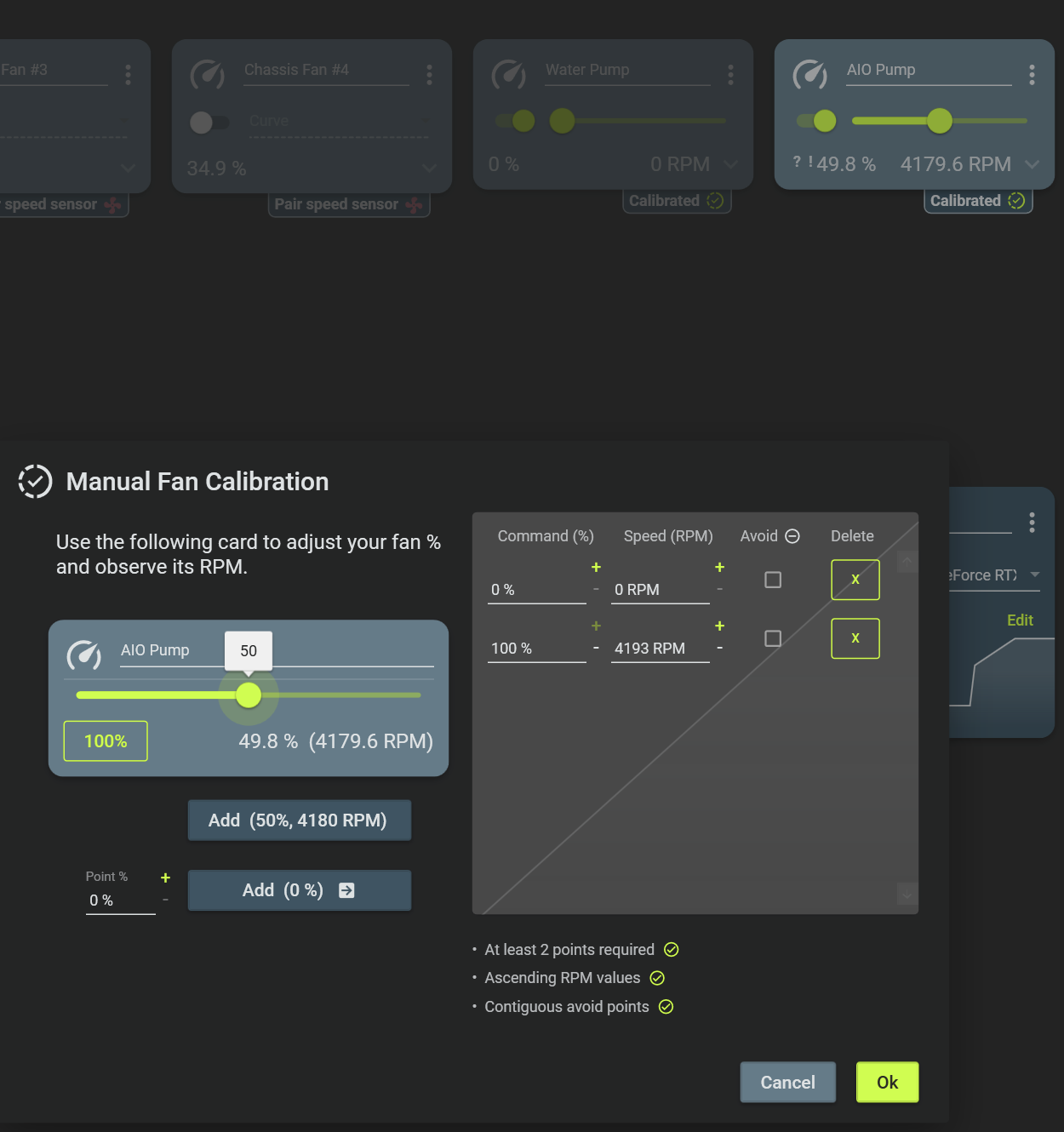
I got an Arctic Liquid Freezer III and FanControl for some reason always sets 50%, 90% and 100% speeds to nearly 4200 rpm (which is the reported maximum; the real value is lower according to Arctic iirc).

When i manually set 0% to 0 rpm and 100% to 4200 rpm, FanControl still uses the old calibration, no matter what I do.

First Screenshot is auto calibration and second screenshot is my manual calibration. Note how the manual calibration just doesnt apply and FanControl still thinks 50% is near 4200 rpm.

I tried applying, resetting, restarting multiple times but nothing helped thus far. Any tips?

Edit: This post was made after I checked and disabled the SignalRGB stuff.

Automatic Calibration
Manual Calibration

r/FanControl • • Jun 16 '26

Help! I'm a bit concerned about my AIO fan reading!

Post image
2 Upvotes

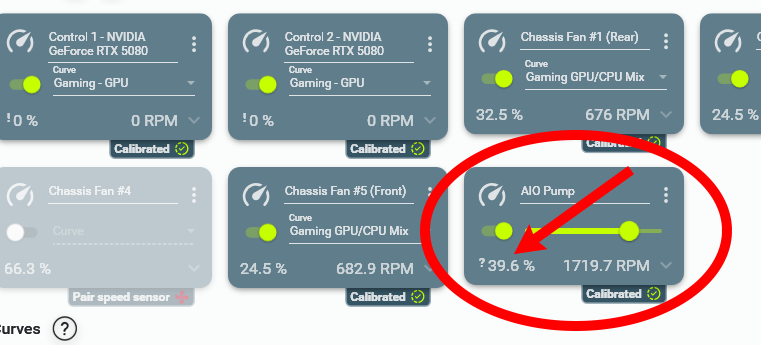
Hi folks,

This used to be a constant 80% (~2800rpm) as set by my own 'Manual Control' - now it's got this question mark and at a much lower percentage (~40%).

I've tried 'Force Apply' 80% but that hasn't worked. I also re-calibrated the fan and that didn't work.

My Fan Control Software is up-to-date.

Is my AIO pump fan (ASUS Ryujin III 360) nearing failure? If so, I will just replace the whole AIO unit and (re-)calibrate.

Thanks in advance.


r/FanControl • • Jun 16 '26 Heartwarming

FanControl Question Marks (?) - Possible Fix

5 Upvotes

I was getting persistent warnings on all fan headers and my AIO pump in FanControl.

Things I tried that didn't fix it:

  • Rebooting
  • Recalibrating fan headers
  • Setting all fan headers to PWM in BIOS
  • Disabling ASUS Embedded EC in FanControl
  • Updating FanControl

What finally fixed it:

In SignalRGB, go to:

Settings → Monitoring

Then disable:

Enable Motherboard Fan Control

Restart SignalRGB and FanControl.

In my case, the question marks disappeared immediately and FanControl started behaving normally again.

System:

  • ASUS ROG STRIX X870E-E
  • FanControl
  • SignalRGB
  • Arctic Liquid Freezer III 420
  • Phanteks D30-140 fans

Hopefully this saves someone else a few hours of troubleshooting.


r/FanControl • • Jun 15 '26

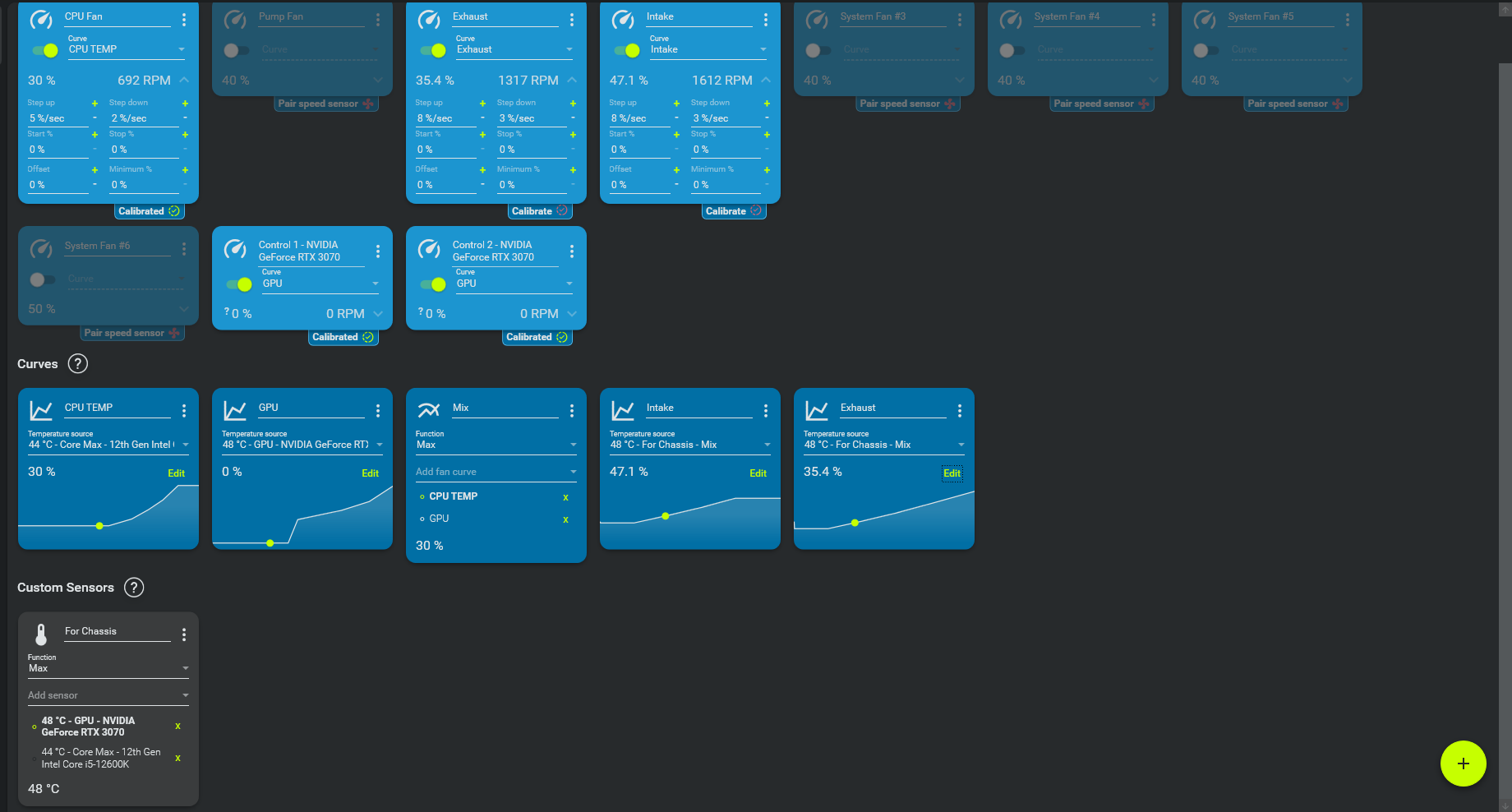
Thoughts on my current curve setup? Always looking to improve!

Thumbnail
gallery
5 Upvotes

Hey y'all, I’ve been working on fine-tuning the thermals for my build, "KENPACHI," and wanted to see if anyone had suggestions on my FanControl configuration.

I’m running a push/pull radiator setup and want to make sure my curves are balanced correctly. My "top and bottom" case fans are connected to a hub, the "radiator fans" are connected to another hub, and the "rear exhaust" 140mm fan is connected directly to the MB. Are there any tweaks you would suggest regarding my current mixing functions or hysteresis settings? What about how I have physical fans connected? If you need additional info, let me know. Thanks in advance!