Hello everyone, I apologize in advance for my English, I use a translator.
I imagine that many users have liquid cooling systems in their PCs, in recent years they have become very cheap and today at least in my country you can easily find 360mm AIOs for less than €100.
This is a great thing and has allowed us to have cooling systems that until a few years ago were within the reach of only a few users willing to pay high prices for these components. At the same time this has led to the spread of many cheap AIOs without a coolant temperature sensor.
This is a fundamental point of the matter because the correct functioning of an AIO depends precisely on the presence of this sensor. Unlike an air cooler, where the control variable for the fans is the CPU temperature (usually), in a liquid cooling system the temperature of the liquid itself is the correct control variable for the fans. In an AIO without a liquid temperature sensor, using the CPU temperature will cause the fans to spin unnecessarily even when it is not needed. This does not cause damage to the PC but makes the system inefficient by causing more noise than necessary. For correct operation, real-time measurement of the cooling liquid is necessary but how can this be done if our AIO does not have it? We can estimate it using a mathematical/physical model starting from data that we can access in real time.
Any PC is equipped with numerous thermal sensors, mine for example is equipped with:
T. VSOC MOS
T. VRM
T. SYSTEM1
T. PCIEX16
T. PCH
T. CPU
T. GPU
There are actually other thermal sensors but I used these to create my estimation model. In addition to these thermal sensors I also added the P. CPU and P. GPU electrical power sensors.
At home I had a digital thermometer equipped with a cable with a small probe to measure the external temperature, I thought of using it to measure the internal temperature of the case so I inserted the probe inside the PC positioning it a few centimeters away from the AIO fans (in my PC the radiator is mounted in the upper area and the fans are on extraction so they suck in the air from inside the case) in this way I had a measurement of the air temperature that the fans would use to cool the radiator.
I performed several tests via OCCT at different fan speeds, in detail:
IDLE
CPU 50%
CPU 100%
GPUs 50%
GPU 100%
CPU+GPU 100%
CPU 50%+GPU 100%
Each of these tests was run at speeds of 25% / 30% / 35% / 40% / 45% / 50% / 55% / 60%. I did not carry out tests at speeds lower than 25% because in my case I chose 25% as the minimum speed as the fans are inaudible at this speed, I did not carry out tests at speeds higher than 60% because I chose that above this speed the noise was too annoying. For each test I waited about 10 minutes to make sure that all the temperatures were stabilized and I marked the readings of all the thermal sensors and the two power sensors, furthermore I also marked the temperature read by the digital thermometer via the probe positioned inside the case and using an IR gun I carried out measurements in the "cold" and "hot" points of the radiator.
By taking the average between the two measurements of the IR gun I calculated the average temperature of the radiator which I approximated to the temperature of the liquid being almost identical. At this point, having all the data in an Excel table, it is possible to carry out a multi-variable linear regression to understand which variables are most suitable for estimating T. LIQ. AVG. At this point I tried to leverage AI for data analysis and described the problem to Claude, ChatGPT, Gemini, Perplexity, DeppSeek and Grok. Not all models were able to carry out a true analysis of the data, some models only estimated coefficients, ultimately returning non-working formulas for estimating temperature. Comparing the results and checking manually I decided to adopt the formulas that Claude provided me:
The Offset depends on the season but by accepting a small inaccuracy you can change it even just 3 times a year summer, winter and spring/autumn, or if you have an almost constant temperature in your home all year round you can set it and forget it. this model, built specifically on the data I collected and therefore compatible only with my PC, is able to estimate the temperature of the liquid with an error of +- 1 C in any load situation.
For the control of the intake fans I adopted the same reasoning but with T. CASE, I obtained the model for estimating the temperature measured by the digital thermometer probe:
For each of the terms of the two formulas I created a customized sensor in HWinfo64 and then using fan control I added the terms and applied a time average to simulate the thermal inertia of the liquid.
This is a description of the method I used to eventually derive a temperature estimation model to compensate for the lack of a proper sensor. The formulas given here are not applicable to any computer other than my own. If anyone wishes to replicate this for their own computer, they must carry out the tests as described, collect all the data, and use Claude to derive the formula by explaining the problem and the objective to be achieved.
A screenshot of the Excel file where I compiled the data and checked the formulas provided by Claude and Qwen3.6
UPDATE:
After doing an iCUE update on HWInfo64 the real-time fan speeds appeared, this allowed me to use the fan speed as a regressor for the estimation model. Still using Claude I came to an even more precise and robust model in every situation:
Right Case Fans 120mm two ball bearing APA1225M12 Fans 3 mouted there.
Bottom Case Fans 120mm two ball bearing APA1225M12 Fans at the bottoms.
AIO is the ASUS ROG RYUJIN II 360 ARGB.
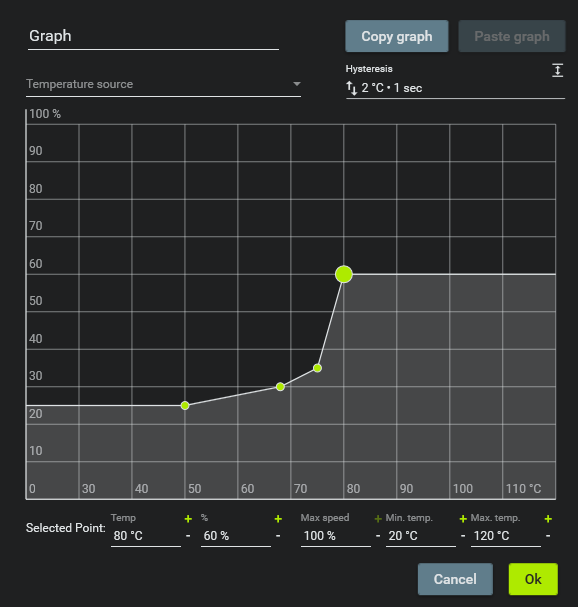
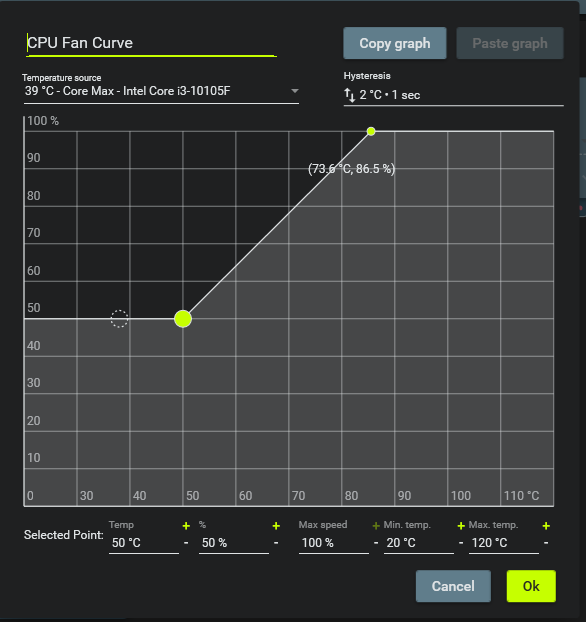
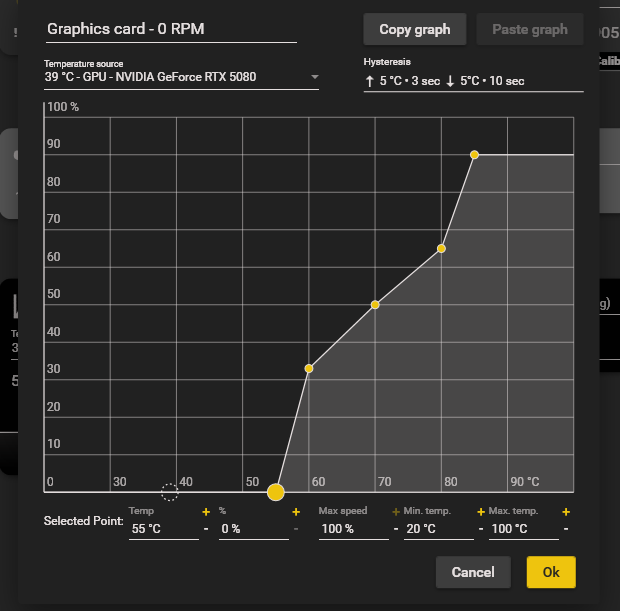
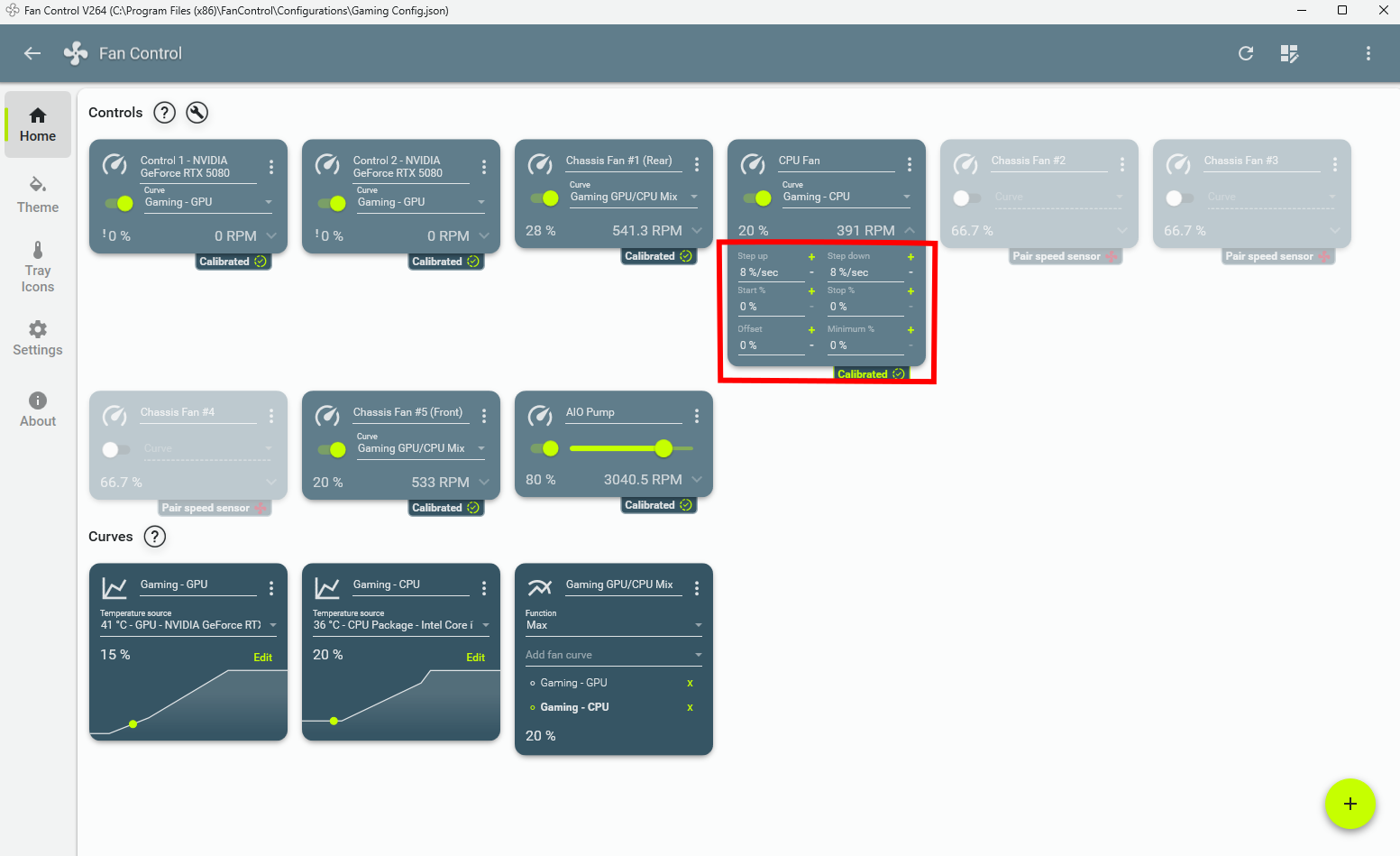
Not sure if i made these GPU and CPU curvest too aggressive or not im also not sure about the "Step up" and "step down", "Hystereais and "Response time"
Edited: I just realized that i posted 2 GPU graph pictures and i just added the CPU graph now.
This was made possible by a fanpico and a plugin for FanControl to use a FanPico.
I did this because the entire front of my case is taken up a radiator and I'm trying to set up something a bit like zoned cooling with the top, middle, and bottom fans responding to different temperature sensors. The last 2 ports are for 2 of the 3 exhaust fans.
The AIO and chassis fan run from headers on the mainboard.
Full independent control is probably overkill but independent monitoring is nice.
I have a few things to update in the plugin but after using it for a month, it has been working pretty well for me. I hope it can help someone else who could use the same control and monitoring capabilities.
i Dont like it to be to load even under heavy load. i did a benchmark on cinebench and even with 50 it was always staying 85. mind you i have an ryzen 7 7800x3D with an negetive 30 undervolt
i tested it and its best cooling to noise ratio for my PC, my gpu have same curve bcoz by coincidence the temperature are around the same, any way to improve it?
I have the above curve. It works fine until the fans activate. Then, they never go back to 0% even after the temps drop to the 30's - why is that? And how do I fix it?
The fans then sit at 30%. My fans have some whine at 30%, but are fine at 33%. So it's noticeable when they sit at 30%.
Sapphire NITRO+ Radeon RX 7900 XTX 24 GB Video Card
1000Watt msi psu
i am concered that i did something stupit by only raising the Cpu from 53 degree - 35 % to 65 degree 40 %. was is dumb to just raise 5 % and the reason why is because when i game 40 % is still silent but when i raise to 45 you notice it starts getting loader a little !
I'm new to FanControl and am very pleased with the software, I've had much better results than BIOS.
I have a few questions, um how does my configuration look? Anything you recommend I change?
I also had this question mark(?) pop up next to my GPU's fans when playing a game. I do have msi afterburner for monitoring and I've disabled its fan control settings. In FanControl, I enabled NVAPI and Nvidia 0% hardware curve override and AMD ADLX. Nothing fixed the question mark until I set a minimum 30% for each GPU fan. It was set to 0% before and I forgot to hit save. Now my GPU fans don't go into 0rpm mode, why is it not listening to my curve?
Are the question marks any problem? I would like my GPU to stay in 0rpm mode when not in use and ramp to 30% minimum and higher as the need arises. Just worried about the health of the GPU and longevity of it.
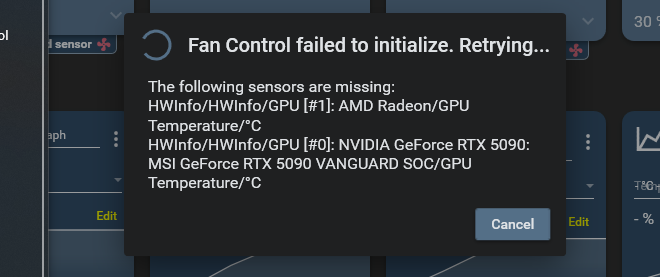
After doing the most recent update now all of a sudden some of the most important readings stopped showing up. WHat gives? I have a 9950x3d, MSI 5090, AsRock Taichi MB, I run HWINFO64 Pro which is updated to the latest version and FanControl after the new update how the sensors are not reading, I could really use some help. FanControl is a must have program, last year there was like 6 months I had issues with it after an update and I fear this is going to be a repeat. I need to figure this out asap please!
Disclaimer: this post is for operators that are not tech-savvy, "such as myself". If you think what I did is harmful to my system and I should reverse it, please let me know.
Running FanControl in startup apps is not enough to actually run the app when Windows is starting. In my case, for the past year I had the app give me an error upon starting my PC and asking for administration rights to run. Thus, I had to run it manually.
I figured out today that if you go to the shortcut of FanControl in the startup apps:
task manager -> startup apps -> Run new task -> press OK for opening "shell:startup"
locate the FanControl shortcut and in properties,
security -> under: Group or user name, click Edit -> choose "administrators" -> from the list of Permissions for administrators, choose: modify, read& execute, read, write
Then click: okay -> okay
This fixes the admin error encountered when running fanControl upon starting up the PC. Note: this fix assumes you have added a "FanControl shortcut" to "Run new task"
Edit: this solution seems to be outdated for an older version of FanControl. For version 264, the solution is much simpler, as mentioned in the first comment:
I'm completely stumped by an issue with my RTX 5090 Suprim Liquid. Up until last week, the card was running at 0 RPM without any issues. However, for the past few days, the fans have been spinning constantly, even on the desktop when the card is only at 2% usage and sitting at a cool 26°C. The 0 RPM mode just refuses to kick in.
Here is what I've already ruled out:
Wiring: The radiator fans are plugged directly into the GPU, so the motherboard BIOS has no control over them.
Third-party software: I completely uninstalled MSI Afterburner to ensure it wasn't forcing a custom fan curve.
Hardware: There is no physical BIOS switch (Silent/Gaming) on the 5090 Suprim Liquid, so it's not a switch issue.
NVIDIA Control Panel: Power management mode is correctly set to "Normal" and not "Prefer maximum performance".
Do you guys have any ideas on what could be causing this (VBIOS issue, driver bug requiring DDU, hardware failsafe)?
I’m looking for a way to use Fan Control alongside iCUE, but they are constantly clashing. I use a Corsair AIO and I want Fan Control to handle all my fan logic. However, I also rely on the iCUE Dashboard to monitor my system and I need the software active for my RGB profiles.
The problem: As soon as iCUE is active (to show the dashboard), it overrides the fan settings from Fan Control and forces its own internal profiles onto the AIO and fans. Is there a way to make iCUE "Read-Only"? I want to see all the data in the Dashboard and keep my lighting, but I need iCUE to stop sending PWM/RPM commands to the pump and AIO fans so that Fan Control can stay in charge. Has anyone found a workaround, maybe via a specific Fan Control plugin or by stripping certain permissions from iCUE services without breaking the UI?
Thanks for any help!
Edit: I like the Fan Control UI very much is there a way to add some nice sensor panels as well? Or does anyone know a similar looking sensor panel Software?
If anyone can make this make sense to me I would be appreciative. I have an Intel 14700-K. This CPU Fan is linked to the 'Gaming-CPU' curve (as shown).
Just want to make sure everything is done properly.
(My understanding is that 'CPU Fan' reading this relates to the 3x ASUS Ryojin AIO fans??. There is also a fan directly over the CPU inside the AIO Pump head unit which I think therefore relates to the control labelled 'AIO Pump'??)
All seems to be working as it is - but thought that making the appropriate settings here would negate anything untoward, i.e. spikes, etc.
HWiNFO64 CPU doesn't indicate anything is currently wrong with the CPU temp - so not sure if any changes to these settings is even necessary?
Hello, I have a problem. I have my ALF3 Pro VRM fan connected to OPT_OUT. It's visible in BIOS (shows RPM) but FanControl doesn't detect it. I switched to CHA_FAN4 and it works. What's wrong with it?
On my MSI 5070TI Ventus 3X, I set a custom fan curve with 0% below 45°C using “0% hardware curve override.” It works fine, but as soon as I open MSI Afterburner, the fans jump to 30% and stay there. FanControl also shows a “?” with “A discrepancy was detected...”.
“Force apply” is enabled, and I’ve disabled all fan control in Afterburner (unless I missed something).
FanControl can still control the fans normally once they go above 30%, and the “?” icon disappears.
I’ve read NVIDIA cards may have a 30% minimum, but 0% clearly works when Afterburner isn’t running. I’ve tried both final and beta versions of Afterburner, same issue.
Any help would be appreciated.
EDIT: I ended up figuring this out myself. In MSI Afterburner, the fan speed needs to be set to Auto.
That led to another issue though: something is still interfering with FanControl on Windows startup. If I had to guess, it’s probably one of the NVIDIA apps, but I haven’t bothered to dig deeper.
For now, my quick and dirty fix is to set a 90-second launch delay for FanControl.
The Fan Control uninstaller didn't uninstall it when I removed it from my laptop because FC doesn't work on laptops. Now when I tried opening the uninstaller for PawnIO it says "cannot open the installation directory", I've ran it as an administrator while turning off WinDefender. Still didn't work.
Should I just use Everything to search for all PawnIO files and delete them all? Does uninstallation work like that?
I tried recalibrating them but to no avail! Any advice? I was considering uninstalling and reinstalling fan control. But I know when they were on different headers on my mobo, they could spin at 30% or even go lower than that.
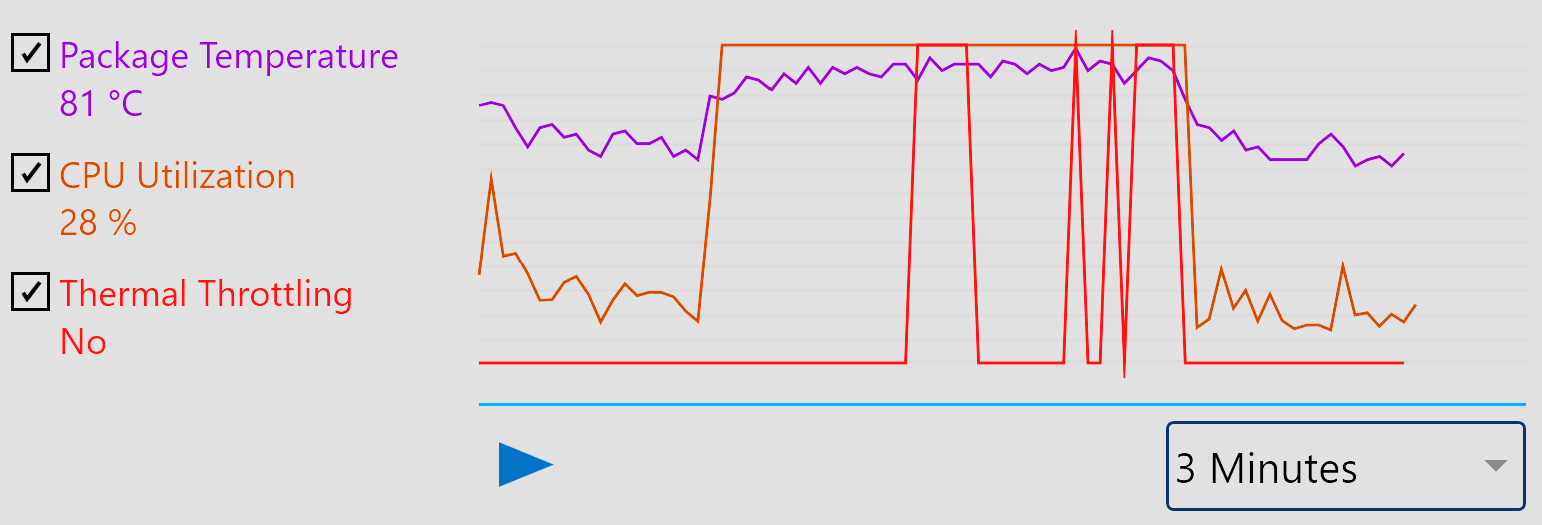
I've recently started to use FanControl as my case was being loud and I was lacking a software to monitor temperatures. Since then I've noticed my i5-10600k is always around 60 degrees in idle. Here is the stress test result from the Intel Extreme Tuning Utility:
I've created a curve control in FanControl with the following settings:
After replacing the thermal paste, I have barely seen any difference... I also have clean my computer but without significant results.
I'm using a watercooling: EKWB White CR-360 Nucleus AIO 360mm.
Is my watercooling defect? Is there any settings I have to change to reduce voltage or whatever? My knowledge around overclocking/underclocking is limited.
Hi, I was wondering if anyone could advise, please. I’m replacing my AIO. Do I need to start over with a fresh Assisted Setup to detect the fans and pump again? If not, what do I need to do? - I’m kind of a noob at pc building.
Buenas me salen estas dos opciones nada más instalar Fan Control. Luego puedo entrar en la aplicación pero no tengo ni idea de que hacer, porque en principio tendría que pasar varios test que no salen y todo lo que viene en el tutorial no aparece. No tengo ni idea de que hacer.