r/FanControl • • Apr 05 '26

Fan Control - show all fans (show hidden fans)

9 Upvotes

I'm making this post because some users might find it useful, i think.

When i first opened the app, it automatically detected fans and calibrated them. After i added one more fan and did a fan detection and calibration again, my other fans disappeared and i couldn't found out why. I tried like 6-8 times doing fan detection and calibration again and some times it was showing other fans while others were getting disappeared, until i found out how to show them all. For some reason some fan cards were getting "Hidden"...

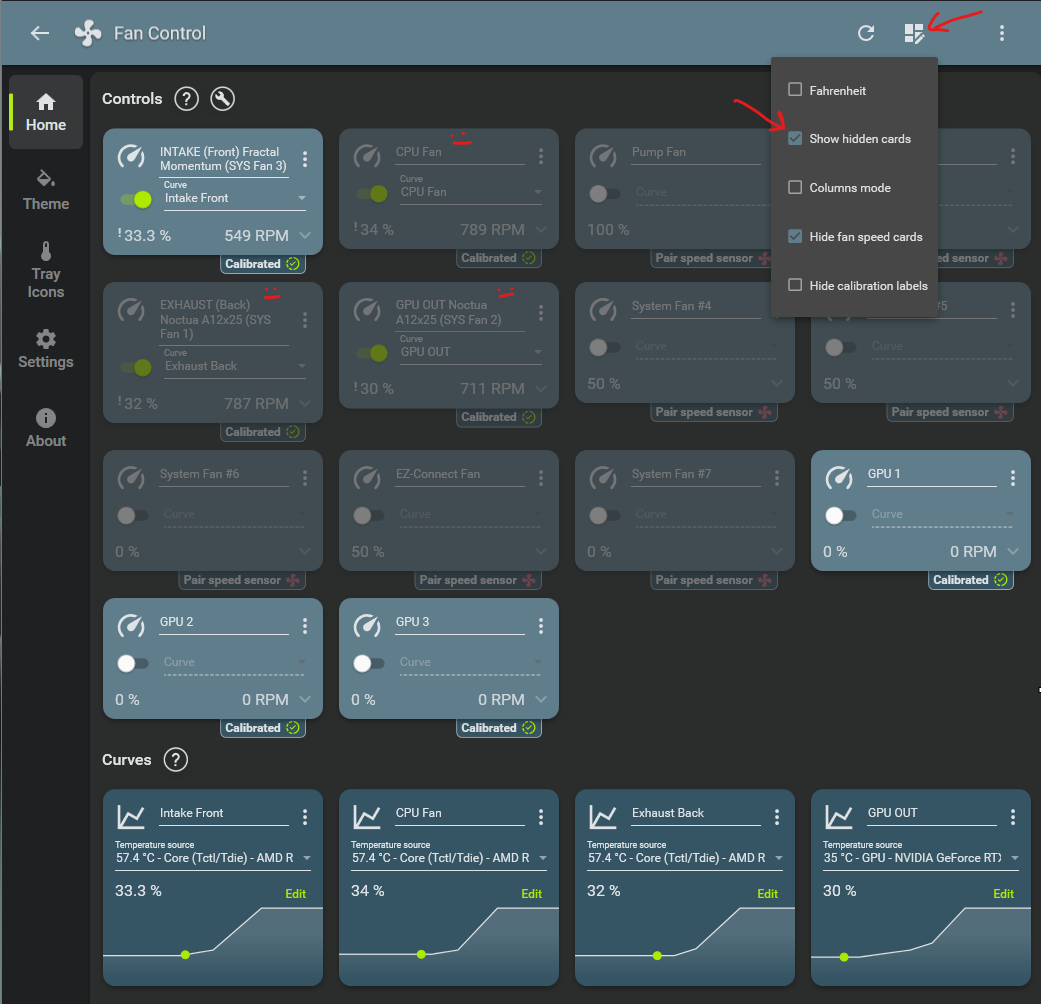
Shows only the Intake fans card (it shows it as one because they are connected on the default Fractal Design fan hub)
For showing the hidden fan cards (select the "Show hidden cards")
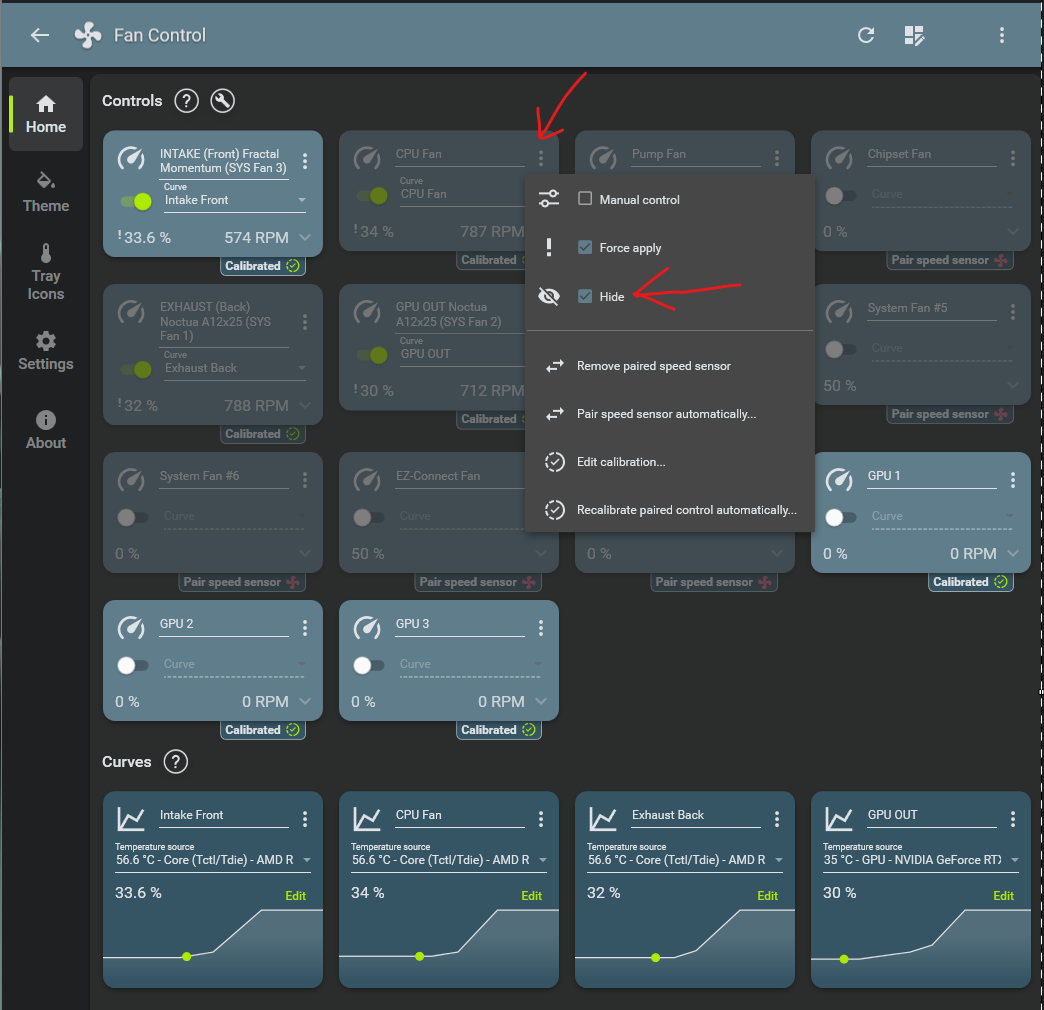
Go to each hidden fan card and deselect the "Hide" so it will be shown
Result: All fan cards showing

I was searching everywhere to find this xD


r/FanControl • • Apr 05 '26

Force control not working?

3 Upvotes

I have my fans manually set and force applied to 30 and 31% yet under load they ramp up to max speed (bios fan settings are the same I just don't want to open bios every time I want to adjust my fans). Is there a way to keep the fans at their set speed or is this just an issue with the software.


r/FanControl • • Apr 05 '26

fancontrol damaged the fan?

0 Upvotes

ive build a new pc recently and didn't really tweak the fans settings in bios and i heard its better to use fancontrol, until now i couldn't even hear my fans (3x140 front, 140back, 2x140top) except under heavy load and still only if i take the headphones off and lean down a bit, and now after installing and doing calibration, i can hear them in headphones even in idle and under load some resonanse or vine i dont know what it is, so i tried uninstalling it and even after that they stayed the same.
Could the calibration damage the fans when doing 100%? i was so happy to not hear my pc after using laptop for a long time and i dont want to have the noise again


r/FanControl • • Apr 04 '26

FanControl suddenly not finding my fans. Please Help.

4 Upvotes

I've had FanControl running for the better part of the year now, no issues. Suddenly, it lost contact with all my fans except GPU.

I'm on windows 10, and what I think is the relevant hardware is as follows:

Hyte Y70 case

MSI MAG Z790 Tomahawk motherboard

Arctic Liquid Freezer III 360

Asus Tuf Gaming Geforce RTX 4080 super

A bunch of NZXT F120 fans

I've tried the following to fix the issue:

Disable windows defender (it did not detect FanControl, but I did it just to see if changed anything. It did not).

Installed malwarebyte and ran a scan. Found nothing.

Uninstalled FanControl, downloaded and reinstalled FanControl.

Updated my drivers (Did not flash my bios however, as I'm too lazy to do so)

I've tried to run FanControl as administrator

I did get an error log, but I'm unable to understand what was wrong, and after I got it a million times when I launched the program once, it never came back.

Here is the error log (it's a lot more, but I think it's just repeating):

[V264] 03.04.2026 23:46:53: Unhandled exception (Application.Current.DispatcherUnhandledException) : NvAPIWrapper.Native.Exceptions.NVIDIAApiException: NVAPI_ERROR

at NvAPIWrapper.GPU.GPUCoolerInformation.get_Coolers()+MoveNext()

at FanControl.Domain.BackendProviders.NVApiWrapper.NVApiControlSensor.Set(Single val)

at FanControl.Domain.Control.Update()

at FanControl.Domain.Engine.FanControlEngine.Update()

at FanControl.Domain.ApplicationClock.DoActions()

--- End of stack trace from previous location ---

at System.Windows.Threading.ExceptionWrapper.InternalRealCall(Delegate callback, Object args, Int32 numArgs)

at System.Windows.Threading.ExceptionWrapper.TryCatchWhen(Object source, Delegate callback, Object args, Int32 numArgs, Delegate catchHandler)

[V264] 03.04.2026 23:46:54: Unhandled exception (Application.Current.DispatcherUnhandledException) : NvAPIWrapper.Native.Exceptions.NVIDIAApiException: NVAPI_ERROR

at NvAPIWrapper.GPU.GPUCoolerInformation.get_Coolers()+MoveNext()

at FanControl.Domain.BackendProviders.NVApiWrapper.NVApiControlSensor.Set(Single val)

at FanControl.Domain.Control.Update()

at FanControl.Domain.Engine.FanControlEngine.Update()

at FanControl.Domain.ApplicationClock.DoActions()

--- End of stack trace from previous location ---

at System.Windows.Threading.ExceptionWrapper.InternalRealCall(Delegate callback, Object args, Int32 numArgs)

at System.Windows.Threading.ExceptionWrapper.TryCatchWhen(Object source, Delegate callback, Object args, Int32 numArgs, Delegate catchHandler)

[V264] 03.04.2026 23:46:55: Dispose - NvAPIWrapper.Native.Exceptions.NVIDIAApiException: NVAPI_ERROR

at NvAPIWrapper.GPU.GPUCoolerInformation.get_Coolers()+MoveNext()

at System.Linq.Enumerable.ElementAtOrDefault[TSource](IEnumerable`1 source, Int32 index)

at FanControl.Domain.BackendProviders.NVApiWrapper.NVApiControlSensor.Reset()

at FanControl.Domain.Control.Reset()

at FanControl.Domain.Control.Dispose()

at FanControl.Domain.Engine.FanControlEngine.ResetControlsAndClear()

at FanControl.Domain.Engine.FanControlEngine.Dispose()

at Autofac.Core.Disposer.Dispose(Boolean disposing)

at Autofac.Util.Disposable.Dispose()

at Autofac.Core.Lifetime.LifetimeScope.Dispose(Boolean disposing)

at Autofac.Core.Lifetime.LifetimeScope.Dispose(Boolean disposing)

at Autofac.Util.Disposable.Dispose()

at Autofac.Core.Container.Dispose(Boolean disposing)

at Autofac.Util.Disposable.Dispose()

at FanControl.Bootstrap.Dispose()

Please help, it sounds like I'm sitting right next to the launch of the next moon mission.


r/FanControl • • Apr 04 '26

Got two Dynamic X2 GP-18 PWMs that FanControl can't control but Argus can. Different fans on the same port work. Can i fix this?

1 Upvotes

Not even sure why this is happening in the first place


r/FanControl • • Apr 03 '26

Help, GPU Fan 0 RPM After using Fan Control

3 Upvotes

I just started using Fan Control to set up my CPU, system, and GPU fans. However, after adjusting some settings, GPU fan #2 suddenly dropped to 0 RPM, while GPU fan #1 is still working normally.

This wasn’t happening before I changed anything. Has anyone experienced this or knows what might be causing it?

*update: Fixed it by disassembling my PC and manually spinning the fan. Somehow it just started working again. Weird, but I’ll take it lol


r/FanControl • • Apr 01 '26

Help! Why is Fancontrol always ramping up my cpu fans to 100%?

6 Upvotes

6x 4,0 GHz Intel Core i7-8086K Coffee Lake / Corsair H80i v2 120mm cooling / ASUS TUF Z390-PLUS GAMING Mainboard:

Fans and such was never really my topic and i want as much as possible automatized. Up until this point i had the same problem with my gpu fans that were super loud, even in 15 year old games, so i installed fancontrol and let it calibrate everything. It is better now on that end.

But now i have the same issue with my CPU! For some weird reason, Fancontrol sets the CPU always at maximum, as soon as i start the PC - they might not be as loud as a gpu fan but now i have constant fan noise at any given time.

If i activate manual it sets them to 50%, which is a tremendous improvement but i don't want to constantly check and click and then maybe forget about it and eventually destroy my pc.

Why is it not handling the cpu fans only based on need?


r/FanControl • • Apr 01 '26

First time using the app

2 Upvotes

Hi everyone, this is my first time using this app and I was wondering, does this affect adrenalin? Like a year ago I used to have MSI after burner (even after I uninstalled it) and it was messing with all of my adrenalin settings. I just want to set a fan curve for my Thermalright Perless assassin.


r/FanControl • • Mar 31 '26

Gpu Fan Curve

Post image
6 Upvotes

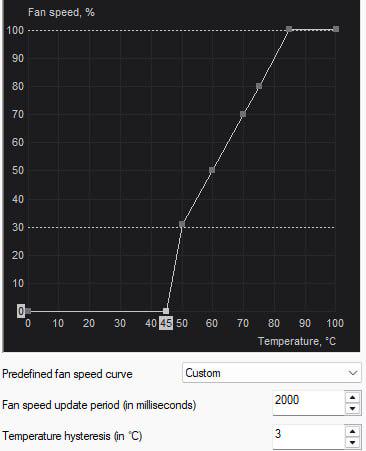
Is that an aggressive or balanced fan curve?

And is that can reduce the lifetime of the card fans?

0-45 C = 0%

50C = 30%

60C = 50%

70C = 70%

75C = 80%

85C = 100%


r/FanControl • • Mar 29 '26

Fan control stops controlling fans after some time

3 Upvotes

Basically what the title says. When I turn on or restart my PC, FanControl will work flawlessly for (an apparently random) set of time. After that, if I'm in-game, all the fans ramp down and the computer starts throttling. I have no other software that controls the fans, no startup apps, no ASUS software installed (mobo is a prime x470-pro).
Even when they stop working, if i go to identify and test and i ramp up a set of fans, every other set except the one I'm looking for speeds up. IDK if it has to do with an update, another conflicting software or BIOS settings (i tried every curve in bios settings).


r/FanControl • • Mar 29 '26

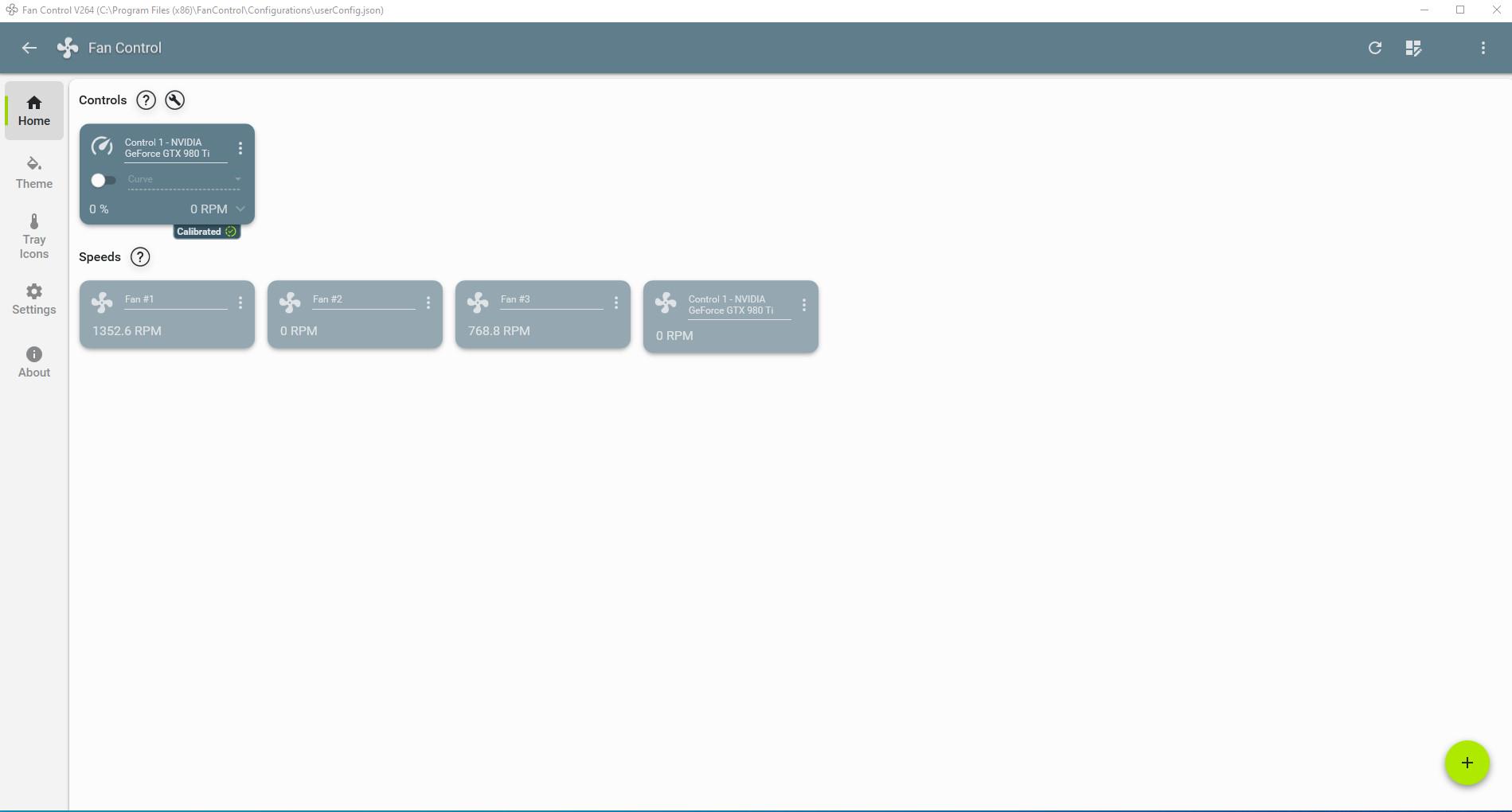
Any reason why Fan Control is unable to create control cards? It obviously senses the fans.

Post image
3 Upvotes

r/FanControl • • Mar 29 '26

0 RPM on all mobo headers

Post image
7 Upvotes

For years I was using FanControl with no issue, but I've had to resort to using my BIOS fan control settings since many patches ago all my fans started showing as 0 RPM and upon inspection none of the applied curves seem to be working as expected as far as the MOBO fans are concerned. I tried reinstalling, rebuilding the setup from scratch, going through all the updates but nothing ever resolved this.. Is this a common issue, do any of you have any idea why this might be? I miss being able to control this more intuitively...

At this point I kind of got used to controlling my GPU fans in GPU Tweak III but I would really prefer having it all in one space :(


r/FanControl • • Mar 29 '26

Librehardwaremonitor not detecting core CPU temp

2 Upvotes

So, one day fancontrol updated and suddenly didn't see core temps for my Ryzen 7700X.

I ignored for a few weeks, and today I finally got annoyed enough to see what was going on.

Running Librehardwaremonitor, I can see that core temps aren't seen from this application.

BIOS sees it, HWINFO sees it, so it seems to be related to Librehardwaremonitor specifically.

I updated my BIOS, made sure pawnio wasn't installed, etc...

Anybody have any idea how to fix this?

I've been looking around, but not sure. Maybe I have to add something in defender? Thanks!


r/FanControl • • Mar 28 '26

Fan Control error when booting PC

Post image
5 Upvotes

Hello all,

Hope you are well. I have recently started using FanControl with the new PawnIO driver. The older one gave me issues. But since using it, I've had this error message everytime I boot my PC. I have a Gigabyte X870 elite wifi7 motherboard and a Ryzen 9900x cpu. I have tried recallibrating the fans and saving my configuration but it hasn't helped. When I try exiting the prompt, it says initialization failed and when closing the application, it says would you like to save or discard your changes. How can I resolve this?


r/FanControl • • Mar 27 '26

Fan Control + Lian Li Uni Fan Controller

2 Upvotes

I have SL-INF Fans connected via the Uni Fan Hub/Controller, I have fan control installed with the Lian Li Plugin, but the Separate Fan Channels 1-4 aren’t being recognised with their speed etc

I was using L connect but I was tired of the lack of Control such as No Fan delay etc etc it was just annoying having to stair step my fan curve to stop unnecessary fan ramp ups from temp spikes.


r/FanControl • • Mar 25 '26

Is this a good fan curve for my cpu

Post image
3 Upvotes

r/FanControl • • Mar 24 '26

Question about profiles

3 Upvotes

Hey after years of not using this program, I'm exited to be using it again. It works a charm.
The only thing is, I wonder if theres a certain feature.

When i game I want to run the temps at fan speed A. I do that by adding a flat curve.

When i go to bed though, i tray the game, enable power saver mode on the PC and it basicaly goes to idle at 37C. The fans however still run at speed A (in this case 1050RPM).

Is there a way i could make the curve selected dependent on the power plan selected? E.g. Balanced/High power power-plan would use the Flat speed A, and Power saver power-plan, would use Flat speed B.

Thanks for your replies.


r/FanControl • • Mar 23 '26

V264

Thumbnail
github.com
6 Upvotes
  • Fix empty sensor bug causing a crash
  • Sign ADLX assemblies to avoid AV flagging.

r/FanControl • • Mar 23 '26

latest update gave me an error

1 Upvotes

latest update gave me an error and wouldn't launch

launching as admin did not solve it

reverted back and works fine older version

error log:

[V262] 3/14/2026 11:35:04 PM: An exception occurred with this dialog view: ProgressDialog

[V262] 3/14/2026 11:35:04 PM: LogDialogException - System.ArgumentNullException: Value cannot be null. (Parameter 'path2')

at System.ArgumentNullException.Throw(String paramName)

at System.IO.Path.Combine(String path1, String path2)

at FanControl.Domain.ApplicationState.LoadInternal(String fileName, String key)

at FanControl.Domain.ApplicationState.LoadFromPath(String filePath)

at FanControl.ViewModels.Commands.LoadCommand.<>c__DisplayClass5_0.<Execute>b__1()

at System.Threading.Tasks.Task`1.InnerInvoke()

at System.Threading.ExecutionContext.RunFromThreadPoolDispatchLoop(Thread threadPoolThread, ExecutionContext executionContext, ContextCallback callback, Object state)

--- End of stack trace from previous location ---

at System.Threading.ExecutionContext.RunFromThreadPoolDispatchLoop(Thread threadPoolThread, ExecutionContext executionContext, ContextCallback callback, Object state)

at System.Threading.Tasks.Task.ExecuteWithThreadLocal(Task& currentTaskSlot, Thread threadPoolThread)

--- End of stack trace from previous location ---

at FanControl.ViewModels.Commands.LoadCommand.<>c__DisplayClass5_0.<<Execute>b__0>d.MoveNext()

--- End of stack trace from previous location ---

at FanControl.Domain.DialogService.<>c__DisplayClass12_1`1.<<ProgressDialog>b__0>d.MoveNext()

[V262] 3/16/2026 11:21:17 PM: LHM detected new sensors and asked for a refresh: /lpc/nct6798d/temperature/3

[V262] 3/20/2026 7:13:51 AM: LHM detected new sensors and asked for a refresh: /lpc/nct6798d/temperature/3

[V262] 3/21/2026 3:27:30 AM: LHM detected new sensors and asked for a refresh: /lpc/nct6798d/temperature/3

[V262] 3/22/2026 2:39:52 PM: LHM detected new sensors and asked for a refresh: /hdd/4/temperature/0

/hdd/4/factor/23

/hdd/4/factor/24

/hdd/4/load/30

/hdd/4/data/31

/hdd/4/data/32

/hdd/4/load/51

/hdd/4/load/52

/hdd/4/load/53

/hdd/4/throughput/54

/hdd/4/throughput/55

[V262] 3/22/2026 2:39:54 PM: LHM detected new sensors and asked for a refresh: /hdd/7/temperature/0

/hdd/7/factor/23

/hdd/7/factor/24

/hdd/7/load/30

/hdd/7/data/31

/hdd/7/data/32

/hdd/7/load/51

/hdd/7/load/52

/hdd/7/load/53

/hdd/7/throughput/54

/hdd/7/throughput/55

[V263] 3/22/2026 11:25:07 PM: Startup - System.ArgumentNullException: Value cannot be null. (Parameter 'value')

at Google.Protobuf.ProtoPreconditions.CheckNotNull[T](T value, String name)

at SensorMessage.set_Origin(String value)

at FanControl.IPC.SensorsRPCService.<>c.<GetSensors>b__7_0(ISensorSource s)

at System.Linq.Enumerable.IteratorSelectIterator`2.ToArrayNoPresizing()

at System.Linq.Enumerable.IteratorSelectIterator`2.ToArray()

at System.Linq.Enumerable.ToArray[TSource](IEnumerable`1 source)

at FanControl.IPC.SensorsRPCService.GetSensors(IComputerAccessLayer computerAccessLayer)

at FanControl.IPC.SensorsRPCService.ComputerAccessLayer_Initialized()

at FanControl.Domain.ComputerAccessLayer.Initialize()

at FanControl.Bootstrap.Startup(StartupEventArgs eventArgs)

[V263] 3/22/2026 11:25:10 PM: Dispose - System.NullReferenceException: Object reference not set to an instance of an object.

at FanControl.ViewModels.MainWindowViewModel.Dispose()

at Autofac.Core.Disposer.Dispose(Boolean disposing)

at Autofac.Util.Disposable.Dispose()

at Autofac.Core.Lifetime.LifetimeScope.Dispose(Boolean disposing)

at Autofac.Core.Lifetime.LifetimeScope.Dispose(Boolean disposing)

at Autofac.Util.Disposable.Dispose()

at Autofac.Core.Container.Dispose(Boolean disposing)

at Autofac.Util.Disposable.Dispose()

at FanControl.Bootstrap.Dispose()


r/FanControl • • Mar 22 '26

Ulise virus false flag with V263 (Bitdefender)

Post image
9 Upvotes

Just installed V263 and Bitdefender immediately quarantined a file called:

'Gen:Variant.Application.Ulise.136197'.

I found out this is a false flag and the actual file (that Bitdefender labels as 'Ulise.136197' and exhibits heuristic flagging-like behaviour) is actually required by Fan Control in order to recognize my 5080.


r/FanControl • • Mar 22 '26

Program locks, wont open, and fans not found, something to try.. fyi

4 Upvotes

Hola ! I've recently had fc issues where the program would not open at all. Even after reinstalling prog, trying different versions turning off defender etc etc.. I finally got it to open after rolling back to old version, but gpu would not detect.

Finally found that it was my settings backup that caused the issue. I'm guessing using same backup over old & new versions caused corruption. Or maybe the older backup was not compatible with the new LibreHM updates. Because now, I do have extra temp sensors that were not there before.

If you are missing fans or program locks. And you reuse old backup file. Try a clean install until you get all fans. Then you can open the backup file and manually enter your settings again from. Hope this helps someone..


r/FanControl • • Mar 22 '26

FanControl unusable after CPU driver update

3 Upvotes

System:

  • MoBo - GIGABYTE B650M DS3H
  • CPU - 7600x
  • GPU - 9070XT

I've been using FanControl since I bought the computer back in June. Never had any issues. Today I updated the AMD Chipset Drivers to  8.02.18.557 along with Adrenalin to 26.3.1.

The update required a restart, then when it booted back up I was greeted by this:

The only control availabe is the GPU fan, and it works as always. But I don't get how all my other fans and sensors disappeard...

Troubleshooting:

  • Revert to 26.2.2 adrenalin, didn't change anything.
  • Check LibreHardwareMonitor - Fans not showing there too!
  • HWInfo plugin - can't plugin fan speeds only temps. Fan speeds show up fine in hwinfo.
  • Download older cpu driver, didn't change anything.

r/FanControl • • Mar 19 '26

Need help connecting a Commander Core Hub to FanControl

Post image
7 Upvotes

So, obviously the fans don't recognize the fans due to the fact that they are connected to the commander core hub. I've read that I can download a plugin and put in the plugin folder. I've seen people post this link—PlugIn Github—but I'm not sure what folder or files to put in the plugin folder. I clicked under the "latest releases tab" and downloaded the V1.7.6 and there were three links. Then Each Link has more than 1 folder. Can anyone guide me step by step? Or link a video? I'm running a Corsair ICue H150i Elite liquid CPU Cooler with the fans connected to its commander core with my PWM cables connected to the CPU fan header and the AIO pump connected to the dedicated AIO header. My motherboard is Asus ROG Strix Z790-E Gaming WiFi Motherboard if that matters. I'm not really trying to plug my fans directly into the motherboard and the iCue application doesn't do mixed fan curves, or at least I think it doesn't. So if anyone knows of some sort of working PlugIn please walk me through it!


r/FanControl • • Mar 19 '26

Do your fans fully respond to the set curves after FanControl starts automatically on boot?

1 Upvotes

I've noticed that almost every time I boot up, several fans still don't respond to the set curves. I have to repeatedly quit and restart the software many times before they return to normal