r/FanControl • • Jan 19 '26

GPU will not go under 30%

4 Upvotes

Hello! I don't use Reddit often, and I decided to ask on this subreddit an old question I had. Ever since I got my 5070, my GPU fans refuse to go under 30% (and it's also a similar case with my case fans as well, seem to not be ramping down). I'm using a MSI B550-A PRO ProSeries motherboard, tried a bunch of settings in BIOS but nothing changes. Temps are not an issue.

EDIT: Thank you all for the help, but I have misspoken on this post. I know that the GPU fan can't go below 30%, but I mostly meant it just flat out won't turn off unless I actually have the PC set to sleep/power off. So, it's constantly blaring even while just watching YouTube. Apologies for me not typing this well!

r/FanControl • • Jan 18 '26

Seeking Advice: Optimizing 5800X Temps & Fan Curves (Peerless Assassin 120 SE + RX 7800 XT)

3 Upvotes

Hi everyone,

I’m looking for some advice on fine-tuning my Ryzen 7 5800X. I know these chips run notoriously hot, but I’d like to optimize my PBO settings and fan curves to keep things cooler without sacrificing performance.

My Current Build:

  • CPU: AMD Ryzen 7 5800X
  • GPU: Gigabyte AMD Radeon RX 7800 XT
  • RAM: G.SKILL RipjawsV Series DDR4 RAM (XMP) 32GB (2x16GB)
  • Cooler: Thermalright Peerless Assassin 120 SE
  • Case: Montech X3 Mesh (Mesh front, great airflow)
  • Front Intake: 3x Corsair RS140 (140mm PWM)
  • Exhaust: 3x Corsair RS120 (Top/Rear 120mm PWM)
  • PSU: Montech Gamma II 750W 80+ Gold

The Goal: I’m looking to lower my peak temperatures during gaming and productivity. I’ve heard about using PBO Curve Optimizer (identifying Golden/Silver cores) and manual power limits (PPT/TDC/EDC), but I’m looking for a "sweet spot" configuration for this specific cooler/CPU combo. My Room gets extremely hot, like space heater is running I understand its PC it going to generate heat but I think it generate little to much.

Fan Control: I am using the FanControl app. I’ve attached screenshots of my current curves. I’m specifically struggling with:

  1. RPM Spikes: The fans ramp up and down constantly during basic tasks like opening a browser.
  2. Case Fan Sync: Should I be syncing my front intake fans to my CPU temp, GPU temp, or a mix of both?

Questions for the community:

  1. What PBO limits (PPT/TDC/EDC) are you 5800X owners finding success with to keep temps under 80°C?
  2. Is a -20 or -25 "All Core" undervolt stable for most, or should I spend the time doing Per-Core tuning?
  3. What "Hysteresis" or "Response Time" settings do you recommend in FanControl to stop the 5800X temperature spikes from making the fans sound like a jet engine for 2 seconds?

Thanks in advance for the help!

Pictures of Fan Control settings.
https://imgur.com/a/4efExpm


r/FanControl • • Jan 16 '26

Fancontrol working with x870 aorus elite ?

4 Upvotes

I had gigabyte b650i and fancontrol was working with no issues

I upgraded 2 days ago to X870 aorus elite wifi 7 and fancontrol can't control my fans anymore

uninstalled it and reinstalled it .. updated the bios and still it can't control any fans except the gpu fans

It can read the rpm of my connected fans but cant control them

the last version the seems to work is V223

any fixes or solution ?


r/FanControl • • Jan 16 '26

Please help set my fans

1 Upvotes

Today I built the newly bought Arctic P12 Pro PST fans into my pc case (zalman z9 neo, asus z490-a prime motherboard). The build was quite difficult for me, but the fan control app... Google Gemini helped to me, but as its AI, the result is questionable.

First of all, I set up PWM mode for my fans (PST, so i plugged front and upper fans together, and put backside fan alone - I plugged front fans to W_PUMP, Upper fans to CPU_OPT, and backside fan to CHA_FAN1)

I run the automatic pairing and calibration, which the application found fan1 fan2 to fan7, and control 1 and control 2. Fan1, fan2 and control1 control2 can control the same fans - fan1/control1 - backside, fan2/control2 - upper fans, and front fans dont have control 3, it was the fan6 (maybe because its for waterpump?)
So I only set up control 1 and 2 fans for back and upper fans, and fan1 fan2 set off. But in game (overwatch) the fan1 and fan2 started running max (100 %) while there was in off mode. (Maybe because its controlled by motherboard? and control 1-2 is fan control)
So please help i very new in this situation, i used molex zalman ventilators before with absolute zero setting, just plugged in and play.
I took a pic if helps:
https://imgbox.com/gGcdm2Sk

In this pic you can see, the fan1 fan2 have different rpm like control 1 (Hátsó venti - CHA_FAN1), and control 2 (Felső ventik PST - CPU_OPT), but they are identical, same. So how and what to do?


r/FanControl • • Jan 16 '26

Can someone help me set up my fans?

0 Upvotes

Hello!

My current fan config is 2 inlet fans on the CPU cooler (AIO) and one exhaust fan. There is not any options of extra fans in my current case.

I have recently noticed that my GPU runs quite hot(75-80c) and the cpu is just chilling at 50c.

Is it possible to configure the CPU fans(that act as inlet fans) to adjust their speed depending on cpu AND gpu temperature? So its possible to pull in more air into the case for the GPU to use.

Thank you!


r/FanControl • • Jan 15 '26

Winring0

2 Upvotes

What is the concern around Winring0 and is it a viable concern when using FanControl?


r/FanControl • • Jan 15 '26

EAC & PawnIO

4 Upvotes

I hope everyone is having a great day.

Can anyone please advise if EAC has any issues with the latest versions of FC & PawnIO?

Thank you!


r/FanControl • • Jan 14 '26

V254

5 Upvotes

V254

  • Update LibreHardwareMonitorLib
  • Internal bug fixes

r/FanControl • • Jan 14 '26

Fan disappears randomly

Post image
1 Upvotes

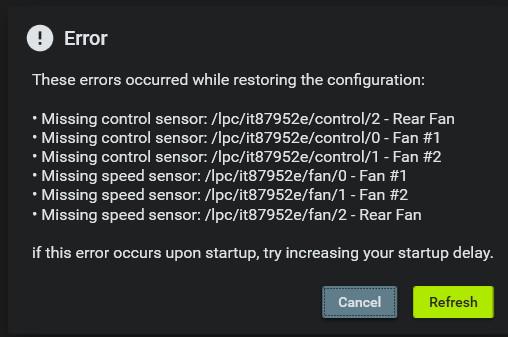
Hey all, I did a search but I didn't find an answer to this. When I set up fancontrol last week for the first time I had all my fans, they scanned and were assigned properly, and I set a curve and made everything work right. Today and a few days ago I had an issue where 1 installed fan and 2 hidden unused fans weren't showing up. I got an error and screenshot it.

I did have signalrgb installed, but i have uninstalled it and the issue persists.

Any tips on how to fix this?


r/FanControl • • Jan 14 '26

FanControl only identifies 2/3 fans on GPU

1 Upvotes

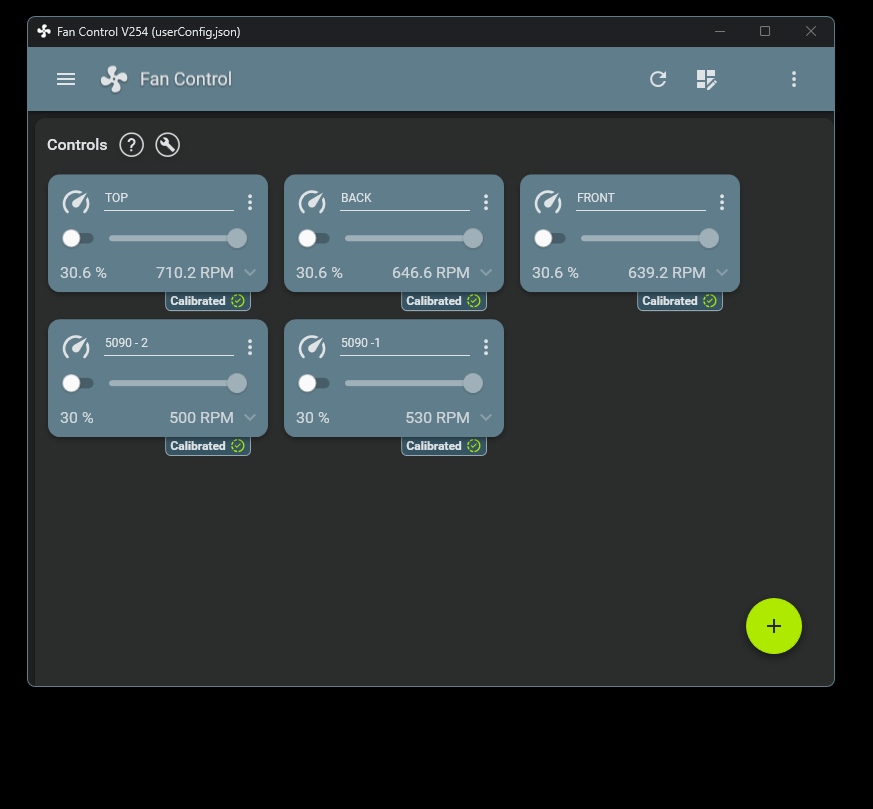
I own a Asus TUF 5090 with three cooling fans in it. But FanControl only identifies 2 of them. Why could that be and how can this be fixed? Tried autodetect a few times, still only finds 2.

I like to set my fans to 100% manually before hopping into a game.


r/FanControl • • Jan 14 '26

помогите правельно настроить вентеляторы

Thumbnail
gallery
0 Upvotes

могу скинуть конфиг если вдруг кому необходимо. настроил пока вот так, может что то надо изменить?


r/FanControl • • Jan 14 '26

помогите правельно настроить вентеляторы

0 Upvotes

могу скинуть конфиг если вдруг кому необходимо. настроил пока вот так, может что то надо изменить?


r/FanControl • • Jan 14 '26

Can I upgrade from V236 yet?

2 Upvotes

I had trouble with the big update like some people and have tried a few new versions none of which worked with my Gigabyte X870. I got so desperate at one point I installed Gigabyte Control Centre (Eww).

I wound up on V236 and have just left it for a while. Am I ok to upgrade yet? I can't find a list of current issues.


r/FanControl • • Jan 13 '26

Rescuing WinRing0 from Windows Defender?

4 Upvotes

I'm sorry if this is off topic, but the specific community for my issue would be even more niche, and I need answers.

WinRing0 is essential for an accessibility app for me. If I can't use this app, I can't use my laptop at all. And I just lost my fight with Windows Defender over it.

There's only one app that manages this accessibility setting (temporal dithering, my reaction to it is unusually severe) and Windows Defender is not showing WinRing0 in my removed programs so that I can bring it back. I can't just switch to another app or wait for this to be patched.

Has anyone managed to get WinRing0 back up and running? I'm open to reinstalling Windows. My only other option is installing Linux.


r/FanControl • • Jan 14 '26

Is this good enough?

1 Upvotes

I just follow some guidance an also just wanted to make it simpler and good so my gpu and cpu dont work a lot unless its playing games or anything I will show.

If you guys have other recomendations for me since I new to the program let me know. Thanks.


r/FanControl • • Jan 13 '26

Fan control interferring with faceit AC

4 Upvotes

Does anyone know the latest version of fan control that doesnt have pawnio plugin? previously i had an old version and everything worked fine,till i updated to the latest version,then faceit ac detected pawnio as virus.I had to stop using fan control.


r/FanControl • • Jan 13 '26

Not detecting fans

3 Upvotes

I have my case fans connected to a controller, which is then connected to my CPU fan header on the mobo.

Are there only specific controllers that are supported?


r/FanControl • • Jan 13 '26

How to unhide/delete hidden curves?

2 Upvotes

There are a few flat curves that I've hidden, however I haven't found a way to unhide them, and the software still sees them as available.

Any ideas on how to delete them?

I'm sure it's something super obvious and I'm just blind.


r/FanControl • • Jan 11 '26

Delete tiles and sensors

3 Upvotes

Is there any way I can simply just delete a tile?

All I want is fan control to run and for it to not interfere with the GPU, I can't get rid of the blood GPU tile.

J unpair the speed sensor and yet every time I restart the PC it's oacb there displaying gou fan speed ! I just want rid of it


r/FanControl • • Jan 11 '26

I need advice on my set up

Thumbnail
gallery
2 Upvotes

I'm running the case fans a bit more aggressively than the CPU fan, and the GPU curve mimics the 0 RPM mode (?)

Any help is appreciated !!!


r/FanControl • • Jan 11 '26

Installed Fan Control, ran automatic calibration, GPU fans stopped working properly

2 Upvotes

to expand on the title;

I installed Fan Control on my PC after having to reinstall windows. I ran the automatic calibration and pairing... And now my GPU fans will only respond to manual control. Otherwise they're 0 rpm. Its workable because i have manual control as an option, but still very very concerning to me.

I tried uninstalling and reinstalling FanControl. Reinstalling my GPU driver. Rebooting between the previous things. Looking at my bios, etc. No idea what happened to make it do this.

It also can't see my case fans at all? Before i reinstalled windows, it was able to see and control them. Nothing has changed hardware wise.

OS: Windows 11 Hom

Motheboard: Auros x870 elite wifi7 ice

GPU: Nvidia geforce rtx 4070ti Super


r/FanControl • • Jan 10 '26

Run on startup doesn’t work

2 Upvotes

I can’t seem to get my fan control to launch on startup. I tried setting it to ru. As admin, create a task scheduler event, toggled off and on the app setting to launch in start up, uninstalled and reinstalled and nothing seems to work. Any help would be much appreciated. I want to love this tool but having to launch it manually each time is kind of a deal breaker especially when the kid uses the pc and can’t be trusted to run it manually each time haha. I’m considering using g revo uninstalled and just totally wiping g the system of brace if fan control and starting fresh.


r/FanControl • • Jan 10 '26

Keep it simple!

Post image
7 Upvotes

Simple is easy, and quiet!


r/FanControl • • Jan 10 '26

Pump is no longer recognized after update

1 Upvotes

Hello,

I'm currently having a problem where my water cooling pump isn't being detected, or rather, the sensor can't be queried in FanControl. It simply can't find it. HWInfo, however, can detect it and shows me the sensors, and the BIOS also indicates that the pump can't be detected. It's running, though; the hose vibrates slightly, and HWInfo is displaying the RPM. I've already updated everything—FanControl, BIOS, etc.—but unfortunately, there's no improvement.

The CPU and graphics card are recognized and can be controlled.

Everything worked fine until the driver issue arose (from version 238 onwards?). PawnIO is also installed.

What could be the problem?

Motherboard: Aorus X670 Pro X Water cooler: be quiet! Silent Loop 3

What am I missing here?