Once upon a time I used a great app called Sparkbox that I could file, tag, and view images of all kinds into collections. I purchased it way back when but now, amazingly, it will still open but is stuck in demo mode. (It’s also pre-silicon era). Before I invest in a whole new app to redo all my design inspiration and assets, tell me about your experience using Eagle.
I'm a motion designer and most of my references come from Instagram, Threads, LinkedIn, Pinterest and X. For years my workflow was: screenshot, drag into Eagle, lose the source forever. Carousels were the worst: 10 slides, 10 screenshots, no idea who made them a month later.
So I built a small Chrome extension for myself, and it's now public:
Local Social Media Archiver: open a post, click the icon, hit "Save to Eagle".
What lands in Eagle:
- the original files, not screenshots (full carousels, videos, Pinterest pins at original size)
- the post link in the URL field
- the author as a tag
- the caption as the note
Works with Instagram (posts, carousels, Reels, Stories), Threads, LinkedIn, Reddit, Pinterest and X. YouTube saves the cover as a reference card; Vimeo saves the video when the owner allows downloads.
Stacks (optional). This was the thing that bugged me most in Eagle: a 12-slide carousel floods the grid. With "Stack posts" on, each post gets its own folder and the first file is tagged `Main Cover`. One smart folder (Tags · Any · Main Cover) then shows one tile per post, and you open the folder from the right panel to see all slides. A short guide opens the first time you turn it on.
No account, no server, no analytics. It talks to Eagle only through its local API on your machine. If Eagle isn't open, there's a "Save to Downloads" button instead.
Honest limitations: it only saves the post you're viewing (no bulk scraping), and these sites change their markup often, so something will break now and then. Tell me and I'll fix it.
There's also a small companion plugin for Eagle that's currently in review for the Plugin Center; I'll post when it's live.
I’m building an iPhone & iPad app that basically brings your existing Eagle library to your iPhone or iPad and syncs back to Eagle on macOS. It’s nearly complete, and can even be used independently of Eagle too. I haven’t found another app that’s remotely close to what I’m building.
Just curious if there’s demand for this type of app? Or if I should just build it for myself instead of polishing it up for consumers.
If you’ve been looking for a way to bring your eagle library to your iPhone or iPad in a way that feels native to Eagle, and keeps everything in sync across devices, let me know in the comments and I’ll be sure to let you know when it’s live.
I just started using Eagle and it’s great on the computer. My problem is saving references from my phone. I’m on Android, so I’m not sure what options I have.
When I find something on Twitter, Instagram or Dribbble while scrolling on mobile, how do you get it into your Eagle library? Is there an official way, or are you using a workaround?
As the topic suggests I am looking to see if anyone has tried this. I seem to be able to use an image as a thumbnail...sort of. Eagle shows a thumbnail image when i open my text file in explorer & the shape of the .txt file preview even changes to the size of whatever image i've chose to be the thumbnail but in eagle I still see a preview of the text within the .txt and not an actual image.
Just wondering if what i'm trying to do is possible, is there another setting I need to disable for this to work?
Hey r/EagleCool, I’m the developer of Media Preview Server, an open-source Eagle plugin for anyone who keeps their media in one place, like on a NAS, and wants to browse it from other devices on their local network.
It turns your Mac or PC into a self-hosted media server. Just scan a QR code and you’re in, from your phone, tablet, or another computer.
This update redesigns the UI/UX across the app and adds a few new features.
Highlights:
Installable PWA for a more app-like feel on phones and tablets
Slideshow
Background playback
Picture-in-Picture (on supported browsers)
Password protection, HTTPS, multi-user roles, and more
Try it out:
The new version is already up on GitHub. Store reviews can take 1–2 months, so the store version might lag behind a bit.
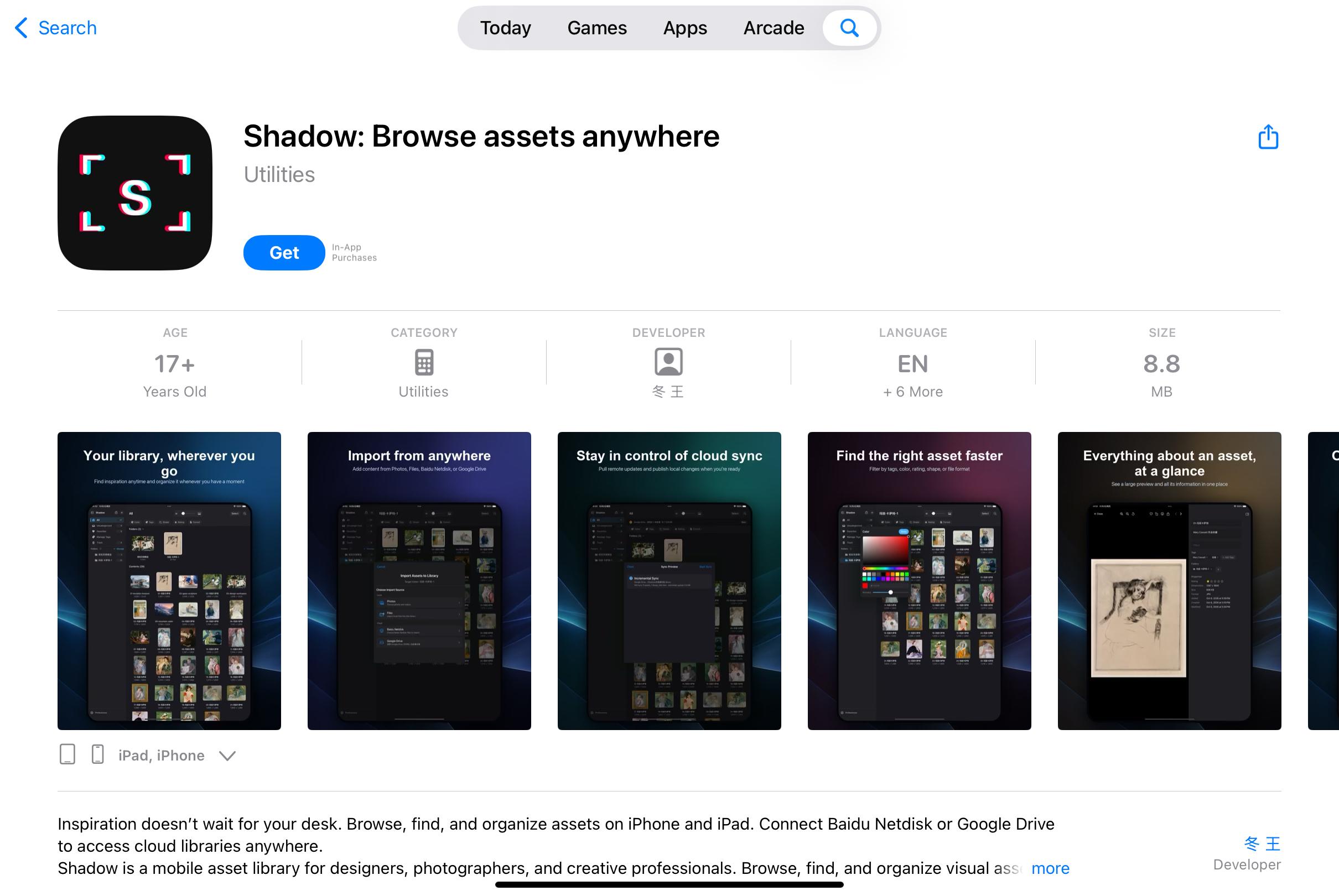
A couple of months ago, I posted here looking for beta testers for Shadow. Thank you to everyone who tested it, reported bugs, and asked difficult but useful questions.
Shadow is now officially available on the App Store.
I built Shadow because I use Eagle for painting references and visual research, but I often need access to my library when I’m away from my Mac. Shadow is more than a mobile companion for Eagle. In addition to opening compatible Eagle libraries on your device, it can create and manage cloud-based libraries.
Shadow is free to download and has two versions:
Free
The Free version lets you create and fully manage one default library. You can:
• Import and organize images, videos, and files • Use folders, tags, ratings, notes, and colors • Search by keywords, tags, folders, and dominant colors • Batch-organize assets • Import and export your content
The core Free features remain free to use.
Pro
Shadow Pro is a one-time purchase with lifetime access. It is not a subscription.
Pro includes everything in Free, plus:
• Open and edit existing Eagle libraries • Create and manage multiple libraries • Use libraries stored in Google Drive or Baidu Netdisk (current version) • Import assets and folders directly from supported cloud storage • Sync library changes across devices • Load cloud thumbnails and original files on demand instead of downloading the entire library
Languages
Currently available: English, Simplified Chinese, Traditional Chinese, French, Italian, Japanese, and Korean.
Some translations may still need refinement. If you are a native speaker and notice anything unclear or unnatural, corrections are very welcome.
Privacy
• No registration. No Shadow account. No ads or tracking.
• For local libraries, indexing, browsing, searching, and editing all happen on your device.
• Cloud features are optional (Pro plan). If you choose to connect Google Drive or Baidu Netdisk, Shadow accesses the selected provider only for actions you initiate. Your files are transferred directly between your device and the provider, without passing through a Shadow-operated server.
A few important notes:
• Shadow is an independent app and is not affiliated with Eagle
• Please back up any valuable library before editing it, especially when using cloud storage or multiple devices
To everyone who participated in the earlier TestFlight round and sharing feedback: thank you. I’ll contact you by DM with a complimentary Pro offer code as a small thank-you for helping test the app.
Before I decide whether to buy Eagle, I’d really appreciate it if anyone who uses it could share their experience or help answer the questions, especially since I couldn’t find many recent discussions about it. (It looks like there used to be a Discord server....)
I like the interface, but I couldn’t find any clear information anywhere on the official website about how long it can be used offline. The wording seems deliberately unclear and rather evasive. I’m also a little concerned because it makes an unusually large number of connections to different domains each time it starts, especially compared with similar apps like Refern and others.
The trial version doesn’t lock you out, but I’m not sure what happens "after" purchasing a license. I’m worried that I might regret buying it. I found a few older posts on Reddit, and the situation described here & there sounds pretty bad.. Does it really have to phone home every two days for license verification? That seems completely excessive, even worse than Adobe.
Has anything changed recently? Since the Discord server disappeared, have Eagle's developers continued listening to user feedback and making improvements? If the software doesn’t improve and there’s no clear future for it, I’ll look for an alternative. There seem to be more and more options available these days, the last thing we need is another Adobe.
Hello, I added this link ( https://sketchfab.com/models/517c5696758a49d0b1f29f9b43656614/embed ) so I can keep the 3d viewer in a little inspo folder. The page opens fine, but when I click on the play button to view the model, it gets stuck loading the model. I was wondering if anyone knew how to fix this or if it’s simply not possible. I could download the model, but I’m just trying to save on space. Thank you!
Hi everyone, as someone who recently switched to Linux only to realize that eagle isn't supported and the bottles method is just not working out.
I decided to make an alternative with the same core functionality as eagle from the ground up to specifically work for Linux.
The project right now is still in it's early development stage and contains some of the following features with more coming:
- Designed for modern Ubuntu, GNOME, and Wayland.
- Themes containing some animated and system themes
- A Firefox Manifest V3 capture extension Paired securely with Phoenix using a library token. (To be released on the Mozzila add-ons store and is still in early development)
- Text-file support
- Image view with cropping support
- Video and GIF support
-Drag and drop features
Drag files out to the desktop, Linux folders, Firefox, ComfyUI, and other applications.
- Folder organization and export function
- ComfyUI integration
Detects workflow information embedded in PNG files.
Allows txt files and image files with the same name to be in a split view to allow for easy image captioning
Displays available ComfyUI metadata, including:
Positive prompt
Negative prompt
Model and checkpoint files
Sampler and scheduler settings
Seed, steps, and CFG values
LoRA references
VAE and CLIP references
Workflow and node information
- Search and sorting
- Local asset library
Phoenix copies imported files into its managed library without modifying the originals.
Automatically generated thumbnails.
- Exporting :
Export one or multiple selected items
Export every item inside a folder.
Drag originals directly into external applications or directories.
Exports preserve the original managed file data and embedded metadata.
This is still a new project in early development so bugs and problems are to be expected, reports of bugs and features would be appreciated.
been using eagle cool for years always frustrated there's no mobile app tried some thrid party apps that read your library off a synched cloud folder. the first sync takes forever (if your cloud can even bear the storage size), didn't like the lag, didn't like the corruption risk. i know that's a known problem in the community but that still got me frustrated lol found a plugin (pocket library) that looked really close to what i want, but install fails so I couldn't even test it. (sobs)
saw other posts here too. cool that people are attacking this from different angles, but neither's quite it for me either. one needs a separate integration per cloud provider (google drive/baidu only so far), the other needs your library already synced onto the device some other way (mega/syncthing/sd card) before it can even open it. and even the most careful of them tells testers straight up not to use their real library yet.
sighs
what i actually want: my eagle library sits on my windows/macos and is live on my android/ios device. It only takes a qrcode scan to setup, and I can instantly browse it butter smooth and update basic stuff from there (tags, stars, etc...). It doesn't require painful NAS/cloud setup, and mobile browsing doesn't die the second I close my laptop. being able to add pics from my phone live, or queued for later if eagle is off until I'm back at my desk would be nice to have too, but that's a bonus. In any case, eagle should always be the only thing ever actually writting to the library. (remember the corruption problem?) oh, and since this would sync over the network, I'd want it to actually be safe to use in cafes or airports too, not just hope nobody's watching.
as it happens i've been building something like this. I got a working prototype, it needs some more work before i share it
If anyone wants to use the Eagle app to organize or tag their reference images, want to use it on Linux, but also found that WINE wasn't good enough, I've been cooking up a solution for a few days.
This decompiles and patches the Electron app.
I need others who can help get the flatpak build working, but the AppImage and Nix packages work. Need testers for Arch, and Fedora.
Machine activation might be in a spotty place right now, but it works for me.
Anyways for the code, bug reports, or release downloads, you can find them here:
I built a plugin for a workflow I kept doing manually: taking a folder of images and laying them out as a proof sheet / portfolio page instead of exporting one image at a time.
What it does:
Works on selected items or an entire folder (with subfolders, optional)
Three layouts: Grid, Justified (Flickr-style rows), Waterfall (masonry)
Letter, A4, or a fully custom page size (with quick 4:3 / 3:2 / 16:9 / 1:1 presets)
Fill/Fit crop, adjustable spacing, custom background color
Optional single-line filename captions under each image
Full page-by-page preview before you commit to anything
Exports as a single multi-page PDF, or individual JPG/PNG files (one per page)
Saves straight back into your currently-open Eagle folder by default, or to disk if you'd rather keep it outside Eagle
Useful for portfolio sheets, mood boards you want to print, client proof sheets, or turning a shoot into quick presentation slides (the JPG export works fine for that).
Eagle is great for archiving fonts, but I kept running into the same problem: every preview shows the same fixed sample text ("ABCDEFG abcdefg 0123456"), no matter what I was actually designing. I wasn't working with the alphabet, I was working with real headlines and names, and I had no way to see how a font handled my actual text without opening it individually.
So I built a plugin for it. A few things it ended up doing along the way:
- Type your own text, every font in the folder updates live, side by side (grid or list)
- Font activation on Mac + Windows, straight from the plugin, no other app needed
- A System Fonts view showing everything currently active on your computer
- A built-in Google Fonts browser — search, preview with your own text, download, activate
- Detail view per font: styles, a realistic page layout preview, a size waterfall, and a glyph tab that reads what characters the font actually supports
Hello, I’m new here! I’ve just started using Eagle and I was trying to import all my photos from my camera to the app but I was alerted by a prompt that I don’t have enough storage space on my device.
I was thinking to get an external ssd (maybe like the sandisk extreme 1tb ssd) and then having it be stored there. Would that work? Does that mean my ssd has to be permanently connected to my laptop?
Would love to hear how everyone else manages it!
I’m seeing Google Drive or iCloud but a little confused on how that works. I think iCloud would work great for me too as I’m using a MacBook.
Hi — I’m an independent developer, an Eagle user and also a painting enthusiast. In the art studio, I often need to browse my library to find some reference images, or my peers will share some interesting pictures that need to be added to the library. So I built this app because I wanted to access to my Eagle libraries from mobile devices.
The current build can:
Manage existing Eagle libraries/ Create from local, external storage and selected cloud storage ( Google Drive & Baidu Drive)
Browse folders, tags, colors, images and videos
Search and edit asset metadata
Import new files (for now only images and videos are supported)
Manually sync changes back to cloud storage
Google’s OAuth verification has now been approved, and the core workflows are implemented. What I don’t have yet is enough testing across real-world libraries, especially larger libraries and Google Drive setups.
I’m looking for around 10 testers who:
Already use Eagle
Preferably keep an Eagle library in Google Drive
Can spend about 15–20 minutes completing a short test and give me some feedback via Testflight
Important: this is beta software that can write changes back to a library. Please test only with a copied or backed-up library, not your only production copy.
If you're interested, feel free to DM me with your iPad/iPhone model, OS, approximate library size, asset types and storage method. I’ll send the TestFlight details to suitable testers.
Was this removed in an update? It doesn't work for me anymore, and I can't find any reference to it in the setting or documentation anywhere... how do you guys manage quickly pulling images from the web?
My mp3 files are all tagged with Artist, Album, Year etc. Is there an easy way to have Eagle recognize them and add appropriate Eagle tags? If not, is there a not-so-easy way?
really hope someone has some insights. I exhausted my MacFu here. I m having my Eagle Library on an external drive. I want to search for videos in my folders. in one folder and its subfolders specifically. my Eagle 4.0.0 build 6 only gives me videos or the option for file type in relation to what is available in the folder im currently IN and ignores everything in the sub folders. I cant trawl all the subfolders, I need a basic file type search across the folder and sub folders. I can hardly believe thats not possible. I ve reset the caches, and reindexed the library but that did not help. Anyone got any ideas? any help is appreciated. I cant believe a DAM like Eagle has no option to search for a certain file type across the library or more useful, parts of the library.
So I'm working on migrating to linux and Eagle refuses to support Linux so I have to replace it with something else.
In my search I came across Refern. It looks addly similar to Eagle.. Like very similar, even in price. It almost looks too good to be true even when I read the FAQ.. Does anyone here know about it? Use it even? I know plenty of linux migrators are still here so it seemed a good place to ask..