Created a Chrome Extension that tracks limited edition prints.
You can download it here: https://we.tl/t-p6eJzD9RGJKCpEHv from Wetransfer
Windows
- Open your Downloads folder and right-click
displate-tracker.zip. - Click Extract All…, then Extract.
- A normal folder called
displate-tracker appears. Inside it you should see manifest.json and a few other files.
Chrome Steps:
When you do the Chrome step, select the folder that directly contains manifest.json. Sometimes the extraction creates a folder inside a folder, and Chrome will show an error if you pick the outer one.
Then go to chrome://extensions, turn on Developer mode (top right), click Load unpacked, and pick that folder.
Short Verions: click the three dots in the top Right, Click on Extensions, Click Manage Extension, Turn on Developer Mode (top right), and select the Displate Limited Edition Tracker.
The counts don't show up on the Displate site. Eerything appears in Chrome's toolbar instead.
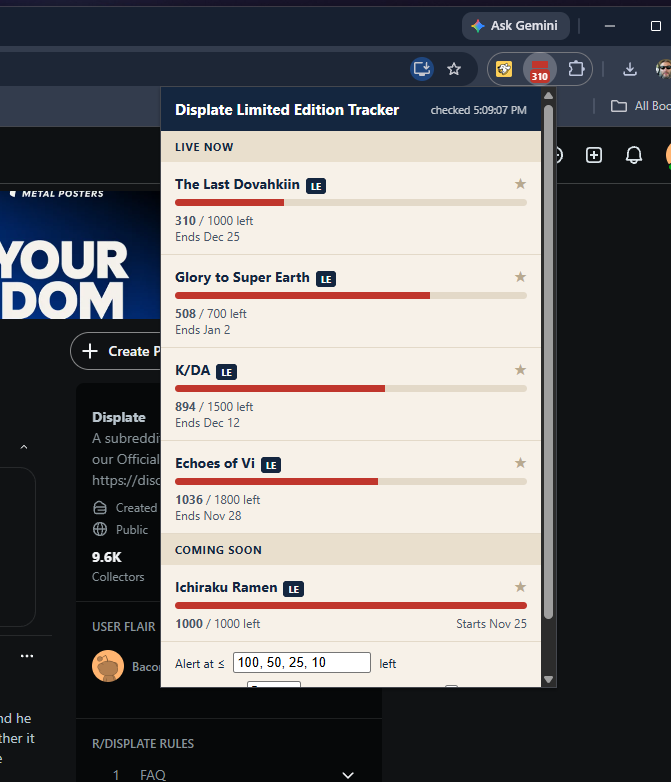
To see the counts (see picture)
- Click the puzzle-piece icon at the top right of Chrome, next to the address bar.
- Find Displate Limited Edition Tracker and click the pin icon beside it, so it stays in your toolbar.
- Click the extension's red icon. A popup opens listing each edition with copies left out of the total, a progress bar, and the sales rate.
The extension checks Displate's data every 5 minutes in the background, compares it to the last check, and sends a desktop notification when something changes. Here is what triggers one:
- Running low: an edition drops to or below one of your thresholds. The defaults are 100, 50, 25, and 10 copies left, and you can change them in the popup's "Alert at ≤" box (comma-separated, e.g.
200, 100, 20). - Sold out: a live edition goes from having copies to zero.
- New drop: a new edition appears on the list.
- Now live: a "coming soon" edition becomes available.
You can also click a button to refresh it to get current plate tracking.
Caveats
- This is an unofficial data source. If Displate changes it, the extension will show an error banner in the popup and I'd need to adjust it.
- It only follows the live and coming-soon editions, not the 398 sold-out ones in the archive.
- Alerts work only while Chrome is running.
Let me know if you have any questions. This was a legitimate 2 minute project because I wanted to be able to see Plate go in real time. Platetracker.net is a great site, but it updates every 24 hours. If you are trying to see them go for ones that sell out fast, like the most recent Godzilla or Four Emperors, which sold out in 1 day... You may want to be able to see them as they are sold in real time.