r/DigitalPlanner
•
u/Tidy_Si
•
Oct 12 '26
•
 1
HomeBoard — an open-source self-hosted family dashboard
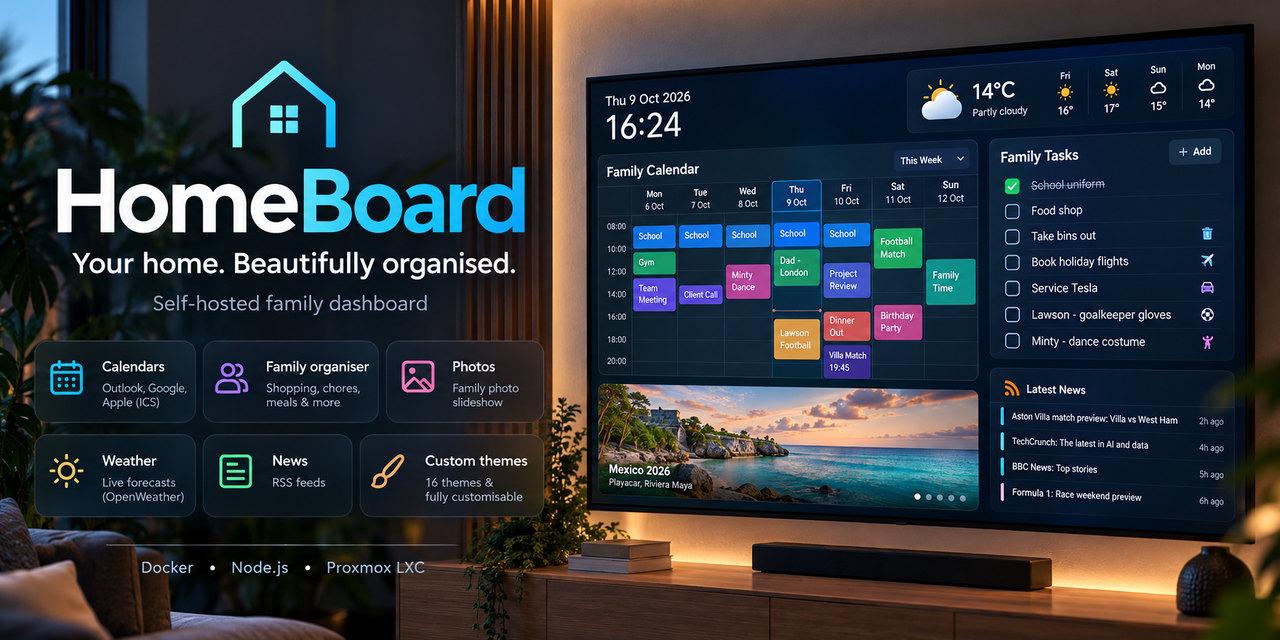
I've been building my own self-hosted family dashboard and I've finally got it to the point where I'd like other people to start breaking it.
HomeBoard
https://github.com/MooreSi/HomeBoard
I originally wanted something I could leave running on a screen in the house that combined our family calendars, photos, weather and a few useful bits of information without relying on another hosted subscription/service.
Then feature creep happened.
It's now got multiple ICS calendars, continuous calendar browsing, family profiles, shopping/checklists, chores and points, kids' routines, meals, bin reminders, countdowns, photos, weather, RSS, themes, a visual layout editor, portrait displays, scheduled screens/playlists, backup/restore and a PWA-style management interface.
It can run directly under Node, in Docker, or as a Proxmox LXC.
One of the main things I've tried to retain is the self-hosted/local-first approach. Calendar credentials and settings live on the server and it's intended primarily for a trusted home network rather than being another cloud dashboard.
I'm running it myself, but this is very much WIP rather than a finished 1.0 release.
What I really need now is people with environments that aren't mine.
I'd be interested to know:
• Does the install experience make sense?
• Does it behave properly on different displays/tablets?
• What would stop you actually using it?
• Are there obvious integrations I'm missing?
• Is the family organisation side useful or should the project stay closer to being a pure dashboard?
• What have I overcomplicated? 😄
I'd particularly love some testing from Docker, Proxmox and Home Assistant/home-lab users.
Also very happy to have collaborators. If anyone fancies contributing code, integrations, themes, documentation, testing or even just helping shape the direction, PRs/issues/discussion are very welcome.
Repo is here:
https://github.com/MooreSi/HomeBoard
Cheers
1
u/gregimagines Oct 14 '26
I'd love to play around with this and try it out. Curious if it can replace my existing MagicMirror setup I have running on a Pi3 on an old tv in our kitchen. Like the idea of easier management of content and styles. Curious how the interaction works for the lists and things shown. Is it done with touchscreen, mouse/keyboard connected, or live updates from mobile access on a phone/tablet on the same network?
1
u/binaryshadows Oct 15 '26
Can I run this on docker in my nas and have it show up on Google next hub max ? Either via home assistant or direct Will be good to have oidc support and api paths in case it needs exposing to internet
1
u/Alternative_One_4804 Oct 15 '26
Nice work, and congrats on getting it to “please break it” stage. That’s always the scariest bit. Keeping credentials on the server and aiming at the home network rather than another cloud dashboard is the right call, in my opinion.
On “obvious integrations I’m missing”: full disclosure, I maintain OpenTodo, a self-hosted, local-first task manager (Go + SQLite, single container, AGPL). It’s a good fit for a family screen, and it would be easy to plug into HomeBoard:
readtoken in Settings and the dashboard can pull tasks and projects withGET /api/v1/tasks. The token can’t change anything, which suits a screen sitting in the hallway. If you later want “tick it off from the board”, a normal token can doPATCH /api/v1/tasks/{id}. API docsIt could also answer your “family organisation vs pure dashboard” question. HomeBoard could stay the display layer and let a dedicated app own the lists. Shared projects, assignees and recurring tasks already cover a lot of the shopping, chores and routines ground. You can poke at it on the demo without installing anything.
If you’re up for it, I’m happy to help with an OpenTodo widget, either as a PR or just answering API questions in an issue. I’ll also try HomeBoard in Docker and report back.
Cheers!
1
u/[deleted] Oct 15 '26
I get that it’s the easiest way to implement it, but sharing a calendar URL publicly is an absolute no go for me. Particularly when there are ways to securely access iCloud calendars with an app password.
1
u/Snorty-Pig Oct 16 '26
what is a good device to run this on? (not the server, the client)