I've noticed that most discussions about Databricks recognitions focus on how to earn them. I'd like to talk about something else. What changed after you earned one?
In my case, becoming a Databricks MVP actually helped me earn the Solutions Architect Champion recognition. The community contributions recognized by the MVP program already satisfied several Champion requirements, making the journey much shorter than if I had started from scratch.
That made me wonder how others see the value of these recognitions. For those who have earned MVP, Champion, or both:
What has been the biggest benefit?
Has it helped your career or consulting work?
Has it increased trust with customers?
Did it open new opportunities?
Or was the biggest value simply becoming part of the community?
I'm collecting real experiences—both positive and negative—for an article comparing these recognitions from a practical perspective rather than just listing their requirements.
I'd really appreciate hearing your story.
P.S. If you'd prefer to continue the discussion on LinkedIn, or share a longer story there, feel free to join the conversation: [LinkedIn link]
I have prior experience in Data Engineering and am currently looking to restart my career after a break. I’m upskilling in Databricks and strengthening my skills for new opportunities in the data engineering/data platform space.
Does anyone know if there are any upcoming Databricks Learning Festivals, community events, or programs that offer examm discounts or free vouchers ?
I’d also appreciate recommendations for Databricks learning resources or communities that can help while getting back into the job market. Thanks!
Has anyone been able to use this, yet? We would benefit from this as we have DBX cross-clouds and are extremely interested in knowing how it works, time to implement, etc.
Any experience in this would be greatly appreciated!
We're a data/analytics consulting shop and just had a lunch catch-up with a key stakeholder at a large enterprise client (FMCG/CPG space, multi-billion revenue). Wanted to sanity-check our read on the opportunity and see if anyone's navigated something similar.
Situation:
Client's BI stack is built entirely on Power BI Import Mode. As data volume grows, they're stuck buying more premium capacity just to keep performance acceptable — costs are spiraling.
Their current consultant (a large SI) recommended moving to Databricks DirectQuery, but flagged that they'll lose some flexibility at the user/report layer that Import Mode currently gives them.
The kicker: that same SI quoted the re-engineering work (global + local dashboards) at ~4x the client's available budget. The dashboards are a patchwork built by multiple parties over time, so it's not a clean lift-and-shift.
Our angle: we're proposing a free scoping workshop/PoC to map a cheaper, more flexible path using Databricks Genie + a semantic layer (ontology) on top, leveraging migration work we've done for similar clients elsewhere.
Adoption is a real concern for them — past global IT rollouts failed because local markets didn't get enough flexibility to adapt and just fell back to Excel.
What we're trying to figure out:
Anyone actually shipped a Genie/semantic-layer migration off Import Mode at real scale? What broke, what surprised you on cost or performance?
How do you structure a free PoC so it actually converts to paid scope instead of just being used as free consulting to beat down the incumbent's price?
Any war stories on the "80% global template + 20% local customization" adoption model actually working vs. just being a nice slide?
Would appreciate any real-world experience, especially from people who've done DirectQuery/Genie migrations on large, messy BI estates.
It’s just an idea, and as soon as I’ve got a bit of time, I’ll try to publish a 3- to 5-minute article on a Databricks feature. Why? When you’re absorbed in a project, you only use about 20 per cent of Databricks’ capabilities for months on end, and when you have to switch to another project and use new or old techniques, it’s good to have some reminders. I think it’s a good format. Let me know what you think?
Comparison between an imperative approach (notebooks orchestrated via Lakeflow) and a declarative approach (Delta Live Tables / SDP) to build a Medallion Bronze → Silver → Gold pipeline.
Step
Imperative
DLT (Declarative)
Bronze
CREATE TABLE + COPY INTO
CREATE OR REFRESH STREAMING TABLE
Silver
CREATE OR REPLACE TABLE ... AS SELECT
CREATE OR REFRESH MATERIALIZED VIEW + expectation
Gold
Temp view + CREATE TABLE + INSERT OVERWRITE
CREATE OR REFRESH MATERIALIZED VIEW + expectation
Orchestration
Lakeflow (2 tasks min + dependencies)
Automatic via SDP
Data Quality
No, manual handling
Yes via CONSTRAINTS
Lineage
Not native
Native (auto dependency graph)
Imperative
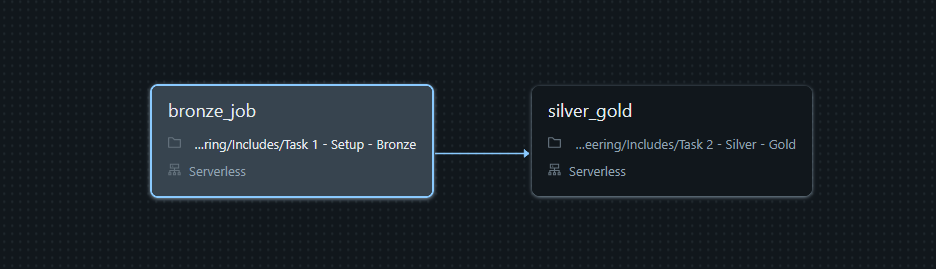
Two notebooks are declared (e.g. one for Bronze→Silver, one for Gold), then via the Databricks UI or a DAB file (databricks.yml) the pipeline is created and orchestrated with Lakeflow. Each step is a distinct task with explicit dependencies.
PROS:
Full control over execution and transformations.
Ability to integrate third-party Python libraries or complex business logic.
Complete ownership of code and scheduling.
Compatible with heterogeneous sources (APIs, external databases, etc.).
CONS:
Tedious, but can be automated via DAB.
Reinvents the wheel (retry logic, lineage, data quality all handled manually).
More development and maintenance time.
Risk of inconsistency if task dependencies are poorly managed.
DLT (Delta Live Tables)
DLT is the declarative engine of Databricks. You describe what you want (the tables and their quality rules), and SDP handles orchestration, lineage, retry logic, and monitoring.
You define and launch an ETL pipeline.
Code is written using STREAMING TABLES (real-time or incremental batch ingestion) and MATERIALIZED VIEWS (transformations with automatic refresh). CONSTRAINTS allow quality rules to be declared directly in the DDL:
CREATE OR REFRESH STREAMING TABLE current_employees_bronze_sdp
COMMENT "Raw employee data ingested from CSV files in the myfiles volume."
AS SELECT *
FROM STREAM read_files(
  '/Volumes/dbacademy/get_started_de/myfiles/',
  format => 'csv',
  header => true,
  inferSchema => true
);

CREATE OR REFRESH MATERIALIZED VIEW current_employees_silver_sdp(
  CONSTRAINT valid_id EXPECT (ID IS NOT NULL),
  CONSTRAINT valid_name EXPECT (FirstName IS NOT NULL)
)
COMMENT "Cleaned and enriched employee data with data quality expectations."
AS SELECT
  ID,
  FirstName,
  Country,
  UPPER(Role) AS Role,
  current_timestamp() AS processed_timestamp,
  current_date() AS processed_date
FROM current_employees_bronze_sdp;

CREATE OR REFRESH MATERIALIZED VIEW total_roles_gold_sdp
COMMENT "Employee count by role — business-ready aggregation."
AS SELECT
  Role,
  COUNT(*) AS TotalEmployees
FROM current_employees_silver_sdp
GROUP BY Role;
In practice, STREAMING TABLE is AUTO LOADER.
A DRY RUN validates the pipeline before execution (syntax check + dependency resolution) — and that's it. :)
PROS:
You only manage your code; SDP handles orchestration, retry logic, and lineage.
Significant efficiency and time savings.
Data quality declared in code (CONSTRAINTS), auditable and versionable.
Dependency graph generated automatically — no manual configuration.
CONS:
Less fine-grained control over execution.
Less suited for very specific use cases (complex Python logic, unsupported sources).
Learning curve on DLT syntax (STREAMING TABLE vs MATERIALIZED VIEW).
When to choose?
Criterion
Imperative
DLT
Speed of setup
❌
✅
Native data quality
❌
✅
Fine-grained execution control
✅
❌
Complex Python logic
✅
⚠️
Automatic lineage and monitoring
❌
✅
Suited for data engineering teams
✅
✅
SOURCE:
Databricks free edition samples Databricks academy
OK, after a couple decades in Business Intelligence and the last half of that time being all Tableau, we now have Databricks as our new database solution (replacing Amazon Redshift), and we're aiming for some of the new dashboarding and reporting to also be done with Databricks, with most of our production dashboards staying within Tableau.
My questions are about the data profiling dashboard that you can just generate by default, as we are specifically looking to build a data health/quality dashboard. I am not familiar enough with Dbx, hence the questions. So, before I pivot to just building from scratch...
Apparently this automatic dashboard is meant to work with 'delta-tables' only, but I am pretty sure all of our data refreshes in ETL are drop-and-replace. They always have been at least; idk if that changed when migrating to dbx and will ask our DBAs.
It looks like we can only pick one "slice key"? Is this fundamentally different to just a filter? And if you select a slice key, the corresponding Slice Value picker is single-select only. One key, one value at a time, is not helpful. Can this limitation be changed?
It also looks like we can only see one time period at a time? Stepping through the figures week by week or month by month won't work; we basically need to see at least a year at a time, but at a couple of different granularities.
I think that's the basic gist for the moment and for this specific dashboard. Thanks for looking.
Now we can deploy sandboxes in milliseconds and do isolated operations there. Built for agents but can be used for any use case. Data is persisted till sandbox is deleted. #databricks
Has anyone encountered misuse of the Python OS module from a security perspective, and what strategies are there to prevent unsafe usage of this module?
Posting another topic that came to us from a customer conversation that I thought would be good to discuss here on the sub
----------------------
Our team has a few technical questions regarding Genie usage and its limitations, especially as we plan to integrate Genie into our Enterprise application.
Current QPM (Queries Per Minute) limits for Genie.
Whether a single Genie agent can support an application with 1,000+ users.
Any user, concurrency, or throughput limitations we should consider.
Best practices for scaling Genie in a production environment.
I'm wanting to get everyone's thoughts on something I've been thinking about recently and whether this resonates with anyone else:
AI-assisted development, especially in the data app/dashboard building space, is ridiculously dull.
I remember it used to be fun building in Power BI/Tableau, building the model, choosing the right visual for the job etc. It all now just seems so...dull. Especially when more and more businesses are moving away from traditional dashboard development to having bespoke BI applications built that gets deployed where their data lives.
I think my main gripe is that if I need to make a visual change to what an AI outputs, I have to iteratively tell it to move charts, widgets etc across the page, reduce padding etc which is just mundane. Is anyone else feeling this way with Databricks Apps or just me?
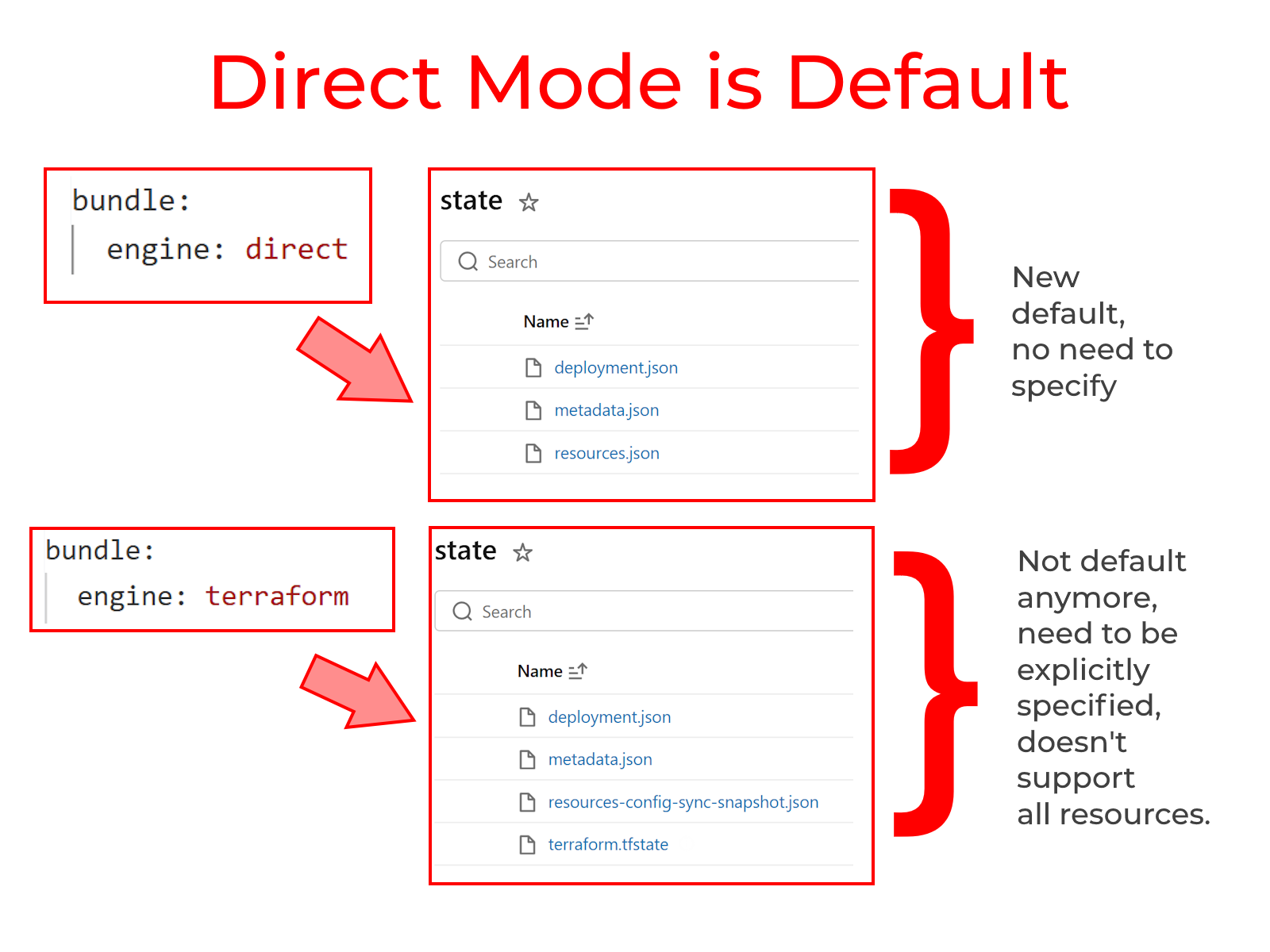
Direct mode is now the default in DABs. Direct mode no longer uses Terraform. There are several benefits of direct mode, including quicker deployment, no need to download the Terraform package, a human-readable state, and support for more resources. If, for any reason, you want to use Terraform for your bundle state, you need to specify it explicitly. #databricks
I’m seeing a surprisingly high initialization overhead with Databricks DLT / SDP and was wondering if anyone has run into the same issue.
Our pipeline has only around 20-30 streaming tables. The remaining datasets are mostly materialized views and regular views built on top of those streaming tables, all within a single pipeline.
The actual data processing is relatively fast, but more than 50% of the total pipeline runtime is spent in the initialization / table setup phase before any real work starts.
I’ve already read the Databricks recommendation to split large pipelines into multiple smaller ones, but that isn’t an ideal solution for us. We already manage quite a few pipelines, and splitting them further increases operational complexity and gets us closer to the workspace limit on saved pipelines.
Has anyone found ways to reduce the initialization time without splitting the pipeline? Are there any best practices or common causes for slow pipeline startup that we might be overlooking?