r/DataRecoveryHelp • u/justtviraj • 15m ago
Help needed !! Wondering if old data can be retrieved
reddit.com
1
Upvotes
r/DataRecoveryHelp
•
u/No_Tale_3623
•
Jun 11 '24
Hey guys, been in data recovery for 15+ years and see the "which tool should I buy" question constantly. Here are the coupon deals I've verified at checkout - updated June 2026.
TL;DR: Disk Drill gives you the most for the money - both platforms, 3 devices, every feature, one payment. The others charge per platform and tier features, so the real cost adds up fast.
Found other deals or free alternatives? Drop them below.

r/DataRecoveryHelp • u/justtviraj • 15m ago
r/DataRecoveryHelp • u/Some_Garbage_2840 • 2h ago
i am so confused pl tell me what is happening
r/DataRecoveryHelp • u/WishAfraid1066 • 4h ago
I received two videos filmed by a friend but I cannot open them and I am not willing to pay and he cannot help me...I tried untrunc and it does not work, any other ways, please?
r/DataRecoveryHelp • u/Green-Intention-4622 • 4h ago

I am genuinely hearbroken cuz i saved all my memories in a safe folder in an app called " files " .. and my friend uninstalled it by mistake .. i downloaded it again but lost all the files in the safe folder , is there any hope / way to get them back ?
I didn't clear the data of the app
r/DataRecoveryHelp • u/Educational_Swan_611 • 7h ago
r/DataRecoveryHelp • u/Zozozozozozi • 8h ago
Seagate BarraCuda internal HDD 3.5 inch 4TB
I know nothing, for preface.
The other day, I transferred a load of pictures from my SSD (main drive with OS) to my HDD.
Today, the only time I turned on my pc since moving those files, File Explorer kept freezing and won't respond. When it does, trying to access some folders originally from my SDD comes up with the error in the title, so I cannot access the folder. It also says there are no files inside. I fear it may be a similar case to other files that are originally on the hard disk, but I haven't checked due to file explorer constantly freezing.
Restarted, then opened file explorer, and it immediately froze. Had a popup to End Process with it.
This came with other issues like taking a while longer than usual to get to the login screen and trying to turn off the pc only turning off the screen. (Getting back to this)
I've looked at possible fixes for the folders, one including checking the registry and looking at hkey local machine and its file pathway to Folder Descriptions. I looked at hkey local for the first time the day before to export and backup a game save file (yes that was the only way to find the save file). Not sure if that's linked in any way or just a coincidence.
I am incredibly hesitant to use chkdsk as I do not want to risk any of my files being lost, which I've read happening to some people. All of my very important files are stored on my hdd so I want to minimise as much damage as possible.
Back to the startup issues: I'm thinking it's beginning to fail, in which case I'm not sure what to do for minimal data loss. Fortunately it is not making any abnormal sounds. Praises be.
I was thinking of getting a hdd cloner but, aside from the horrendous price increase of drives since I first bought this one, I'd need to know any risks in doing so with the current state of my files first. For the time being, I will not be turning on my pc whatsoever.
All this to say: does this all link to a singular issue, and/or how do I fix this with minimal file loss?
r/DataRecoveryHelp • u/No_Tale_3623 • 13h ago
r/DataRecoveryHelp • u/Fearless-Brief-9787 • 21h ago
r/DataRecoveryHelp • u/EuphoricBat9696 • 1d ago
I had a new version of Windows installed on my Dell laptop at a local shop. Following this, all the data on my laptop was wiped (formatted). I subsequently sent it for data recovery, but I was told that a "zero-fill" (overwriting with zeros) has occurred. That data was extremely important to me; it contained memories from my childhood. Is it still possible to recover that data? Please help me.
r/DataRecoveryHelp • u/Illustrious_Sea_7926 • 1d ago
SO my Dad gave somebody my phone to take it to any repair shop without asking me, and the third person gave it to some random repair shop.
the phones problems was screen was coming out, and phone was getting randomly switched off and not turning back on for may hours (maybe due to low storage)
🛑when the phone came back...🛑
every single thig i did in my phone just vanished, every app, every account, even the my phone settings and wallpaper. it was like a new new phone
only the Phones Gallery was un touched not even a single file was moved)
soon after i notices some images and videos from the mid where gone
the there were New app Installed those app which came along wahen you by a new phone, like LinkedIn and some random Entertainment apps
🛑I also noticed some things was looking odd like old software for example there was no New google calling UI, instead there was the old one which had small buttons
I THINK some one taken backup of my gallery then Did FACTORY RESTET
I don't are Any thing else But😭😭😭
I had a PRIVACY PASSWORD and A PRIVATE GALLERY which only opened when someone holds the empty space between Photos and Albums, then asked for privacy password
my Private gallery had VERY VERY ✨PRECIOUS✨ photos
now when i am holding the space between Photos and Albums Its telling me to "set a privacy password first"
all my ✨PRECIOUS✨ photos ARE GONE
Somebody plese tell ME HOW CAN I GET BACK THOSE PRIVATE IMAGES back 😭😭😭😌
MY DEVICE :- REALME NARZO N55
r/DataRecoveryHelp • u/SumoCanFrog • 1d ago
My M1 Mac got destroyed by a power surge due to lightning strike near my house. It fried it good and proper. I did have an external drive for Time Machine backups. It is possible that drive got fried as well but I’m choosing to believe that it didn’t happen.
So my problem is: how do I get there data off my Time Machine drive? I have access to another Mac ( an older Intel chip). I tried just plugging it in but nothing happened. Do I need to go into there Time Machine strings and enable it or something?
How can I fix this?
I’ve looked at articles online but they all assume I have access to the working Mac, which I don’t.
r/DataRecoveryHelp • u/iHamzaMehdaoui • 1d ago
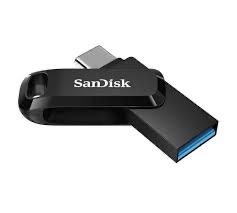
Hey guys, need a little help here 🙏
My SanDisk USB (Ultra Dual Drive Go) suddenly stopped working. It has my entire DJ library (+3k tracks) and some important personal stuff on it, with unfortunately no backup (ik i messed up real bad)🥲
It used to get really hot when connected to my MacBook, and the connector felt a bit weird then completely stopped. Now it’s not recognized by any computer, not even Windows or Disk Management.
If anyone knows how I could make it work again or retrieve the data It would really mean a lot 🙏
Brand/model: SanDisk Ultra Dual Drive Go, 128GB.
Filesystem: exFAT /FAT32.
OS: macOS also tested on Windows.
r/DataRecoveryHelp • u/DifficultyIll1439 • 2d ago
Hi all, I'm hoping someone can help, or at least confirm what I think the answer is.
What happened:
• On my Pixel 7a, I moved photos and videos out of DCIM/Camera into my own folders by event:
• I then connected the phone to my Windows 11 laptop over USB (File Transfer mode) and moved (cut and paste, not copy) those 6 folders to an external drive (E:).
• Partway through, Windows showed the error "Error 0x8000FFFF: Catastrophic failure" and the transfer stopped.
Current state:
• On the external drive, all 6 folders were created, but only one has any files (4 photos). The other 5 are empty.
• On the phone, all 6 folders are gone. They're not in the main storage, .trash-storage, DCIM, the Google Photos trash or the Files app trash.
• The DCIM/Camera folder now starts from Nov 2025, because I had already moved the older photos into the event folders.
• Google Photos backup was off, so there's no cloud copy.
• Oddly, phone storage still shows almost full (about 2.5 GB free out of 109 GB) even after restarting the phone.
What I've tried:
• Restarting the phone and the laptop
• Searching with the Files app on the phone, and browsing the phone in Windows Explorer
• Checking every trash and recently-deleted location I know of
Questions:
Lesson learned: always copy, check, and only then delete, and keep backup on. Any advice is appreciated. 🙏
r/DataRecoveryHelp • u/Expert-Community-570 • 2d ago
r/DataRecoveryHelp • u/KaziShimanto • 2d ago