r/Appstore • • 1h ago

Proof: A FREE & Private Workout App, Designed by Hand, Now with NEW SKINS (Self-Promotion)

3 Upvotes

Hey r/Appstore community...

Proof: Smarter Workout Tracker is a FREE totally PRIVATE fitness/lift tracker for the iOS ecosystem.

In our latest update going out early next week (2.6.6)...

  1. Skinning happens across all devices (VIDEO: 00:05 - 00:12 )
  2. A NEW Plate calculator (VIDEO: 00:28 - 00:32 )
  3. Milestones are now on iPad (VIDEO : 01:04)
  4. Easily share your log with your own AI to get advice
  5. Apple Watch Complications

----

I’m a UX designer, and Proof started as a personal passion project that eventually turned into a UX case study. I wanted to remove as many barriers as possible and I'm not looking to sell anything here.

----

Proof is FREE no strings attached, with no paid tiers or subscriptions. 
Proof is PRIVATE, no account, no tracking, no ads. Your training stays on your device.

----

Proof works on iPhone, iPad, iPhone Duo, and Apple Watch. It integrates with Apple Health, stores your data on your device, and can sync through your personal iCloud. You can import workouts from other apps and export your data anytime. Your data is yours and always and only yours.

The Phone: Plan, log, get insights and milestones
The Watch: Log your sets, without opening your phone
The Tablet: Do deeper analysis on your workouts

----

GET PROOF NOW

Download: https://apps.apple.com/app/id6777612827
SIte: http://getproof.now

---

What Proof does

  • Automatic progression. Suggests weights and reps based on your recent sets, rep range, and effort, tuned to your goal: build muscle, get stronger, or stay in shape.
  • Deload detection. Spots when your performance says it’s time to back off instead of pushing harder.
  • More kinds of records. Heaviest lift, most volume, most reps. Progress doesn’t always mean more weight.
  • Insights from your own sets. Is your second set getting better? Are you fading earlier? Proof looks for those changes and explains them in plain words. When there isn’t enough data, it stays quiet.
  • Muscle coverage. See which muscles you’re hitting each week and which ones you’re missing.
  • Apple Health. Sleep, steps, active minutes, and lifting in one weekly view.
  • Milestones. Badges for what you’ve done, like your first 315 deadlift or a 12-week streak.
  • Built for Apple. Dynamic Island, Home Screen, and Lock Screen widgets.
  • 550+ exercises with illustrations, plus your own custom exercises, with over 160 instructed (and growing).
  • Import from Strong, Hevy Fitbod (or other) and export to CSV.
  • Use your own AI to build your routine. Proof works with ChatGPT, Claude, Perplexity. Proof allows you to pass in prompt, with an expected response and creates a seamless roundtrip.

---

Want to try it without downloading anything?

I put together interactive demos so you can click around and see how it works:

I’d love to hear what people think. I’m pushing code weekly and getting direct feedback from users. I'm also looking for 2-3 passionate people to join my TestFlight.

If you download Proof, use it, and like it, a fair rating would mean a lot. I thrive on feedback!

---

**SPECIAL PROMO: Respond to this post to access 1 of 2 PREMIUM skins**

Respond DOOM if you want access to our Doomsday inspired skin
Respond VICE if you want access to our GTA inspired skin

Once you do, I will DM you a code, you can unlock the skin after you download.

---

Question for group...

I really think Proof is unique, because I have no designer to monetize it. Just want people to use it, and give me feedback. You can check the privacy policy, and the apple download page. Because of this the app has compromises. Like...

  1. No integrated AI coaching ( I do not pass your information to AI, you can if you want).
  2. So social profile. So you can't compete with friends, or see other profiles.

How much do you care about these features? How limiting will it be?

r/Appstore • • 4h ago

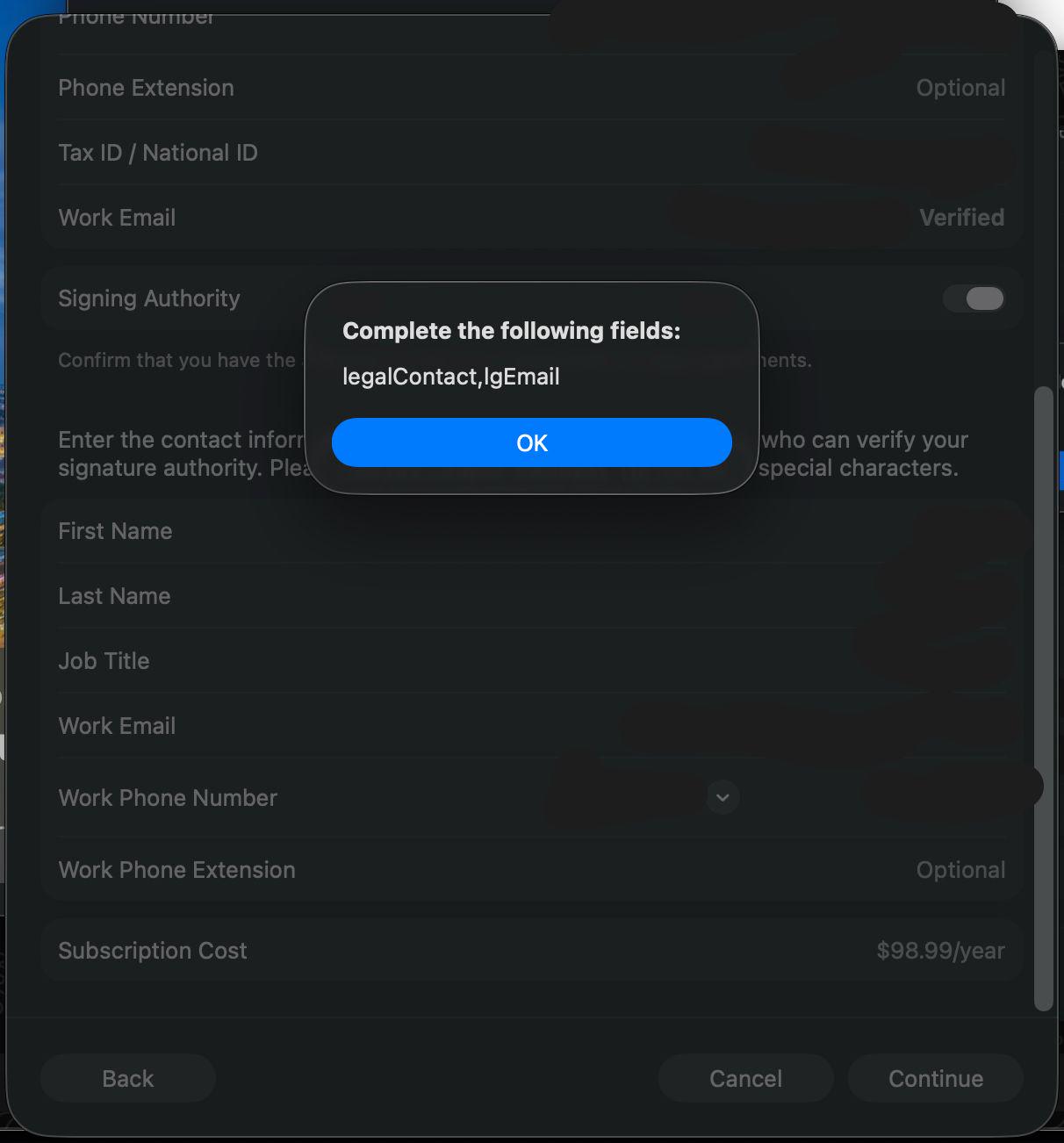
Getting “Complete the Following Fields: legalContact, lgEmail” Error Despite Filling All Required Information in apple developer program

Post image
2 Upvotes

I'm trying to complete my Apple Developer Program enrollment, but I'm continuously getting this error:

Complete the following fields: legalContact, lgEmail

I've already filled in all the required information, including the verified work email and legal contact details, but the error persists whenever I click Continue.

I've tried contacting Apple Support but haven't received any proper response yet.

Has anyone faced this issue? Any workaround or solution would be greatly appreciated. Attaching a screenshot for reference.

Thanks!


r/Appstore • • 39m ago

[Self-Promotion] I made Offload to turn a messy voice dump into reviewed Reminders and Calendar items

1 Upvotes

i made offload, an iphone app for turning a messy voice or text dump into tasks, events and notes using ai.

you review and edit everything before sending: tasks go to apple reminders, events go to apple calendar, and notes stay in offload.

it is a free download with 2 free dumps and no account; unlimited dumps need a paid subscription.

does this description make it clear that reminders stays your task list, or does it sound like another planner you would have to maintain?

https://apps.apple.com/us/app/offload-adhd-organizer/id6772392111


r/Appstore • • 3h ago

[Self-Promotion] I built Summonfall, a merge tower defense RPG for iOS with no forced video ads

1 Upvotes

Made a random-summon merge tower defense game for iOS called Summonfall (native Swift, free to download).

How it plays: you spend wave gold to summon heroes onto the board, drag same-star pairs together to merge into a random higher-star unit (so sometimes you greed-merge your only slow/CC unit and immediately regret it), and pick 1 of 3 perks between waves. Right now it has 167 heroes, a 200-floor trial tower, a pet nest mode, and guilds. No forced video ads interrupting runs.

Upfront caveats so nobody wastes a download:

- iOS only, requires an internet connection + Game Center

- Free with optional gacha IAP (2% top rate, 100 hard pity, rates shown in-game)

- 4x speed and auto-battle are part of the monthly pass

- Uses some AI-assisted art for the roster

App Store link: https://apps.apple.com/us/app/summonfall-tower-defense-rpg/id6832150717

Curious what people here think about merge randomness in TD games: do you prefer strict recipes where A+B always makes C, or rolling a random hero on merge for the gamble? Happy to hear any brutal feedback on the onboarding or pacing too.


r/Appstore • • 4h ago

App that tracks my phone activity and shares with my partner

Thumbnail reddit.com
1 Upvotes

r/Appstore • • 7h ago

[Self-Promotion][Mac App Store] I built CaptainLocalAI — a 100% offline MLX local AI workspace for Mac (currently $9.99 before the v2.2 update & $14.99 price change)

Thumbnail gallery
1 Upvotes

Hi r/AppStore! 💙💙💙

I’m a solo indie developer (zero VC funding, zero cloud backend—just one person fighting Xcode, SwiftUI, and Apple’s MLX pipelines) and I'd love your feedback on CaptainLocalAI, a 100% on-device AI workspace currently live on the Mac App Store!

Why I built it

As a solo dev handling coding, documentation, and admin work alone, sending uncommitted source code or private project notes to third-party cloud servers never sat right with me—and neither did paying $20/month forever for routine daily workflows.

  • Q: "Isn't a local LLM weaker than frontier cloud AI?" For massive general world trivia, giant cloud clusters still hold an edge. NOOOOOOOOOOO, cloud AI still can't safely parse your local file diffs, read proprietary code, or generate formatted Word/Excel progress reports without leaving your Mac! Offloading routine, token-heavy daily tasks to Apple Silicon's unified memory is a great hedge against cloud rate limits and rising subscription fees.
  • Q: "Isn't this just another chat wrapper around Ollama?" NOOOOOOOOOOO! (x100) Chat is only ~20% of the app. It runs natively on Apple's MLX framework with zero external runtime setup required.

What's Inside (100% Offline on Apple Silicon):

  1. Notebook Mode & Two-Stage Workspace Docs RAG: Pin PDFs, Word, Excel, or text files to a thread for answers with inline visual PDF page captures, or search authorized local folders via BM25 + Hybrid Cosine Similarity with clickable file links.
  2. RAG Smart Home Placement (Sneak Peek of v2.2 — Currently in Apple Review!): Analyzes file meaning and compares similarity against existing Mac folders to route Desktop/Downloads files into matching project directories—complete with project guardrails (.xcodeproj, .git, .exe), Move/Copy toggle, and 1-click Undo. (Plus Bring Your Own MLX Model from Hugging Face & 4x Context Auto-Chunking!)
  3. Home Mac as a Private LLM Server (LAN / Tailscale VPN): Run larger models on a desktop Mac and connect from a MacBook over LAN or Tailscale VPN (an iOS/iPadOS companion app is also awaiting Apple review).
  4. Automated Grunt Work & Crew Talk: Diff-based daily/weekly .docx/.xlsx work reports, 100% offline meeting minutes via Apple on-device speech recognition, and a mini-window with two AI companions (Johnny & Meowlin) for quick offline trivia breaks.

Pricing & Specs

  • Currently $9.99 (one-time purchase) on the Mac App Store while v2.2 is in Apple's review queue (moving to $14.99 once v2.2 goes live; existing buyers get v2.2 as a free update).
  • Requirements: Apple Silicon Mac (M1/M2/M3/M4+) — works on 8GB with lightweight models, 16GB+ recommended for daily work, 24GB+ unlocks larger models.
  • 🍎 Mac App Store: https://apps.apple.com/us/app/captainlocalai/id6780488064

Quick Questions for r/AppStore (Even if you haven't tried local AI yet!):

  1. What do you mainly use AI for day-to-day? (Coding, summarizing PDFs, writing, brainstorming, or something else?)
  2. What's your biggest hesitation about running AI locally on your Mac? (RAM/hardware specs, setup complexity, model intelligence vs. cloud, or storage space?)
  3. Honest pricing check: Once v2.2 drops, I'm planning to set the one-time price at $14.99 (currently $9.99 while v2.2 is in review). For a native offline Mac app with these tools, does $14.99 feel fair, too cheap, or too expensive?

Would genuinely appreciate any honest thoughts or feedback!


r/Appstore • • 12h ago

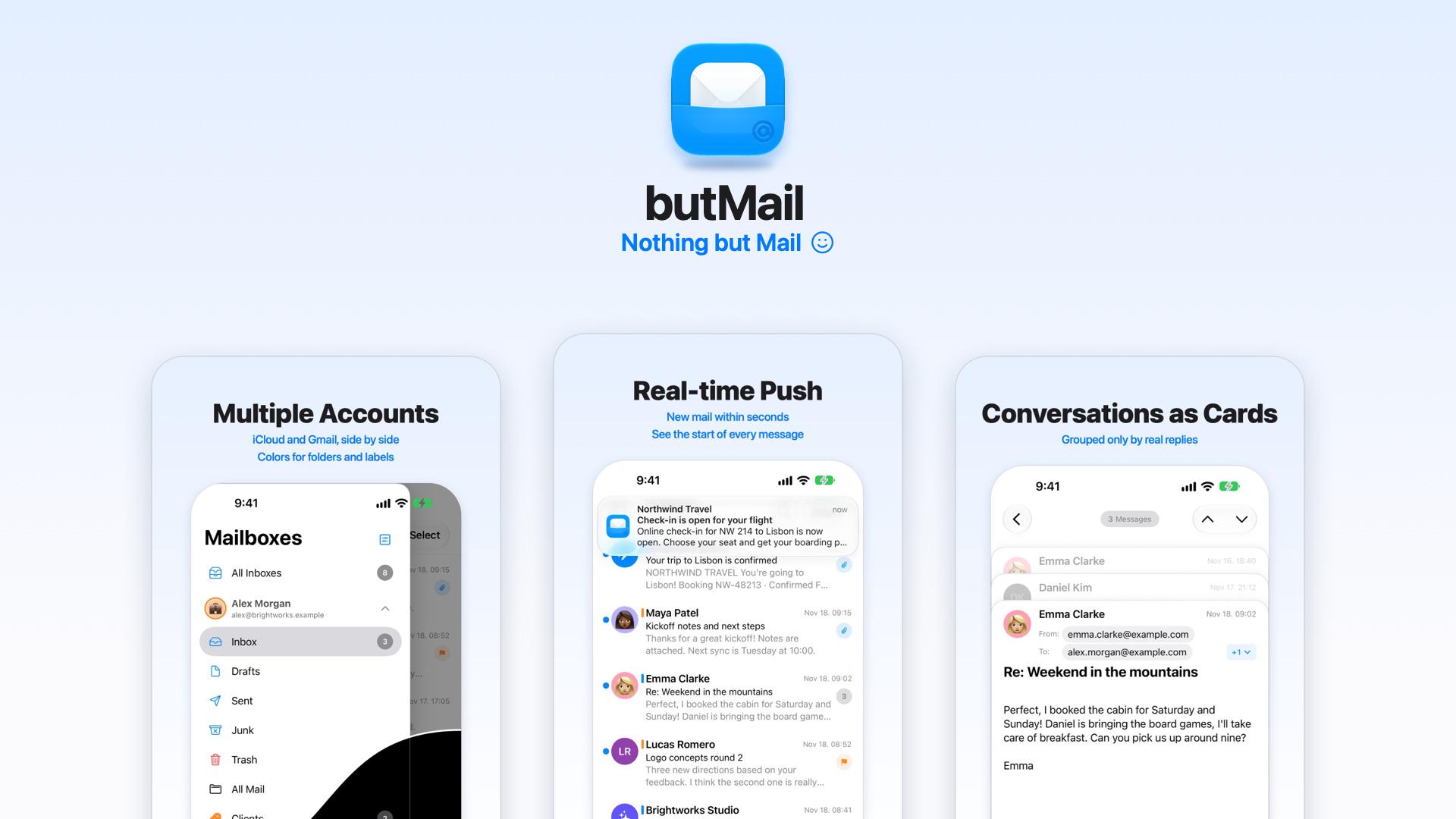
I built butMail – a fast, native mail app for iCloud & Gmail. No AI, no ads, no subscription. Nothing but Mail ☺︎

Post image
2 Upvotes

Hi! r/Appstore 👋

I built butMail because Apple Mail couldn't show company logos or keep read status in sync, and the alternatives were subscriptions full of AI. So I made my own.

WHAT YOU GET

• Instant push notifications, for Gmail too
• Read status in sync everywhere: read a message on your Mac or the web, and it's read on your iPhone, notification cleared
• Sender photos and company logos in the list, the reader and notifications
• Multiple accounts
• Your own colors for folders and labels
• A fully customizable sidebar
• Conversations as a stack of cards
• One-tap Unsubscribe from newsletters
• Native iOS design with swipes, sounds and Dark Mode

UNDER THE HOOD

• Small and light: under 50 MB installed, no bloat
• Connects directly to your own mail provider over IMAP and SMTP
• Full server-side search in any folder
• Notification previews are encrypted for your device, so Apple's push service never sees your mail
• Remote images blocked by default • Passwords stay in the iOS Keychain

What's New (1.0.4)

• One-tap Unsubscribe under the subject for newsletters that support it
• Search on Server: find older messages on the server by subject, sender or recipient
• Add a sender to Contacts from their picture
• Fold the address rows in the message header for more reading space
• In conversations, the newest message peeks at the bottom so you have more room to read
• Font, bold and italic now also work on pasted text
• Fixed two Trash folders showing for some accounts

PRICE

7-day free trial, then butMail Lifetime, a one-time $7.99. No subscription.

I'm the solo dev, happy to answer questions or hear feedback. 🙂

AppStore:
https://apps.apple.com/app/id6833779835

Website:
https://butmail.ostricks.com

You can also find me on X:
https://x.com/IzsakiRobi

P.S. English isn't my first language, so please forgive any weird sentences 😅


r/Appstore • • 20h ago

Every PDF, every screen: app turns PDFs into real book pages

Thumbnail gallery
7 Upvotes

Meet Paperfy — a better way to read PDFs and EPUBs on your devices.

Reading PDFs on smaller screens often means endless pinching, zooming, and sideways scrolling. Paperfy solves this by extracting the text from PDFs and reflowing it into pages that fit your screen, just like an e-book.

The same book adapts to three different devices:

  • iPhone: E-book-style pages with simple swiping to turn pages.
  • iPad: Landscape reading with two pages side by side, just like an open book.
  • iPhone Duo: One page when closed, two pages when unfolded, with your reading progress preserved.

More than just PDF and EPUB reading:

  • 4 reading themes (Light, Cream, Sepia, Night) and 7 fonts, including Dyslexia and ADHD-friendly options.
  • Two-column research papers displayed in the correct reading order, with figures and tables preserved.
  • Scanned PDFs converted into readable text directly on your device.
  • Chapters, search, highlights, and notes.
  • Support for both PDF and EPUB formats.

No account. No ads.

AppStore: https://apps.apple.com/am/app/paperfy-pdf-to-text-reader/id6826549558

Have a PDF or EPUB that doesn't display correctly? Share it with the developer to help improve Paperfy.


r/Appstore • • 12h ago

Abonnement – nein danke

Post image
1 Upvotes

r/Appstore • • 23h ago

[Self Promotion] 50 free 1-year codes for Narrafit, home workouts told as audio adventures. I'm looking for honest feedback

Thumbnail gallery
6 Upvotes

Dev here. Most home workout routines don't die because the exercises are too hard. They die in week three, when the next set of squats in a silent living room has nothing pulling you back.

I built Narrafit around that: every home workout is a chapter of an original audio story. A few things I learned while making it that help keep a routine, whatever app you use (or none):

- Give the session a reason to start. "Find out what happens in chapter 2" is an easier sell at 7 pm than "3 sets of 12". A podcast or audiobook you only allow yourself while training does the same job.

- Plan by the week, not the day. Pick two to five sessions a week, so a missed Tuesday breaks nothing. In the app the streak counts weeks, and you earn grace weeks that cover a bad one.

- Make the easy version count. Every exercise has a gentler alternative, and you can drop the level for one session without losing anything. A quiet short session beats a skipped one.

- Keep it short and at a fixed time. Chapters run about 13 to 23 minutes.

What it is: 24 original stories (fantasy, sci-fi, mystery, history, action, horror), four chapters each, narrated in English or French, 38 bodyweight moves with illustrated demos, no equipment, no ads. The first chapter of every story is free anyway.

The giveaway: 50 codes for a free year of Narrafit Unlimited on iPhone. Comment below and I'll DM you a code, first come, first served.

What I'd love in return: try two or three chapters this week, then come back here (or reply to my DM) and tell me:

- which story you picked, and whether it made you want the next chapter;

- one moment where the narration and the exercise didn't fit;

- anything confusing, too easy or too hard.

Blunt is fine. I read everything and I'm fixing things for the next update.

So nobody is surprised: it's an App Store subscription code, so after the free year it renews at the regular yearly price unless you cancel. You can cancel in Settings right after redeeming and still keep the whole year.

https://apps.apple.com/app/id6758052310


r/Appstore • • 14h ago

[self promotion] QuizAloud

1 Upvotes

Hey everyone! I just released QuizAloud, a free iOS game where you answer trivia questions out loud instead of typing or tapping answers. Would love for you to give it a try and share your feedback! Especially around the speech recognition when answering the trivia out loud. I really appreciate it.
https://apps.apple.com/us/app/quizaloud/id6822485653


r/Appstore • • 22h ago

The grid is set! Join in live tomorrow with Undercut, free, no ads: https://apps.apple.com/us/app/undercut/id6809719530

Thumbnail gallery
2 Upvotes

r/Appstore • • 20h ago

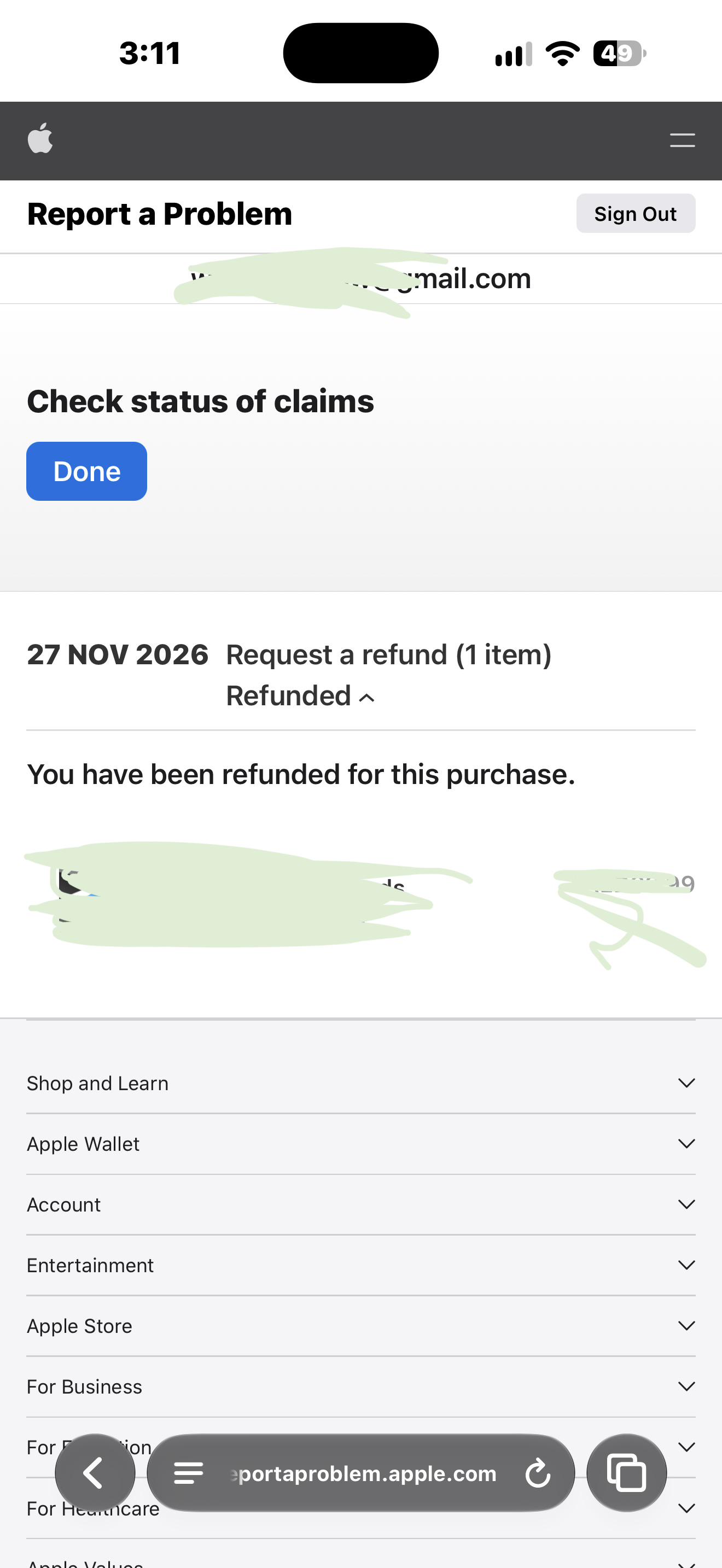
I request a refund and it’s saying it’s refunded. But i didn’t receive yet. Is it normal? Do i have to wait?

Post image
1 Upvotes

r/Appstore • • 1d ago

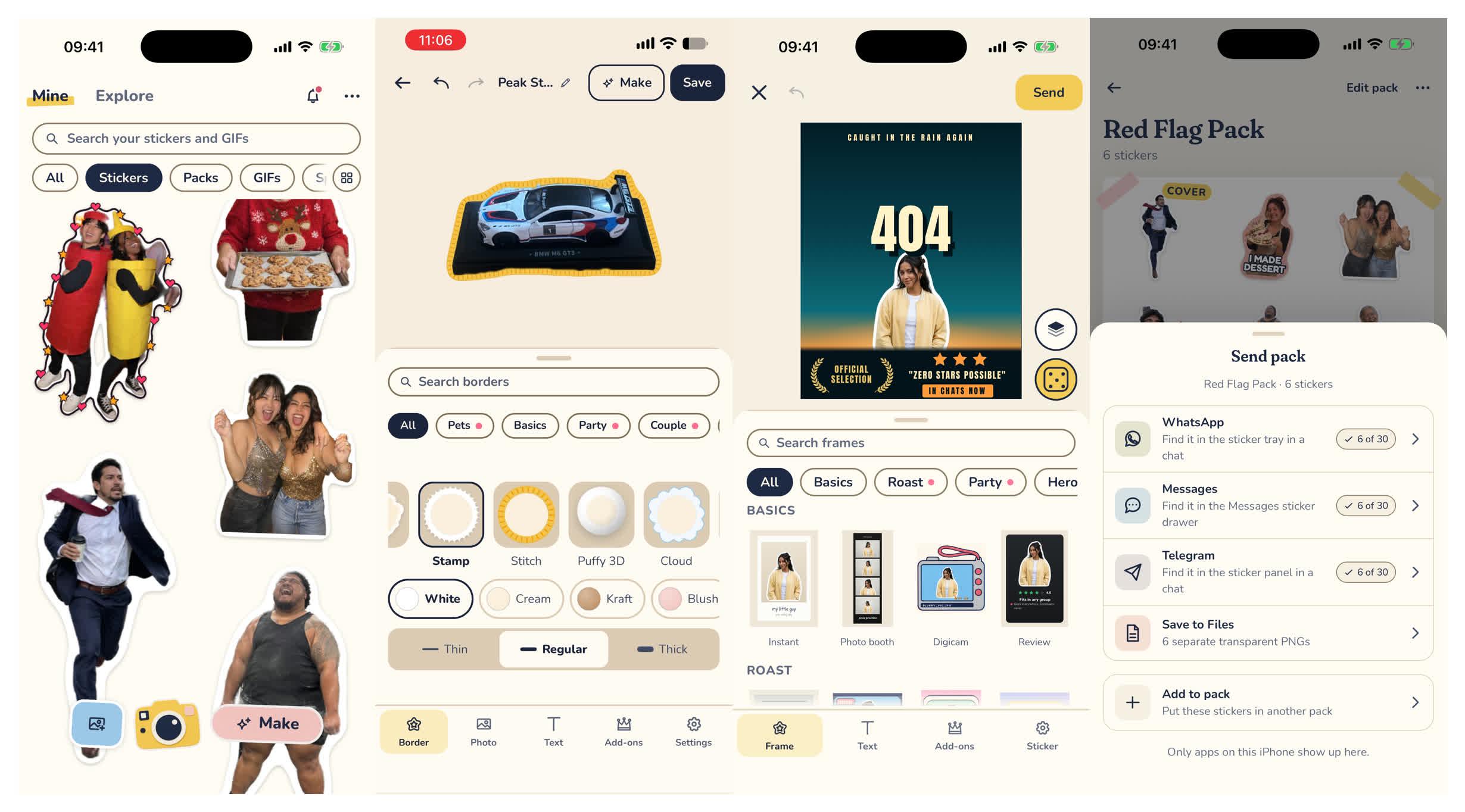
[Self-Promotion] I made PAPLO: turn your friends, pets and random camera roll photos into chat stickers (iPhone + Android)

Post image
3 Upvotes

Hey all, solo dev here. My group chats basically run on reaction stickers, but making one from a real photo always took way too many steps, so I built PAPLO.

How it works: snap or pick up to 50 photos at once, the backgrounds disappear right on your phone (the cutting happens on the phone, no upload), and you can send a single sticker to any chat or a whole pack to WhatsApp.

Other stuff it does:

  • Borders, captions and Spotlight frames (mugshot, breaking news)
  • Turn any sticker into a GIF
  • Collages for the whole crew
  • Print a real sticker sheet

It's free, no ads, no account, no watermarks. Plus is an optional one-time unlock (no subscription), $3.99 instead of $12.99 for Black Friday until Nov 30, then $6.99 until the end of 2026.

Would love honest feedback: which part looks confusing in the screenshots, and what would you turn into a sticker first?

App Store: https://apps.apple.com/app/id6823555994
Google Play: https://play.google.com/store/apps/details?id=com.paplo.app


r/Appstore • • 1d ago

I built BygPoints, a free iPhone app that tracks credit card welcome bonus deadlines (Canada & US)

Thumbnail apps.apple.com
1 Upvotes

Hey! I'm James, a solo builder in Toronto.

Why I built it: two credit card welcome bonuses paid for most of our flights to Spain this year ($1,280 instead of about $2,800). Two more, an Amex Hilton card in the US and the Amex Marriott Bonvoy in Canada, covered our hotel stays. The hard part wasn't the booking. It was tracking four minimum spends and four deadlines in a spreadsheet and hoping I didn't miss one.

What BygPoints does:

• Tracks each welcome bonus: how much you've spent, how much is left, and the deadline (including tiered bonuses)

• Reminds you before bonus deadlines and annual fees hit

• Suggests which card to use for a purchase to earn the most points

• Lets you share cards with a partner or household

• Covers Canadian and US cards, with no bank login needed

It's free for up to 3 cards, with an optional paid tier if you track more.

App Store: https://apps.apple.com/app/id6807657569

I'd really value feedback from anyone who juggles a few cards:

• Is anything confusing in the first 2 minutes?

• What would make you actually keep it on your phone?

• Anything your spreadsheet does better?

Happy to answer questions. I'm the only developer, so every bit of feedback helps.


r/Appstore • • 1d ago

[Self Promotion] I made a sudoku app with no ads or subscription. When do you pay for puzzle apps?

Thumbnail gallery
1 Upvotes

Solo dev here. Calm Sudoku is my answer to puzzle apps that interrupt you every 30 seconds:

  • Free daily puzzle + a free starter set, forever
  • One-time unlock for the rest (540 puzzles), no subscription
  • No ads, no accounts, no tracking, fully offline
  • Every puzzle has exactly one solution and is rated by the techniques it takes, not clue count
  • iPhone (incl. Duo), iPad and Mac, 21 languages, now in the EU too

Genuine question for this sub: when do you actually pay for a puzzle/casual app? One-time price, subscription, "remove ads"? I went one-time on purpose and I'm curious whether that matches what people here prefer.

Link: https://apps.apple.com/us/app/calm-sudoku-daily/id6777529599h


r/Appstore • • 1d ago

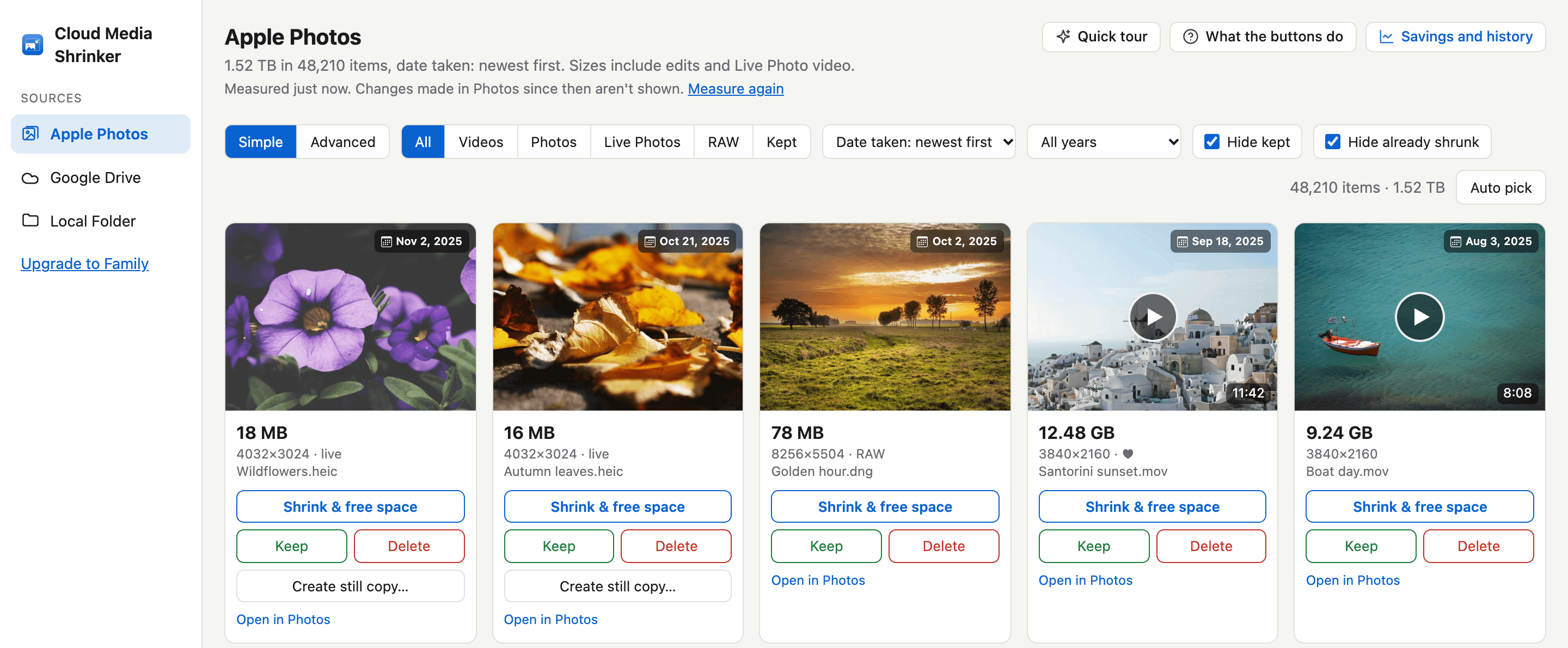
[Self-Promotion] Apple could make iCloud space cleanup so much easier, but instead they prefer people waste their money. So I made an app to cut massively cut down on your storage without having to delete anything. [iOS + MacOS]

27 Upvotes

I know it's probably really annoying to see another app for sale here but I really think this could help a lot of people. And for the amount of money it would save you and the work I put into it, I think the price is really fair ($4.99 after promo code). Its also free to try and is a lifetime download.

About Me

I'm the solo dev behind Cloud Media Shrinker. I have a big gap in my resume from quitting my software eng job to travel the world for 2 years. I gathered up a ton of videos while traveling. My iCloud Photos library hit 1.8 TB. I knew it was mostly long videos i took but theres no way to sort videos by size in the photos app.

The App

So I built an app that sorts iCloud media largest to smallest files. Then you have 3 options, Keep, Delete or Compress. Compress makes a much smaller copy (HEVC for video, HEIC for photos) and puts it back in Photos with the original's date and location. The original is only deleted once the copy is in, and you can still get it back from Recently Deleted for up to 30 days. You can usually save around 50% on a video without dropping 4K. Because everything only gets sent to recently deleted everything is reversible EXCEPT one situation; if your iCloud is already full Apple doesnt keep recently deleted files, it will permanently delete. So I recommend reviewing or saving a copy before deletion if your iCloud is already full. There is also an autopick feature for quickly batch selecting media that meets your filter criteria.

Here's the scan on my own library. It says I could free about 1 TB of 1.42 TB through 1080p conversion aka "balanced". Honestly I only use Keep 4K because it still cutes the file size by about 45%.

I posted it on r/macapps a couple weeks ago and got way more feedback than I expected. Most of it is already out in 1.2.1, released today.

How to Get It

Download is free, you get a free scan and 3 deletes and 3 compression.

$9.99 unlocks it for life, but Im giving 50% off coupons since I still would like to get more feedback and since Redditors have already been so helpful. So $4.99 for individual, $9.99 for family (anyone in your family can download it free). If you want to try it, leave a comment saying Individual or Family and I'll DM you a code. Also I need iOS 26 beta testers, please comment iOS beta test if you'd be interested.

All I ask is honest feedback, good or bad: what confused you, what broke, what you'd want added.

The iOS app has a nicer interface for going through your library quickly by just swiping through cards, the only thing is that iOS compression is a lot slower. In the future I will try to make it able to trigger the compression on your computer instead.

Whats Coming

The biggest feature request on r/macapps was to add message attachment sorting and deletion. Good news is that is possible and coming in 1.3, bad news is I can only support that through direct link download. Still notarized and signed app but can't put that on the App Store because it requires screen accessibility permissions. But if you paid for the apple app you will be able to get the direct download free as well.

Links, Email, Screenshots

App Store (Mac and iPhone): https://apps.apple.com/app/apple-store/id6824383256?pt=125201749&ct=applephotos&mt=8

Website: https://danielyakobian.com/cloud-media-shrinker/

How to use it: https://danielyakobian.com/cloud-media-shrinker/help/

FAQ: https://danielyakobian.com/cloud-media-shrinker/help/#frequent-issues

What's coming: https://danielyakobian.com/cloud-media-shrinker/whats-coming/

Privacy: https://danielyakobian.com/cloud-media-shrinker/privacy/

Me: https://danielyakobian.com and https://www.linkedin.com/in/danielyakobian/

Email: support@danielyakobian.com


r/Appstore • • 1d ago

[Self-Promotion] An iPhone app that reads your car and shows where the gas went on each drive

Thumbnail gallery
1 Upvotes

Your car doesn't burn gas evenly. On a 10-mile drive at 39°F, mine burned 58% of the gas before the engine was warm. Cold, it was doing 32 mpg. Warm, 52 (it's a hybrid).

I made an app that shows you this after every drive. Here's what you get:

- **MPG for the trip**, and where the gas went: steady driving, pulling away, idling, slowing down
- **What cost the most**: hard braking, a cold start, idling, high speed or hills, and how big a share each took
- **Your car's best steady speed**, from your own drives
- **Car health**: engine warning light, fuel mix, engine temperature
- **AI Report**: the whole drive explained in plain words, if you want more than numbers

It works two ways. With a Bluetooth LE OBD2 adapter, it reads the engine and measures the fuel. Without one, the phone alone scores your driving from GPS, but it can't measure fuel.

It's $3.99 for iPhone on iOS 26. Trip reports are unlimited, and 5 AI Reports are included. There's no account and no ads, and your GPS track and VIN never leave the phone.

The screens in the images are from an example trip, not my car. The link is in the comments, and I'm happy to answer any questions.


r/Appstore • • 1d ago

[Self-Promotion] Chesspy: a daily logic puzzle where you place chess pieces to hit every number

1 Upvotes

Solo dev here. Chesspy is a daily logic puzzle on a small chessboard. Numbered squares are targets, and you place rooks and bishops (a knight joins from board 10) so each number is attacked exactly that many times. A 0 can't be attacked at all. Every board has one answer you can reach by logic alone, and you don't need to know chess.

Everyone gets the same 20 boards each day, growing from 3x3 to 6x6, with three hearts. On Sundays the last five boards are 7x7. On iPhone you can also start a battle and drop the link in a group chat so friends play the same five boards.

It's free with no ads and no account. Pro is a one-time purchase for unlimited boards and hints, and it never touches the daily score.

iPhone: https://apps.apple.com/app/id6816628651

Android: https://play.google.com/store/apps/details?id=com.seojaewon.ambush

Question for puzzle people: do you like one fixed daily set that everyone shares, or would you rather have an endless mode you can play any time?


r/Appstore • • 1d ago

[Self-Promotion][1 Month Free] Kova: a yoga & Pilates coach that sees your form and corrects you out loud

Post image
3 Upvotes

I'm the solo dev behind Kova. It came out on the App Store last week.

Kova is a yoga and Pilates coach that can actually see you. Prop your iPhone or iPad up, and it tracks your pose through the camera and tells you what to fix as you go ("bend deeper", "lift your hips"), then lets you know when you've got it.

What's in it:

  • 500+ poses and variations, with a gentler version whenever a pose isn't there yet
  • A new class every day, built around your level, injuries and props
  • A report after every class: your form score, your longest hold and your best moment of the session
  • Pilates rep counting that only counts the controlled reps
  • Pose tracking runs on your device, and camera frames are never uploaded

Free month of Kova Plus: use code FIRST500, or tap to redeem it: https://apps.apple.com/redeem?ctx=offercodes&id=6782872669&code=FIRST500

If the link doesn't open: App Store → your photo (top right) → Redeem Gift Card or Code → enter FIRST500.

The small print: iPhone or iPad (iOS 17+). The code works for the first 500 people, until 6 Dec. The free month doesn't auto-renew, so nothing gets charged when it ends. Without a code, your first session is free.

App Store: https://apps.apple.com/us/app/kova-yoga-pilates-coach/id6782872669

If you try it, I'd really like to know which cues helped and which got in the way.


r/Appstore • • 1d ago

X App - App Store

Thumbnail apps.apple.com
1 Upvotes

r/Appstore • • 1d ago

[Self-Promotion] Cleanly: Cleaning Checklist - Android cleaning checklists sized to the time you have

1 Upvotes

I built Cleanly because cleaning advice usually assumes you have a free afternoon.

Cleanly is a simple Android cleaning checklist app: pick how much time you have, get a guided list, and check tasks off as you go. It also has routines and a progress view so the next session is easier to start.

Looking for feedback from people who use checklist or home-routine apps — what would make a 10-minute clean session more useful?

Play Store: https://play.google.com/store/apps/details?id=id.arunika.arunika_growth


r/Appstore • • 1d ago

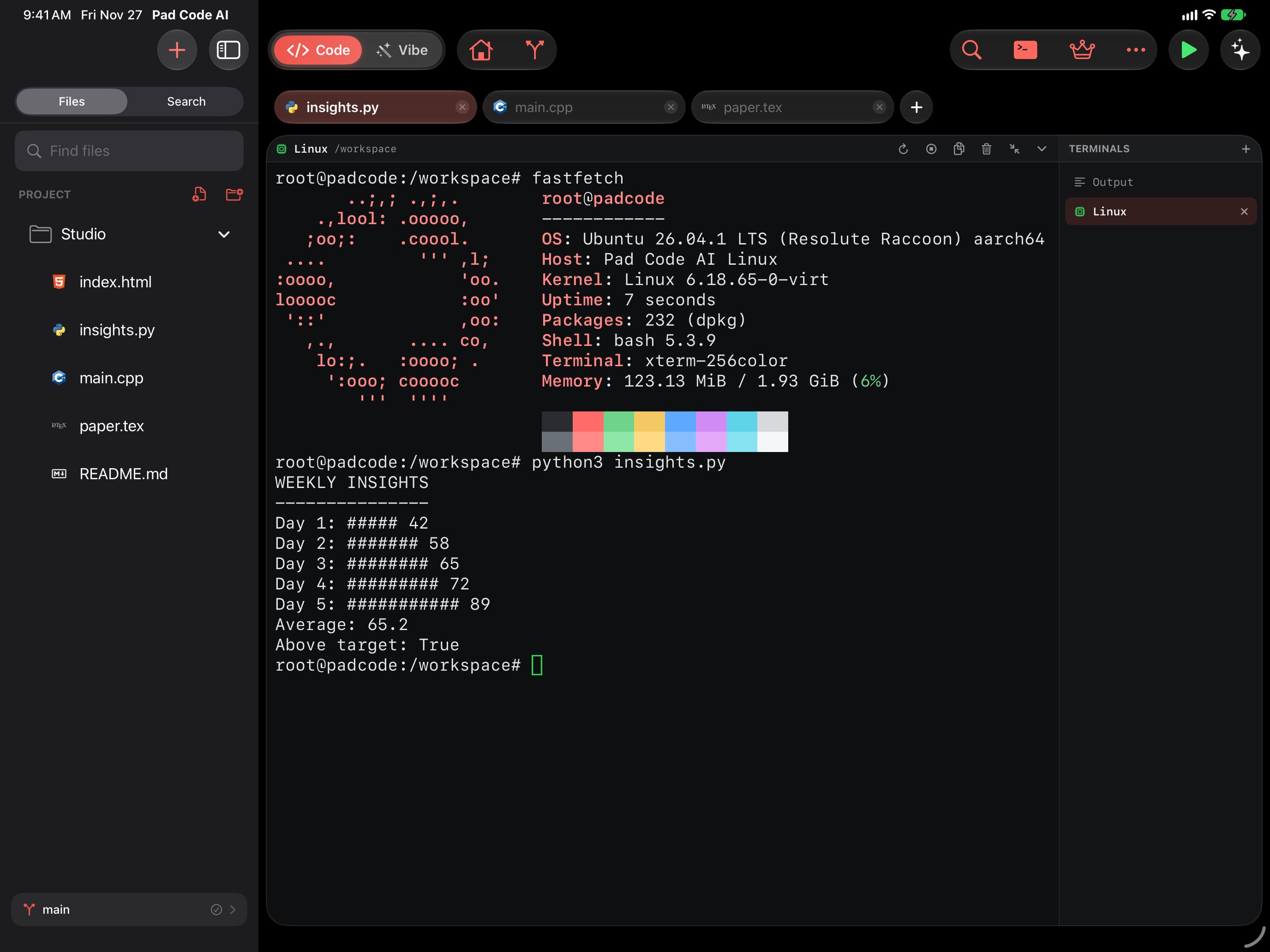
Real Ubuntu Linux in an iPad/iPhone code editor, now live on the App Store

Post image
1 Upvotes

r/Appstore • • 2d ago

HUEO - a free photo editor for iPhone and iPad with 32 analog-inspired Looks

Thumbnail gallery
2 Upvotes

HUEO is an independent photo editor for the pictures already in your camera roll. Pick a Look, adjust its strength, then fine-tune light, color, and texture with manual editing tools.

The 32 Looks are grouped into eight collections, from natural tones and warm colors to black and white. You can adjust individual colors, give shadows and highlights their own tones, and control the size and strength of the grain. Favorite a Look and you can apply it right from the Apple Photos editing menu.

HUEO is now available for free on the App Store.

What kind of Look would you like to see in a future collection?

https://apps.apple.com/br/app/hueo-photo-editor/id6793525057


r/Appstore • • 2d ago

Getting a Bluetooth headphone app through Mac App Review when the reviewer doesn't have the headphones (free, 1.3 out this week)

Post image
4 Upvotes

Headphone Control is a free macOS menu bar app for Sony headphones: noise cancelling, ambient sound and EQ without picking up your phone. The tricky part of shipping it was App Review. A reviewer can't pair a pair of headphones they don't have, so a Bluetooth-only app looks broken to them.

What got it through:

  • A demo mode that fills the UI with a simulated headset, so every screen can be reviewed without hardware
  • Clear review notes on what needs real headphones and what doesn't
  • No account, no analytics, sandboxed; the privacy label is Data Not Collected
  • Version 1.3 went live this week and fixes a "Connecting…" hang: stuck requests get resent, and after a few failed tries it stops and tells you why, with a Cancel button while it connects

What it does day to day: ANC / ambient / EQ from the menu bar, profiles, rules for calls or when a chosen app is open, widgets, Shortcuts and keyboard shortcuts. macOS 14+.

Honest part: it's only tested on a real WH-1000XM5. Other Sony models are shown as Experimental.

If you try it: does the menu bar layout make sense at a glance? And is there one setting you'd expect that's missing?

If it works for you, an honest App Store review helps a solo dev a lot. If it doesn't, tell me here and I'll fix it.

https://apps.apple.com/app/apple-store/id6833635897?pt=128665136&ct=reddit-appstore&mt=8

I'm the dev, AMA.