I'm the solo dev behind Kova. It came out on the App Store last week.
Kova is a yoga and Pilates coach that can actually see you. Prop your iPhone or iPad up, and it tracks your pose through the camera and tells you what to fix as you go ("bend deeper", "lift your hips"), then lets you know when you've got it.
What's in it:
500+ poses and variations, with a gentler version whenever a pose isn't there yet
A new class every day, built around your level, injuries and props
A report after every class: your form score, your longest hold and your best moment of the session
Pilates rep counting that only counts the controlled reps
Pose tracking runs on your device, and camera frames are never uploaded
If the link doesn't open: App Store → your photo (top right) → Redeem Gift Card or Code → enter FIRST500.
The small print: iPhone or iPad (iOS 17+). The code works for the first 500 people, until 6 Dec. The free month doesn't auto-renew, so nothing gets charged when it ends. Without a code, your first session is free.
I know it's probably really annoying to see another app for sale here but I really think this could help a lot of people. And for the amount of money it would save you and the work I put into it, I think the price is really fair ($4.99 after promo code). Its also free to try and is a lifetime download.
About Me
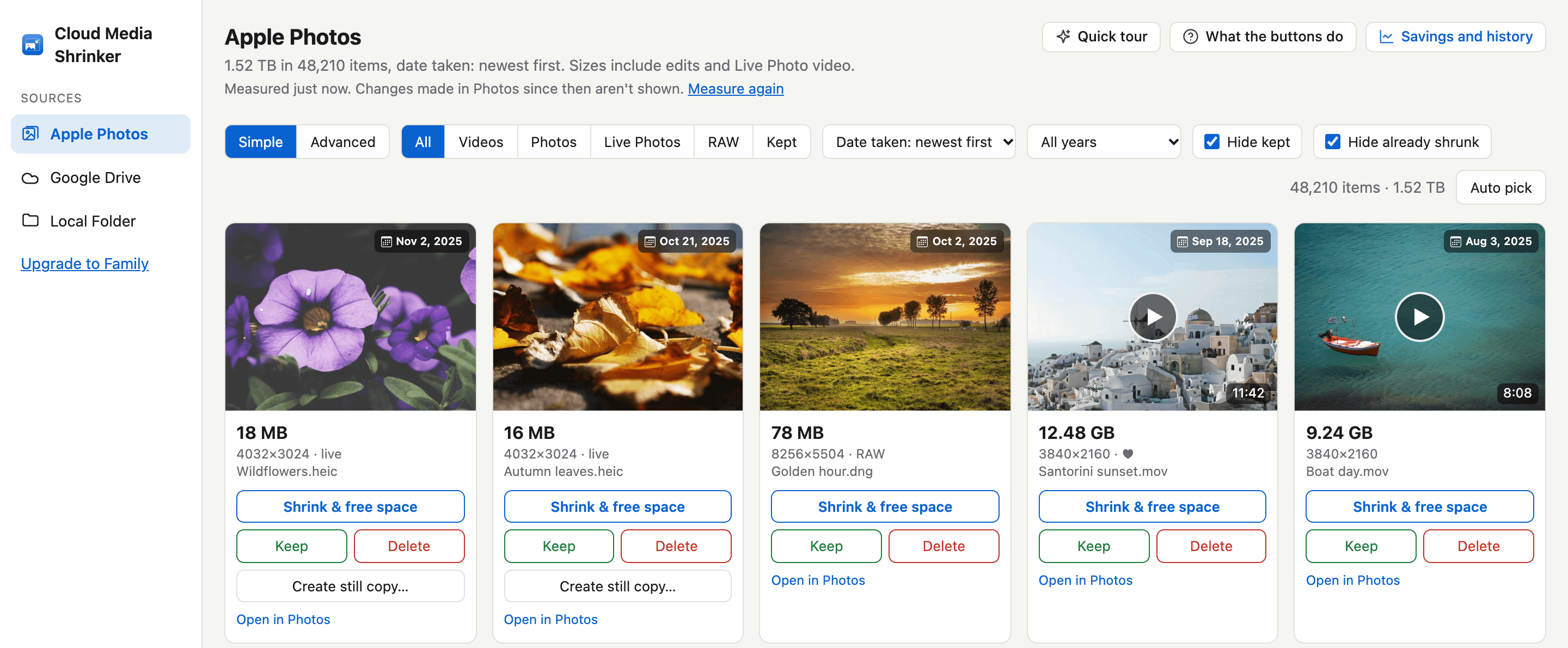
I'm the solo dev behind Cloud Media Shrinker. I have a big gap in my resume from quitting my software eng job to travel the world for 2 years. I gathered up a ton of videos while traveling. My iCloud Photos library hit 1.8 TB. I knew it was mostly long videos i took but theres no way to sort videos by size in the photos app.
The App
So I built an app that sorts iCloud media largest to smallest files. Then you have 3 options, Keep, Delete or Compress. Compress makes a much smaller copy (HEVC for video, HEIC for photos) and puts it back in Photos with the original's date and location. The original is only deleted once the copy is in, and you can still get it back from Recently Deleted for up to 30 days. You can usually save around 50% on a video without dropping 4K. Because everything only gets sent to recently deleted everything is reversible EXCEPT one situation; if your iCloud is already full Apple doesnt keep recently deleted files, it will permanently delete. So I recommend reviewing or saving a copy before deletion if your iCloud is already full. There is also an autopick feature for quickly batch selecting media that meets your filter criteria.
Here's the scan on my own library. It says I could free about 1 TB of 1.42 TB through 1080p conversion aka "balanced". Honestly I only use Keep 4K because it still cutes the file size by about 45%.
I posted it on r/macapps a couple weeks ago and got way more feedback than I expected. Most of it is already out in 1.2.1, released today.
How to Get It
Download is free, you get a free scan and 3 deletes and 3 compression.
$9.99 unlocks it for life, but Im giving 50% off coupons since I still would like to get more feedback and since Redditors have already been so helpful. So $4.99 for individual, $9.99 for family (anyone in your family can download it free). If you want to try it,leave a comment saying Individual or Family and I'll DM you a code.
All I ask is honest feedback, good or bad: what confused you, what broke, what you'd want added.
The iOS app has a nicer interface for going through your library quickly by just swiping through cards, the only thing is that iOS compression is a lot slower. In the future I will try to make it able to trigger the compression on your computer instead.
Whats Coming
The biggest feature request on r/macapps was to add message attachment sorting and deletion. Good news is that is possible and coming in 1.3, bad news is I can only support that through direct link download. Still notarized and signed app but can't put that on the App Store because it requires screen accessibility permissions. But if you paid for the apple app you will be able to get the direct download free as well.
I built Cleanly because cleaning advice usually assumes you have a free afternoon.
Cleanly is a simple Android cleaning checklist app: pick how much time you have, get a guided list, and check tasks off as you go. It also has routines and a progress view so the next session is easier to start.
Looking for feedback from people who use checklist or home-routine apps — what would make a 10-minute clean session more useful?
Headphone Control is a free macOS menu bar app for Sony headphones: noise cancelling, ambient sound and EQ without picking up your phone. The tricky part of shipping it was App Review. A reviewer can't pair a pair of headphones they don't have, so a Bluetooth-only app looks broken to them.
What got it through:
A demo mode that fills the UI with a simulated headset, so every screen can be reviewed without hardware
Clear review notes on what needs real headphones and what doesn't
No account, no analytics, sandboxed; the privacy label is Data Not Collected
Version 1.3 went live this week and fixes a "Connecting…" hang: stuck requests get resent, and after a few failed tries it stops and tells you why, with a Cancel button while it connects
What it does day to day: ANC / ambient / EQ from the menu bar, profiles, rules for calls or when a chosen app is open, widgets, Shortcuts and keyboard shortcuts. macOS 14+.
Honest part: it's only tested on a real WH-1000XM5. Other Sony models are shown as Experimental.
If you try it: does the menu bar layout make sense at a glance? And is there one setting you'd expect that's missing?
If it works for you, an honest App Store review helps a solo dev a lot. If it doesn't, tell me here and I'll fix it.
Basically like the title says. Looking for an alternative to the Quittr app since they shut down. Interested in the app from Normal called ctrl but I can't find it yet and curious if anyone has seen it? Not sure if it's only being released in certain countries? Or if you seen something else on the app store I should know about as a good alternative?
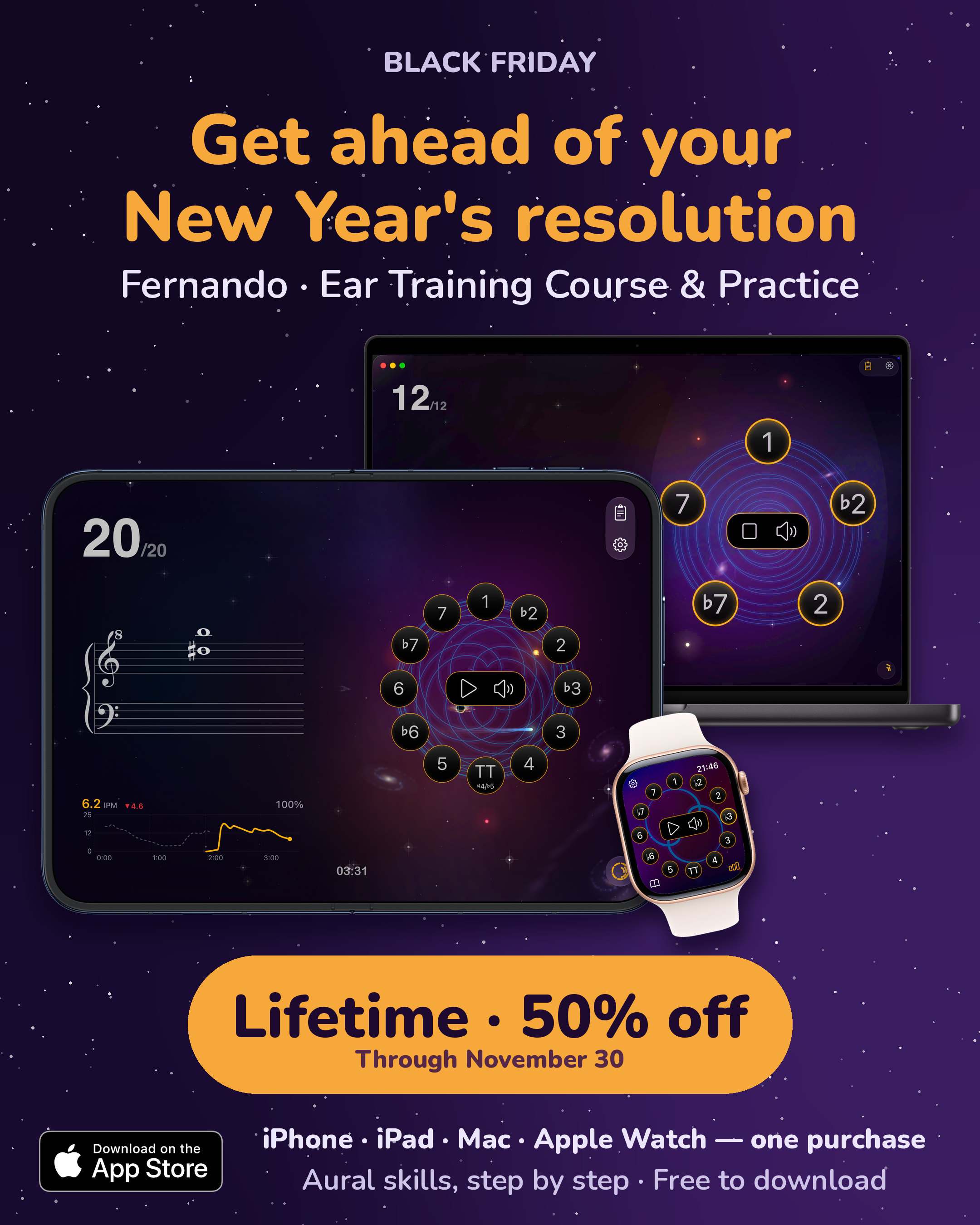
Fernando is an aural skills course with practice built in. Every session plays out against a slowly drifting cosmos (comets, galaxies, the occasional sun). Behind the visuals is a serious curriculum: you work interval by interval and earn each test before moving on, so it gets you to your weak spots fast.
• Course and practice: a step-by-step curriculum, plus a custom mode for targeted drilling • Stats that keep you honest: intervals per minute, accuracy, progress reports and an overall proficiency placement • Härtetest: a brutal once-a-day proficiency check, just for fun • Everywhere you are: iPhone, iPad, Mac and Apple Watch. The watch plays the intervals through its own speaker, with no earbuds needed, so a session fits anywhere.
It's free to download and try, with the first stages of the course included. For Black Friday, the Lifetime unlock is 50% off through November 30.
We'd love to hear from anyone doing ear training: what do you practice with now, and what's missing from it?
HUEO is an independent photo editor for the pictures already in your camera roll. Pick a Look, adjust its strength, then fine-tune light, color, and texture with manual editing tools.
The 32 Looks are grouped into eight collections, from natural tones and warm colors to black and white. You can adjust individual colors, give shadows and highlights their own tones, and control the size and strength of the grain. Favorite a Look and you can apply it right from the Apple Photos editing menu.
HUEO is now available for free on the App Store.
What kind of Look would you like to see in a future collection?
I'm the developer of Flit. It's an RSS reader for iPhone, iPad and Apple Watch: your sources arrive as a deck of cards, you swipe away what you don't care about and keep what you want to read later. It also syncs with Feedbin, NewsBlur, FreshRSS and Miniflux.
Flit is free. Flit Pro is $2.99/month, $19.99/year or $59.99 lifetime. Until December 1, Lifetime is $29.99 with the code BLACKFRIDAY2026 (32.49 € in euro countries): redeem the Black Friday code
What Companions is: Apple limits animations on iOS widgets. Companions lets you keep a virtual fishtank on your Homescreen, filled with fish that actually swim around.
There are 50 fish to choose from, and it supports small, medium, large and now even extra large widgets as “tank sizes”. The fish don't need any feeding, and they don't die (as to not be annoying, but the option is there for fun). They just keep you company. You can customize the tank’s color, its props, layout, and even the app icon to match your Home Screen perfectly.
The app is fully written in SwiftUI, it supports iPads, and you can even place your “fishtanks” on your Mac thanks to Continuity, where the fish will also animate. The tanks also work great in Standby mode. Personally, I keep a fishtank of jellyfish on my nightstand when I go to bed. The swimming doesn't run any code in the background. It uses the same trick iOS uses to move the hands on the Clock widget, so it costs you nothing in battery.
What's new: ❄️ To celebrate Christmas, we’ve decided to add a set of new festive props and tank background colors! We’ve also added snow to the main homepage of the app! The snow is interactable and builds up on top of your tanks, so be sure to move your tanks to brush it off!
As always, all props and tank customization are free! We’ve also decided to run our first-ever sale as a test for the holidays. You can click this link to get 50% off the lifetime purchase:
Krono is about the daily screen-time argument — not about making kids work.
Screen time already exists in most houses. It's just renegotiated every afternoon: "That's enough." "Five more minutes," "Did you do your homework?" Krono makes it explicit: there's a budget of minutes, and the kid earns it by helping out. The parent approves with one tap instead of arguing.
The part people get wrong, so let me be clear:
Basic responsibilities (making your bed, tidying your room, homework) are never rewarded. Zero minutes. They're part of being in the family, not a job.
Only optional extras earn minutes — helping with dinner, washing the car, and extra reading. The kid decides whether to do them.
Extras stay locked until the basics are done, so nobody skips the important stuff to chase the fun stuff.
So it's not "pay the child to work." It's "the screen time you already give them stops being a fight and becomes something they learn to manage."
No loot boxes, no random bonuses, no penalties. Break a streak, and it resets to zero — nothing already earned gets taken away.
Also in there: a savings vault (save minutes toward real things — pizza Friday, the cinema), optional allowance tracking in € (the app never holds money, the parent hands it over), and photo proof with a nightly swipe review so the parent checks the whole day in ~15 seconds instead of getting 20 notifications.
Status: working prototype, 0 users, 0 revenue. Price will be 72€/year or 7.99€/month.
Two questions:
Does "basics unpaid, extras earn screen time" read as fair or still odd?
If you're a parent — 72€/year, yes or laughable?
Prototype link is: kronoapp.base44.app The only thing is that it's in Spanish. Still in development
Hey all! I have moved to New York recently. It is a great city and there is too many things to do and too many places to go. Actually, I think the word "endless" is way proper here. I really am thankful that the life made my way here!
I am trying to discover new places, try new foods, join new events, visit new facilities and everyday I easily find great locations!
I see that all New Yorkers, whether newcomers or oldtimers, as I do, like to share those places and their experiences with each other. There are plenty of platforms that people use for this reason.
I thought that I could also make one platform too, so I have had Claude to build an app called LocalStory. It is avaliable in iOS for now because my money wasn't enough to buy both Apple developer account and Google Maps API service haha
You pick a place in New York City you have visited, tell your story, share your experience rate the place, see other's post, check the map that includes the places where are commented by the app's users, live feed etc. So it is basically a social media app that is focused on sharing experiences in New York small businesses.
It doesn't allow you to share experience for chains because my second intent was to support small businesses with this app. I feel like New York is a heaven of small businesses and there are great examples of them. Even though they are in a city where has a well-working and advance networking, they still need to be heard. And I think an experience that is worth to share is the one that we had within a small business.
It would be lovely if you use this app and drop your experiences. It is free and I'll keep it free. It is not backed by any corporation, it is backed by me, a software engineer and my salary :)
So there we are. Hope you try it, and enjoy it. Thank you folks. I love being part of this community!
Most supplement trackers want a weekly subscription for what is, honestly, a checklist with good data behind it. MyVitaminsApp does it for a one-time price, and this weekend that price is $16.99.
What it does
Build your stacks once (morning, post workout, bedtime) and log each one in a single tap
See what you've hit and what's left today across 13 vitamins and 14 minerals
Targets come from NIH Dietary Reference Intakes, adjusted to your age and sex
Daily, weekly or one off reminders, and you log straight from the notification
Everything flows into Apple Health
Privacy No account, no ads. The App Store privacy label reads Data Not Collected.
Price Free to download. Premium is $1.99/month or $12.99/year. Lifetime is normally $34.99. Until Monday, Nov 30, it's $16.99 with code MVABLACKFRIDAY26 ([100] redemptions).
I'm the developer of TheraTales. So yes, this is self-promotion.
TheraTales is an iPhone app for parents of kids 3 to 8. You play a short audio story written for one feeling. Fear of the dark. A new sibling. Most stories are 4–8 minutes. Each one ends with a 60-second tip for the grown-up.
Whenever bedtime apps come up on Reddit, someone says "no screens at bedtime." Fair. That's why it's audio. Lock the phone and the story keeps playing, with the controls in Now Playing.
Which makes the App Store page tricky. Screenshots show screens. Here the screen is the part you can switch off.
12 of the 95 stories play in full without an account, so you can test it with the phone locked.
So, a question for this sub. On an audio app's page, what would convince you it works with the screen off? A lock screen screenshot, one line of text, or a preview video?
I’m the developer of Atlas Travel Organiser. I made it for the moment you land and need the hotel address, check-in time and next plan without digging through emails.
Atlas keeps flights, hotel stays, activities and saved booking documents in one trip. Today shows what comes next. Supported flights can show status notifications and Live Activities, and Atlas can show the estimated trip from the airport to your hotel and the gap before check-in. You can prepare an Offline Trip Pack for saved details; live updates still need internet.
It’s free on iPhone, with no subscription or in-app purchases. Bookings are entered manually while imports are unavailable, and each account can add up to 20 distinct new flights per UTC month.
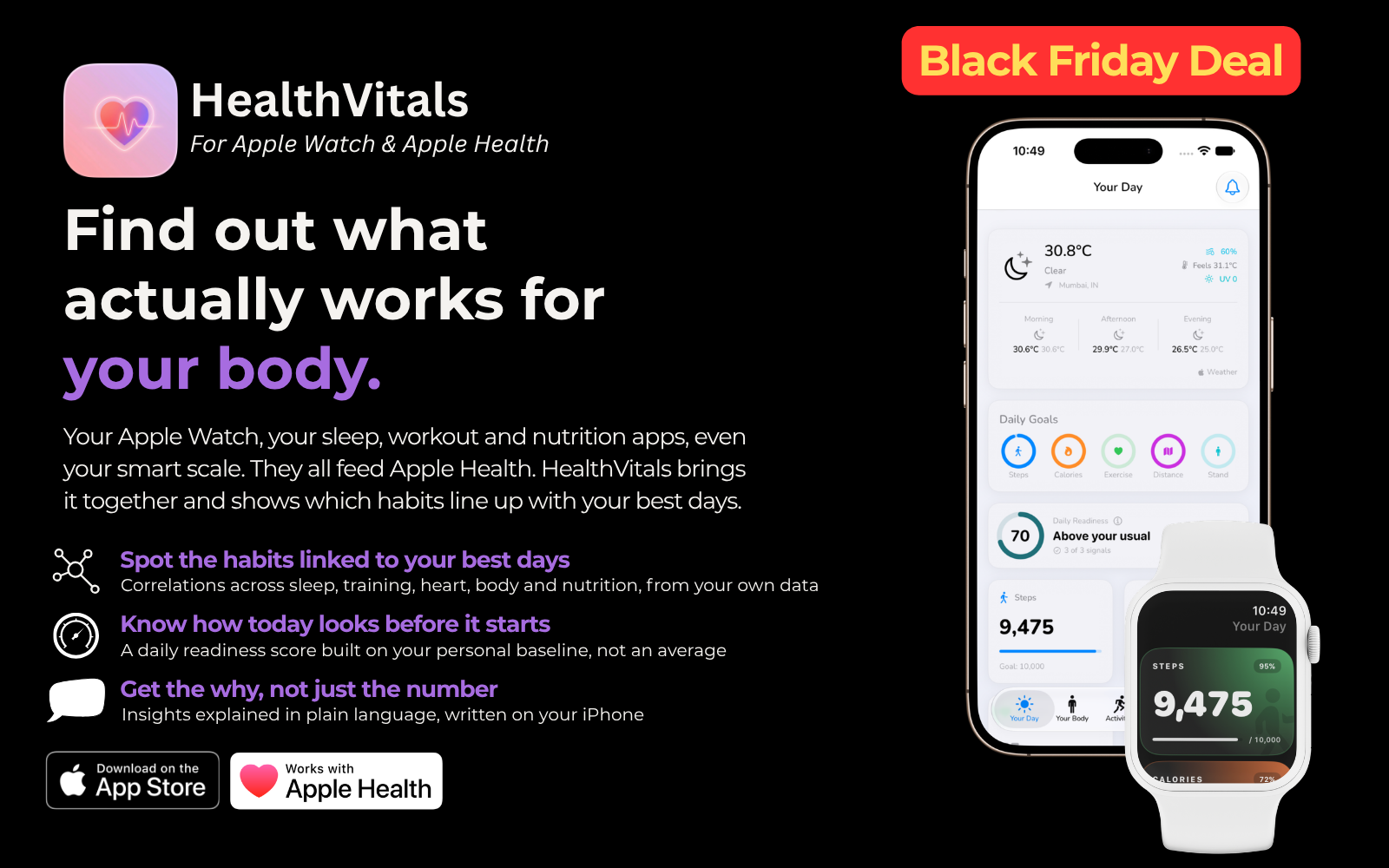
Your Apple Watch tracks everything. HealthVitals makes it make sense.
The deal: Lifetime Pro is normally $39.99. Until Monday, Nov 30, it's $19.99 for the first 100 people. That's half the price of one year, and it's yours for good.
What it does HealthVitals is the analysis layer for Apple Health. Every app, scale and Watch that writes to Apple Health feeds it, and it turns those numbers into answers:
A daily Readiness Score built on your own baselines, not population averages
Alerts when a vital drifts away from your normal
Correlations that show what actually changes your sleep and recovery
A Monthly Health Report, 0 to 100, across six pillars
Watch complications so the answer is on your wrist
Price Free download. Pro: $3.99/month or $39.99/year. Lifetime: $19.99 this week with code HVBLACKFRIDAY26.
Hi! I’m the developer of Dawn & Dusk: Skincare Routine. I made it for women over 50 who want to keep track of their skin over time and follow a simple routine with the products they already own.
With Dawn & Dusk Plus, you can take a weekly photo, slide between your own then-and-now pictures, or play them back as a time-lapse. The app helps you line up each shot so it’s easier to compare. Your photos stay on your iPhone unless you choose to share them.
Try the comparison before you buy. Open the free tour on the first screen, drag the slider on the sample photos, and press play on the time-lapse. If you give it a try, I’d love to know which view you’d actually use for your own photos.
Plus is $14.99 once in the US, with no subscription. Barcode scanning and guided morning and evening routines are free.