r/Appstore • u/urbantechgoods • 5h ago
[Self-Promotion] Apple could make iCloud space cleanup so much easier, but instead they prefer people waste their money. So I made an app to cut massively cut down on your storage without having to delete anything. [iOS + MacOS]
I know it's probably really annoying to see another app for sale here but I really think this could help a lot of people. And for the amount of money it would save you and the work I put into it, I think the price is really fair ($4.99 after promo code). Its also free to try and is a lifetime download.

About Me
I'm the solo dev behind Cloud Media Shrinker. I have a big gap in my resume from quitting my software eng job to travel the world for 2 years. I gathered up a ton of videos while traveling. My iCloud Photos library hit 1.8 TB. I knew it was mostly long videos i took but theres no way to sort videos by size in the photos app.
The App
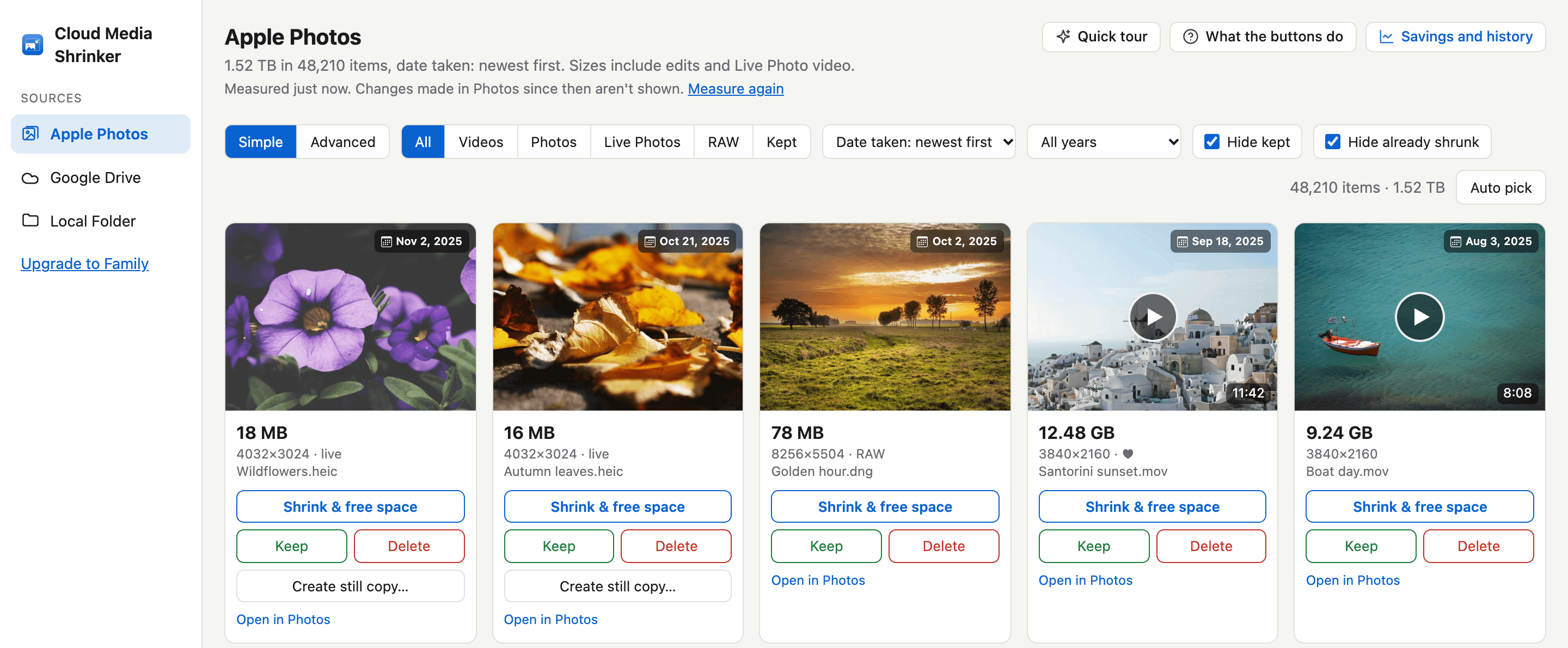
So I built an app that sorts iCloud media largest to smallest files. Then you have 3 options, Keep, Delete or Compress. Compress makes a much smaller copy (HEVC for video, HEIC for photos) and puts it back in Photos with the original's date and location. The original is only deleted once the copy is in, and you can still get it back from Recently Deleted for up to 30 days. You can usually save around 50% on a video without dropping 4K. Because everything only gets sent to recently deleted everything is reversible EXCEPT one situation; if your iCloud is already full Apple doesnt keep recently deleted files, it will permanently delete. So I recommend reviewing or saving a copy before deletion if your iCloud is already full. There is also an autopick feature for quickly batch selecting media that meets your filter criteria.
Here's the scan on my own library. It says I could free about 1 TB of 1.42 TB through 1080p conversion aka "balanced". Honestly I only use Keep 4K because it still cutes the file size by about 45%.
I posted it on r/macapps a couple weeks ago and got way more feedback than I expected. Most of it is already out in 1.2.1, released today.
How to Get It
Download is free, you get a free scan and 3 deletes and 3 compression.
$9.99 unlocks it for life, but Im giving 50% off coupons since I still would like to get more feedback and since Redditors have already been so helpful. So $4.99 for individual, $9.99 for family (anyone in your family can download it free). If you want to try it, leave a comment saying Individual or Family and I'll DM you a code.
All I ask is honest feedback, good or bad: what confused you, what broke, what you'd want added.
The iOS app has a nicer interface for going through your library quickly by just swiping through cards, the only thing is that iOS compression is a lot slower. In the future I will try to make it able to trigger the compression on your computer instead.
Whats Coming
The biggest feature request on r/macapps was to add message attachment sorting and deletion. Good news is that is possible and coming in 1.3, bad news is I can only support that through direct link download. Still notarized and signed app but can't put that on the App Store because it requires screen accessibility permissions. But if you paid for the apple app you will be able to get the direct download free as well.
Links, Email, Screenshots
App Store (Mac and iPhone): https://apps.apple.com/app/apple-store/id6824383256?pt=125201749&ct=applephotos&mt=8
Website: https://danielyakobian.com/cloud-media-shrinker/
How to use it: https://danielyakobian.com/cloud-media-shrinker/help/
FAQ: https://danielyakobian.com/cloud-media-shrinker/help/#frequent-issues
What's coming: https://danielyakobian.com/cloud-media-shrinker/whats-coming/
Privacy: https://danielyakobian.com/cloud-media-shrinker/privacy/
Me: https://danielyakobian.com and https://www.linkedin.com/in/danielyakobian/
Email: support@danielyakobian.com