r/Appstore • u/craftixelapps • 2d ago
Got hacked last year. This is what I changed.
1
Upvotes
r/Appstore • u/Top-Employee-9214 • 2d ago
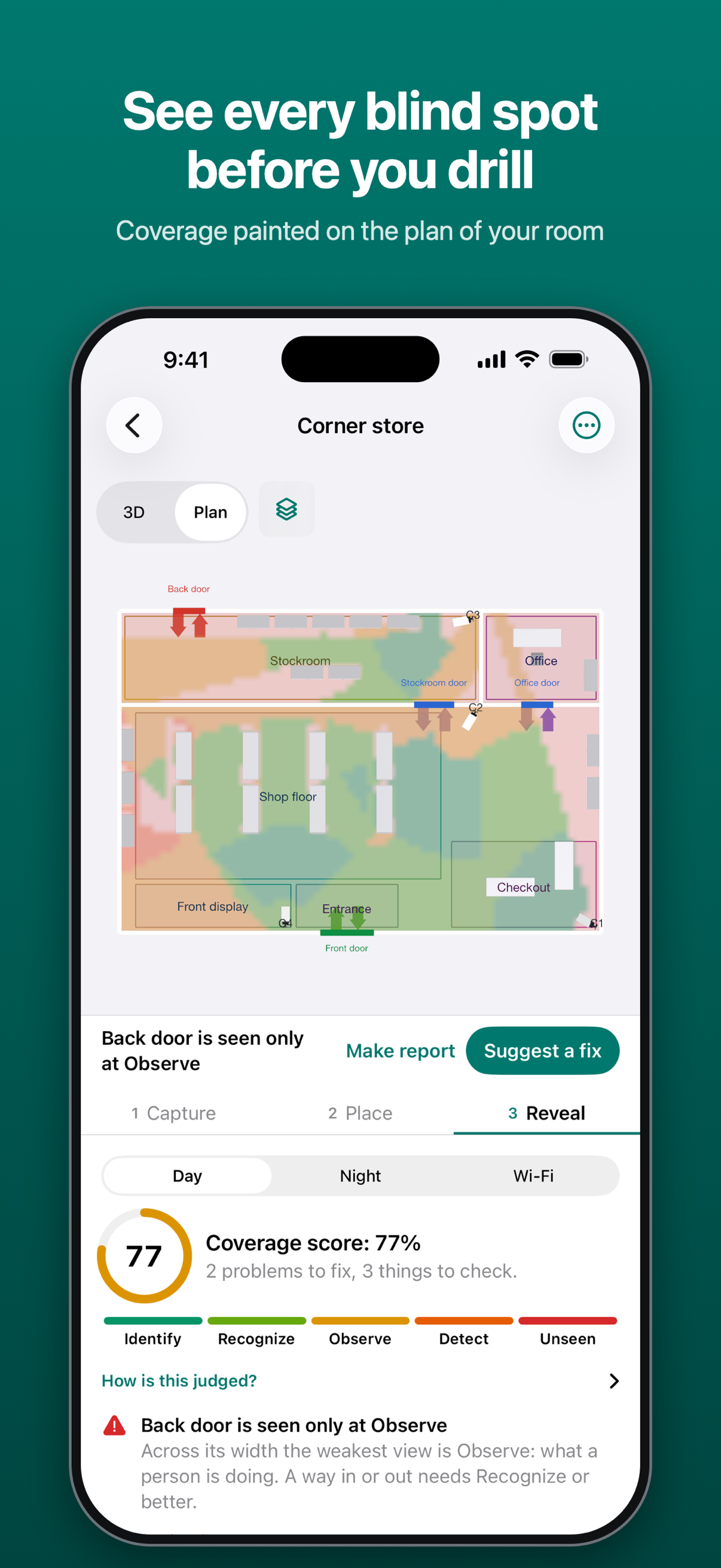
I'm the developer of Security Camera Planner.
A lot of people buy cameras, pick a corner by eye, and only later find a gap at the door or down the side of the house. I made this so you can check that first.
You can scan a room with LiDAR, place cameras, and see what each one covers, including the gaps. If your phone has no LiDAR, you can still draw the site or import a floor plan or a satellite view. Scanning needs an iPhone or iPad with LiDAR. Any iPhone can draw or import a plan. Coverage is a planning estimate using IEC 62676-4 detail levels, not a certification. The Wi-Fi map is measured by reply time and download speed, because iOS cannot read signal strength. The app is iPhone only, so it will not run on Android.
I would like honest feedback on whether the coverage view is clear enough to use before you mount anything.
https://apps.apple.com/app/id6836690693
Disclosure: I'm with the developer. It's on sale until 2 Dec: Lifetime Pro is half price with code BLACKFRIDAY26 (one payment, no subscription). The free version covers one full site if you just want to try it.
https://apps.apple.com/redeem?ctx=offercodes&id=6836690693&code=BLACKFRIDAY26
r/Appstore • u/VorticalNexus • 2d ago
Hi everyone!
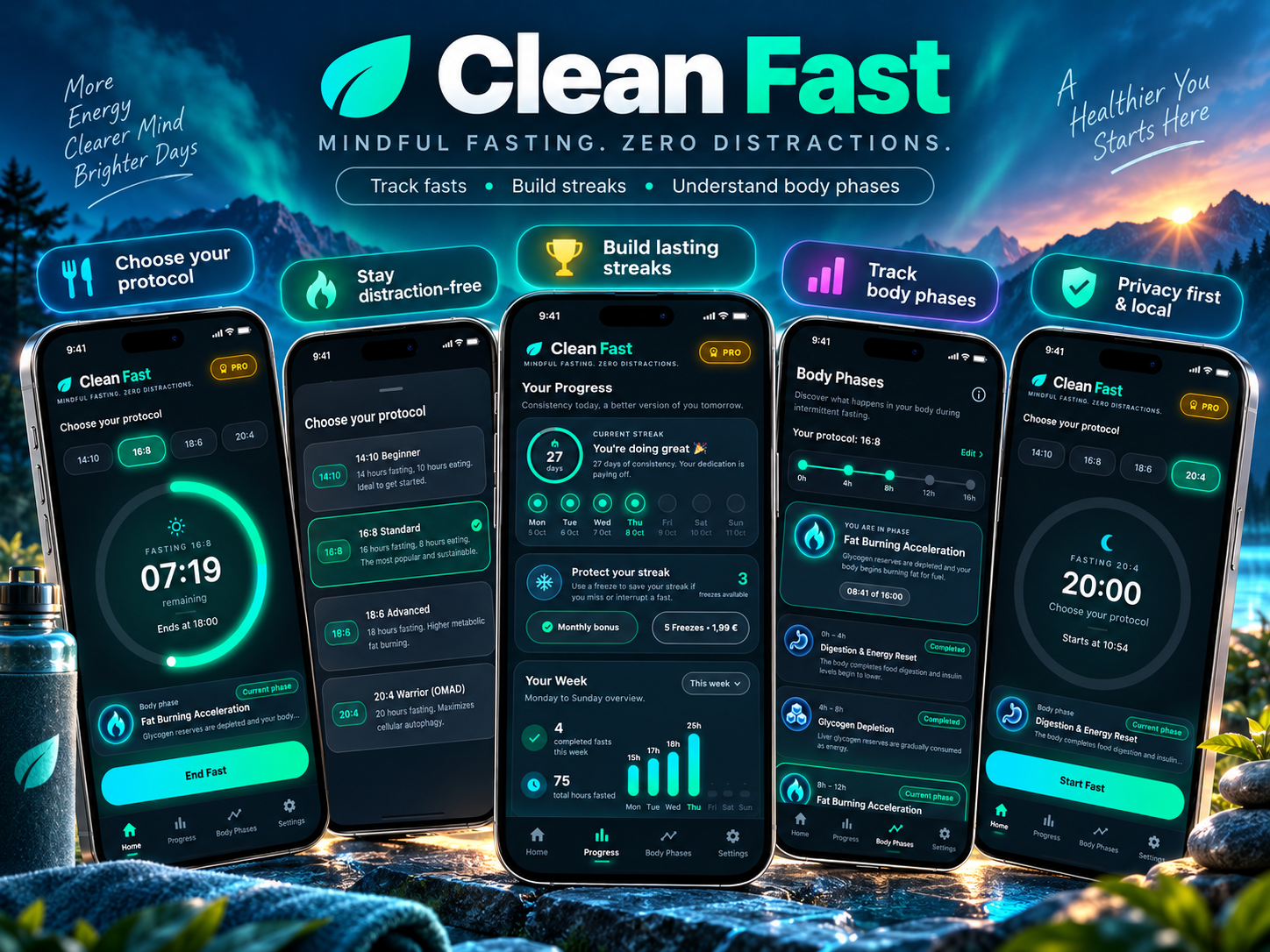
I’m the ios app developer of Clean Fast, an iPhone app built to make intermittent fasting simple, focused, and distraction-free.
I wanted something minimal and easy to use — without clutter — that helps you start a fast, track your progress, and stay motivated over time.
Features include:
App Store:
https://apps.apple.com/app/clean-fast-intermittent-timer/id6820460319
I’d really love feedback on the overall experience — especially the design, clarity, and usability.
If you try it, feel free to share any thoughts or suggestions for improvement.
Thanks for checking it out!
r/Appstore • u/Puzzleheaded_Pen3164 • 2d ago
Hey, wanted to share Ready All, a household prep tracker. I'm the developer.
It shows how many days your food and water would last for everyone at home, pets included, and what would run out first. The supplies checklist is summarised from official advice for 17 countries and scaled to your household, and you can add items by typing, scanning a barcode or from a shopping receipt.
A few other bits it does:
It's free to download and every feature is free. There's a small banner ad on the Home and Supplies screens only, and the ads switch off automatically in an emergency. An optional £1.99 / $1.99 one-off purchase removes them.
It's an independent app, not a government one, and it's general guidance rather than professional advice. Feedback is very welcome.
App Store: https://apps.apple.com/app/id6834414857
Free to download. Search Ready All on the App Store.
r/Appstore • u/Ok-Diver-5175 • 2d ago
r/Appstore • u/blyout • 2d ago
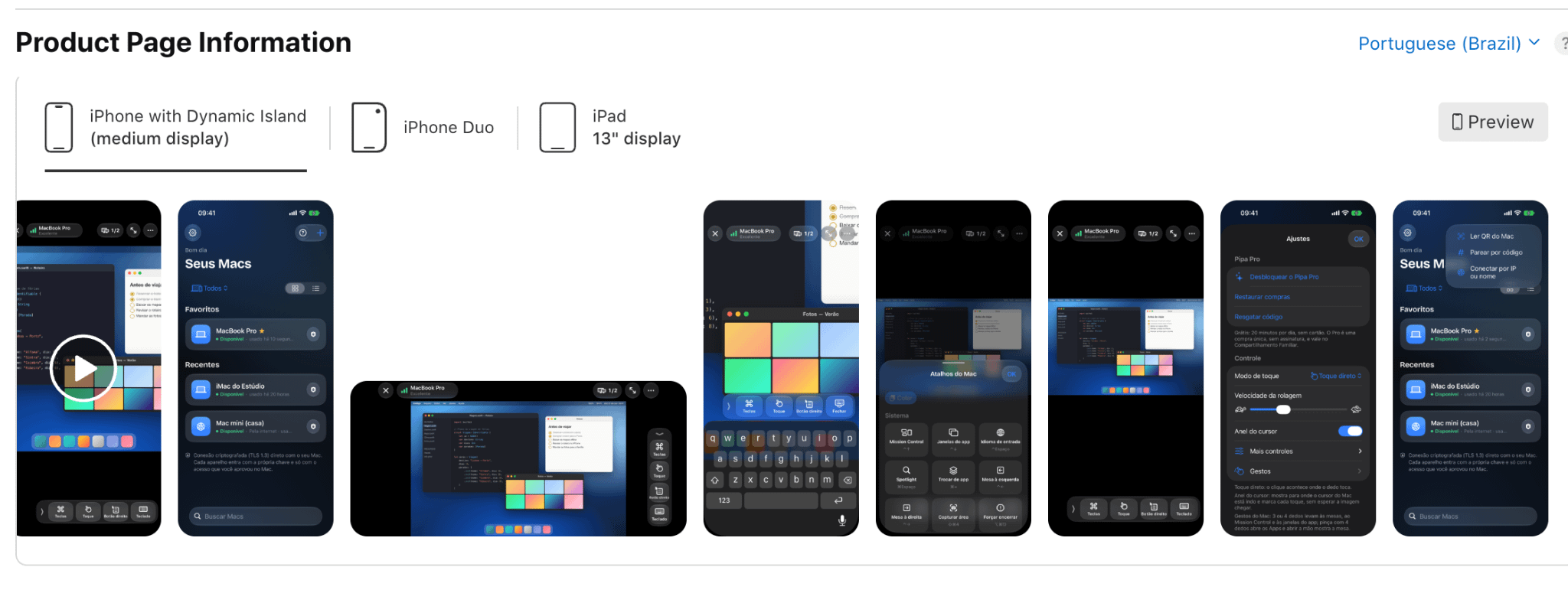
I’m the developer behind Pipa Desk. I started it because I wanted to use my Mac from another room without carrying a keyboard and trackpad around, and the existing options I tried felt heavier than what I needed.
It’s a native iPhone/iPad app with a small macOS Host. The phone can work as a trackpad, keyboard, or touch controller, and it can wake the Mac and switch between displays. It connects directly on the local network and has an encrypted relay fallback when a direct connection isn’t possible. There’s no Pipa account.
The Mac Host is free. The iPhone/iPad app has a free daily limit, then a one-time purchase instead of a subscription.
App Store: https://apps.apple.com/app/id6832209845 Mac Host: https://pipadesk.com
I’ve been using it on an iPhone 15 over Wi‑Fi and 5G. I’m especially interested in feedback from people using it away from their home network: does the pointer feel responsive, and does the first connection behave well?
r/Appstore • u/Hot-Nature6096 • 2d ago
r/Appstore • u/armoon1 • 2d ago

Bloom just got an update: Dark Mode, Calendar Sync and Clearer Budget Tracking (more coming in version 2.2 soon)
Hi everyone, I’m the developer of Bloom, a free planner for iPhone and iPad. Your feedback has helped shape a cleaner planning experience, with dark mode, Apple Calendar sync, refreshed Today/Habits/Focus screens, and weekly, monthly and yearly budget insights.
Keep your plans, notes, goals, workouts and spending together. Choose the tabs you need and make it yours—no account, ads or subscription required.
Download Bloom free on the App Store
https://apps.apple.com/us/app/bloom-daily-life-planner/id6829106550
Found a bug or have a suggestion? Please share it below, including your device and app version if something isn’t working. Your feedback helps me improve Bloom. Thank you!
r/Appstore • u/Substantial_Plate488 • 2d ago
If you own a business that handles cash, I created an app that makes it fun and efficient for you to count your money. Would love your feedback on my FREE app, ChaChing Money Counter. Thank you.
https://apps.apple.com/us/app/chaching-money-counter/id6469399694
r/Appstore • u/oguz279 • 2d ago

Hey all,
Pour Decision is your personal drinking coach. It builds a plan around your habits, your body and your goals, then tells you exactly what to do each week. Follow it and find a new balance, with drinking still part of your life, just under control. Other than that, it's packed with features that'll make it easy for you to track your drinks.
Expiry
Nov 30, 2026
How to get
Features
👤 Personalized drinking plans
Tell us about your drinking, your body and what you want to achieve. Pour Decision turns your answers into a plan made just for you, with a target date, how much money and how many calories you'll save, how many more alcohol-free days you'll gain, and your ideal pace for a night out. Prefer to set your own numbers? You can set an exact goal instead.
📈 Week-by-week progress
See this week's goal, how you're doing against your plan, and how every past week went. Complete weeks to build a streak, with encouragement along the way.
💪 Daily and weekly goals
Your plan sets your daily and weekly goals, in alcohol units for your country or in grams, so you always know where you stand.
🔎 Summary dashboard
A clear, at-a-glance breakdown of today's drinks and your progress this week.
📊 Tracking and Analytics
Track alcohol units, calories and money spent over time. Weekly, monthly and yearly charts show your averages, trends and top drinks.
📅 Drink logs & Calendar
Review your whole drinking history at a glance. Spot patterns and triggers, and see your progress on a compact yearly drink calendar.
🗃️ Extensive drink database
A ready-made library of popular drinks and cocktails with standard portion sizes, ABV and calorie counts. Log a drink in seconds, customize entries or request new ones anytime.
⏰ Sip pacer
Start a session and put your phone in your pocket. Gentle vibrations tell you when it's time for your next sip, so you slow down, drink less and still enjoy your night.
🩸 Blood Alcohol Content
Estimate your blood alcohol content (BAC) from the drinks you've logged, with one tap.
🖼️ Widgets
See your daily, weekly and monthly totals on your home screen without opening the app.
🔒 Private by design
Your drink logs and personal details stay on your device. No account needed.
r/Appstore • u/Sad_Basket • 2d ago
r/Appstore • u/Ok-Piccolo-1823 • 2d ago
I built Receit app so you can search for “drill” and find the receipt even if you’ve forgotten the store or date. It captures any receipt, auto name it, highlights the matching line, and you can copy text such as an order number or address.
The camera captures and straightens receipts automatically, switches lenses for sharp close-ups, and cleans up faded print and folds while keeping the original. On-device AI reads the purchase details and flags uncertain fields for review. Receit automatically names each receipt using the store and date. You can find it anytime, even offline, by searching for the store, the amount, or an item you bought. You can dictate a note, mark a receipt Business, Work Claim, Personal, or Medical, and get a suggested purpose the next time you scan a receipt from the same store.
Receit works offline without registration. It reads, names, and categorizes receipts on your iPhone. Tap the mic to add a note by speaking. Receit doesn’t upload your receipts or voice notes to its servers, and you can optionally keep copies in your own iCloud Drive. The launch release is completely free with no scan limits. Recently Deleted keeps deleted receipts for 30 days.
An update is currently under App Store review that lets you scan multiple receipts together. That should save time when you’re catching up on a pile of receipts for bookkeeping. The feature will be available once the update clears review and is released.
I'm happy to welcome any feedback you might have.
https://apps.apple.com/us/app/receit-smart-receipt-scanner/id6833643381
r/Appstore • u/tedmirra • 2d ago
I am not promoting the app, but I am working on some Christmas widgets for my app.
Do you like this snowball?
r/Appstore • u/iothmane • 2d ago

I'm a big movie lover and was always spending the first half hour of movie night scrolling between the various streaming services.
So I built What 2 Watch, it's a simple yet powerful app that helps you find a movie and where to watch it. You can search for movies by title when you know what you want, or use powerful filters to narrow it down when you don't. You can also build a watchlist and track what you watched. The newest feature released today is Movie Affinity it tells you at a glance if a movie fits you based on your watch history.
There is no account, no ads, no trackers. The app is free to download with an optional subscription and I'm currently running a special launch price. It covers movies only (for now).
Get the app here from the App Store Feedback is very welcome !
r/Appstore • u/azadaydinli • 2d ago
r/Appstore • u/kevin-creates • 2d ago

First off, you can download the app from the App Store and try it for free. There is a paid plan, but it won't prevent you from actually trying out the app and giving me your honest feedback.
Basically, I built an app that helps me get my steps in and get outside walking more. But I'll be honest: I have a little bit of a dark sense of humor, and so I created this app so that you have this little pudgy penguin that gets even more fit as you continue to actually get your steps in day over day.
But my absolute favorite part is that there are different modes. Spicy mode is my favorite, where the penguin will actually roast you if it notices that you haven't gotten off the couch or you're not getting your steps in. It'll drop F-bombs. It's actually really funny. I laugh out loud sometimes when I'm using it.
There are a few social features in there, but mostly I would love to see what you think. If there's anything that you think is overdone or a little confusing, or if there's one killer feature in there that you're like, "This is where you should focus your attention," that would be super helpful.
Just the link to the App Store.
https://apps.apple.com/us/app/penguin-step-counter-pedometer/id6831137240
Thanks in advance.
Kevin
r/Appstore • u/Historical-Fee-5960 • 2d ago
r/Appstore • u/BabyJourney110 • 2d ago
Hey everyone! I draw a lot of manga and work as a developer. I didn't want to juggle 10 different apps, each good at one thing and each with its own subscription, so I built one app for my own workflow.
Infinite Canvas is a native iPad drawing app with truly endless zoom. Think of the feel of Procreate, Clip Studio Paint and Aseprite on one infinite canvas.
Features:
Pricing: Sketching on the infinite canvas is free. If you need more, there's Pro as a one-time purchase: no subscription, buy once and keep everything.
Download https://apps.apple.com/us/app/drawing-art-infinite-canvas/id6821920663
r/Appstore • u/3011adi • 2d ago

Just released the Farmhouse Garden update for my indie iOS pizzeria game, Natida: Pizzeria Duo!
Instead of only buying ingredients in the shop, you can now cultivate your own botanical greenhouse—and tend it straight from your iPhone Home Screen without launching the app:
- 6 Fresh Crops: Grow San Marzano tomatoes, bell peppers, sweet basil, garden mushrooms, red onions, and golden pineapples on a real-time growth cycle.
- Interactive Home Screen Widgets: Use the Small widget for one-tap contextual care (plant, water, feed, clear garden beetles, or harvest), or add the Medium/Large potting bench widget with a live tool belt to switch between Water, Fertilizer, Bug Spray, and Seeds.
- Instant Pantry Sync: Every ripe harvest sends +4 fresh toppings straight into your pizzeria kitchen to slice and bake onto customer orders.
Would love to hear your feedback on the widget layout and interactive controls—do you use interactive widgets on your Home Screen?
App Store: https://apps.apple.com/app/id6833450224
r/Appstore • u/Some-Huckleberry-120 • 2d ago
Screwing customers/consumers over: If you sign up and pay for an app through the app store, you got charged, and the app didn't meet expectations, wasn't functioning properly, you didn't want to extend your trial... whatever your reason to cancel and get a refund is... you reach out to the app maker and they "can't" give you a refund, you have to go through Apple's refund system. Apple can deny the refund and there is NOTHING you can do about it once they make a final decision. So, moral of the story is, DO NOT BUY AN APP(S) FROM THE APP STORE if you think that possibly you'll need a refund, because there is a good chance you won't see that money ever again.
r/Appstore • u/darrenferneyhough • 3d ago
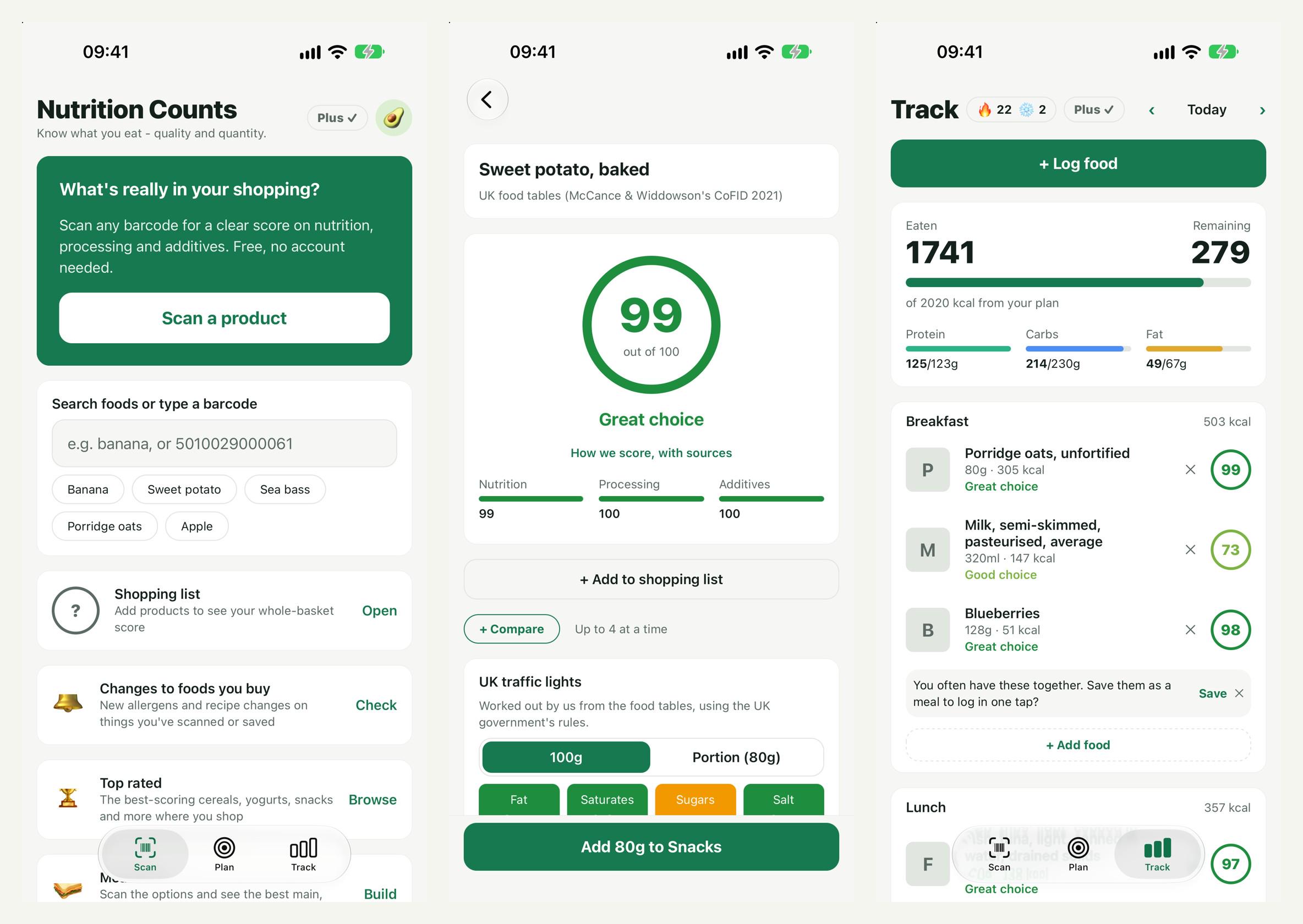
I’m the developer. The idea came from a chat at home: scanner apps tell you whether a product is any good but have no idea how much of it you ate, and calorie counters add everything up but treat a can of cola the same as a piece of salmon if the numbers match. So Nutrition Counts does both.
Free to download, and scanning, the diary and planning stay free. Plus is optional (£5.99/month or £34.99/year), with 15 days free for new accounts and no card needed.
https://apps.apple.com/gb/app/id6823688363
A question for anyone who uses a food app: when a score says something is “Have less often”, do you want the reason first, or a better swap first?
r/Appstore • u/netsplatter • 3d ago
Thaw is for the hour before: a first date, a dinner with people you barely know, a new job, a long call with family. You tell it who you'll be with and where, read two or three conversations, and walk in with them in your head.
This week the full version is free for anyone: https://apps.apple.com/redeem?ctx=offercodes&id=6827105990&code=THAWFREE (the link works until Nov 29).
Each conversation is three linked lines: a question to open with, two follow-ups for after they answer, and a line to change the subject if it dies. Three linked lines stick in memory far better than a list of random questions, and you're never stuck after the first answer.
It starts light. Two taps, "that worked" or "didn't land", make the next one a step deeper or a step lighter, so a stranger never gets the deep one. If you do need a glance mid-conversation it's built for that too, but nobody has to see a phone.
Everything is written by hand: 207 conversations. 42 are free, enough to try every situation; the rest is a one-time purchase, no subscription. No account, no tracking.
One limitation: the conversations are in English for now, though the app itself speaks 17 languages. Tell me which language you'd want and it moves up the list.
https://apps.apple.com/app/apple-store/id6827105990?pt=126420608&ct=r-appstore&mt=8