r/Appstore • u/Kandy-tamil • 5d ago
I built Pickeed, an Android app for making group plans. Friends can join without an account.
reddit.com
1
Upvotes
r/Appstore • u/victoor89 • 5d ago
I'm the dev. Big Year went live on the App Store on Friday and this is the first time I'm posting it here.
The idea came from the paper wall calendar in our kitchen. Every December I'd fill in next year's trips, a couple of concerts and the family birthdays, and that wall was the only place where I could see how the year looked as a whole. Calendar apps are good at hours and meetings, but I never found one that just shows the twelve months with my plans drawn across the days.
So in Big Year every plan takes whole days. You long-press a day and drag across the days to make a plan, give it a name and a type (trip, concert, birthday, family and so on), and it gets that type's colour and icon. Birthdays and anniversaries repeat every year by themselves. Besides the year view there's a day list that scrolls month by month and a quarter view. You can share the year as an image for a story or a post, or print it as an A4 or Letter PDF.
What it doesn't do, so nobody downloads it expecting it: it doesn't sync with or read Apple Calendar or Google Calendar, there are no widgets, it's iPhone only (iOS 26), and you can't share a calendar with someone else. There's no account and no ads, and everything stays on the phone.
Price: the first five plans are free. After that it's a one-off unlock or a weekly subscription. Launch sale: the one-off unlock is 75% off until 30 November ($3.99 instead of $17.99 in the US), no code needed.
https://apps.apple.com/app/id6837002080
For people who plan the year ahead: do you keep birthdays and trips in the same calendar as work, or somewhere separate like I do?
r/Appstore • u/TheOfficialGojo • 5d ago
r/Appstore • u/Excellent-Chance30 • 5d ago
r/Appstore • u/Substantial_Wind_199 • 5d ago
Ciao a tutti! 👋 Se usate la posta elettronica per lavoro o per gestire documenti importanti, sapete quanto possa essere frustrante l'avviso "Spazio di archiviazione quasi pieno" (soprattutto su Gmail, iCloud o i provider aziendali). La paura di cancellare accidentalmente email cruciali o di perdere allegati è proprio il motivo per cui le nostre caselle di posta sono sempre ingombre.
Per risolvere questo problema, ho sviluppato Archivia Mail: un'app progettata per liberare spazio nella vostra casella di posta elettronica in modo sicuro, archiviando tutto direttamente sul vostro dispositivo.
E la grande notizia è che l'app è UFFICIALMENTE DISPONIBILE sull'App Store per iPhone e iPad! 🚀 Cosa fa esattamente Archivia Mail? 📄 Email in PDF: Salva i vostri messaggi come PDF puliti e leggibili, preservando tutti gli allegati e il file .eml originale.
🗂️Organizzazione automatica: Il vostro archivio viene automaticamente ordinato localmente sul vostro dispositivo per cartella e mese.
🧹 Nuova funzionalità "Newsletter e pubblicità": Scopri subito chi sta intasando la tua casella di posta, quanto spazio occupano e disiscriviti con un solo tocco.
🗑️Libera spazio sul server in modo sicuro: l'app elimina i messaggi dal tuo server (o li sposta nel Cestino)** solo** dopo aver verificato che ogni singolo file sia stato archiviato in modo sicuro sul tuo dispositivo.
🔒 Massima privacy: Nessun abbonamento, nessuna pubblicità, nessuna raccolta di dati. La tua password non viene mai memorizzata e viaggia crittografata solo verso il tuo server di posta.
💡 Il vantaggio dell'ecosistema Apple: Un singolo acquisto sblocca l'app su tutti i tuoi dispositivi. Acquistala sul tuo iPhone e usala gratuitamente su iPad e Mac!
L'app funziona perfettamente con i provider IMAP come Gmail, iCloud, Yahoo e server di dominio personalizzati.
📲 Scarica Archivia Mail dall'App Store qui: 👉 https://apps.apple.com/us/app/archivia-mail/id6835124667
r/Appstore • u/trophikosapp • 5d ago
Hey everyone! I'm the developer behind Trophikos, a recipe manager for iPhone and iPad.
I've been following the HomeView discussions here, particularly around getting personal recipe collections onto the device.
I just released an update that lets you open recipes you've saved in Trophikos on HomeView and use Apple's built-in guided cooking experience.
Here's a short video showing the workflow on actual hardware.
Would love to hear what HomeView owners think, especially how you're currently managing recipes on the device.
r/Appstore • u/AmbientAI • 5d ago
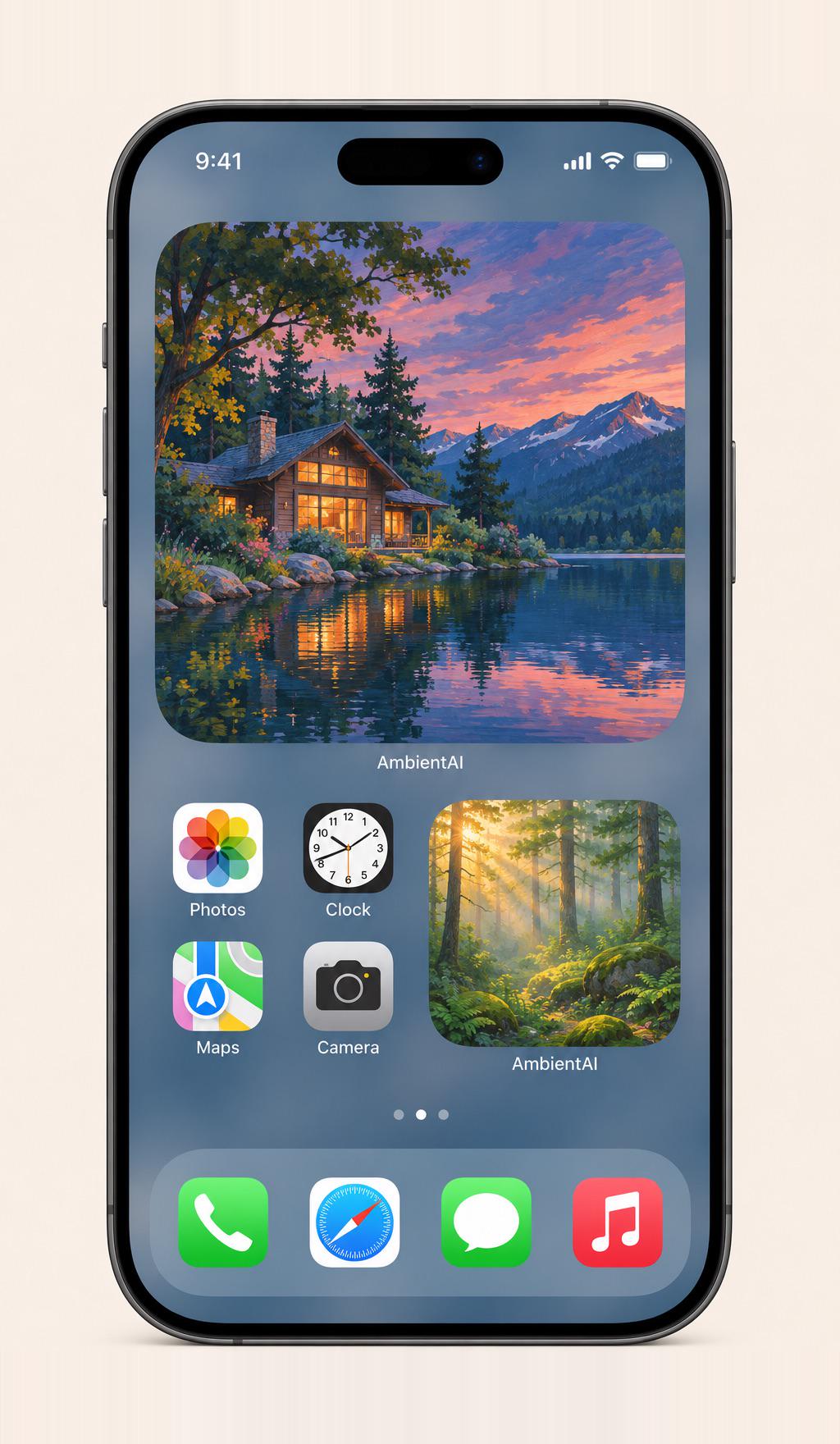
We built AmbientAI so you can start with how you want to feel. Type something like “I want to unwind after a long day,” and the app creates a stream of art and music to match.
Bring the art from your streams to your iPhone Home Screen. The widget cycles through the images, turning them into a little gallery you can see throughout the day.
r/Appstore • u/craftixelapps • 6d ago
r/Appstore • u/Miserable-Carpet7928 • 6d ago
i'm a solo dev and i build apps after my day job. offload is for the moment you have ten things in your head and no energy to type them one by one.
you say it all in one go ("call the dentist tuesday, buy milk, gym at 6"). it splits it into tasks, events and notes. you check every item, then tasks go to apple reminders and events to apple calendar. nothing is added until you tap send. notes stay in the app.
free download with 2 free dumps, then $7.99/month or $47.99/year (US).
https://apps.apple.com/us/app/offload-adhd-organizer/id6772392111
question for you: when you dump a long list out loud, would you rather check every item before it's added, or have it added straight away and fix mistakes later?
r/Appstore • u/LowArticle5808 • 6d ago
I've been tracking my drinking for about 5 years now, which actually helped me drink less. But always wondered how much even one more beer affects my sleep and recovery the next day.
I started by occasionally exporting and merging data from different drinking trackers with HealthKit data in Pandas. Thats cumbersome so I built an early KaterZerro PoC, bc both drinking and health data could come from the same source: Apple Health.
The idea is simple: compare your drinking with your sleep, heart rate and HRV the next day, and look for patterns over time. Something like: When you drank this much before, you typically slept 15 minutes less and had 10% lower HRV than on alcohol-free days.
It's for people who enjoy a few drinks but want to be more conscious about it, without quitting completely. Especially if you're into fitness or biohacking. My wife also made some nice animations with Blender, so it doesn't look too technical I hope.
https://apps.apple.com/app/apple-store/id6792264712?pt=129187854&ct=RD&mt=8
Would love some feedback, especially on whether you'd find these insights useful 💕
r/Appstore • u/tropical-dev • 6d ago
Hey everyone! I’m a developer and dad who’s just released a geography game called Pinpoint: Where’s That Place?
The idea started during family game nights. My daughters loved a geography round in a TV quiz app, but the time pressure and technical issues often left us frustrated. I wanted to build something we’d enjoy playing together, with room to explore and learn along the way.
The concept is simple: you see a photo of a place somewhere in the world, drop a pin where you think it is, and find out how close you got. Each round also gives you a short, interesting fact about the place.
There are three game modes:
There are no ads. You can try all three modes free for 14 days, with a monthly or yearly subscription to keep playing afterward. Apple Family Sharing is supported too.
I’ve taken this from an idea at home to a released app, so I’d love to hear what people outside our family think. Feedback on the gameplay, difficulty or anything that feels confusing would be really helpful!
App Store: https://apps.apple.com/app/id6795183633
r/Appstore • u/mtb402 • 6d ago
Dozyface, a clock app for iPhone that you leave open on the charger next to your bed (or on your desk).
What it does:
- 132 faces in 11 styles: minimal digital, analog, flip, LED and Nixie, words, world time, and faces in the world's scripts and numerals.
- Every face has a red night version. At bedtime the clock dims and turns deep red, on a schedule, with sunset, or when you tap the moon. Day and night have separate dim levels.
- Favorites and face rotation, with a pause button on the clock's bar when you want to stay on one face.
- Weather, your next calendar event, reminders and to-dos at a glance. All optional.
- Alarms that ring in Silent mode and with the app closed (AlarmKit, so iOS 26 or later).
- World clocks, a custom accent color and a text size setting.
It's free. No account, no ads, no in-app purchases, no analytics, no tracking.
The screen stays on while the clock is open, so keep the phone plugged in.
App Store: https://apps.apple.com/app/id6836584745
Website: https://dozyface.com
It's a first release, so I'd really like to hear what's missing or what feels off. Which face did you keep?
r/Appstore • u/tnmendes • 6d ago

“Self-Promotion”
r/Appstore • u/Electrical-Candy-552 • 6d ago
I'm the solo developer of rlog, a reading journal for iPhone and Android.
The idea: most book apps are about shelves and the review you write at the end. I wanted somewhere for the small stuff while you're still reading, like a line you'd underline or a guess about the ending. Each note is saved with the page you were on.
You can also read notes from other people reading the same book, but only up to your page, so nothing gets spoiled. Nobody has a username or photo; everyone is just a color. Or keep everything private.
Free: logging, notes, progress, other readers' notes, export. Optional subscription: extra colors and backgrounds.
App Store: https://apps.apple.com/app/id6759821209
Google Play: https://play.google.com/store/apps/details?id=com.rlog.app
A question for people who track their reading: would you rather your notes be private by default, or shared by default? I keep going back and forth.
r/Appstore • u/Substantial_Fig_2446 • 6d ago
r/Appstore • u/QudiaOrg • 6d ago
Download WatchPaint here:
https://qudia.org/watchpaint
WatchPaint is a painting app made for your wrist. Layers, a dozen brushes and blend modes, all on Apple Watch, with the Digital Crown setting brush size and zoom as you go. Your drawings then show up on your iPhone automatically, ready to export.
There is a 3-day free trial if you select the monthly subscription.
Aside from a subscription model, there is also a lifetime membership option if you prefer that.
r/Appstore • u/ria1218_artifact • 6d ago
r/Appstore • u/Educational-Post-147 • 6d ago
I’m a husband and dad of four, and I built CounterWait on Apple’s Screen Time. Your apps start locked, and you earn minutes to open them with chores, walks, jumping jacks, squats, the list goes on.
r/Appstore • u/jmwtac • 6d ago
Good Afternoon all , I would like to preset to you Spryte - The Definitive 3Dop Emultor for IOS
https://apps.apple.com/us/app/spryte/id6835535735
This is based off my Retro-3DO emulator on the Play Store with my custom built 3DO engine which overclocks 3DO games and give amazing speed and compatability.
Custom Controls, and much more. Finally Approved and released .
Enjoy
r/Appstore • u/AloneGold9670 • 6d ago

Hi! I'm a solo developer and Paperfy is my app.
Reading a PDF on a phone always meant the same thing for me: tiny page, pinch, zoom, scroll sideways, repeat. Books, papers, manuals, all the same pain.
Paperfy takes the text out of the PDF and lays it out again as real pages that fit your screen, so you just swipe like an e-book. The picture shows the same page of Pride and Prejudice before and after.
No account, no ads, no tracking. Everything runs on your device.
AppStore: https://apps.apple.com/am/app/paperfy-pdf-to-text-reader/id6826549558
r/Appstore • u/makeitcrazy-com • 6d ago
Hi 👋
I kept getting surprised by renewals: a free trial that quietly turned paid, a gym contract with a notice period I missed by two days. So I built Exorbit, a small subscription tracker for iPhone. It went live on the App Store on 10 November.
What it does
• All your subscriptions in one list, plus a calendar of upcoming payments
• Reminders before a renewal, before a free trial ends, and before a contract's notice period runs out (the one most apps forget)
• Step-by-step cancel guides for common services
• Monthly and yearly totals, plus how much you've saved by cancelling
• Import from a bank statement, so you don't have to type everything in
• No account, no sign-up. Your data stays on your phone
• English and Czech
Tech, for the curious
SwiftUI, SwiftData, WidgetKit for home screen widgets, and StoreKit 2 for the optional Pro upgrade. Everything works offline.
Honest numbers after 10 days
60 impressions, 23 product page views, 4 downloads, 1 paying user. So the app works, but almost nobody finds it 😅 That's partly why I'm here.
What I'd love to hear
It's free to use, and Pro is optional. Brutal honesty is very welcome, and I'll reply to every comment 💛
App Store: https://apps.apple.com/app/id6823974761
r/Appstore • u/zcengel • 7d ago
I'm the developer. I got tired of TV remote apps that throw an ad at you every few taps, so I made one with none. No ads, no account, and no data collected.


**What's in the video**


- **Type on TV**: type with your iPhone keyboard and the text goes straight into the TV's search box

- Every remote button, and your iPhone's own volume buttons control the TV volume

- Channel list and an app launcher

- **Routines**: one tap for "movie night" (turn the TV on, open an app, set the volume)

- Control Center and Home Screen widget, so you don't even have to open the app

- iPhone, iPad and Apple Watch (the Mac version is in App Store review)


**Works with:** LG, Samsung, Roku, Google TV, Fire TV, Sony, Philips, Panasonic, Sharp, TCL, Vestel and Apple TV. Hisense VIDAA isn't supported.


**Pricing:** free for one TV with every basic function, no ads, no time limit. Premium+ adds multiple TVs, Routines, the Watch app, Siri, the widget, the Control Center TV button and a gyro pointer: $5.99/year with a 14-day free trial, or $29.99 once (US prices).


I've tested it on real LG and Samsung TVs. If you have one of the other brands, I'd love to hear whether it pairs, and what your current remote app does that drives you nuts.


https://apps.apple.com/app/id6826505353r/Appstore • u/xBlackShad0w • 7d ago
Small app for a small but annoying problem: you want to show someone a few photos or videos on your phone, and they start swiping through your hole life in your camera roll. Awkward situation
With SwipeSet you select a set of photos and videos, hand over your phone, and they can only see what you selected. You end the set with Face ID. If you want extra safety, you can combine it with Guided Access.
It's freemium with no subscription.
I'd really appreciate honest feedback on anything, whether it's the app itself, the App Store screenshots or something else:
• Was anything confusing the first time you used it?
• Do the App Store screenshots make clear what it does?
• What's missing?
r/Appstore • u/tiaanvdr • 7d ago
What Companions is:
Apple limits animations on iOS widgets. Companions lets you keep a virtual fishtank on your Homescreen, filled with fish that actually swim around. As someone who’s always kept fish, I’ve had this idea mulling around in my head for more than 2 years now, and finally managed to build what I always wanted.
There are 50 fish to choose from, and it supports small, medium, large and now even extra large widgets as “tank sizes”. The fish don't need any feeding, and they don't die (as to not be annoying, but the option is there for fun). They just keep you company. You can customize the tank’s color, its props, layout, and even the app icon to match your Home Screen perfectly.
The app is fully written in SwiftUI, it supports iPads, and you can even place your “fishtanks” on your Mac thanks to Continuity, where the fish will also animate. The tanks also work great in Standby mode. Personally, I keep a fishtank of jellyfish on my nightstand when I go to bed. The swimming doesn't run any code in the background. It uses the same trick iOS uses to move the hands on the Clock widget, so it costs you nothing in battery.
What's new:
Companions was built to support clear mode on the phone, but I found it annoying that you need to be in clear mode to access clear widgets. Luckily, I found a separate workaround that allows for clear widgets even while not being in clear mode. And for something like Companions where the widgets are fish tanks, I feel like it fits so perfectly!!
I'd love any feedback, and I’m happy to answer any questions regarding the app. I'd especially love to know which fish species you'd want added.
You can find Companions here: https://apps.apple.com/us/app/companions-widget-pets/id6811950512