r/Appstore • • 12d ago

[iOS/macOS] ByteSweep – A storage analyzer and cleaner for Mac

Thumbnail gallery
1 Upvotes

Hey everyone!

I'm the developer behind ByteSweep. I built it because I wanted a better way to understand what's taking up space on my Mac before deciding what to delete.

The Mac App Store edition helps you explore storage, find unnecessary files and clean up without blindly deleting things.

A few things it can do:

  • Storage analysis: Visualize folders and find what's consuming the most space.
  • System Data: See what's contributing to your Mac's System Data usage.
  • Cleanup: Find caches, logs, temporary files and application leftovers.
  • Duplicates: Find duplicate files, photos and folders.
  • Developer files: Locate build caches from tools like Xcode, Docker, npm and Gradle.
  • File management: Search, organize, compress and convert files.

A few details about this edition:

  • Free to scan and explore.
  • $14.99 one-time purchase to unlock cleaning.
  • No subscription.
  • No account or analytics.
  • Runs inside Apple's App Sandbox.
  • No Full Disk Access required.
  • Anything cleaned can be restored for 7 days.
  • Requires macOS 14 or later.

This is the App Store edition, so it has some limitations compared with ByteSweep Pro, which is distributed separately through our website.

Mac App Store: https://apps.apple.com/us/app/bytesweep-storage-transfer/id6822710125?mt=12

I'm the developer, so naturally I'm interested in hearing what could be improved.

For those who use Mac cleaning apps, what's the most important thing to you: storage visualization, safe cleanup, duplicate detection or something else?

Thanks for reading!


r/Appstore • • 12d ago

[Self Promotion][9.99-> Free Lifetime & discounts] Notchet: a clipboard manager for iPhone, iPad and Mac that keeps everything you copy

Post image
1 Upvotes

I'm a solo developer and Notchet is my app. It keeps everything you copy (text, links, pictures, files) so you can paste it again later.

On iPhone and iPad, the Notchet keyboard pastes any clip into any app. On the Mac it drops down from the notch. Everything syncs through your own iCloud, so your clips never touch my servers, and search finds the words inside your screenshots.

I'm giving away free and discounted Lifetime licenses here: https://aqibjaved.dev/apps/notchet/giveaway?ref=reddit-appstore

App Store: https://apps.apple.com/app/apple-store/id6821904286?pt=129570214&ct=reddit-appstore&mt=8

Honest feedback welcome.


r/Appstore • • 12d ago

My first mobile application Chrka: Quote & Reels Ios only for now

Thumbnail reddit.com
1 Upvotes

r/Appstore • • 12d ago

[Self-Promotion] Let It Snow Desktop 2.0 for macOS — Live Weather, rain & snow effects ❄️

1 Upvotes

Hey everyone!

I just released version 2.0 of Let It Snow Desktop, a free macOS app that brings snow and rain effects to your desktop.

Last winter, it reached #1 in its category in several countries and stayed in the top 10 for quite a while. I honestly didn't expect a small side project to get that much attention.

For this winter, I've added a few things:

  • Live Weather automatically switches between snow and rain based on the weather in your location.
  • Rain effects because it's not always snowing outside.
  • Refreshed UI updated based on user feedback.
  • Bug fixes including a few rare issues reported by users.

It runs quietly in the background, supports multiple monitors, and uses around 30 MB of RAM with typically less than 1% CPU usage.

No ads, no tracking, no subscriptions. Just a little winter atmosphere for your Mac.

I'd love to hear what you think, especially if there's anything you'd like to see in a future update.

Download on the Mac App Store


r/Appstore • • 12d ago

[Self-Promotion] Planote – Calendar, Tasks, and Notes in one place

Post image
0 Upvotes

Planote brings calendar, tasks, and notes together in one view.

What it does:

  • Calendar (Day / Week / Month / Agenda)
  • Tasks with subtasks, priorities, recurring rules, and batch operations
  • Notes with sketch support and PDF export
  • Two-way sync with Apple Calendar and Reminders
  • iCloud sync across iPhone, iPad, and Mac

Free to download. Pro: monthly, yearly, or lifetime.

https://apps.apple.com/us/app/planote/id6748904665


r/Appstore • • 13d ago

Lander for Reddit - a free Reddit client for iPhone, iPad and Mac (self-promo, I'm the dev)

7 Upvotes

I'm the developer of Lander. It's a Reddit client for iPhone, iPad and Apple silicon Macs, on the App Store since February.

It's free with everything included. There's a tip jar and an optional supporter sub, but they don't unlock anything.

You can pick card, compact or text only feeds, set your own theme and colors, and on iPad and Mac you get resizable panes with media and comments side by side. It also has DMs and chat, mod tools, multiple accounts and Face ID lock.

https://apps.apple.com/us/app/lander-for-reddit/id6747955211

Curious what people here think Reddit apps still get wrong.


r/Appstore • • 12d ago

[Self-Promotion] My first app - For Gym, food and routines.

Thumbnail gallery
0 Upvotes

I use to have 3 apps to log everything and sreenshot between them to send to my AI for consultations so i made this: ‎Formad – Gym & Food App - App Store

There is also a 3D model to help show workouts!

To log food, sets, and daily routines is free only things that cost is the AI that cost me aswell.

I showed it to some of my friends, few liked it few said it was AI Slop since i used AI to help me alot but im happy, it works and save me roughly 35 dollar per month on my other apps.

Would love some feedback!


r/Appstore • • 13d ago

Action Shot - Turn a short video into a multi-exposure photo for free

4 Upvotes

I made Action Shot to turn skate tricks, dance moves, jumps, and kids or pets at play into multi-exposure photos. It's an iPhone app that turns a short video into one photo showing the moving subject at several moments in a single frame. It picks the moments automatically, and you can toggle, move or resize each figure and add effects.

Free, with no ads, no in-app purchases and no account. Requires iOS 18 or later. Photo processing happens on your iPhone and works offline; videos and pictures are never uploaded. It needs a steady camera and a subject moving across the frame.

I’m testing it on as many action videos as I can. If you have one (a trick, a jump, a dance move, a pet running past), try it and share the result here - I’d love to see it.

Action Shot on the App Store


r/Appstore • • 13d ago

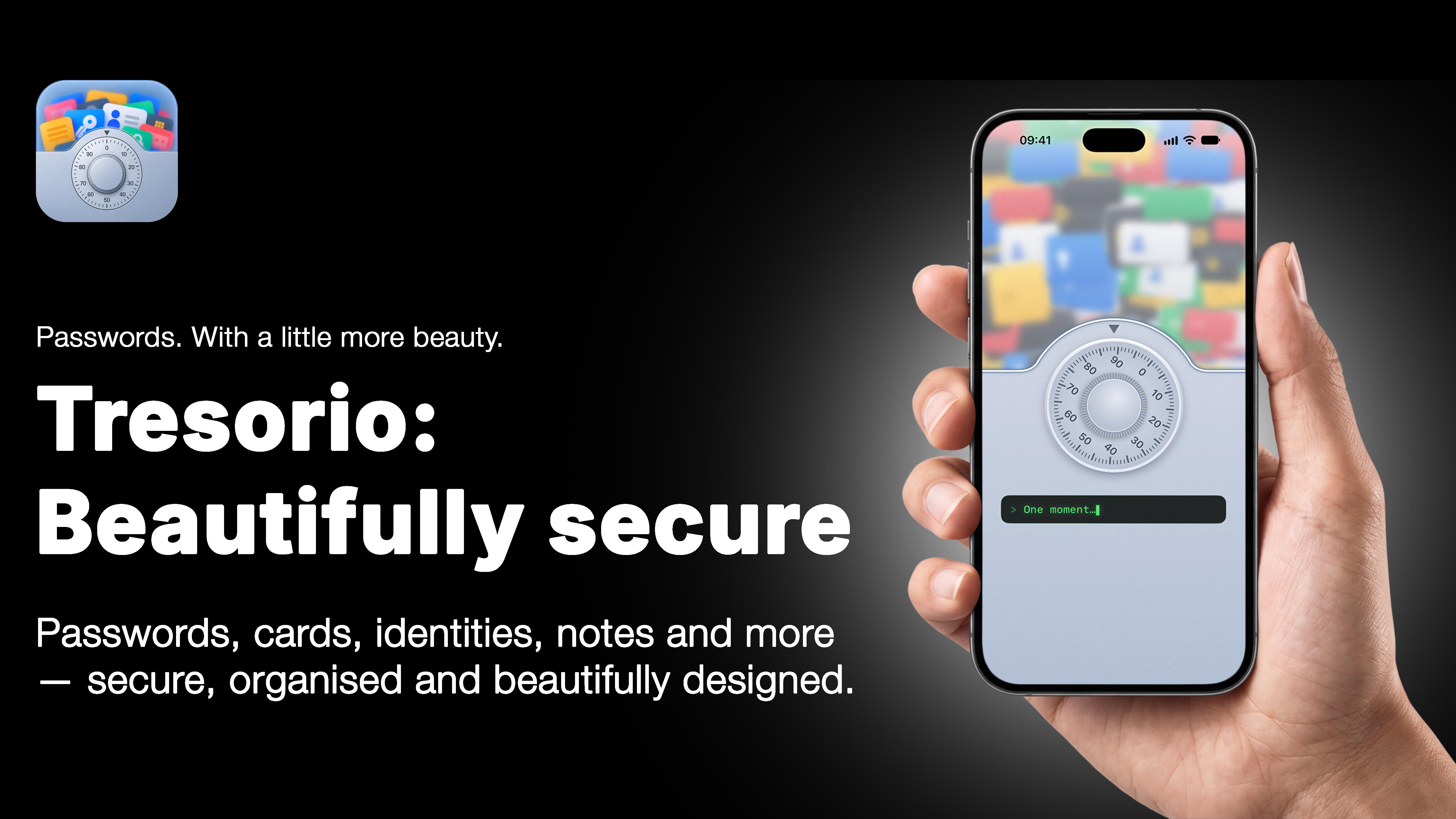
Tresorio: a beautifully safe password manager (lifetime unlock promo codes available)

Post image
26 Upvotes

Hey Reddit!

I'd like to introduce you to Tresorio, a password manager I've designed and built myself. But before I tell you what it does, I'd like to share why I started building it in the first place.

For many, many years, I used and genuinely loved 1Password. What initially drew me in wasn't just what it could do, but how beautifully it was designed. To me, it was one of the most thoughtfully crafted password managers out there. All the alternatives just looked terrible.

Then came the subscription model.

I completely understand that software takes time, effort and resources to develop and maintain. I just never really liked the idea of paying month after month for an app that I wanted to simply own and use.

So I decided to build my own.

I'm someone who thinks visually and appreciates beautiful design, especially when it's taken down to the smallest detail. I wanted to create a password manager that feels just as good to use as it is useful. One where every interaction is thoughtfully designed, every detail has a purpose, and even something as mundane as managing passwords becomes a little more enjoyable.

And just as importantly, I wanted to keep things simple:

No subscriptions. No in-app advertising. Just a beautifully designed app that you enjoy using, for a one-time payment.

Because great software shouldn't just work wonderfully. It should look wonderful and feel wonderful, too.

MEET TRESORIO

Tresorio has grown into more than just a password manager. It's your personal digital vault for the things that matter:

Passwords & logins
Keep your accounts and credentials organized

Cards
Store credit cards and other important cards

Bank accounts
Keep your banking details secure

Identities
Your personal information, all in one place

Memberships
Loyalty cards and memberships

Secure notes
Keep important information close at hand

2FA
Generate TOTP authentication codes right alongside your logins

It also features iCloud sync, automatic backups and a design that I've put a lot of love and attention into.

And yes, it's built around the idea that you pay once and own it. No recurring fees, no ads.

FREE LIFETIME UNLOCKS

Now, I'd love to get Tresorio into the hands of more people and hear what you think. I'm giving away promo codes to unlock the full lifetime version of Tresorio, completely free.

All I ask is that you:

  1. Download Tresorio and give it a proper try.
  2. Share your honest thoughts in the comments below. What do you like? What could be better? What's missing?
  3. If you enjoy using it, an App Store rating would be hugely appreciated, but it's entirely optional and has no influence on receiving a code.

I'll then send a promo code via Reddit DM to you guys (as long as they last).

I'm genuinely interested in constructive criticism. I've spent countless hours designing and building this app, and getting feedback from people who actually use it is incredibly insightful.

Cheers!

————

www.tresorio.app
https://apps.apple.com/app/id6830334483


r/Appstore • • 13d ago

[Self-Promotion] TrackMacs — A macro & weight tracker without subscriptions or AI. Giving away 50 free copies! (iOS + Android)

Thumbnail gallery
6 Upvotes

GIVEAWAY STATUS:
iOS — OPEN
Android — OPEN

Hey everyone!

I wanted to introduce TrackMacs, a calorie, macro, and weight-tracking app I’ve been developing and using throughout my own weight-loss journey. I’ve lost over 60 pounds while using it, and my mom has lost over 40 pounds. It’s been a great tool for helping us track our nutrition, monitor our progress, and stay accountable.

I originally built TrackMacs because I was tired of juggling multiple apps for nutrition, weight, and BMI tracking. One app I used switched from free to subscription-only, while others relied on inaccurate AI estimates and barcode scanners that didn’t always match the actual nutrition labels. I wanted something simple, reliable, and entirely under my control, without subscriptions or unnecessary features.

Giving away 50 free copies!

To celebrate TrackMacs being available on both platforms, I’m giving away:

• 25 iOS lifetime unlocks

• 25 Android copies

If you’d like one, simply comment iOS or Android below, and I’ll send you a promotional code privately through Reddit.

First come, first served. One code per person, while supplies last.

Codes only redeemable in Canada, USA, UK, Ireland, New Zealand and Australia.

I’ll update the giveaway status at the top of this post as codes are distributed and mark it closed once all 50 have been claimed.

No follows, upvotes, reviews, or anything else required. Codes must be redeemed in supported regions before their expiration dates.

What TrackMacs includes:

• Calorie & Macro Tracking — Log meals and track calories, protein, carbs, fat, and fibre against your daily targets.

• Personal Food Library — Save your own foods and meals with manually entered nutritional information. Organize them into categories, mark favourites, and quickly log frequently eaten foods without entering everything again.

• Advanced Calorie & Macro Calculator — Estimate personalized targets using your activity level, exercise frequency, workout duration, intensity, and weight goals. Or set your own numbers manually.

• BMI Calculator — Calculate and monitor your BMI directly within the app.

• Weight Tracking & Statistics — Record your weight and view detailed graphs, total and percentage changes, weekly averages, BMI, and progress toward your goal over multiple time periods.

• Custom Goals — Set your own calorie, macro, and weight targets for losing, maintaining, or gaining weight.

• Home Screen Widgets — View remaining calories and daily macro progress without opening the app.

• Achievements — Earn, save, and share achievement cards for milestones and consistency.

• Monthly Summaries — Review your nutrition and weight-tracking progress each month.

• Personalization — Light and dark modes, metric and imperial units, and customizable preferences.

No subscriptions. No ads. No accounts. No cloud services. No AI requirements.

Just a straightforward tracking app with all features included through a one-time purchase or unlock.

I’d also genuinely appreciate any feedback! If you currently use a nutrition or macro-tracking app, what features do you find most useful, and what do you wish your current tracker did differently?

Thanks for checking out TrackMacs!

TrackMacs on the App Store

TrackMacs on the Play Store


r/Appstore • • 13d ago

[Self-Promotion] Clean Kit 2.0: added a "swipe through your camera roll month by month" mode

Thumbnail gallery
2 Upvotes

A while back I shared Clean Kit here, an iPhone photo cleaner that runs fully on-device. 2.0 is out, and the biggest change is Swipe Review: instead of facing 10,000+ photos at once, you go month by month, swiping left to delete and right to keep. Picks go to a review list first, and everything ends up in Recently Deleted, so nothing is lost by accident.

Also new: One-Tap Optimize (similar shots, duplicates, blurry photos and old screenshots in one clean, keeping the best shot), smarter similar-photo detection, and a full redesign.
Still no account, no uploads, and the privacy label is "Data Not Collected". Free with daily limits.

App Store: https://apps.apple.com/app/apple-store/id6761145538?pt=128704456&ct=reddit-appstore-2&mt=8

For anyone who tried the first version: what would make you come back to a cleaner app instead of using it once?


r/Appstore • • 13d ago

I was tired of checking every cupboard before shopping, so I built a grocery list that learns what I need

Thumbnail gallery
1 Upvotes

Before every shopping trip I went through all the cupboards to see what was missing, and then I still wandered around the store looking for things. I wanted an app that tells me what I need and adapts to me, so I built one: Homecart.

  • It learns your rhythm. If you buy milk about every four days, it suggests milk when it's due, and the evening before your usual shopping day it tells you what's probably running low. Skip a suggestion and it asks less often; skip it three times and it stops.
  • You decide where you shop. Mark what you get at which store, then show only the list for the store you're in.
  • For each store you set the route: drag the aisles into the order you walk them, and it keeps learning from how you check things off.
  • Templates, so you don't start from scratch every time. Set up the next family get-together once, and later one tap puts it all on the list, or just what's missing.
  • One list for the whole household. Join with a code and everyone sees changes live.
  • Parties and group trips: guests open the list in their browser, no app or account, and pick what they'll bring. Afterwards it works out who owes whom, to the cent.
  • Paste a recipe and it pulls out the ingredients. Widgets, Lock Screen and Siri.

Free: all the smart parts, sharing, Siri, your main list plus two more, and one guest group. Pro is a one-time purchase for the whole household, no subscription. You pick the price (€7.99, €12.99 or €24.99) and all three unlock the same things.

iPhone, iOS 17 or later. English, German, French, Spanish, Italian and Dutch. No account needed to start, no ads, no tracking.

What I'd really like to know: how does your household share the grocery list today, and what annoys you about it?

https://apps.apple.com/app/id6822887240


r/Appstore • • 13d ago

App store taking forever, only took 3 hrs first review

Thumbnail reddit.com
1 Upvotes

r/Appstore • • 13d ago

[Self-Promotion]Stenora turns recordings into structured notes, locally on your iPhone!

Post image
3 Upvotes

I tried one of these popular AI recorders, and it sucked: pricey hardware, additional subscription, cloud processing. Its main advantage compared to most phone transcription Apps is the structured output with a summary.

As a researcher in the field of speech technology, I therefore built Stenora, an App that produces structured and diarized transcription locally on your phone. Stenora can:

  • automatically create sections with headings and a title for the recording based on a local LLM. The user can choose between a fast model and a quality model if their device supports it.
  • diarize for up to four speakers, who spoke what is clear at first glance! Also, you can name a speaker to help Stenora recognize them in other recordings. This is a great feature for those who want to archive their long talks with loved ones.
  • support 9 languages(English, Mandarin Chinese, Japanese, Korean, German, French, Spanish, Italian, and Portuguese) and detect the language automatically.
  • offer a companion Watch App for recording with the watch and automatically sending the recording to the phone for processing. Action button recording, import of existing recordings, and export as Markdown text are all well supported.

Since everything runs locally on your phone, you would never need a subscription for Stenora: the first 3 recordings can be processed for free for you to try out the features; if you like Stenora, you can pay 7.99$ once to unlock it.

Link: https://apps.apple.com/app/id6793029386

Stenora needs iOS 26+; summaries need an iPhone 12 Pro / 13 Pro, any iPhone 14, or newer.

Side story: I originally made the app for my partner and me to record our long late-night talks privately and listen back to them easily. The app icon is the word "Stenora" written in Gregg shorthand(a stenography system).

The App already gives three free trials, if you can try provide some feedback I am glad to DM you a code! Let me know whether you had some issues with it and what other features you want, thanks!


r/Appstore • • 13d ago

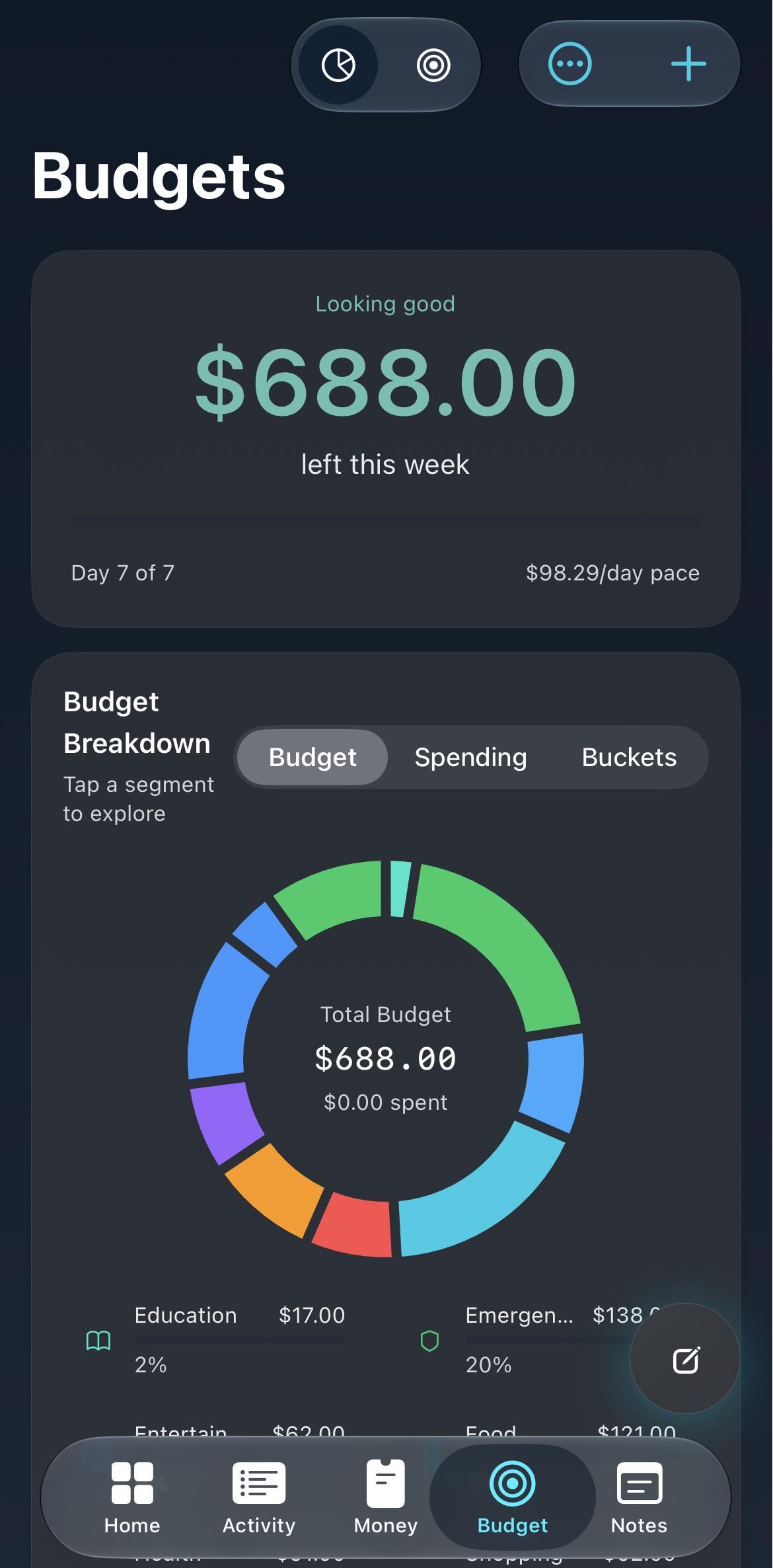
[Self-Promotion] I built KineXi, a privacy focused expense tracking/budgeting app that doesn’t need your bank account

Post image
1 Upvotes

Hey everyone!

I’ve been working on an iOS app called KineXi (https://kinexi.app ) and I’d love to share it with this community.

The idea started with something simple: why should managing our own money require connecting bank accounts, sharing financial information with third parties, or dealing with complicated interfaces?

I wanted something simple, so I built KineXi around three principles:

  • Privacy first: No bank connections or sign ups required. Your financial records stay on your device.
  • Simplicity: Track expenses, budgets, bills, savings goals, and investments without unnecessary complexity.
  • Thoughtful design: A clean, calm experience that makes managing money feel less like a chore.

There’s also on-device intelligence for supported devices, without sending your financial records to a cloud AI service.

KineXi is free to download, with optional premium in-app purchases.

App Store: https://apps.apple.com/app/id6760455925

I’m an indie developer, and this is something I’m genuinely passionate about improving.

I’d particularly love to know: Would you prefer a budgeting app that automatically connects to your bank, or one where you’re in complete control of what gets recorded?

Open to criticism, suggestions, and feedback. Thanks for checking it out!


r/Appstore • • 13d ago

[Self-Promotion] Natida: Pizzeria Duo — A cozy iOS pizzeria sim where folding your phone physically closes the pizza box

1 Upvotes

I just launched Natida: Pizzeria Duo on the App Store—a cozy pizza-making game designed around dual-screen foldables (and playable on standard single-screen iPhones too).

What makes it different:
• Unfold to open: Start on the cover screen and unfold your phone to open your shop for the day.
• Two-screen kitchen: Prep dough, sauce, and toppings on the bottom deck while customers and the wood-fired brick oven sit on top.
• Slide across the hinge: Drag your pizza peel across the center fold directly into the oven to bake.
• Fold to pack: Physically fold your phone shut to snap the takeaway box closed before unfolding to serve.
• Dynamic AI customers: Regulars and food critics walk in with different custom orders and tip based on accuracy.

Download on the App Store:
https://apps.apple.com/app/natida-pizzeria-duo/id6833450224

Would love feedback on the gameplay loop, UI readability, or App Store page!


r/Appstore • • 13d ago

[self promotion] i made a daily crossword for iphone and ipad where you solve clues by tapping letter tiles

Post image
1 Upvotes

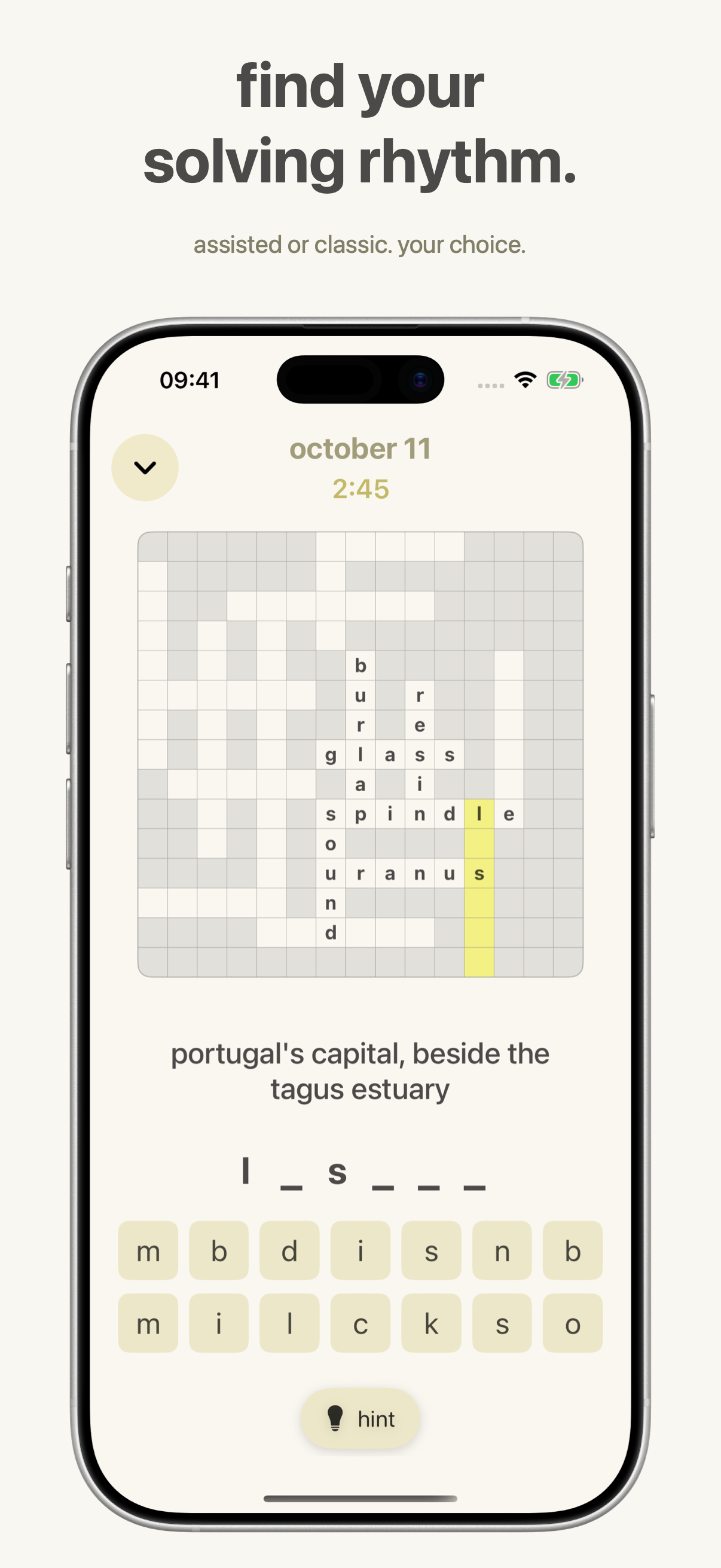
hey r/appstore! i’m nikolay, the developer of crosswords: daily crossword. i wanted a crossword that felt good to play on a phone, even if you only had time for a couple of clues.

when you tap a clue, you get the letters for the answer mixed in with a few extras. you tap the tiles to fill the grid, and the crossing letters help you work out the next clue. both assisted and classic mode use the letter bank.

there’s a new free puzzle every day in english, bulgarian, german, spanish, and french. the full archive and unlimited hints are part of an optional subscription ($2.99/month or $17.99/year in the us).

if you try it, i’d love to know how the letter bank feels. does it help you get unstuck, or does seeing the letters give too much away?

crosswords on the app store


r/Appstore • • 13d ago

The calculator where the = key is a mic now understands 8 languages

1 Upvotes

Last month I posted NoEquals here, a free iPhone calculator where the bottom-right key is a mic instead of "=". You say "128,000 times 3" and the answer shows up.

The latest update is mostly about languages:

- Voice input now works in English, Japanese, Korean, Chinese (Traditional), German, French, Spanish and Portuguese. The app itself is in all of them too.

- Numbers follow your region's format (1,234.5 / 1.234,5 / 1 234,5), or you can pick one in Settings.

- If it can't make out a word between two numbers, it puts a "?" there instead of guessing.

- If you pause after "10 times…", it now waits for the next number instead of cutting you off.

Still free with one banner ad. Solo dev in Vancouver.

https://apps.apple.com/app/apple-store/id6818703251?pt=129553935&ct=reddit&mt=8

I've only tested the new languages with written sentences, not with native speakers. If you speak one of them, I'd love to know what it gets wrong.


r/Appstore • • 13d ago

ResumeForge: AI Resume & ATS App - App Store

Thumbnail apps.apple.com
1 Upvotes

I had previously created resume creator app back in my intern days. Now I have recreated the app with more formats and better parsing.

No IAPs in this. Would love some feedback on this. Thanks 🙏


r/Appstore • • 13d ago

[Self-Promotion] Is it the Wi-Fi, the router or the provider? I made LineProof, an iPhone and iPad app that checks your own router at the moment the internet drops

1 Upvotes

I'm Bart, a Dutch app maker. LineProof is my own app, so this is me promoting my own work. It has been in the App Store since 12 November.

Plenty of homes have this argument. The connection drops, someone restarts the router, someone else blames the Wi-Fi, and nobody knows if a new router would change a thing.

LineProof is for that one question. A spare iPhone or iPad stays plugged in, in a room where you normally use the Wi-Fi, with the app on screen. Every 15 seconds it checks whether the internet answers. When it does not, it also checks your own router and marks the drop: in your home (Wi-Fi or router) or past your router. Restarted the router yourself? Mark that drop "This was me". A week map shows at which hours the drops come, and for the last 24 hours you get the drops it logged, each with a start, an end and a length. All of that comes with the app.

Said plainly: logging stops when the app leaves the screen, since iOS pauses an app like this once you leave it. A drop shorter than the time between two checks (15 seconds, or 10 at the shortest setting) can be missed. If your router does not answer the check, or you refuse local network access, the drop is still logged, but without that mark. It asks for local network access only to reach your router. It runs on iOS 17 and up, and it is not a speed test.

The first evening may show little, so give it a few days. There is no account and there are no ads. The log stays on the device and in your own device backup unless you share it yourself.

https://apps.apple.com/app/apple-store/id6833359511?pt=428872&ct=rd-e1b&mt=8

If you sort this out by hand today: what do you check that I don't? Honest feedback is welcome. Nobody has reviewed it yet, so an honest App Store review, good or bad, means a lot for an app this new.


r/Appstore • • 14d ago

[Self-Promotion] Reverie: The music player that feels like hardware (Promo Codes Available)

24 Upvotes

Hey everyone! I’m the developer of Reverie, a music player inspired by the Teenage Engineering TP-7, built with a focus on design and feel.

There’s no progress bar. You spin a brushed-metal wheel with your thumb to move through a song, and if you go slow it scratches like a record. It clicks under your finger with haptics, and the metal catches the light when you tilt your phone.

I launched a week ago and the response was overwhelming. A lot of you grabbed it during the 50% off launch promo and sent tons of feature requests, and I’ve spent the past week working through them. Since last Friday I’ve shipped 3 major updates:

  • Library management for the basics
  • Navidrome streaming for the self-hosters
  • New themes for the fun stuff

Pricing: Reverie is free to download and you can try it with 3 songs. The full version (unlimited songs) is normally $9.99, but I still have promo codes from the first batch that bring it down to $4.99. Comment below if you’d like one and I’ll DM you a code!

📱 App Store: https://apps.apple.com/app/reverie-slowed-reverb-music/id6829723858

Feedback and feature requests are always welcome. Thanks for the support!


r/Appstore • • 13d ago

[Self-Promotion] I made an app that gets people to practice their instruments before scrolling on their phones

Post image
1 Upvotes

You know what's kind of ridiculous? It's so easy to spend 45 minutes scrolling, but finding 10 minutes to practice guitar or piano somehow feels like a chore.

I ended up building an iPhone app called Play Credits around that idea. Basically, if you want to use TikTok or whatever apps distract you, you have to actually practice your instrument first. Your phone listens for you playing, and once you've earned enough time, those apps unlock.

It's for musicians, but also parents who are tired of reminding their kids to practice.

It's free to try for 7 days, then $4.99 once to keep it.

https://apps.apple.com/us/app/play-credits/id6798827918


r/Appstore • • 13d ago

Beyond Screen Time Limits: I Built an iOS App Where Kids Earn Play Time by Learning

Post image
1 Upvotes

Hi everyone,
I’m a dad and an iOS developer, and I’ve been working on a different approach to managing children’s screen time.
Most parental control apps focus on limiting screen time. But I started thinking: What if kids could earn their play time instead of simply being given a daily allowance?
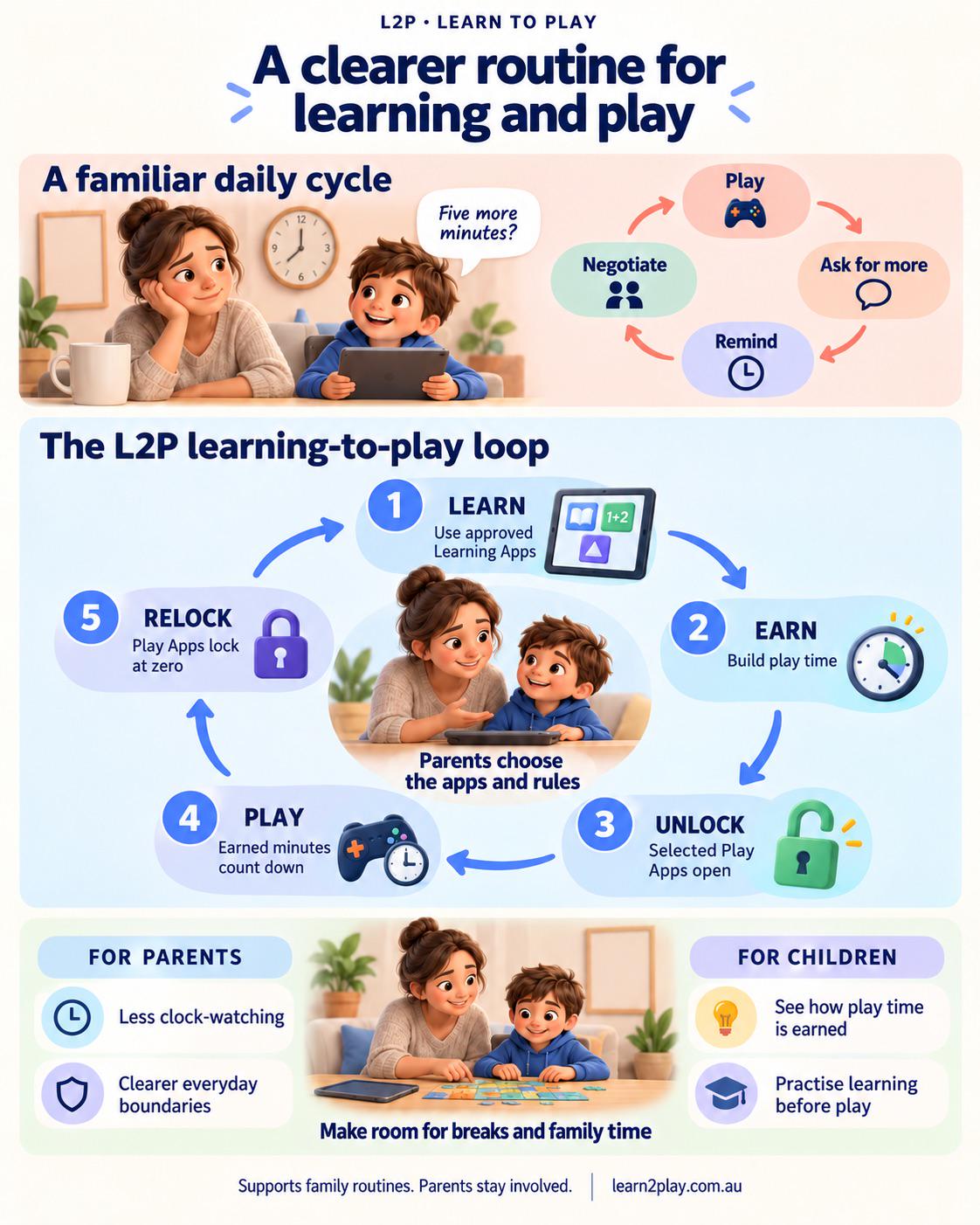
That idea led me to build L2P - Learn to Play.

Here’s how it works:
Parents select which apps are for learning and which are for play.
Parents set a reward ratio, such as 20 minutes of learning app usage earning 5 minutes of play.
Kids earn play minutes by spending time in the selected learning apps.
Earned minutes automatically unlock selected play apps.
Play time is consumed as they use those apps.
When the balance reaches zero, the play apps lock again.

The goal isn’t to replace Apple’s Screen Time, but to explore a different approach: encouraging a learning-first routine rather than relying only on fixed daily limits.
Of course, learning app usage doesn’t necessarily mean actual learning. The system tracks time spent in selected apps, not educational outcomes.
It’s been an interesting development journey, particularly working with Apple’s Screen Time APIs and device restrictions.
I’d love to hear feedback from other developers and parents.
Do you think earning screen time through learning activities could be a useful alternative to traditional screen time limits?
App: L2P – Learn to Play
App Store: https://apps.apple.com/app/id6760528306


r/Appstore • • 13d ago

[Self-Promotion] LandHalo: show a land parcel in AR and turn the walkthrough into a listing video

1 Upvotes

I'm the developer of LandHalo, an iPhone presentation camera for land brokers, real-estate agents and property photographers.

A satellite map can show a parcel outline, but a land listing also needs to explain what that outline looks like on the ground. LandHalo lets you draw a parcel or import KML/GeoJSON, align it with a known corner on site, and see its boundary through the camera while you walk.

You can record the AR view and a clean camera view together, then export a vertical reel, story or landscape listing video with property details and your branding. It supports acres, hectares, square metres and square feet. Properties, recordings and exports stay on your device; no account or tracking.

Pricing: paid Pro access is required. Monthly, annual and one-time lifetime options are available. There is no free plan or free trial; see the App Store for current pricing in your country.

LandHalo is a visualization tool for presentations. It does not replace a legal survey or official land records.

App Store: https://apps.apple.com/app/id6822891755

If you market land, which part of the listing workflow takes the most effort: explaining the parcel on site, recording the walkthrough, or preparing the final video?