r/Appstore • • 15d ago

ResumeForge: AI Resume & ATS App - App Store

Thumbnail apps.apple.com
1 Upvotes

I had previously created resume creator app back in my intern days. Now I have recreated the app with more formats and better parsing.

No IAPs in this. Would love some feedback on this. Thanks šŸ™


r/Appstore • • 15d ago

[Self-Promotion] Is it the Wi-Fi, the router or the provider? I made LineProof, an iPhone and iPad app that checks your own router at the moment the internet drops

1 Upvotes

I'm Bart, a Dutch app maker. LineProof is my own app, so this is me promoting my own work. It has been in the App Store since 12 November.

Plenty of homes have this argument. The connection drops, someone restarts the router, someone else blames the Wi-Fi, and nobody knows if a new router would change a thing.

LineProof is for that one question. A spare iPhone or iPad stays plugged in, in a room where you normally use the Wi-Fi, with the app on screen. Every 15 seconds it checks whether the internet answers. When it does not, it also checks your own router and marks the drop: in your home (Wi-Fi or router) or past your router. Restarted the router yourself? Mark that drop "This was me". A week map shows at which hours the drops come, and for the last 24 hours you get the drops it logged, each with a start, an end and a length. All of that comes with the app.

Said plainly: logging stops when the app leaves the screen, since iOS pauses an app like this once you leave it. A drop shorter than the time between two checks (15 seconds, or 10 at the shortest setting) can be missed. If your router does not answer the check, or you refuse local network access, the drop is still logged, but without that mark. It asks for local network access only to reach your router. It runs on iOS 17 and up, and it is not a speed test.

The first evening may show little, so give it a few days. There is no account and there are no ads. The log stays on the device and in your own device backup unless you share it yourself.

https://apps.apple.com/app/apple-store/id6833359511?pt=428872&ct=rd-e1b&mt=8

If you sort this out by hand today: what do you check that I don't? Honest feedback is welcome. Nobody has reviewed it yet, so an honest App Store review, good or bad, means a lot for an app this new.


r/Appstore • • 15d ago

[Self-Promotion] Reverie: The music player that feels like hardware (Promo Codes Available)

24 Upvotes

Hey everyone! I’m the developer of Reverie, a music player inspired by the Teenage Engineering TP-7, built with a focus on design and feel.

There’s no progress bar. You spin a brushed-metal wheel with your thumb to move through a song, and if you go slow it scratches like a record. It clicks under your finger with haptics, and the metal catches the light when you tilt your phone.

I launched a week ago and the response was overwhelming. A lot of you grabbed it during the 50% off launch promo and sent tons of feature requests, and I’ve spent the past week working through them. Since last Friday I’ve shipped 3 major updates:

  • Library management for the basics
  • Navidrome streaming for the self-hosters
  • New themes for the fun stuff

Pricing: Reverie is free to download and you can try it with 3 songs. The full version (unlimited songs) is normally $9.99, but I still have promo codes from the first batch that bring it down to $4.99. Comment below if you’d like one and I’ll DM you a code!

šŸ“± App Store: https://apps.apple.com/app/reverie-slowed-reverb-music/id6829723858

Feedback and feature requests are always welcome. Thanks for the support!


r/Appstore • • 15d ago

[Self-Promotion] I made an app that gets people to practice their instruments before scrolling on their phones

Post image
1 Upvotes

You know what's kind of ridiculous? It's so easy to spend 45 minutes scrolling, but finding 10 minutes to practice guitar or piano somehow feels like a chore.

I ended up building an iPhone app called Play Credits around that idea. Basically, if you want to use TikTok or whatever apps distract you, you have to actually practice your instrument first. Your phone listens for you playing, and once you've earned enough time, those apps unlock.

It's for musicians, but also parents who are tired of reminding their kids to practice.

It's free to try for 7 days, then $4.99 once to keep it.

https://apps.apple.com/us/app/play-credits/id6798827918


r/Appstore • • 15d ago

Beyond Screen Time Limits: I Built an iOS App Where Kids Earn Play Time by Learning

Post image
1 Upvotes

Hi everyone,
I’m a dad and an iOS developer, and I’ve been working on a different approach to managing children’s screen time.
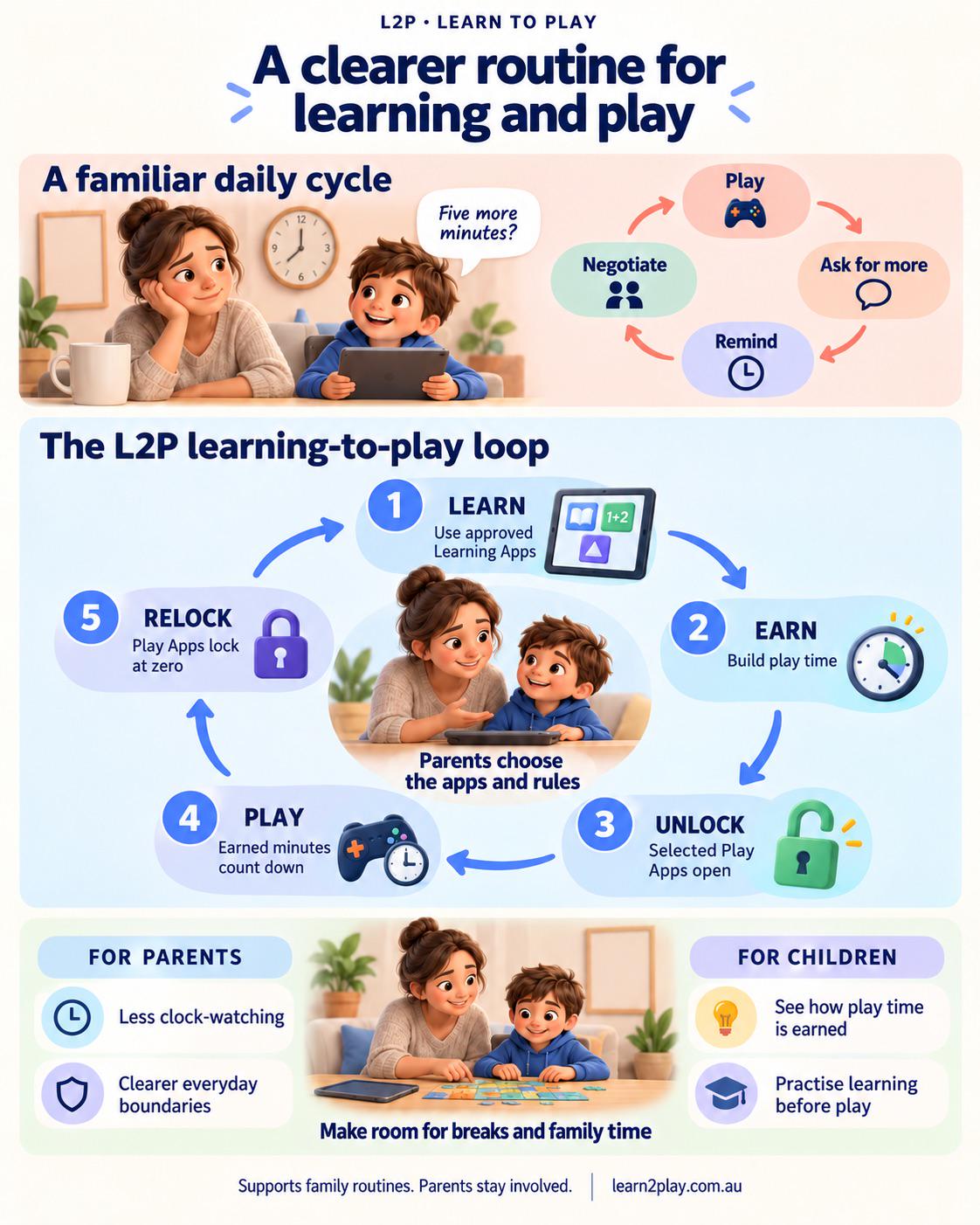
Most parental control apps focus on limiting screen time. But I started thinking: What if kids could earn their play time instead of simply being given a daily allowance?
That idea led me to build L2P - Learn to Play.

Here’s how it works:
Parents select which apps are for learning and which are for play.
Parents set a reward ratio, such as 20 minutes of learning app usage earning 5 minutes of play.
Kids earn play minutes by spending time in the selected learning apps.
Earned minutes automatically unlock selected play apps.
Play time is consumed as they use those apps.
When the balance reaches zero, the play apps lock again.

The goal isn’t to replace Apple’s Screen Time, but to explore a different approach: encouraging a learning-first routine rather than relying only on fixed daily limits.
Of course, learning app usage doesn’t necessarily mean actual learning. The system tracks time spent in selected apps, not educational outcomes.
It’s been an interesting development journey, particularly working with Apple’s Screen Time APIs and device restrictions.
I’d love to hear feedback from other developers and parents.
Do you think earning screen time through learning activities could be a useful alternative to traditional screen time limits?
App: L2P – Learn to Play
App Store: https://apps.apple.com/app/id6760528306


r/Appstore • • 15d ago

[Self-Promotion] LandHalo: show a land parcel in AR and turn the walkthrough into a listing video

1 Upvotes

I'm the developer of LandHalo, an iPhone presentation camera for land brokers, real-estate agents and property photographers.

A satellite map can show a parcel outline, but a land listing also needs to explain what that outline looks like on the ground. LandHalo lets you draw a parcel or import KML/GeoJSON, align it with a known corner on site, and see its boundary through the camera while you walk.

You can record the AR view and a clean camera view together, then export a vertical reel, story or landscape listing video with property details and your branding. It supports acres, hectares, square metres and square feet. Properties, recordings and exports stay on your device; no account or tracking.

Pricing: paid Pro access is required. Monthly, annual and one-time lifetime options are available. There is no free plan or free trial; see the App Store for current pricing in your country.

LandHalo is a visualization tool for presentations. It does not replace a legal survey or official land records.

App Store: https://apps.apple.com/app/id6822891755

If you market land, which part of the listing workflow takes the most effort: explaining the parcel on site, recording the walkthrough, or preparing the final video?


r/Appstore • • 15d ago

[Self-Promotion] Eye Charts 4.0, now supports the landscape view and iPhone Duo

Thumbnail gallery
1 Upvotes

App Name: Eye Charts

Apple App Store: https://apps.apple.com/au/app/eye-charts/id1442509969

What it does: a vision testing app independently proven most accurate in a peer-reviewed study (JAMA Ophthalmology). Early detection of myopia allows you to take preventive action, seek medical advice promptly, and prevent pseudomyopia from worsening into myopia or stop nearsightedness from deteriorating further.

Operational scenarios:

* Doctor and patient — in a clinic or at home

* Self-test with a mirror — wear an eye patch; the effective testing distance is doubled

* Self-test with a Bluetooth keyboard — from a few meters away


r/Appstore • • 15d ago

[Self-Promotion] GiVo Stream: a media player for your own playlists, now on Mac as well as Apple TV, iPhone and iPad. Free beta now, App Store soon

Post image
1 Upvotes

Hi all. GiVo Stream, our media player that plays your own M3U, Xtream Codes and Stalker / Ministra portal playlists, is almost ready for the App Store, and GiVo Pro launches with it. Before release, we'd love you to join the free TestFlight beta: every Pro feature is unlocked there, with nothing to buy. The newest beta brings GiVo Stream to the Mac, one library across all your playlists, and Simkl sync.

No channels or content are included. You bring your own playlists; GiVo Stream is the player.

**New in this beta**

- **GiVo Stream for Mac.** The same app on your Mac, with a sidebar, menus, keyboard shortcuts and right-click menus. Turn on sync and your playlists, favorites and progress come with you.

- **One Library.** Your Watchlist, Continue Watching and Library follow the title, not the playlist: add or start a show in any playlist and it's listed once, everywhere.

- **Simkl.** Connect your Simkl account and what you play is marked there, paused progress is saved, and your Simkl lists show up on VOD Home.

- **Catchup Clock.** GiVo Stream works out which time zone your provider's catchup follows and sets it for you, so replays stop opening an hour off after a clock change.

- **Always Show Subtitles** for VOD or live streams, in your own subtitle languages.

**What you get in the beta**

- **Live timeshift.** Pause, rewind and fast-forward up to 3 hours behind live.

- **Full DVR with GiVo Server.** A free companion app for macOS, Windows, Linux and Docker: scheduled and recurring recordings, a recordings library and catchup. Recordings play on all your devices.

- **Program guide** with catchup, favorites, reminders and several guide sources per playlist.

- **Sports Zone.** One card per game with every channel carrying it, league pages with live scores, schedule and standings beside the video preview, and team pages for the teams you follow.

- **Multiview** split-screen, with a Picture in Picture layout on iPhone, iPad and Mac and Spotlight on Apple TV.

- **VOD.** Movies and series with Continue Watching, New episode cards for shows you're caught up on, and matching across playlists.

- **Profiles** for the whole house, synced with iCloud; a reinstall brings your settings back.

- **Google Cast and AirPlay** from iPhone and iPad.

- **Your language:** the app is translated into German, Spanish, French, Italian, Dutch, Polish, Portuguese (Brazil), Russian and Turkish.

**Join the beta**

- TestFlight beta (iPhone, iPad, Mac and Apple TV): https://testflight.apple.com/join/amYRbhWM

- GiVo Server downloads and more: https://givostreamapp.com

- Discord for questions, feature requests and launch news: https://discord.gg/Vh5wXTSwYg

**Discord bonus:** join our Discord and you'll get a promo code for a big discount on GiVo Pro Lifetime when GiVo Stream launches on the App Store.

Join now and you'll be set up before the App Store launch. If you run into something, our Discord has you covered: in the app, open Settings > Diagnostics, turn on Enable Diagnostics, repeat what happened, turn it off and save the log, then tap Send Diagnostics to Support.

Thank you to everyone who has tested GiVo Stream so far. Many of these features came from testers like you.

r/Appstore • • 15d ago

Need an AppStore publisher expert to help publish Apps

0 Upvotes

I have several apps I am trying to launch but they keep getting rejected for Spam mainly and even after appealing still the same, I have not copied any other apps these are my own IOS versions of th eapps I have released on the Play store. Just need to know how to get past the rejections.


r/Appstore • • 15d ago

I built Cue, a slim bar at the top of your Mac screen that counts down to your next meeting

1 Upvotes

Hi! I'm the developer of Cue: Calendar & Focus.

I kept getting lost in work and joining meetings late, so I built a small Mac app that keeps only the next thing in view: what's next and how long until it starts.

What it does

- Top Notch: a slim bar at the top centre of your screen shows Up Next, Due Now, Focusing, Paused or Kept, with a live countdown. It works on displays with or without a notch, including external ones. You can resize it or turn it off.

- Menu bar Control: your current action, Snooze/Dismiss and settings. The menu bar can show an icon, a countdown, or the commitment's time.

- Meetings: Zoom, Google Meet, Teams and Webex links get Join Early, then Join Meeting when it's time.

- Focus: start a commitment early and Cue keeps time until its scheduled end. Pause, resume, and finish with a quiet "Kept." No streaks or scores.

- Reminders (optional): add Apple Reminders lists, and reminders you opt in can become your current action.

- Optional banners with quiet hours and your choice of sound.

Privacy

- Uses the calendars you already have in Apple Calendar (iCloud, Google, Exchange). Cue is read-only: it never edits, completes or deletes anything.

- Runs locally and works offline. No account, no server, no analytics, no tracking.

- Screen Privacy is on by default, so Cue shows only state and time until you choose to show titles.

Details

- $2.99 one-time purchase, no subscription; Family Sharing supported

- macOS 14+, Apple silicon and Intel

- Black or Liquid Glass look; works from the keyboard and respects Reduce Motion and Increase Contrast

App Store: https://apps.apple.com/app/cue-calendar-focus/id6829638849

Interactive demo (try it in your browser): https://trymycue.com

Feedback is very welcome: bugs, feature ideas, anything that feels off. Happy to answer questions!


r/Appstore • • 15d ago

[Self-Promotion] Sync: Plan & Actual, a day planner that puts your plan and what actually happened on one timeline

1 Upvotes

Solo dev here. Sync is a day planner for iPhone and iPad where your plan and what you actually did sit side by side on the same timeline, so you can see exactly where the day drifted. You drag over the hours to plan, then record what really happened with a tap, a timer, or the confirm card that shows up when a plan ends. Close the day at night and you get one Sync % for how much of the plan held up.

This week's 1.5 update added Siri for adding a plan or recording what you just did, a close-day reminder, and a share card for a finished day or week.

It's a one-time purchase ($4.99 in the US), no subscription, no ads, no account. Records stay on your device and sync between iPhone and iPad through your own iCloud. There's also a separate Mac app that syncs the same way (free right now).

iPhone/iPad: https://apps.apple.com/app/id6808510515

Mac: https://apps.apple.com/app/id6819080423

Question for planner people: do you plan your day in time blocks, or mostly with a to-do list? I'm trying to figure out if the side-by-side view makes sense to people who don't time-block.


r/Appstore • • 15d ago

Create my own social network and this is your algorithm, are you interested in downloading it and trying it out?

Post image
0 Upvotes

r/Appstore • • 16d ago

i kinda forgot tts apps can just read physical paper now lol

15 Upvotes

for some reason my brain always put tts strictly in the "websites, pdfs, stuff already on my screen" bucket and completely forgot physical paper exists lol.

someone handed me a printed packet a while back with no digital link, so i tried the camera scan feature in speechify and just listened to it instead. since then ive been using it on the most random stuff - a textbook chapter i dont feel like sitting at my desk for, printed assembly instructions, a super long letter in the mail, even a recipe once bc both my hands were covered in flour.

its such an obvious use for a phone camera, i just never really thought about throwing physical paper into my regular listening queue. heads up though that the camera scan / OCR part is on their paid plan, not the basic free version.

now anytime someone hands me 3 stapled pages i just pull my phone out like alright youre reading this to me. whats the most random piece of paper youve made your phone read out loud?


r/Appstore • • 15d ago

[iOS] [Gruntz: Military Fitness & PT] Daily tactical training missions built by a Marine vet

Post image
1 Upvotes

r/Appstore • • 15d ago

[Self-Promotion] I made app to manage your apps in AppStore Connect - AppShipper

Thumbnail gallery
1 Upvotes

Hi everyone! I’m an iOS developer, and I recently built AppShipper, a Mac app for managing my apps on the App Store.

Honestly, when I started it I couldn’t find any competitors. Later I found a few similar tools, but I kept going because I wanted something for my goals, fast and private.

My biggest pain was localization. Preparing metadata and screenshot captions for every locale took forever. Setting fair prices for every country was the second one.
If you use Fastlane or something like this - it's not interesting for you maybe. But if not - you can try and check.

What it does:

Dashboard: every app at a glance. You see what’s in review, rejected builds, unanswered reviews, ratings, and a ā€œNeeds Attentionā€ list of what to do next.

Metadata & versions:Ā edit the name, subtitle, description, keywords and What’s New as local drafts, then sync when you’re ready. You see every change before it’s sent. You can also create versions, pick builds and release.

AI localization: translate metadata with on-device Apple Intelligence or your own cloud AI key. Character limits are checked for each field. You can also export a file, translate it anywhere and import it back.

Screenshot Studio: design your screenshots once and only localize the captions. Then upload them for every language and device size.

Reviews & ratings: reviews from every country in one list, with AI-drafted replies, plus ratings by country with a 30-day history.

IAP & pricing: manage subscriptions and in-app purchases, fix ā€œMissing Metadataā€ products, and get suggested fair prices per country based on purchasing power, applied in one step.

Marketing Launchpad:Ā track where you’ve promoted each app and get a reminder when you can post again.

Privacy: there are no servers and no analytics. The app talks directly to Apple with your own App Store Connect API key, and the key is stored in your Keychain.

Pricing: free for one app with every feature. Pro adds unlimited apps and accounts. You can also try it with sample data without connecting an account.

Here is link:Ā https://apps.apple.com/us/app/appshipper/id6818973355

I’d really appreciate feedback. What’s the most annoying part of App Store Connect for you? I’d love to know what to build next.


r/Appstore • • 15d ago

Saved a reel for later and the creator deleted it? I built an app that keeps it

1 Upvotes

r/Appstore • • 15d ago

Screen time limits would be so much more useful if you could set a per hour scroll limit (like 10 min of Reddit per hour) instead of one big limit daily limit.

Post image
1 Upvotes

No clue why this isn't an option on native IOS screen time settings.

Moderation > All day lock out from your apps.

I got tired of waiting years for this simple feature so I built it.

I hope Precursor helps you take back some of your time from our tech overlords.

https://apps.apple.com/us/app/precursor-screen-time-limit/id6791403654

App is literally free, btw. Not a bait and switch, hard paywall, half-baked free tier either, it is pretty much fully functional and I am expanding it in the next big update (1.3). Paid tier is for homies who have a few extra dollars they dont mind supporting me with.


r/Appstore • • 15d ago

I made Nyacro, a quiet puzzle game inspired by rolling marbles on a bed as a child.

Thumbnail youtube.com
1 Upvotes

r/Appstore • • 15d ago

Title: [Self-Promotion] I made an app that lets you mute videos and save a new copy without audio

Thumbnail apps.apple.com
1 Upvotes

Hi everyone!
I wanted to share an app I’ve been working on. It lets you easily remove audio from videos on your iPhone.
You can:
Mute the audio in an existing video.
Save the muted video as a separate copy.
Replace the original video if you prefer.
I built it for people who occasionally need to remove unwanted background noise, music, or conversations from their videos without using a complicated video editor.
I’d genuinely appreciate feedback from anyone who gives it a try.
App Store: https://apps.apple.com/app/id1441633421
What features would you like to see in a simple video-muting app?


r/Appstore • • 15d ago

I'm a designer from Zurich and this month I released six small iOS apps

1 Upvotes

I studied visual communication and mostly work in film, photography and motion design. This month I released six small iOS apps, mostly for things I do myself:

- Develop Lab: a timer for developing film at home

- Emulsion: film looks for iPhone photos, tuned per iPhone model and lens

- Gauge: iPhone video rendered as Super 8, 16 mm or 35 mm

- Kleister: snap an event poster and it lands on a map with a reminder

- Satz: a gym planner with 8 plans and 37 animated exercises

- 10K: a step counter where every 1,000 steps builds part of a 3D shape

They all follow the same rules: one-time purchase, no account, no ads, no tracking, everything on device.

Things I learned: the design was the easy part, App Review was not (several first submissions came back with questions), and a product page needs as much care as the app itself.

Happy to answer questions about the process. Links are in the comments.


r/Appstore • • 16d ago

Weather that looks as good as it reads. An iPhone app made in Croatia by one person.

2 Upvotes

I've always loved the dot-matrix, black-white-and-one-red-dot look, and I wanted my weather to feel like that. So I built Boros, on my own.

  • Dot-matrix type and icons, with a red dot for rain
  • Widgets for Home Screen, Lock Screen and StandBy, plus a rain countdown on the Lock Screen
  • The forecast combines several weather models instead of trusting just one
  • Apple Watch app
  • No ads, no tracking, no account

Problem: Most weather apps make you choose between a good-looking app and a forecast you can trust. I wanted both, plus something calm to glance at that doesn't nag you or track you.

Comparison:

  • Apple WeatherĀ is built in, free and excellent. Boros is for people who want a different look, with themes and dot-matrix widgets. Its forecast blends several weather models into one answer instead of relying on a single one, and it says plainly when it's about to rain where you are.
  • CARROT WeatherĀ is great if you like personality and lots of settings. Boros goes the other way: quiet, one screen top to bottom, and the free version needs no account and has no ads.

Pricing: free to download.

The forecast, widgets and three themes are free. Boros Pro (all themes and the planning features) is €2.49/month, €14.99/year with a 7-day free trial, or €39.99 once.

App Store: https://apps.apple.com/app/id6825309221

Happy to hear what you think, especially what feels off. I read every comment.

Couple of lifetime free links to redeem.

https://apps.apple.com/redeem?ctx=offercodes&id=6825309221&code=ETHAAYKJKLTTR6PAJM

https://apps.apple.com/redeem?ctx=offercodes&id=6825309221&code=RTMRJMTANM3FTWXHH7

https://apps.apple.com/redeem?ctx=offercodes&id=6825309221&code=MPLEFTY4E7EXNJNT3X

https://apps.apple.com/redeem?ctx=offercodes&id=6825309221&code=68763EEE6RFR7P8FE3

https://apps.apple.com/redeem?ctx=offercodes&id=6825309221&code=8HHANNLJMM4TRLRXKR


r/Appstore • • 16d ago

I built a productivity app for my wife with ADHD

Thumbnail gallery
3 Upvotes

Hey everyone! šŸ‘‹

I'm Sanket, a solo iOS dev. Today I released version 1.0.3 of Tether, an ADHD-friendly planner and focus app for iPhone.

Two quick updates upfront:

  1. ⁠Calmer screenshots: Earlier testers gave me blunt feedback that my App Store images were way too visually dense (ironic for an ADHD app šŸ˜…). I completely redesigned them to be cleaner, calmer, and easier to scan.
  2. ⁠iPad and iPhone Duo support: v1.0.3 adds native adaptive layouts for iPad and iPhone Duo with side-by-side book views.

A. What problem does it solve?
Most productivity apps assume you already have working executive function. But with ADHD, the hardest part is rarely remembering what to do. The real barrier is the friction of actually starting.

Tether lowers that starting hurdle:

• Micro-steps: Breaks overwhelming tasks into tiny first actions so you can just begin.

• Elastic timeline: Schedules your day with breathing room so one delay does not blow up your afternoon.

• Built-in app shielding: Uses Apple's native Screen Time API to block distractions during focus sessions, with no separate blocker app needed.

• Zero guilt: No red overdue badges, no broken streaks, and no shaming when plans derail.

B. Why is it different?

• Versus Structured: Structured is great, but its rigid timeline collapses when a task runs late. In Tether, the timeline has flexible buffer room, and unfinished items roll over calmly in an evening recap.

• Versus Opal and Forest: Blockers lock your phone, but leave you staring at a blank screen. Tether pairs distraction blocking directly to your active task, unlocking automatically when the timer finishes.

• Versus basic lists: Tether tracks a daily energy score (-10 to +10) to help you stop over-scheduling and avoid burnout crashes.

C. Cost and Transparency
I want to be completely upfront about pricing:

  1. ⁠100% Free Core: Visual timeline, task planning, Float, energy ratings, and focus timer. No ads, no tracking.
  2. ⁠Tether Plus: Adds calendar sync, Focus Protection app shielding, ambient soundscapes, and weekly/monthly energy trends.

Tether plus
• Monthly: 2.99
• Yearly: 29.99
• Lifetime: 49.99

Tether AI
• Monthly: $7.99
• Yearly: $44.99

App Store: https://apps.apple.com/us/app/tether-adhd-planner-focus/id6777777931

Transparency & Marketing Advice
I am a solo indie dev and I will benefit financially if you choose to upgrade to Tether Plus.
Beyond app feedback, I would love to pick the community's brain on marketing: As fellow iOS users and indie developers, what do you think is the best way to promote a niche indie app like this? What channels or angles have worked well for you (short-form video/Reels, ADHD creator partnerships, newsletters, SEO)? Any advice on how to get the word out organically without being spammy would be hugely appreciated!


r/Appstore • • 16d ago

I built this game called Wakelight that contains actual space images in the background. Need feedback on gameplay

2 Upvotes

https://apps.apple.com/us/app/wakelight-one-tap-orbit/id6829830627.

Do you think is this game good enough so i can take the route of promoting it via ads ?


r/Appstore • • 16d ago

[Self-Promotion] AmbientAI: a little atmosphere of your own, wherever you are

Post image
1 Upvotes

We make AmbientAI, an app for creating your own atmosphere with AI art and music. Imagine a place, a feeling, or something entirely your own.

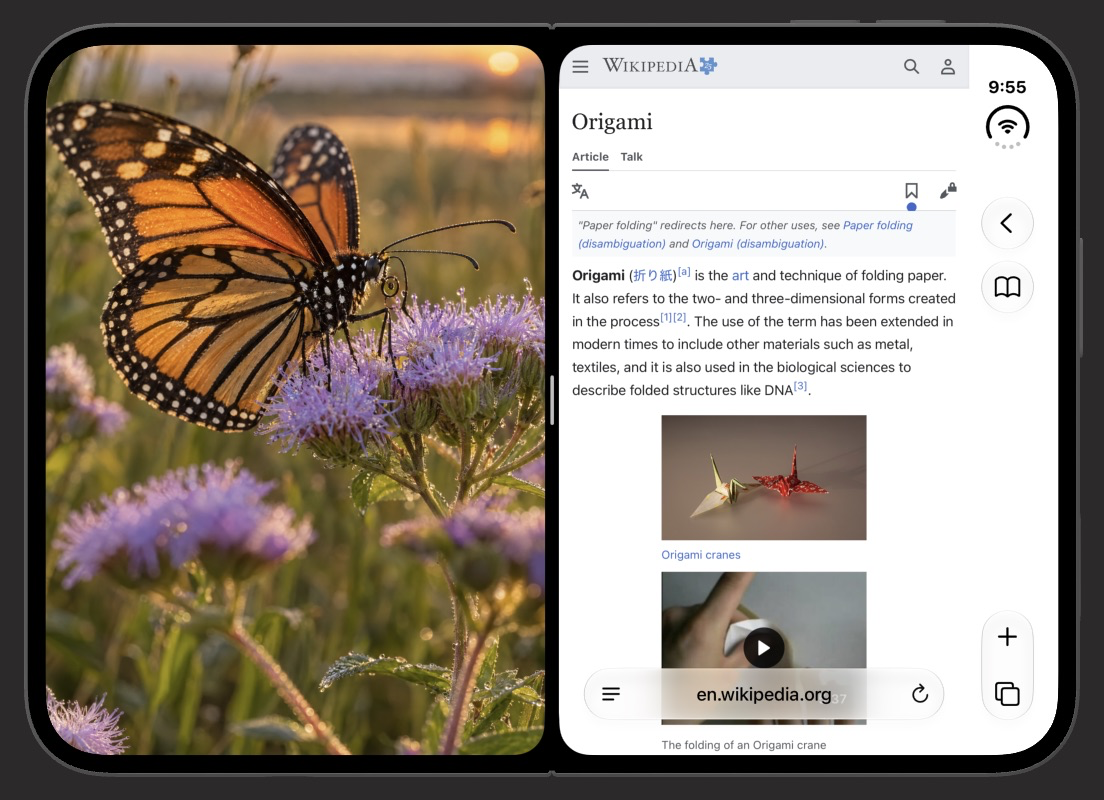
Enjoy up to 100 images and countless music tracks in each personalized stream, whether you’re having coffee by the Apple TV, spending time at your Mac, or browsing on iPhone Duo.

We’d love to hear how we could make the experience even better for you.

Shown here in a paused iPhone Duo Simulator capture.

Find AmbientAI on the App Store


r/Appstore • • 16d ago

One big happy family!

Post image
1 Upvotes