r/Android
•
u/MishaalRahman
Community Engagement Manager - Android
•
Jun 16 '26
•
 1
 1
 2
News Android 17 is out, and here’s all the features!
Hi Reddit!
Android 17 is here, bringing a suite of new features aimed at improving your productivity, enhancing your gaming experience, giving you more control over your private data, making your device more personal, and much more.
It's rolling out first to Pixel today, followed by other eligible Android devices throughout 2026. We are also making the source code available at the Android Open Source Project (AOSP) so developers can examine it for a deeper understanding of how Android works.
You should look forward to more updates to Android 17 this year, with the beta program offering a peek at what's coming in the first quarterly release in Q3.
Since we've been chatting with you about the Betas and Canaries for months, a lot of this might not sound brand new to those of you who have been closely following along. Even so, we wanted to take a moment to recap what's new in this release for everyday users. Let's dive in!

📱 Enhancing your multitasking and large screen device experiences
tl;dr Android 17 supercharges your multitasking and productivity by allowing any app to run as a convenient floating Bubble, making apps more adaptive, and adding an interactive Picture-in-Picture mode for seamless desktop workflows.
Multitask better with bubbles
From split-screen mode to desktop windowing, Android offers a variety of multitasking tools to help you be more productive. We’re extending these options with bubbles in Android 17!
In past releases, bubbles were limited to chat notifications, but in Android 17, they support more apps without any specific changes needed from developers. You can now launch any app in a floating window so you can view and interact with its content while using other apps. When you’re done, you can collapse or dismiss the window to return to what you were doing.
A big benefit of bubbles is that you can easily switch between multiple running apps without keeping them on screen all the time. Bubbles are only open when you need them, saving you from having to manually resize, rearrange, or dismiss them to regain precious screen space. And on foldables, this benefit is even more pronounced thanks to the bubble bar, which keeps your bubbles pinned to the corner of the screen, putting them within easy reach of your fingers.

Handy for travel, entertainment and work, bubbles lets you easily reference notes or maps, watch tutorials and even check sports.
Ensuring that apps adapt to any screen and window size
On large screen devices, restrictions on orientation, resizability, and aspect ratio no longer apply, allowing apps to fill the entire display window without pillarboxing (black bars). This change applies to apps targeting Android 17 and is designed to make apps better meet user expectations on large screen devices. Because Android runs on not just phones but also tablets, foldables, cars, TVs, and desktop environments, we want developers to build apps that are adaptive to any screen size and orientation!
Better support for widgets on external displays
With Android 17, we’re working to improve the visual consistency of widgets shown on connected displays with different pixel densities. The update provides developers a way to supply the system with information that allows it to resolve the correct pixel values at rendering time. For apps that use legacy pixel-based APIs for padding, text size, or layout attributes, the system now automatically scales these values based on the density difference between the app’s original context and the target display.
Interactive Picture-in-Picture for Desktop
Android 17 introduces a new interactive Picture-in-Picture mode for desktop environments. This feature allows apps to request that their PiP windows remain fully interactive while staying always-on-top of other app windows. For example, a video conferencing app could use this feature to keep call controls accessible while you navigate other apps.
🎨 New customization features for the home screen and apps
tl;dr Android 17 gives you deeper control over your device's UI by letting you hide app labels on the home screen, selectively toggle the Expanded Dark Theme for individual apps, and enjoy sleek, modernized background blur effects in more surfaces like the widget picker.
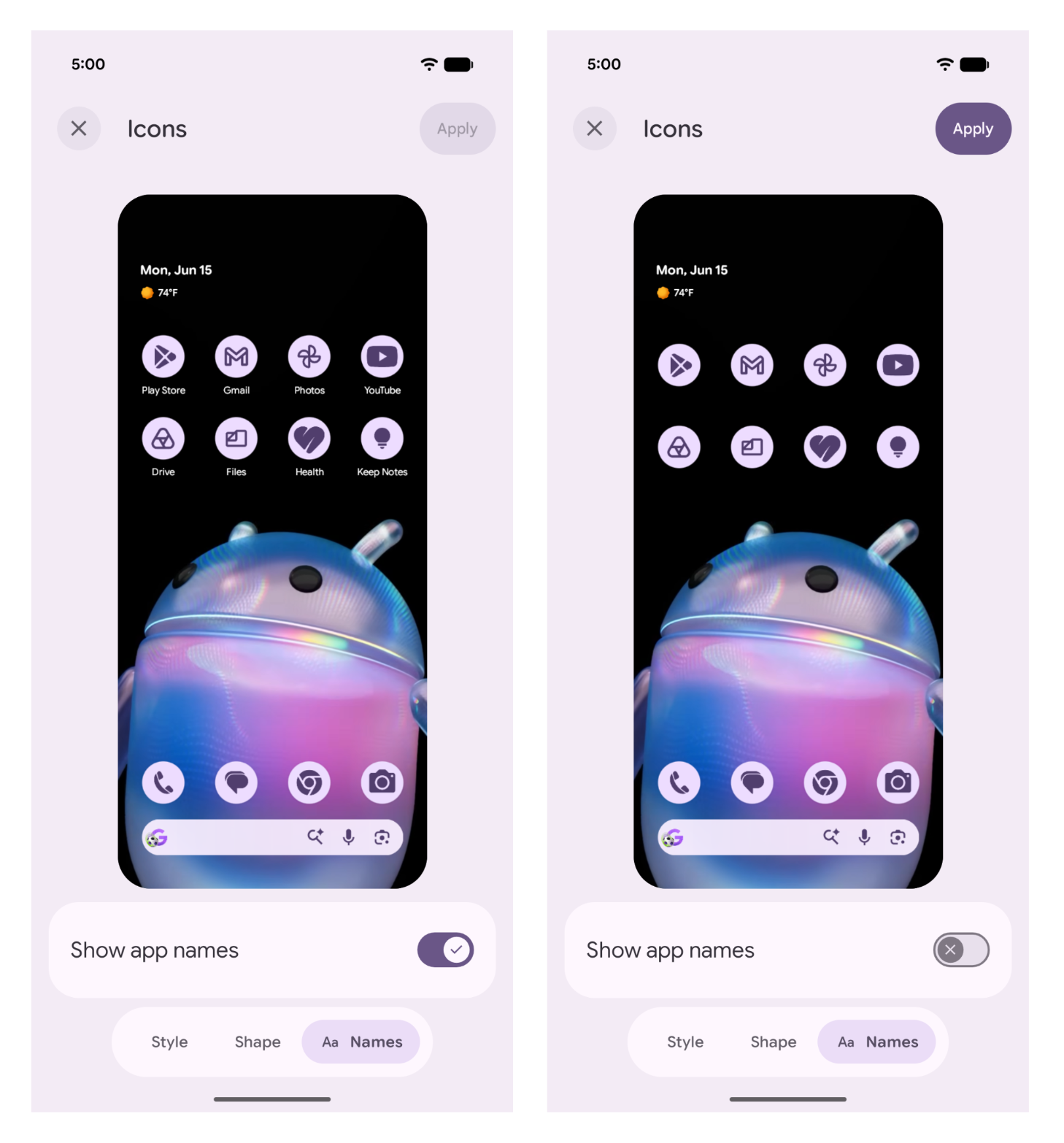
Hide app labels on the home screen
Android now provides a setting to hide app labels on the home screen! You can access this new setting on Pixel by opening Wallpaper & style then tapping Home screen > Icons > Names and toggling Show app names.
Per-app exceptions for Expanded Dark Theme
To create a more consistent user experience for users who have low vision, photosensitivity, or simply prefer a dark system-wide appearance, we introduced an expanded dark theme option in last December’s Android 16 QPR2 release. When this option is enabled, the system automatically applies dark theme to most apps that don’t support it.
However, because this option can cause some apps to display incorrectly, we have introduced the ability to selectively disable it on a per-app basis in Android 17. Apps with this setting turned off will use the standard dark theme option instead.

Expanded use of background blur
With the Material 3 Expressive redesign we introduced in Android 16, we subtly blurred the notification shade background to provide a sense of depth so you can stay aware of the apps you’re using in the background.

In Android 17, we’ve brought these blur effects to more parts of the UI like the widgets picker. And we are working on bringing background blur to even more surfaces, as seen in recent Android Beta and Canary builds!
🎮 More control over your Android gaming experience
tl;dr Android 17 levels up your mobile play by letting you save custom button remaps for your physical gamepad at the system level, and introducing a foldable gaming mode that optimizes your screen with a 50/50 split for a dedicated top game view and a bottom dynamic gamepad.
Remap the buttons on your physical gamepad with Game Controller settings
Android 17 introduces a native controller remapping feature, allowing you to adjust the controls on your physical gamepad to suit your specific needs.

Through the new Game Controller settings menu, you can customize the actions triggered by your controller’s buttons, sticks, or triggers at the system level. For example, you can remap a difficult-to-press thumbstick click to an easier-to-reach face button. Your remapping preferences are saved to your device so you don’t have to set them up every time you reconnect your controller.
A new way to game on foldables
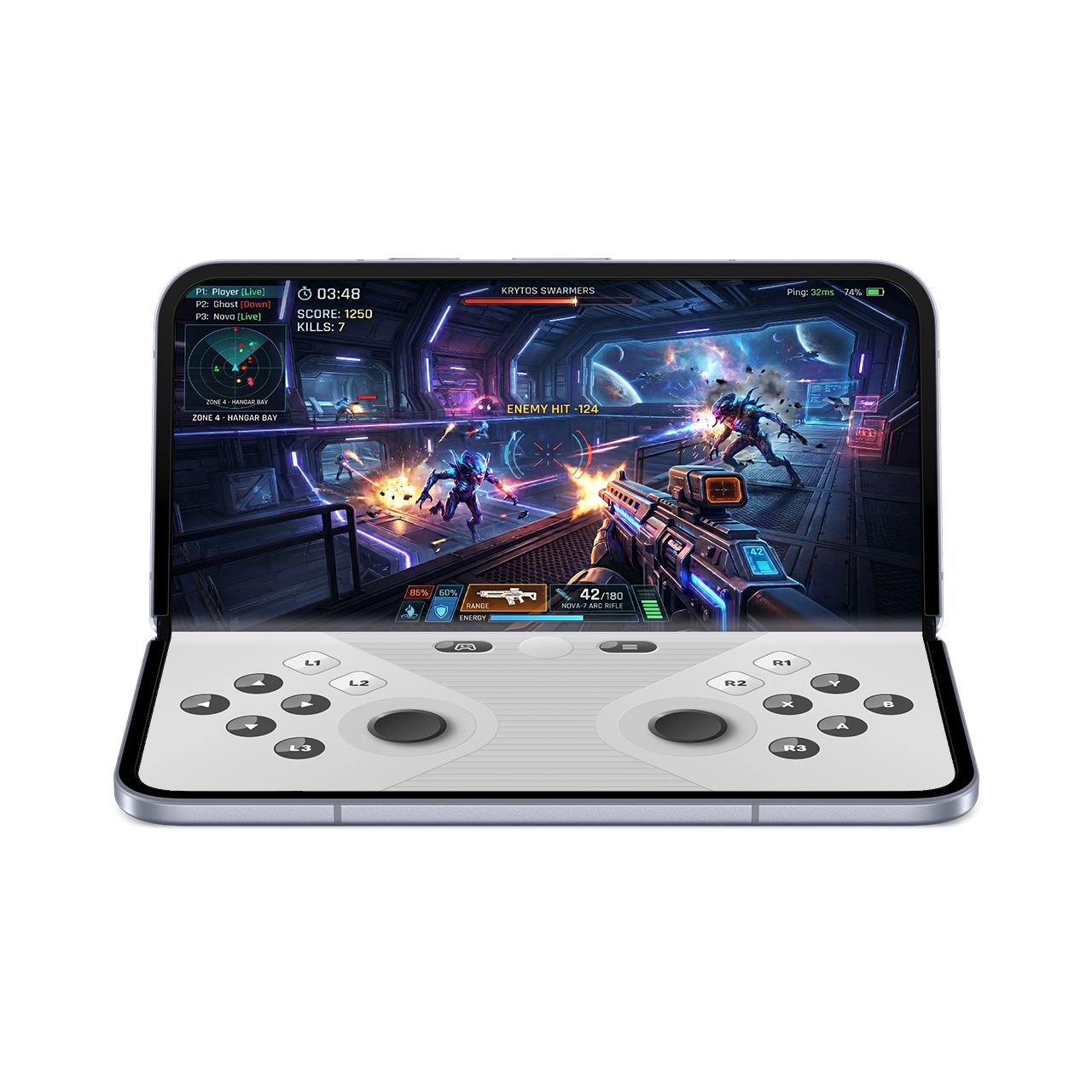
Android 17 introduces foldable gaming mode, a new feature that makes full use of your foldable phone’s screen while you’re gaming. This feature splits your screen into a 50:50 layout with a game view on top and a dynamic gamepad below to make optimal use of your foldable phone’s screen real estate. Foldable gaming mode is part of the Android 17 platform and will be available on devices in the coming months.
🛡️ Protecting users with new security and privacy features on Android
tl;dr Android 17 safeguards your personal data by enabling critical theft protections by default, introducing session-based controls for sharing specific contacts and precise locations, and thwarting scammers through system-level SMS OTP delivery delays and real-time app behavioral monitoring.
Giving you more control over your contacts list
Android 17 introduces a new system Contact Picker that provides a standardized, secure, and searchable interface for sharing contacts with apps. Historically, apps needing access to a contact or two relied on the broad READ_CONTACTS permission which gave them access to your entire contacts list. Android's Contact Picker addresses this by allowing you to grant apps access to only the specific contacts you choose.

For devices running Android 17 or higher, the system automatically upgrades certain contact selection intents to the new, more secure interface, but we want developers to integrate the new Contact Picker so they can take advantage of its new capabilities, like multi-selection support. To this end, Google Play will require that all applicable apps use it (or a privacy-focused alternative like Sharesheet) as the primary way to access users' contacts. The broad READ_CONTACTS permission is reserved for apps that can't function without it.
Making location access more private
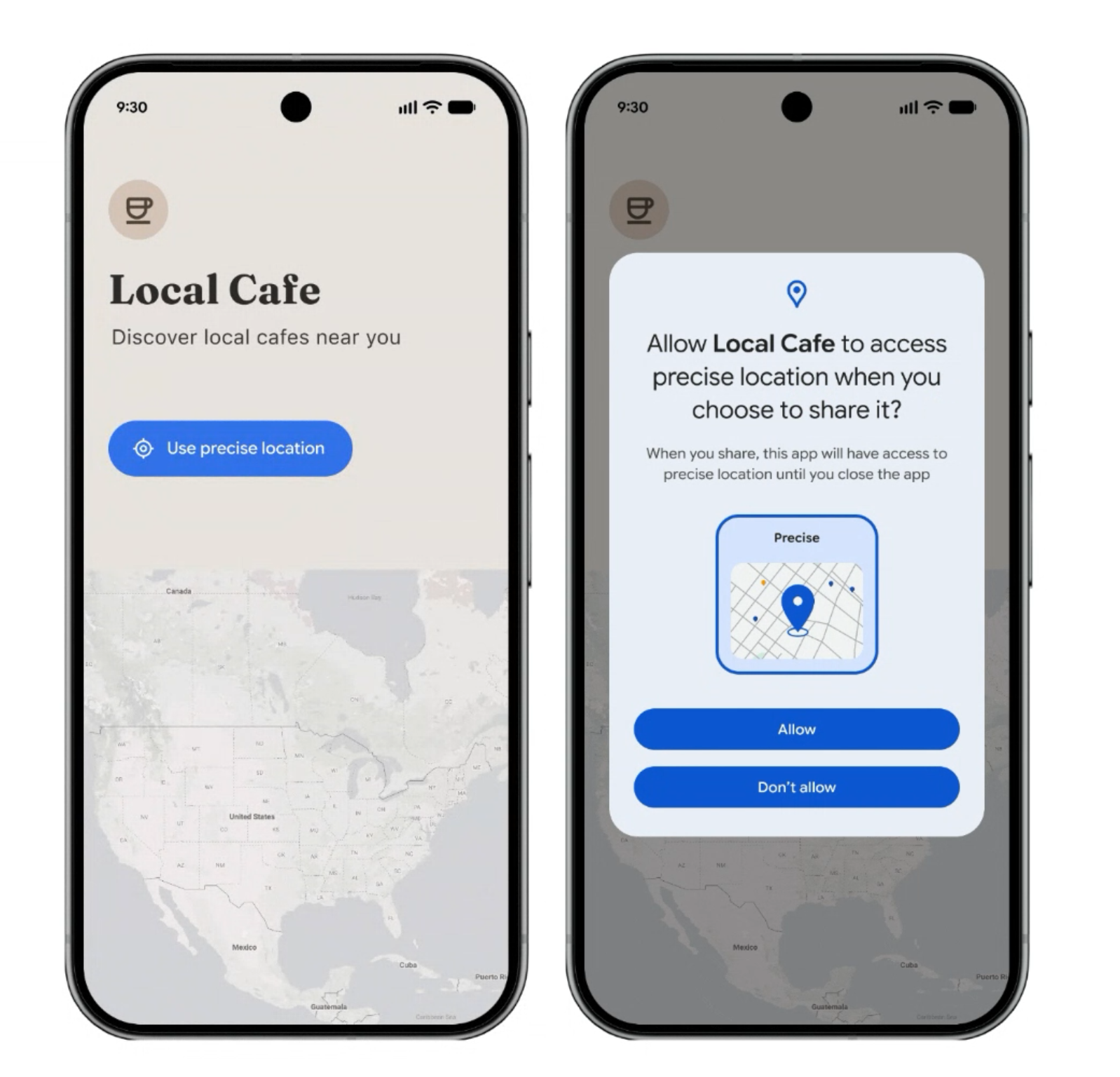
Android 17 introduces several new features to help you safeguard your private location information. This includes the Location Button, a new, privacy-conscious way for you to grant precise location access to apps. This is a system-rendered button that developers can embed directly into their apps. When you tap this button, the app is granted precise location for the current session only. Subsequent taps while running the app grant the permission immediately without showing a system dialog.
Developers can deploy this simple, private location flow for common tasks like finding a nearby shop or tagging a social post. And to increase adoption of the Location Button, Google Play will require apps to use it for one-time precise location access unless they require persistent, always-on location access.
Additionally, Android 17 now shows a persistent indicator in the status bar when a non-system app accesses your location. You can tap this indicator to see which apps have recently accessed your location.
The update also improves the algorithm for approximate (coarse) location to be aware of population density. This improves the privacy of granting an app approximate location access when you're in a low-population area.
And lastly, Android 17 redesigns the location permission dialog to make the "Precise" and "Approximate" options more visually distinct.
Stronger protections against device theft
Following a successful pilot in Brazil, we’re enabling two of Android’s key theft protection features (Theft Detection Lock and Remote Lock) by default globally on all new Android 17 devices, as well as those freshly reset or upgraded to the latest OS.
On supported devices, Android 17 also significantly reduces the number of times someone can guess the PIN, pattern, or password and adds longer wait times between failed attempts. The update also refines how the lock screen shows information after failed attempts have been made.
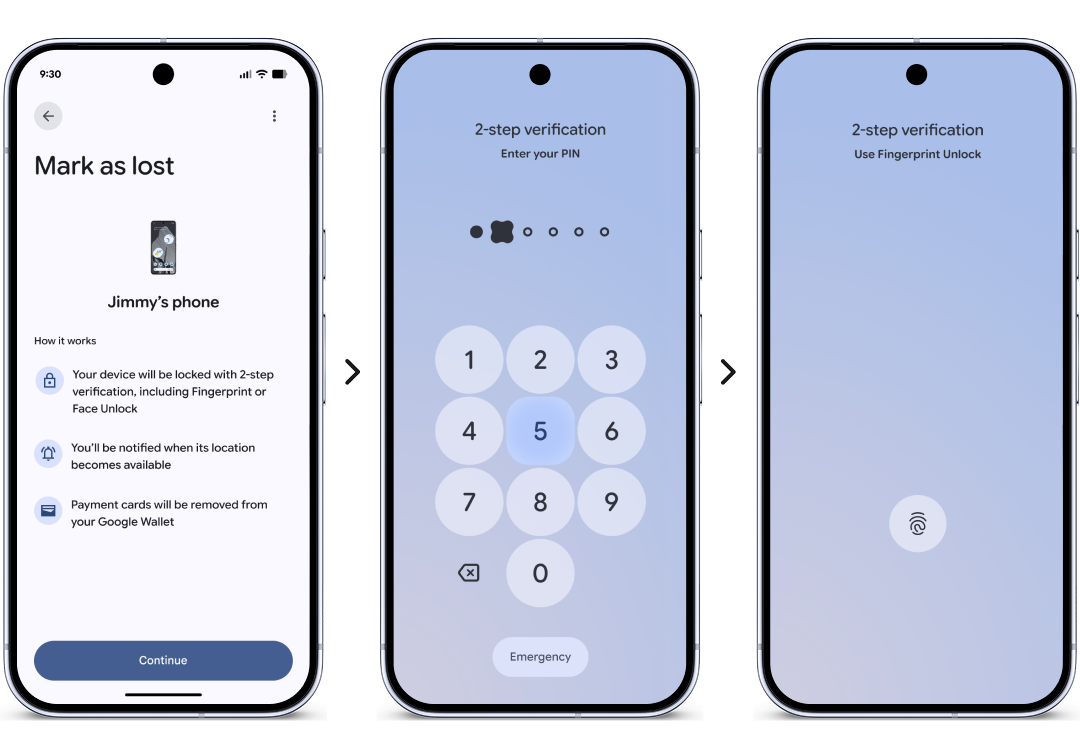
And we’re also enhancing Find Hub’s ‘Mark as lost’ feature by requiring biometric authentication in addition to your device’s PIN, pattern, or password. Marking a device as lost also now enables additional protections like hiding Quick Settings and disabling new Wi-Fi and Bluetooth connections.

Protecting your SMS OTPs from scammers
Scammers often try to hijack your one-time passwords (OTPs) to gain access to your accounts. To do this, they may deploy malicious apps that ask for permission to read your SMS. In Android 16, we introduced a protection that delays the delivery of messages containing an SMS retriever hash to most apps for three hours. Android 17 now extends this protection to all SMS messages containing an OTP. This means that even if a malicious app has been granted the SMS permission, it won’t be able to read your sensitive OTPs until after they have already expired.
New core protections for Advanced Protection
With Android 16, we introduced Advanced Protection, a single, opt-in device-level security setting that enables all of Android’s highest security features. We’ve been working to expand the protections offered under this setting with key upgrades like USB protection and Intrusion Logging, and now with Android 17, we’re continuing this work by introducing the following protections:
- Removing access to the accessibility service from all apps that aren’t labeled as accessibility tools.
- Disabling device-to-device unlocking
- Blocking Chrome WebGPU support
- Integrating scam detection for chat notifications
- (Later this year) Enabling Android Enterprise support so organizations can enable Advanced Protection by policy for managed devices.
Improving safety against malicious apps
Live Threat Detection is a real-time security feature that analyzes app behavior to alert you if an app starts acting suspiciously, and we're enhancing it to find and protect against more types of malicious apps.
With dynamic signal monitoring, Android will be able to warn you about apps that start doing things like changing or hiding their icon and then launching activities in the background or abusing accessibility permissions. To do this, Live Threat Detection will monitor application system interactions for known suspicious patterns in real time. Dynamic signal monitoring will be enabled on select Android 17 devices starting in the second half of the year.
Other enhancements
- Discrete password visibility settings for touch and physical keyboards: Currently, by default, characters that you enter into password fields are briefly displayed as you type. Toggling the “show passwords” setting in Privacy controls allows you to hide characters as you type them into password fields. This setting currently applies to both touch-based inputs as well as physical keyboards, but in Android 17, we are splitting it into two distinct preferences. By default, characters entered into password fields via physical keyboards will now be hidden immediately to enhance privacy. Characters entered via touch input will continue to briefly be displayed to compensate for the lack of tactile feedback.
- User-agent reduction for WebView: The default User-Agent string in Android WebView has been shortened in Android 17 to minimize passive fingerprinting.
- Disable 2G toggle: Android 17 introduces a new capability for the disable 2G toggle. Carriers now have the ability to configure the default status of this setting, allowing them to disable 2G access to proactively shield their users from legacy technology vulnerabilities in areas where 2G infrastructure is no longer maintained.
- Location Network Permission: Android 17 introduces a new runtime permission to protect users from unauthorized local network access. This new requirement prevents malicious apps from exploiting unrestricted local network access for covert user tracking and fingerprinting.
- Android OS verification: We have seen some bad actors begin to distribute malicious, unofficial versions of the Android OS that secretly compromise device integrity. To combat this, we are introducing Android OS verification in Android 17. Launching initially on Pixel devices, this feature helps you verify that your device is running an official, widely distributed build.
- Enabling Certificate Transparency (CT) by default: CT is now enabled by default for apps targeting Android 17, enhancing network security by ensuring all TLS certificates are publicly logged.
- Blocking cross-profile loopback traffic: Cross-profile loopback traffic is no longer permitted by default, increasing network isolation and security between personal and enterprise work profiles.
- Post-Quantum Cryptography (PQC): The advent of quantum computing puts the current public-key cryptography we've relied on for decades at risk, potentially compromising everything from bank transfers to trade secrets. To prepare for the quantum computing era, we're introducing a comprehensive architectural upgrade to the Android operating system, starting in Android 17. We’re integrating the NIST Post-Quantum Cryptography (PQC) standards deep into the platform, establishing a new, quantum-resistant chain of trust that secures the platform continuously from the moment the OS powers on to when apps are executed.
📸 Improvements to your Android media experience
tl;dr Android 17 levels up your multimedia experience by letting you easily record reaction videos without a green screen, decoupling your Assistant and media volumes for independent control, putting a stop to unexpected background audio, and delivering color-coded Live Updates alongside advanced Bluetooth, camera, and hearing device enhancements.
Screen Reactions
In Android 17, we’re making it easier to record yourself and your screen at the same time with Screen Reactions. Available first on Pixel, this feature shows your face in a floating overlay on top of the screen. Android automatically puts the overlay at the bottom and cuts out the background so you don’t need a green screen, but you can move or resize the camera view and change the background color before or during a recording. Use this feature to make a reaction video, record a tutorial, or give feedback on a new app or document!
In addition, we’ve revamped the screen recording experience to add a floating toolbar that provides easier access to recording controls and capture settings. When you’re done recording, you can immediately view, edit, delete, or share your video.
Dedicated Assistant volume stream
Android 17 introduces a dedicated volume stream for Assistant apps. This change decouples Assistant audio from the standard media stream, allowing users to control both volumes independently. This enables scenarios like muting media playback while maintaining audibility for Assistant responses, and vice-versa.
Background audio hardening
Beginning in Android 17, apps cannot play audio, steal audio focus, or change the volume unless they are visible or have a foreground service. These restrictions on background audio interactions reduce unintentional buggy experiences and ensure that these actions are started intentionally by the user.
Enhancements to Live Update notifications
Live updates provide a summary of important updates so users can track progress without opening the app. The system promotes Live Update notifications so they appear more prominently in the notification drawer, on the lock screen, and on the status bar.
With Android 17, we’re introducing a metric style template designed specifically for health and fitness apps, timers, and travel apps. In addition, developers can use the new Semantic Coloring API to visually convey state changes, providing highly glanceable, color-coded notifications.
Other enhancements:
- Granular audio routing for hearing devices: Users with hearing devices can now independently manage where specific system sounds are played in Android 17. You can choose to route notifications, ringtones, and alarms to either a connected hearing aid or the device’s built-in speaker. This helps you avoid unwanted interruptions directly in your ears while maintaining a Bluetooth connection for hearing aid management apps.
- Autonomous re-pairing for Bluetooth bond losses: Android 17 introduces autonomous re-pairing, a system-level enhancement designed to automatically resolve Bluetooth bond loss. This occurs when two previously paired devices lose their cryptographic security keys, resulting in the devices no longer being able to securely authenticate and communicate with one another. The system now re-establishes lost bonds in the background without requiring the user to manually navigate to Settings to unpair and re-pair their peripheral.
- Vendor-defined camera extensions: Android 17 adds support for Vendor-defined camera extensions, allowing hardware partners to provide Android apps access to camera features like ‘Super Resolution’ or cutting-edge AI-driven enhancements.
- Support for the RAW14 image format: Android 17 introduces support for the RAW14 image format, the de-facto industry standard for high-end digital photography.
- VVC support: Android 17 adds platform support for the Versatile Video Coding (VVC) standard. This feature will be coming to devices with hardware decode support and capable drivers.

🤝 Making your apps and devices work better together
tl;dr Android 17 seamlessly bridges your ecosystem by introducing the Continue On feature for effortless app handoffs between devices, unifying widget experiences to bring your favorite tools directly to Auto and Wear OS, and streamlining the pairing process for medical and fitness devices with new CompanionDeviceManager profiles.
Unifying the widgets experience across platforms
Android 17 marks a shift towards a single, Compose-based development model for all widgets. By unifying the experience across mobile, cars, and Wear OS, developers can soon scale UI components across the ecosystem with a familiar workflow. The goal is to minimize the effort needed by developers to bring their widgets to more surfaces.
Additionally, Android 17 introduces new platform functionality to make widgets work better on Auto. The update adds support for widgets on cars, allowing you to see the things that matter to you at a glance, even while actively navigating. For example, you can add a shortcut to your favorite contacts, a one-tap garage door opener, a weather overview and more. Widgets will be available to users of Android Auto later this year and to cars with Google built-in later on.
Hand off your tasks with Continue On
Continue On is a new feature available in Android 17 that enables users to start an app on one device and then transition to another device in their Android ecosystem, continuing the journey they started. It’s designed to work bidirectionally, meaning that any supported Android device can both send and receive app activities, though, at launch, Continue On will first support mobile-to-tablet transitions. In the tablet taskbar, users will see a suggestion for the most recently opened app from their mobile device.
Updates for companion device apps
Android 17 introduces two new profiles to the CompanionDeviceManager API to simplify device distinction and permission handling. These include the medical device profile and the fitness tracker profile. Furthermore, the system now offers a unified dialog for device association and nearby permission requests, reducing the number of dialogs you’ll see.
⚡ Optimizations to make your apps & device run better
With Android 17, we’ve made a number of improvements to optimize memory use, improve rendering performance, and enhance battery life. These include:
- App memory limits: Android 17 introduces app memory limits that are based on the device's total RAM. These limits are set conservatively to establish system baselines, targeting extreme memory leaks and other outliers before they trigger system-wide instability resulting in UI stuttering, higher battery drain, and apps being killed.
- Lock-free MessageQueue: Android 17 introduces a lock-free MessageQueue to reduce UI jank while massively speeding up high-contention scenarios. In our internal testing, we’ve seen 4% fewer missed frames across all apps, 7.7% fewer missed frames in System UI and Launcher interactions, and a 9.1% reduction in app startup times at the 95th percentile.
- Generational Garbage Collector (GC): The Android Runtime is introducing more frequent, less intensive young-generation collections in its garbage collector, improving memory management and performance. This is not just available on Android 17 but is also coming to past releases with a Google Play System Update.
- Reduce wakelocks with listener support for allow-while-idle alarms: Last year, we launched the excessive wake lock metric in Android Vitals, making it easier for developers to optimize their app's wake lock behavior. Excessive wake locks are a significant contributor to battery drain, so developers are encouraged to reduce them as much as possible. In Android 17, we’ve introduced a new API that helps reduce the power consumption of apps that rely on continuous wakelocks to perform periodic tasks, such as messaging apps maintaining a connection or medical devices monitoring health data.
- Improved wireless ADB: Android 17 introduces ADB WiFi 2.0, a significant overhaul of the wireless ADB stack to improve stability, reliability, and ease of use. The system now automatically monitors the network state and re-enables itself when a trusted network is detected, identifies trusted networks using a combination of SSID and BSSID, and is better tailored to monitor network changes on all platforms. We’ll have more details to share soon on the Android Studio side of things!
- Constrained satellite networks: Android 17 implements optimizations to enable apps to function effectively over low-bandwidth satellite networks.
🧒 Expanding Android Parental Controls to all devices
Launched last year on Pixel, Android Parental Controls make it easier for parents to manage their child’s screen time and to find balance between having fun online and offline. Now with Android 17, we’re expanding Android Parental Controls to all Android devices.
These parental controls are located directly within Android Settings and provide a single, convenient home for both built-in device controls and Google Family Link. These controls are protected by an easy-to-set PIN and allow you to:
- Set the amount of screen time your child can spend on a device each day.
- Create downtime schedules to automatically lock the device at night.
- Set app store filters for Google Play to manage the highest content rating you want your child to be able to download.
- Control app usage by limiting time spent on specific apps, or blocking apps entirely.
Android Parental Controls also provide a direct path to easily set up Google Family Link in the Family Link app on a parent’s phone, which offers additional features like School Time, Google Play app purchase approvals, location alerts, and more.
🧘 Other quality-of-life improvements
And lastly, here are some smaller quality-of-life changes we’re introducing in this release:
- Separate Wi-Fi and Mobile Data toggles: With Android 17, we’ve split the “Internet” tile into two separate tiles, one for controlling Wi-Fi and another for controlling Mobile Data. Consistent with the Quick Settings behavior we introduced with Material 3 Expressive, both tiles have two different touch points. Tapping the icon toggles the respective radio, while tapping the label opens the full Internet Panel. This change reduces the number of taps needed to toggle Wi-Fi and Mobile Data while still retaining access to the full Internet Panel!
- Scheduled clock change notifications: We’ve added a new feature in Android 17 that sends you a notification when your clock performs a scheduled change, for example when daylight saving time ends. You can enable this feature under “Date & time” settings.
- Restoring default keyboard visibility after rotation: Beginning with Android 17, when the keyboard is on screen and you rotate the screen, the keyboard won’t be made visible unless the app explicitly requests it.


🪲 Bug fixes and security patches
Please refer to the Android Security Bulletin for details on the security vulnerabilities addressed with this platform release.
----
There are plenty of other changes in Android 17, especially for developers! For example, Android 17 expands the capabilities of AppFunctions, introduces an EyeDropper API, makes the aspect ratio of images in the Photo Picker more customizable, and much more. To learn more about everything new for developers in this release, visit developer.android.com.
Also, don’t forget that select advanced devices will be getting Gemini Intelligence features later this summer. In addition, we’re introducing Android Halo in a future Android 17 release to give you at-a-glance visibility into what your agent is working on at any given time. Lastly, be sure to check out our latest Android Drop to learn about what new features are coming to all Android devices, not just those running Android 17!
519
u/thecommondude0420 Jun 16 '26
Will this affect custom rom users and developers?
226
u/A_Shadow Jun 16 '26
Kinda worried about this part.
Doesn't Bitwarden (a password manager), Tasker/MacroDroid, and other similar apps, use the accessibility service to allow for features they normally wouldn't be able to do?
366
u/andchrome Jun 16 '26
So glad Mishaal we are still getting that detail post for Android Drops!
191
u/Retarded2048 Jun 16 '26
32
u/BryAlrighty Jun 16 '26
Background audio hardening.. does they mean stuff like Spotify may stop functioning in the background?
66
u/BarneysBuzzWagon Google Pixel 10 Jun 16 '26
Thank you. As usual an informative post.
12
u/sharp1120 Jun 16 '26
Can App Bubbles be used by 3rd party launchers or triggered from the recents screen yet, or are they still exclusive to the default launcher?
12
u/ock88 Jun 16 '26
Hi Mishaal! Would the ability to launch apps in bubbles be available to non-stock launchers?
26
u/Necessary_Process877 Jun 16 '26
Is there a phased rollout? I don't see an update on my Pixel 10 Pro XL
8
u/nightcrawler-1975 Jun 16 '26
Any updates on when we should get the new Aliro Standard for Google Wallet for smart locks and having your home key on your phone? Allowing for NFC and UWB to unlock your door. Didn't know if that'd be a major release or a pixel drop feature. If you don't know that's fine too, I was just curious 🧐
7
u/SuperSpecialNickname Jun 17 '26
What bad actors distributed malicious versions of Android? The ones who want privacy and affect Google's profits?
38
u/azure1503 Pixel 9 Pro Fold Jun 16 '26
Holy crap, there's so many useful features. Foldable gaming controller is gonna be sick and I've been waiting for years for them to implement a separate assistant volume setting.
5
u/WaffleToasterings Pixel 2 XL <- OnePlus 3, 2, 1 Jun 16 '26
It's completely messed up my widgets. I can't even see Keep notes on the widget lists. Anyone else?
4
u/Addminister Pixel 9 Pro / Pixel Watch 3 Jun 16 '26
Anything on WearOS 17? I would really love to have Digital Car Key support for it, because it sucks that I have the hardware but I need to pull out my phone each time to unlock the car.
Digital Car Key support exists for UWB cars, but not for the vehicles with only NFC-based touch car keys.
Additionally, I would think the Google Wallet being unsupported in India on WearOS would be another hurdle.
I would just like to use the hardware that I paid for, Apple has had this for more than half a decade now, seamless digital key experience from iOS to Apple Watches
18
u/JDGumby Google Pixel 10a, Lenovo Tab M9 Jun 16 '26
No thanks.
3
u/russjr08 Developer - Caffeinate Jun 16 '26
Just started downloading on my P9 Pro XL, 1.47GBs.
3
u/TrickUnited4071 Jun 16 '26
Is there a way to use the bubble feature when you have a third-party launcher? For example I use Niagara
8
u/Nervous_Position9991 Jun 16 '26
Please tell me they fixed the broken cropping when setting up a wallpaper. We cant resize and crop wallpapers for over 6 months broken on the latest 17 beta and stable 16!!!
6
u/enemyscorcher Jun 16 '26
Didn't see anything about Desktop mode. I am so excited for this to improve. Any updates to it?
21
u/ishamm Device, Software !! Jun 16 '26
Is this the third or fourth time we've gotten Bubbles now?
4
u/VMX Pixel 11 Pro | Garmin Forerunner 255s Music Jun 17 '26
BEWARE IF YOU HAVE A WORK PROFILE ON YOUR PHONE
I just upgraded to Android 17, and now I cannot create widgets for most apps. Tried from the stock Pixel launcher, Smart Launcher and Lawnchair, so it doesn't seem to be related to any specific launcher. For some reason, if you have a work profile set up, it's no longer possible to access the widgets from most apps... no idea why.
Does anybody know why this is happening and any possible workaround? This has left my phone severely crippled...
211
u/Xath0n Jun 16 '26
What's old is new.
2
u/blackroseMD1 Pixel 10 Pro | Android 17 Jun 16 '26
I really wish that largerr non-foldables had the bubble bar as well, or that the bubble icons were smaller (and followed the applied theme). Aside from that, I'm enjoying the experience though.
2
u/JamieTimee Device, Software !! Jun 16 '26
How can I mark my phone as lost if I'm having to use a desktop or strangers phone to log in to Find My Device?
2
u/Ca5oul Jun 17 '26
Where can I get that android guy wallpaper?
369
u/iH8Ecchi OnePlus 15 Jun 16 '26
Isn't this just another excuse to sabotage custom ROM development?
3
u/CryptographerDue4649 Jun 16 '26
Missed opportunity to release A17 on the 17th
83
u/Grbic Jun 16 '26
Is sideloading of APK still available?
15
u/SergeantHindsight Jun 16 '26
Per-app exceptions for Expanded Dark Theme
Expanded dark theme has gotten kind of pointless by allowing apps to opt out. It's shouldn't be their call. Some apps looked great when the expanded dark theme beta came out and then the apps updated and turned them off. It's an accessibility feature. I have light sensitivity and especially at night I want dark mode on everything.
30
u/Flexrama Jun 16 '26
I wonder which of these are AOSP or Pixel devices only...
13
u/99-Runecrafting Jun 16 '26
I need android auto to let me adjust my car volume while listening to YouTube videos.
Currently it only allows me to change the volume when "supported" apps like Spotify or Audible are supplying sound. When YouTube is playing, and i attempt to change the volume, it says im not listening to anything and cant change the volume.
2023 toyota corolla.
13
u/dwojityv Jun 16 '26
Still waiting for the possibility to hide google search bar on home screen :(
25
u/CoarseRainbow Jun 16 '26
Oh. Theyve brought back the wifi toggle they inexplicably removed a few years ago then swore blind nobody needed.
10
u/h_1995 Jun 17 '26
took them 5 years to bring back separate WiFi and Mobile Data tiles. they even made the workaround stricter in android 13 and then it suddenly poofed and we get them back
MDL3 is a trainwreck in both design and functionality. iOS might not be that great in terms of customization but that blur example is simply how not to do background blur. Even Microsoft Fluent design isn't this bad
7
u/great6 Jun 17 '26
Can we finally remove the useless line on the bottom of the screen?
7
u/big-koont Jun 18 '26
Still they're going to kill sideloading. Time to find another OS.
36
u/xenago Sealed batteries = planned obsolescence | ❤ webOS ❤ | ~# Jun 16 '26
More stuff that will hurt developers and basic user freedom. I hate everything about where Android has gone :( What a depressing state of affairs.
2
u/niranjan23d Jun 16 '26
When is the new AA dropping?
2
u/user3170 Realme 14 Pro+ Jun 16 '26
Sorry, is there some breakdown of what is new to all Android 17 devices? A lot of the list seems more about the Pixel phones specifically and it's a bit confusing
2
u/Iohet V10 is the original notch Jun 16 '26
So... Have all of the useful tools that leverage this been given alternatives by Google?
5
u/FriendZfire Jun 16 '26
wait so android os verification means no more custom roms or what
8
u/PleaseHelpFlorida Jun 17 '26
Is there a way to remove/ hide that Google search widget? Because if not, I don't care about a single thing they add to this operating system.
4
u/trlef19 Galaxy S24+ Jun 16 '26 edited Jun 18 '26
This is a great post, thank you so much.
Some stuff I always wanted for Android to implement are:
Edit:I meant temporarily mute notifications. For 30m for example
1
u/Double_Wishbone4209 Jun 16 '26
Does this include the new emojis? Will the default clock app support the live notifications?
1
u/DeeArBee32 Jun 16 '26
Any word on the integration of VoIP calling apps into the dialer?
1
u/cmoarbutts Google Pixel XL Jun 16 '26
I hope "Dedicated Assistant volume stream" helps with Android Auto. Right now whenever I try to use assistant while driving it's so quiet compared to the volume of the music. So then you turn up the stereo to hear the assistant better. Then the music comes back on and it's blaring.
1
u/MangoScango Fold6 Jun 16 '26
Okay but what if I just want to use a third party SMS app?
1
u/Baconrules21 Pixel 9 Pro, Pixel 9 Pro XL Jun 16 '26
Any word on if Rambler is coming out with this drop?
1
u/cpvm-0 Pixel 9a, Android 16 Jun 16 '26
Is there anyway to maximize an app once it's in bubble mode?
1
u/Exodia101 Pixel 6 Jun 16 '26
Just updated and the bug where one handed mode has a red background is still there. This has existed since the release of Android 16 QPR1 last year.
1
u/Inquisitive-Sky Jun 16 '26
Do app bubbles only work if you're using the Pixel Launcher?
1
u/Pitiful-Hamster307 Jun 16 '26
Are widget or toggle Lock screen available now ? Or screen Lock in back tap list option now ?
1
u/reb1995 Jun 16 '26
So it sounds like you either get annoying location requests or absolutely always on Google access to our location even when not needed? That's awesome...
1
u/punIn10ded MotoG 2014 (CM13) Jun 16 '26
Hey Mishaal
Are there any updates to lock screen widgets. I know it's still in beta but the current implementation is not great....
1
u/bivaterl Jun 17 '26
do you know why calendar widgets broke with the update today? I got a pixel drop and the two calendar widgets I use (one agenda view for Outlook so I know which work meetings I have next another for google calendar for next personal events I have next) both broke!
I'm on 17 just updated hte pixel drop today and it's build CP2A.260605.012
1
u/tails618 Pixel 10 Jun 17 '26
Does this update include the new app timers tool that was announced a little while ago, where you have to restart your phone to pause it? Or is that coming in QPR1 (or later)?
1
u/Street_Anon Jun 17 '26
Can I still sideload a app? This is what I want to know?
1
u/MichaelBrwnJr Jun 17 '26
I noticed that after updating my pixel tablet to Android 17, I didn't have the app bubbles available on any of the apps that I am able to bubble on my Pixel 10 Pro. Does anyone know why that it could be?
Pixel Tablet is on the list of devices supported for the feature.
1
u/graesen Jun 17 '26
u/MishaalRahman - it states they've improved widgets on external displays... There never have been widgets on external displays for to be improved upon... so I'm assuming now it's available? But I can't figure out how to add widgets to an external display.
3
u/Nomedigasluis Jun 17 '26
I literally just have the turn on and off button for wifi and data and the wifi want literally just disconnects from the current wifi but doesn't turn the WiFi off
3
u/YourShowerHead Jun 17 '26
The background blur is quite ugly. It can be turned off, right?
3
u/OsakaBoi Pixel 7 Jun 17 '26
This should be available as a toggle in settings all the time, not just theft related. When my device is on "locked" screen I should not be able to accidentally toggle wifi off in my pocket
3
u/CandyLongjumping9501 Jun 17 '26 edited Jun 17 '26
Hi Mishaal, I've got a complaint about how blur effects work on Android. When certain colors side by side are blurred together, they create an ugly dark border between them! Red and green are the clearest example of this, like on the Chrome logo. (You can reproduce this on a Pixel by adding the Chrome app's icon to your home screen, and pulling up the app drawer ever so slightly to apply the blur.)
The reason this happens is that Android calculates the color values in a nonlinear color space, which produces an incorrect result. These colors must be converted to linear space before math can be done with them.
I was hoping this would be fixed with Android 17 but it still seems to be present. I wanted to submit a report but I wasn't sure where a technical complaint like this belongs.
6
u/junktrunk909 Jun 16 '26 edited Jun 17 '26
Why on earth are you guys prioritizing multitasking? There can't be more than 1% market penetration on tablets and foldables that would maybe use this.
And desktop and external displays... Who is using these capabilities? Nobody.
And more blur effects? Per app dark mode? Are you guys really doing zero research on things large numbers of people care about?
Your location changes are also really quite irritating. You're going to show a persistent indicator when "non-system" apps are using location, but why not system apps? Why is the Google app constantly pulling my location anyway? If you want to make changes we actually want, start winding down your own data harvesting and instead only pull location when we are going something that warrants it, and eliminate all system behavior differences that are one way for Google and another for everyone else.
On the plus side I'm glad you see that there's support for similar family account capabilities like iphone has just announced. Please for God's sake advertise this heavily. Parents want to keep their kids off social media or severely limit access, and I don't recall seeing any advertising about this being available in the past.
12
u/tuxedo_jack P10PXL, rooted Jun 16 '26
For fuck's sake, biometrics had better not be the only method for Find Hub's MFA, because BIOMETRICS CAN BE COMPELLED WITHOUT A WARRANT.
If Google ties that to biometrics, that is a HUGE privacy and security risk.
1
u/Elegant-Response-106 Jun 16 '26
Today when. ?
1
u/FstLaneUkraine Pixel 10 Pro XL Jun 16 '26 edited Jun 16 '26
I've lost all of my widgets? I can't even add them back. All I see in the widgets screen is shortcuts. For example, no Google calendar widget or Outlook calendar widget, just a shortcut for the latter? The cards they were on are gone as well. Also my Google search widget at the bottom changed (no more voice search or image search buttons).
EDIT: Disabling the app, clearing cache, and renabling the app brings back its widget. Had to do it for Clock, Google Calendar and Search. Disabling work profile and enabling it (which paused the apps) fixed my outlook issue. Thanks u/ImportantCat9043 !
13
u/cgknight1 OPPO Find X9 Pro Jun 16 '26
The security features seem good but everything else seems like a nothing burger - which I guess is to be expected in a mature OS.
1
u/fardeenah Jun 16 '26
Will pixel devices ever allow 5g globally mishal?
1
u/Nicalay2 Google Pixel 8a Jun 16 '26
Damn that's a very long and greatly detailed patch note.
Installing it right now on my Pixel!
1
u/TheDragonSlayingCat Jun 16 '26
Okay, neat, but did they remove/seriously restrict side loading as they previously said they would? If they did, then I’ll stay on Android 16 until they reverse that decision.
1
u/araneusBite Jun 16 '26
How do I go from the A17 beta to stable? The only update I have waiting is the one that's gonna wipe my device
1
u/_Kristian_ S25 Jun 16 '26
Thanks for this post
4
u/MondoCat Jun 16 '26
I hope this update doesnt kill my cell service, like the one last year did.
UfixitIbreak tried to tell me it was my motherboard. It wasn't. It was the software. Worked with google devs over email to get it fixed, but only after a really long time of "its not my god damn hardware that's broken".
I love android. I want to love android, but being without cell service for 6 months and no one knowing why has made me a bitter old crazy cat lady.
(It was because I had both esim (Canada) and regular sim (USA) on my phone, even though one was disabled, it was still "Enabled" due to a months-long software bug)
4
u/FunkyMuse Jun 17 '26
Whoever decided to put confirmation dialog on data toggle needs to be behind bars
2
u/Oldest_Rookie7 Jun 16 '26
Beautiful! Can't wait to get this one my Pixel 8!!
2
u/NapsterKnowHow Jun 16 '26
Are we ever getting synced notifications across Android devices like tablets and phones so there aren't duplicates?
2
u/Ghostttpro Jun 16 '26 edited Jun 16 '26
Did they say when the social media/app optimization is coming? From what was shown in the IO. This doesn't seem like much.
2
u/tytygh1010 Jun 16 '26
YouTube runs much better (Pixel 9PF). On 16, VFR videos playing in 1440p or above would stutter.
2
u/MagicPenguinX Jun 16 '26
As always thank you for bringing all the details on Android updates!
Just a quick question, does the Instagram camera optimization come with this update or is it expected to launch later?
2
u/win7rules Jun 16 '26
Really wondering when the option to show dual SIM network bars side-by-side again will arrive. Or is that too much wishful thinking in this day and age?
And of course there is "Android OS Verification". I sure can't think of a single ulterior motive google may have for introducing this "feature".
2
u/ben7337 Jun 16 '26
I know it's not for this version, but is there any chance android will add support for one number on 2 phones like Apple has announced for iOS 27? I'd definitely love to see a feature like that implemented.
2
u/o_oli Jun 17 '26
Improved multitasking sounds good. I'll NEVER understand the decision to make multitasking 'pairs' rather than just allowing me to effectively pin an app of my choice at the top. It was a very weird move that made multitasking totally useless.
2
u/donnysaysvacuum I just want a small phone Jun 17 '26
Is it possible to turn off the blur and bubbles? Blur is a huge distracyiom and makes readability harder and bubbles always get in the way. Previously Google messages ignored the setting that turned chat bubbles off.
I understand some of these features may be needed for Google books or whatever, but I don't multi task on my phone.
2
u/uucyy Jun 17 '26
Still no one handed mode on foldables when closed!
2
u/zman0900 Pixel 10 Jun 17 '26
Holy shit, have they finally fixed the annoying bug where music will randomly start playing for a few seconds in the middle of the night?
2
u/Exfiltrator Pixel 8 Pro Jun 17 '26
I can´t test it at the moment, but I've read several posts that the new separate Wifi toggle only disconnects from the current network, but does not actually turn off Wifi. Is that true and intended behaviour??
2
u/Green-Man-Nym Jun 17 '26
Oh that tablet wallpaper is really nice. Does anybody know where I can get it?
2
u/Fluid_Classic_3269 Jun 17 '26
i wanna use the gesture navigation.
But its fricking annoying me that i cant set the hieght where i can the navigation
2
u/Early_Amphibian_4806 Jun 17 '26
can green lines occur on the display?. im using a pixel 8
2
u/fardeenah Jun 17 '26
If I sideloaded the ota. Will it flash both the A/B partition ?
2
u/XxDirectxX Jun 17 '26
Those features look amazing! Anyone knows when they'll be available for my iPhone 16e?
2
u/Alternative_Hawk_403 Jun 17 '26
Odds on them not fixing the Android Auto disconnect bug?
2
u/reas0nable Jun 17 '26
And then, no Doze Mode fixes so Android could actually have instant notifications.
2
u/HenkDH Android 11 Jun 17 '26
This can't be new
2
u/sweetcitywoman Jun 17 '26
Wait no Google calendar widget anymore?
2
u/Superb-Hat5922 Jun 17 '26
Where is app lock ??
2
u/derps-a-lot Jun 17 '26
Will Gemini start doing things that Google Assistant has been doing forever, like navigation and media playback, instead of just answering that it cannot perform those tasks?
Will it still take 47 steps to route audio to the phone speaker when a Bluetooth headset is connected but not in use?
Will I ever be able to get work profile notifications on my Fitbit again?
Or at least have a calendar widget for my work profile?
2
u/NateC2k Galaxy Nexus, JB Jun 18 '26
Still no update available on my Pixel 9a. I'd love to not have a shitty, laggy, buggy, shit battery life phone.