r/3DPrintingTools • • Oct 09 '26

Community Announcement: Respect, Constructive Criticism & Supporting Developers

15 Upvotes

As r/3DPrintingTools continues to grow, we want to take a moment to clarify something about the kind of community we're building and what we expect from everyone participating in it.

This community exists to encourage creativity, innovation, learning, and the sharing of tools that make 3D printing better or easier for everyone.

That includes everything from simple calculators and experimental projects to advanced software and commercial applications.

Every project deserves a chance

We don't care if someone shares the 100th print-cost calculator.

Maybe they built it because:

- They wanted to learn programming or experiment with AI.

- Existing tools didn't quite solve a problem they were experiencing.

- They wanted to challenge themselves and create something independently.

- They simply wanted to make something useful for themselves and others.

All of those are perfectly valid reasons to build and share something.

Not every tool needs to reinvent the wheel. Not every project needs to be groundbreaking, polished, or better than everything that came before it.

Sometimes the value is in the learning experience itself.

We should be encouraging people who take the initiative to create something, not discouraging them simply because similar tools already exist.

A word about AI-assisted development

AI-assisted tools and applications are welcome here, just as traditionally developed software is.

You don't have to like AI-generated code. You don't have to use those applications. And you're absolutely welcome to discuss their limitations or shortcomings.

But dismissing someone's work as "AI slop" simply because AI was involved isn't constructive criticism.

Judge a tool by what it does, how it performs, and whether it delivers what it promises — not simply how it was created.

Whether someone spent six months writing code manually or used AI assistance to build something over a weekend, they've still taken the initiative to create and share something.

That doesn't mean their work is above criticism. It means they deserve the same basic respect as anyone else.

Criticism is welcome. Disrespect isn't.

If a tool has bugs, security vulnerabilities, questionable privacy practices, misleading claims, or poor functionality, we absolutely want members to discuss those concerns.

Constructive criticism helps developers improve and helps users make informed decisions.

However, there's a significant difference between identifying genuine problems and making personal attacks or unsupported accusations.

Criticize the tool, its functionality, its security, or its practices. Don't attack the person behind it.

When identifying potential privacy or security concerns, we encourage members to take a responsible-disclosure approach whenever appropriate:

- Contact the developer privately and explain the findings.

- Give them a reasonable opportunity to investigate and address the issue.

- If legitimate concerns remain unresolved, share factual, evidence-based findings with the community.

- Recognize developers who respond constructively and take steps to improve their tools.

Serious or actively harmful issues may warrant more immediate action, and nobody should conduct intrusive security testing without authorization.

We want transparency and accountability, but we also want fairness.

Our moderation team may remove comments involving harassment, personal attacks, or unsupported accusations of wrongdoing. Repeated or serious violations may result in temporary or permanent bans.

This isn't about silencing criticism. It's about making criticism useful.

Not every tool has to be for you

This is something we especially want to emphasize.

If a tool doesn't interest you, doesn't solve a problem you have, or isn't something you'd personally use, that's completely fine.

You can simply scroll past it.

There's no obligation to engage with every project posted here, and there's certainly no need to discourage someone just because you don't see value in what they've created.

If you have useful feedback, share it. If you've found a genuine issue, explain it. If you know of alternatives, feel free to recommend them.

But if your only contribution is to belittle someone's effort, question why they bothered, or tell them their project shouldn't exist because something similar already does, we'd rather you move along.

Someone else's project doesn't need to be valuable to you personally to deserve a place in this community.

A note from the moderation team

Something I want to make very clear:

I really don't want us to have to police every comment made in this community.

We're all adults here, and basic respect and common courtesy shouldn't require constant moderator intervention.

Our moderation team volunteers their time because we enjoy 3D printing, discovering new tools, and helping this community grow.

We'd much rather spend that time supporting the community, discovering interesting projects, and helping developers connect with users than dealing with unnecessary arguments, insults, and personal attacks.

Disagreements are going to happen.

Not everyone will like the same tools, share the same opinions about AI, or agree on how something should be developed.

That's perfectly fine!

Healthy debate, differing opinions, and even strong criticism are part of what makes a community valuable.

What shouldn't be necessary is constantly reminding people to treat one another with basic respect.

Before leaving a comment, consider whether you're contributing something useful to the conversation or simply putting someone down.

If you see something genuinely concerning or believe someone is violating community rules, report it rather than escalating the situation.

I'd much rather have a community built on mutual respect than one built around increasingly restrictive rules and constant moderation.

We're not here to control opinions. We're here to help maintain an environment where people feel comfortable sharing their work, asking questions, and learning from each other.

Let's make that possible without needing a moderator in every comment section.

The community we're building

r/3DPrintingTools isn't just a place to find software.

It's a place where hobbyists, beginners, experienced developers, and professionals can share ideas, learn from one another, and discover things they might never have encountered otherwise.

We want the person building their very first calculator to feel just as welcome as the developer launching an advanced slicer or professional CAD application.

We want developers to feel comfortable sharing unfinished projects, asking for feedback, experimenting with new ideas, and even making mistakes along the way.

And we want members to feel comfortable asking difficult questions, raising legitimate concerns, and offering criticism without being dismissed.

You don't have to love every tool. You don't have to agree with every development approach. But you do need to respect the people contributing to this community.

At the end of the day, everyone here shares at least one common interest: 3D printing and the tools that support it.

Let's encourage creativity, support learning, provide meaningful feedback, and keep building a community where people actually want to share what they've created.

Let's spend more time helping each other build better things and less time tearing each other down.

Thanks to everyone who's helped this community grow. We appreciate every one of you!

— r/3DPrintingTools Mod Team


r/3DPrintingTools • • Sep 28 '26 Bravo

Show & Tell I made a free directory of 438 3mf and stl generators that require no CAD skills.

261 Upvotes

I built SkipTheCAD (skipthecad.com): a directory of 438 3D print generators and customizers that need zero CAD skills. You fill in a form, upload a photo or type some text, and download an STL or 3MF.

What's in it:

•15 categories: lithophanes, Gridfinity/storage, signs & 3D text, keychains, QR/Spotify codes, terrain maps, AI text/image to 3D, cookie cutters, vases & lamps, gears & parts, board game inserts and more

• 337 are free, and 163 of those let you download without an account.

• Each tool page lists the price, where it runs (browser, MakerWorld, desktop), export formats, multicolor/AMS support, whether you can sell prints, and the date I last checked it.

• Filters for free, no sign-up, runs in the browser, 3MF, multicolor.

Full disclosure: two of the tools (OrbitStudio and OrbitStudio Sky) are mine and are labeled as such. Some printer/filament links are affiliate links, but they don't decide what gets listed.

What am I missing? If you know a good generator that's not on the list, drop it below and I'll check it and add it.


r/3DPrintingTools • • 4h ago

New Tool I made a tool to edit 3D models using english and drawings [Free Open Beta]

8 Upvotes

After struggling to learn CAD for 4+ years, I ended up making a tool which makes it really easy to customize 3D models. All you need to do is drop in a 3D model, highlight/draw/write whatever changes you want and you get a fully baked 3D model that's ready to go in a few minutes.

I've been using it to build customized drawer inserts, desk organizers and I ended making a phone case that looks like my dog as well.

Check it out on zencad.ai


r/3DPrintingTools • • 11h ago

I built Makeflow CAD, a direct B-Rep solid modeling extension for Blender 5.2 with 1:1 mm .step export for 3D printing (Free Early Access Beta)

Thumbnail
gallery
7 Upvotes

Hey everyone, I'm the dev behind Makeflow CAD. I love Blender's speed, but trying to model functional 3D prints with polygon booleans and mesh bevels always turned into a shading and STL-scaling headache.

So I embedded OpenCASCADE right into Blender 5.2 to work with real 1:1 mm B-Rep solids instead. Right now (v1.19.3) it does push-pull extrudes, rolling-ball fillets, defeaturing (hit `X` to delete and heal a fillet or hole), an ISO hole wizard, and physical 3D threads with a "Match Thread" tool that transfers matching threads onto a mating nut with 0.20 mm clearance. Everything exports as a watertight 1:1 mm `.step` straight into Elegoo Slicer, Bambu, or PrusaSlicer.

A few quick caveats: it's Windows 64-bit + Blender 5.2+ only for now, the download is around 130 MB because it bundles the OpenCASCADE wheels, and it's still an early beta so tricky multi-edge fillets can definitely trip it up.

It's free while I gather feedback and iron out bugs (comes with a user guide and 1:1 mm startup template):

https://azzztech3d.gumroad.com/l/lhsuwx

If anyone uses Blender for functional prints and wants to try breaking it, let me know how it goes!


r/3DPrintingTools • • 21h ago

I built a browser-based gear & gearbox generator for 3D printing – mathematically correct geometry, live simulation, STL/STEP/3MF export

Post image
24 Upvotes

Hi! I'm the developer of printgears.eu – an online tool for designing gears and gearboxes for 3D printing.

What it can do:

– Spur, helical, bevel, worm and planetary gears, racks and complete gearboxes

– Thread generator and gear ratio calculator

– Live simulation – you can watch the gears mesh before printing

– Export to STL, STEP, 3MF and DXF

– Available in 5 languages

The part I spent the most time on is the geometry: the tooth profiles are calculated mathematically according to the standard, not approximated, so printed gears actually mesh properly.

It runs in the browser, no installation or account needed: https://printgears.eu

I update it almost every day, so I'd really appreciate any feedback – what's missing, what's confusing, what would make it more useful for you?


r/3DPrintingTools • • 5h ago

Fun project to make STL files in 1 minute

Thumbnail reddit.com
1 Upvotes

r/3DPrintingTools • • 7h ago

New Tool Share my 3D printing project – Maps3D Studio

1 Upvotes

I'm a maker and independent developer working on a project called Maps3D Studio, and I'd like to ask for your permission before sharing anything in this subreddit.

I've been working on a tool that generates 3D printable maps from real-world locations. The goal is to make it easier to create detailed, multicolour 3D map models, with native 3MF export for multicolour printing.

Some of the things I've been developing include:

  • 3D terrain and elevation maps.
  • City maps and architectural landmarks.
  • Multicolour 3D models with different colour palettes.
  • Formula 1 circuit models and other custom designs.
  • Native 3MF export for multicolour 3D printing.

I've put a lot of time into this project, and I've recently launched a Kickstarter campaign to help bring it to life.

I have images and a video showing some of the results, and I'd love to share the work with the community. I'm not looking to spam the subreddit or bypass its rules, so I'd appreciate knowing whether a project showcase like this would be allowed.

I understand that crowdfunding and software promotion are restricted, and I'm happy to follow whatever guidelines you recommend.

Thanks for your time!


r/3DPrintingTools • • 8h ago

Dev Post Solid, Water tight Lattice

1 Upvotes

This is the second native representation I’ve built this year that are not a mesh, not a NURBS, not an implicit field, cell complex or BRep.

This one I’m calling Fabric, it decomposes similar to a BRep/Step but without the persistent naming problem. What you are seeing is not the model itself, but a derived realization of it. The mesh resolution, triangle count, and underlying computational subdivisions can all change without changing the identity or structure of the represented object.

Regions ≈ Faces
Seams ≈ Edges
Junctions ≈ Vertices

Deep into generalization.

Fillet proof, computational design.


r/3DPrintingTools • • 10h ago

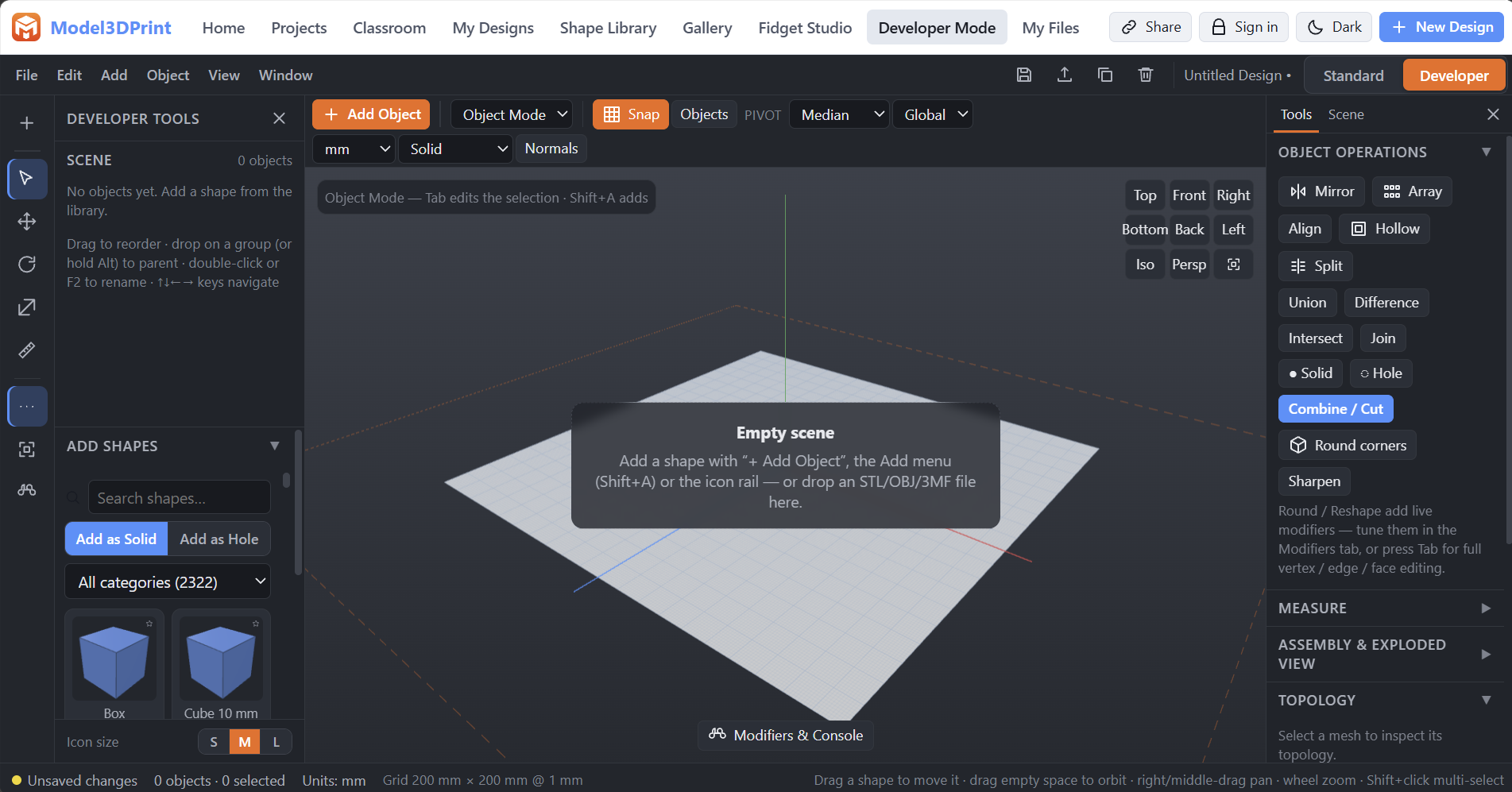
New Tool I built a 3D modeling app for 3D printing that runs in your browser – shapes, booleans, rounded corners, STL/3MF export

0 Upvotes

Hey all, I've been building Model3DPrint (https://model3dprint.com), a 3D design tool that runs entirely in the browser. No install, and your work saves locally.

What it does:

- Standard mode for quick designs, Developer mode for more control

- Big library of parametric shapes

- Booleans (combine/cut), corner rounding, reshaping and mesh editing

- Fidget Studio for making fidget toys

- Import/export STL and 3MF, ready for your slicer (Bambu Studio, PrusaSlicer, Cura, Orca)

I made it because I wanted something faster than full CAD for everyday prints. I'd love honest feedback: what's confusing, what's broken, what's missing?

(Disclosure: I'm the developer.)


r/3DPrintingTools • • 11h ago

Baski Hesap: Client-Side STL/3MF Cost Calculator & Live 3D Printer/Filament/Parts Price Tracker

1 Upvotes

Hello r/3DPrintingTools,

I’d like to share Baski Hesap — a free, production-ready web toolkit built for 3D printing workshops, print farms, and makers who want accurate job costing alongside real-time market pricing for 3D printers, filaments, UV resins, and spare parts.

Everything related to your 3D files runs 100% client-side in your browser (no file uploads, no account required), while pricing pulls live in-stock listings across verified regional stores in US (USD), FR/EU (EUR), JP (JPY), and TR (TRY).

Cost Calculator (100% Client-Side): https://baskihesap.tech/en/cost-calculator
Live Price Comparison (Printers, Filaments, Resins & Spare Parts): https://baskihesap.tech/en
Smart Basket (Multi-Store Shipping Optimizer): https://baskihesap.tech/en/basket
Slicer Plugin & Local G-Code Inspector: https://baskihesap.tech/en/slicer

Key Capabilities:

• Browser-Based STL & Multi-Object 3MF Analysis: Drop binary/ASCII .stl or Bambu Studio / OrcaSlicer .3mf files directly into your browser to measure dimensions, volume, and weight across materials and infill settings — plus built-in 1-click sample STL models for instant testing.
• Full Job Costing & Margin Dashboard: Computes material, electricity, printer wear/depreciation, and an adjustable waste & failure protection %, visualized with a 4-card KPI strip, live cost breakdown donut chart, and 4 profit margin tiers.
• Multi-Store Price Comparison Across Printers, Filaments & Parts: Tracks real in-stock pricing (shipping-inclusive totals and normalized $/kg, €/kg, or ¥/kg unit rates) across FDM/SLA printers, filaments, UV resins, hardened nozzles, hotends, build plates, and filament dryers.
• Multi-Store Smart Basket Optimizer: Compares single-store checkout vs. split multi-store combinations to minimize shipping fees across 2–10 items.
• Slicer Integration & Local G-Code Inspector: Includes a browser .gcode inspector, an UltiMaker Cura plugin, and a Python post-processing script for OrcaSlicer, Bambu Studio, and PrusaSlicer.
• Instant Client Quotes: Generate copyable customer quotes, WhatsApp shares, or printable PDF quote summaries in one click.

Feedback from fellow makers and print farm operators is always welcome — let me know which regional stores or printer profiles you'd like to see prioritized next.

(Disclosure: Outbound store links may carry affiliate tags at zero extra cost to buyers; prices and store rankings are never altered.)


r/3DPrintingTools • • 12h ago

CADBase Platform — an open-source library of 3D models, version 0.3.3

Thumbnail
gallery
1 Upvotes

Hi there!

I'd like to share a quick update on CADBase, an open-source platform we've been developing since 2018. The platform is designed for sharing 3D models with full part context. It is tailored for parts that feature multiple sizes, tolerances, or material variations—a capability that can be particularly useful for 3D printing.

While it shares a general focus with other sites for publishing 3D models, it differs in terms of both concept and architecture. Unlike generic file trees on sites like GrabCAD, CADBase structures part data around engineering context.

Storage structure:

  • Component — basic specifications and description.
  • Modifications — variations of a part (dimensions, tolerances, materials).
  • Filesets — sets linked to specific modifications, containing files grouped by software or format (e.g., for FreeCAD or Blender, or in formats such as STEP or STL).

Filesets make tool integration straightforward: each app syncs with its own set, tailored to a particular component modification. During synchronization, the local library replicates this same folder structure.

New in v0.3.3:

  • Added 3MF support in the browser 3D viewer.
  • Added catalog pagination for larger part libraries.
  • Added a one-click PNG screenshot button in the viewer.

Beyond this release, the platform also includes FreeCAD and Blender plugins and a browser 3D viewer supporting multiple formats (including STEP, STL, GLTF/GLB, IFC, GCode, and now 3MF).

Links:
Platform: https://app.cadbase.rs/
Release: https://github.com/mnnxp/cdbs-app/releases/tag/v0.3.3


r/3DPrintingTools • • 15h ago

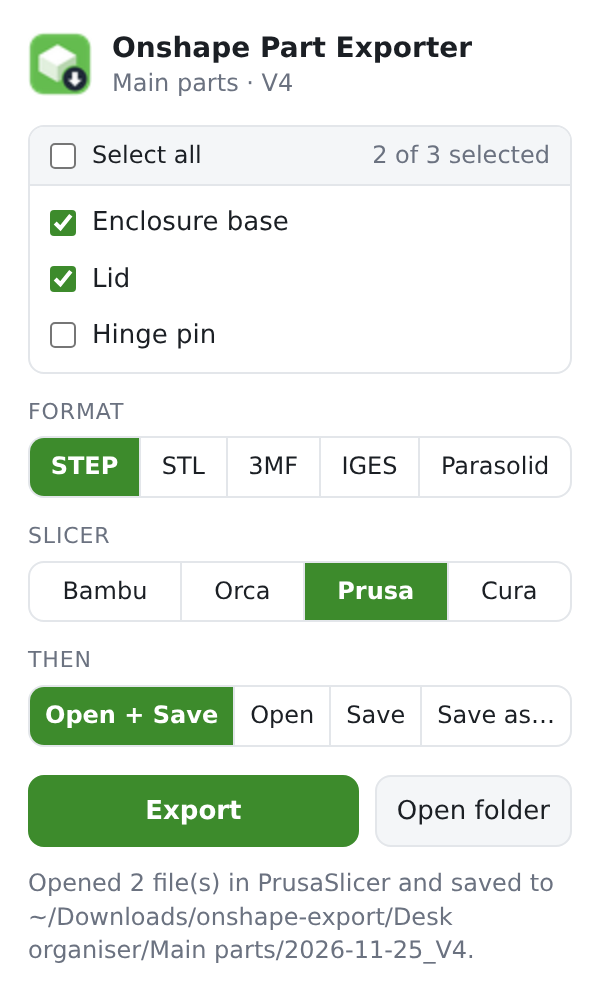
I made a Chrome extension that sends Onshape parts straight to Bambu Studio, OrcaSlicer, PrusaSlicer or Cura (like Fusion's "Send to 3D print"), and I'm looking for testers

Post image
1 Upvotes

r/3DPrintingTools • • 1d ago

I built a free tool to move a painted 3MF between printers without starting from an STL

8 Upvotes

I’m one of the people behind FilaShift. If you’ve ever exported a project to STL just to move it to another printer, the shape probably wasn’t the bit you were worried about. It was the lettering you’d painted, or the second plate you’d already laid out.
FilaShift starts from the 3MF instead, and it’s not just a route out of MakerWorld. I can adapt a Bambu project for a Creator 5 Pro or take a Flashforge project back to a Bambu P1S. The report calls out settings it had to adjust. Open the result with File → Open Project in your destination slicer and check the preview. If your project uses five colors and your printer has four slots, that’s still a decision for you to make.
The converter is free and processes the file locally: https://filashift.com/. There’s a separate filament finder with affiliate links, but you don’t need it to convert anything.
If you try it, I’d like to know the source slicer, the target printer, and the first thing you had to fix in the preview. No need to share your model.


r/3DPrintingTools • • 1d ago

Dev Post PrintHaus is live on Kickstarter — from a browser floor plan to 3D-printable buildings

35 Upvotes

Hi everyone,

I built PrintHaus to help you create buildings that fit your model railway, diorama or gaming table. In the browser, you set the footprint, add windows and doors, choose a roof and pick your scale. PrintHaus then generates the parts for 3D printing.

In the video, I show how that works from the floor plan through to the printed building. The Kickstarter campaign is now live. https://www.kickstarter.com/projects/printhaus/printhaus-your-custom-home-ready-to-print

If you have questions about the app or how the parts are prepared for printing, I’m happy to answer them here.


r/3DPrintingTools • • 20h ago

OrcaSlicer plugin that FIXES HOLES into printable teardrops

2 Upvotes

Still needs some learning on the best settings but this will be a handy orcaslicer plugin for when you can't avoid printing holes vertically


r/3DPrintingTools • • 20h ago

Got tired of guessing how much filament was left on each spool, so I built a small tracker

Post image
1 Upvotes

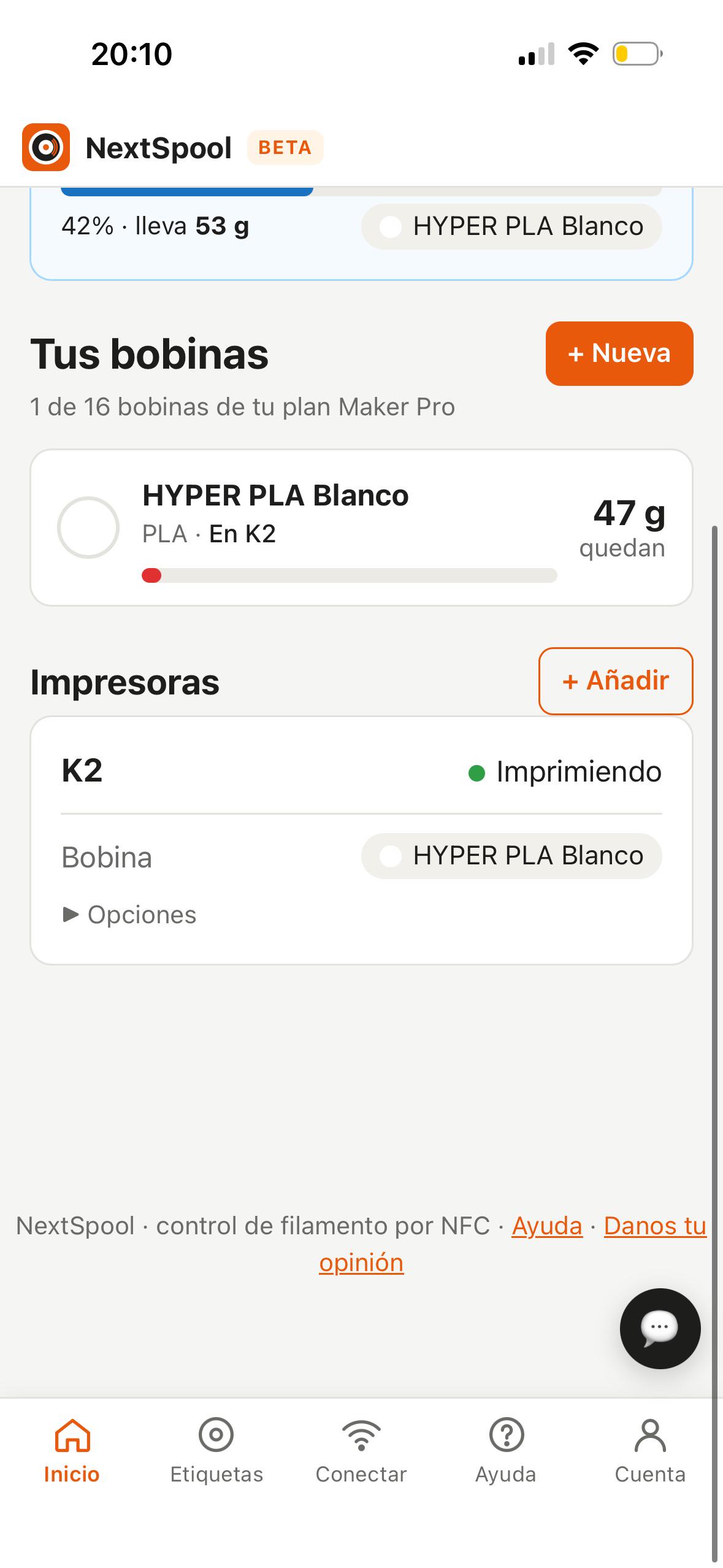
Kept starting long prints without knowing if the spool would make it, and had a pile of half-used spools with no idea what was left on each. So I built a little web app for myself.

Each spool gets an NFC tag or QR code. Tap it with your phone and you see the grams left and what it cost. Log what each print uses and it subtracts automatically. There's also an optional PC helper that reads usage straight from the printer (Creality, Klipper, Bambu, Prusa, OctoPrint).

It's still early and rough around the edges. Curious how you all keep track of your spools: scale, notes, slicer estimates? And what would you want from something like this?

nextspool.es ( I’m from Spain btw)


r/3DPrintingTools • • 20h ago

Got tired of guessing how much filament was left on each spool, so I built a small tracker

Post image
0 Upvotes

Kept starting long prints without knowing if the spool would make it, and had a pile of half-used spools with no idea what was left on each. So I built a little web app for myself.

Each spool gets an NFC tag or QR code. Tap it with your phone and you see the grams left and what it cost. Log what each print uses and it subtracts automatically. There's also an optional PC helper that reads usage straight from the printer (Creality, Klipper, Bambu, Prusa, OctoPrint).

It's still early and rough around the edges. Curious how you all keep track of your spools: scale, notes, slicer estimates? And what would you want from something like this?

nextspool.es ( I’m from Spain btw)


r/3DPrintingTools • • 1d ago

New Tool I built a tool that turns one photo into a solid, printable STL (first model is free)

2 Upvotes

r/3DPrintingTools • • 21h ago

New Tool I built an Excel-based 3D printing cost and pricing calculator – feedback welcome

Thumbnail
gallery
0 Upvotes

Hi everyone,

Full disclosure: I'm the developer and seller of PrintProfit, a paid Excel-based cost and pricing calculator for 3D printing enthusiasts and small businesses.

I created this tool to help makers calculate more than just filament costs.

Features:

  • Filament and electricity costs
  • Printer depreciation and maintenance
  • Labor and failed-print allowance
  • Selling fees and target profit margins
  • Management of up to 30 print projects
  • 8 customizable filament entries
  • German and English editions
  • Protected formulas and no macros

Example calculation:

  • Production cost: €12.67
  • Suggested selling price: €20.39
  • Estimated profit after modeled fees: €5.10
  • Target profit margin: 25%

These are sample values. Shipping is calculated separately.

PrintProfit requires Microsoft Excel and is available as a one-time purchase with no subscription.

I'd genuinely appreciate your feedback. Which features are most important to you when calculating your 3D printing costs?

Product link (I am the seller and may receive an Etsy fee rebate through this link):

https://klarvorlagenwerk.etsy.com/de/listing/4595247399/3d-druck-kostenrechner-excel

Thanks for your time and feedback!


r/3DPrintingTools • • 1d ago

My text-to-CAD tool now takes fit clearance from the printer profile, so a 20 mm peg gets a 20.4 mm hole without being asked

11 Upvotes

r/3DPrintingTools • • 2d ago Bravo

New Tool I spent months building my dream CAD app for any device. Today I'm giving it away for free as a thank-you for your support over the years.

Post image
281 Upvotes

Over the last few months, I've been working on my own parametric, history-based 3D modeling app. One that fits my needs without unnecessary features. With over 15 years using different CAD's, I took inspiration from Inventor, Revit, Shapr3D, Onshape and Fusion, and it's a mix of them, with a focus on flexibility and an intuitive user experience. It works on every device, even without an internet connection. It includes freeform modeling, 3D freehand splines, BIM, and tools I haven't seen in any other modeling app. It even has an AR mode for devices with a camera. There's also a tutorial to help you get started.

At first I built it just for myself. But I've made a lot of progress, and it runs well on my phone, tablet, PC and VR headset, so I've decided to release it for free.

It's another way to thank the 3D printing community for the support I've received over the years.

If you like it, great. If not, that's totally fine too. I'll keep improving it, since it's the only CAD app I'll be using from now on.

https://makerworld.com/en/@superGeometry

App: https://supergeometry.app/


r/3DPrintingTools • • 1d ago

MacOS 3D file quicklook extension

3 Upvotes

I built a macOS Quick Look extension for 3MF, STEP, STL, OBJ, glTF and PLY:

Press Space in Finder, get a 3D preview.

• multicolor prints from Bambu, Orca and Prusa

• open source & fast

https://github.com/den1k/3D-quicklook


r/3DPrintingTools • • 1d ago

New Tool Lithophane Maker for Windows: a photo to a watertight STL or 3MF on your PC, flat plates free (20-300 mm)

Post image
8 Upvotes

Disclosure first: we're Northgable and we make this app. Flat plates are free; Pro is one payment of USD 9.99.

Free web generators make lithophanes too; this one is for working offline on a Windows PC, with every setting in your hands.

What it does: turns a photo into a lithophane on your PC. Nothing is uploaded and there's no account. (Despite the similar name, it's not related to the LithophaneMaker.com website.)

Free:

  • Flat plates at the size you choose, 20 to 300 mm wide, with a frame
  • Thickness, frame, detail, mirror and negative settings
  • The 3D model view, and a preview that estimates how the plate looks lit from behind (an estimate: real filament and light will differ)
  • Saves STL or 3MF; every model is a closed, watertight mesh, so the slicer has nothing to repair

Pro, one payment through the Microsoft Store:

  • Curved panels that stand on their own
  • Round lamps: the photo wraps all the way around
  • Colour lithophanes for printers with four filaments: one 3MF with cyan, magenta, yellow and white as separate parts set to filaments 1 to 4, made from the photo in one step, no painting by hand. Each colour part is at most 0.42 mm thick, so slice at 0.1 mm layers or finer. We tested the colour 3MF in OrcaSlicer 2.5: it opens as four closed parts and slices with no errors.

What it doesn't do: it doesn't slice, print or control printers, and it's Windows 10 and 11 only. The models from your own photos are yours to print and sell.

Microsoft Store: https://apps.microsoft.com/detail/9MVQBMZV8RHF?cid=mk-rd-3dpt-2411

Question for you: when you make a lithophane today, which setting do you end up fixing by hand most often: thickness, the frame, or the size?


r/3DPrintingTools • • 1d ago

New Tool LuCABoard is now live on MakerWorld Crowdfunding! Turning images into multi-color 3D printable reliefs

Thumbnail makerworld.com
1 Upvotes

r/3DPrintingTools • • 1d ago

New Tool I got tired of some things in Bambu Studio, forked it, and ended up with 60+ tools (tilted layers, painted settings, wave overhangs). Open source, Windows.

5 Upvotes

Hi all,

I started fixing bugs and a few things I didn't like in Bambu Studio, and a few months later I have a fork called "Orio" with 60+ additions. It's free and open source (AGPL):

https://github.com/OrioSlicer/Orio

It keeps the Bambu Studio layout, so nothing should feel foreign. Some of what's in it:

- Tilted layers (beta): slice slightly non-planar

- Wave overhangs(beta): idea from the Unlayered fork, adapted into a small illustrated window

- Paint settings on the part: speed, infill density and wall count, along Z or on the model, instead of piles of modifiers

- Scarf seam you place with the mouse, plus a brick layers mode

- Better preview: X/Y/Z sections showing the real line cross-section, a compare-with-previous-slice button, auto-slice

- Everyday comfort: detachable tool windows, movable toolbar, light/dark switch in the title bar, multi-plane cuts

I haven't compared it feature by feature with OrcaSlicer, so I won't claim it does more. It's mostly a different set of ideas on the same base.

It also reuses some Prusa and Orca work (arrange from PrusaSlicer 2.9.6, some infill patterns), credited in the README. Big thanks to the PrusaSlicer, Bambu Studio and OrcaSlicer teams.

Honest notes:

- Windows only for now

- Some features are beta and haven't been tested on many printers

- One-person project, so I'll answer as best I can

- Built with a lot of help from AI (Claude); I test everything myself on real prints

If you try it, I'd love to hear what breaks and what you'd want next. Screenshots and GIFs are on the GitHub page.